





 Shopify
 Stripe
 Slack
Slack Notion
 Google Workspace
 Confluence

How Do You Recover a Deleted Agent in Macha? The 30-Day Trash and Restore


Deleted a Macha agent by mistake? Since June 17, 2026 it sits in the Trash tab on the Agents page for 30 days, and one click on Restore brings it back, with its triggers paused until you switch them on.
Key takeaways
- Macha moves a deleted agent to the Trash tab on the Agents page for 30 days, and one click on Restore brings it back before the permanent purge.
- A restored Macha agent returns with its instructions, model, tools, sub-agent links and trigger configuration, but its triggers come back paused until you re-enable them.
- Macha's API reference says deleting an agent tears down external help-desk webhooks such as Zendesk's, and restoring doesn't recreate them, so check each trigger after a restore.
- Deleting an agent through Macha's sidekick or the DELETE /api/v1/agents/:id endpoint uses the same soft delete and the same 30-day window, with restores done from the Trash tab.
- After the 30-day countdown reaches zero, Macha permanently purges a trashed agent, and no deeper backup tier exists to recover it.

To recover a deleted agent in Macha, open the Agents page, click the Trash tab and press Restore on the agent's row; you have 30 days from the delete before it's permanently purged. The agent returns with its instructions, model, tools, sub-agent links and trigger configuration, but its triggers come back paused until you re-enable them.
| Question | Answer |
|---|---|
| Where do deleted agents go? | The Trash tab on the Agents page |
| How long can you restore? | 30 days, then permanent purge |
| What comes back? | Instructions, model, tools, sub-agent links, trigger config |
| What doesn't switch back on? | Triggers (restored paused) |
| Sidekick or API deletes? | Same soft delete, same 30 days; restore is dashboard-only |
If you've ever deleted the wrong thing in production (you meant to remove the half-built draft agent and removed the one quietly triaging 400 tickets a day), this feature turns that into a 30-day inconvenience instead of a disaster. In most tools the delete dialog warns you it "cannot be undone," and it means it. Macha's stopped saying that when soft-delete shipped on June 17, 2026.
What is the difference between soft-delete and hard delete?
If you've built software, you know the distinction. A hard delete permanently removes the record: the row is gone, and recovery means restoring from a backup (if you have one, and if anyone notices in time). A soft delete marks the record as deleted instead of erasing it: the data stays, flagged as inactive and hidden from normal views, ready to be un-flagged. It's the difference between shredding a document and dropping it in a recycle bin you can still open.
Soft-delete is the safer default for anything a human can click by mistake. It protects against accidental loss, preserves an audit trail, and, critically for support teams, lets you recover from an error yourself without filing a ticket with your vendor and waiting on a backup restore. The pattern is so well-established that the major platforms all converge on roughly the same shape: OneDrive keeps deleted files for 30 days on personal accounts (93 days on work or school accounts unless an admin changes it), soft-deleted users in Microsoft Entra ID are restorable for 30 days, and Google Drive permanently deletes items that sit in trash for more than 30 days, with a further 25-day admin recovery window after a user empties the trash. Thirty days is the common default for "long enough to notice, short enough to not be a liability." Macha now matches it.
An agent is exactly the kind of object this protects. It's not a throwaway record. It's hours of configuration: carefully tuned instructions, a curated tool set, knowledge sources, sub-agents wired together, and live triggers firing on real ticket events. Losing that to a misclick is expensive in a way a stray data row never is.
What happens when you delete an agent in Macha?
Here's the new lifecycle, step by step.
You delete an agent from the Agents page the same way you always have, with the trash icon on its row. The first thing you'll notice is the confirmation copy has changed. It used to say the deletion was permanent and couldn't be undone. Now it tells you the truth: "Move this agent to trash? You can restore it within 30 days. After that it will be permanently deleted." Small change, big difference in how confidently you can hit the button.
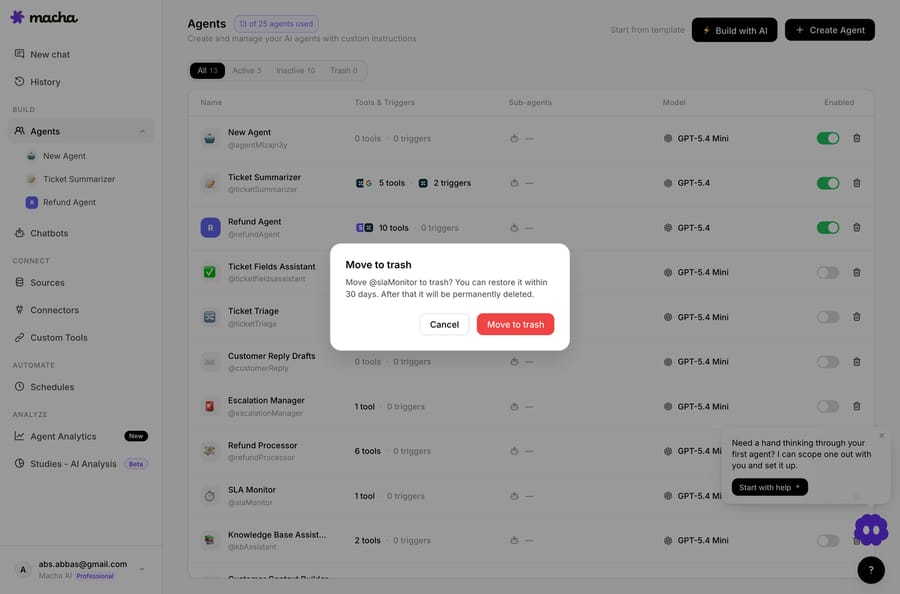
The Agents page itself is where this all lives: your active agents, with the tabs that now include Trash sitting across the top.

The deleted agent leaves your active agents list and appears under a new Trash tab on the same page. That tab is the whole recovery surface:
- Each trashed agent shows how long ago it was trashed and how many days remain before automatic purge, so you always know your runway.
- Every row has a one-click Restore button. No support ticket, no backup request, no waiting.
- After the 30-day countdown hits zero, the agent is permanently deleted and can't be recovered. That's the one hard edge in the whole flow: the window is real, and it doesn't extend itself.
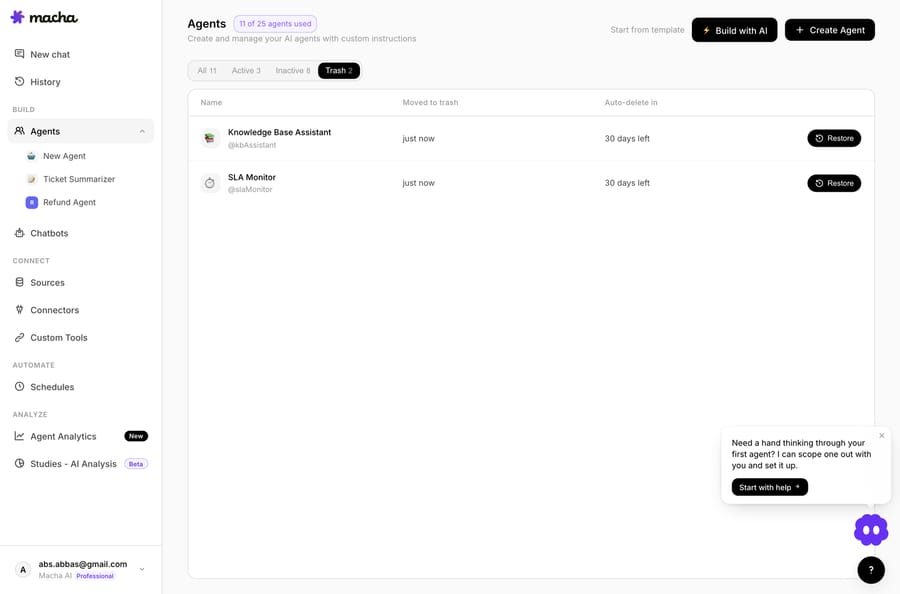
Restore is the reverse of delete, and it's faithful. Click it inside the window and the agent comes back to your active list with its instructions, model selection, tool configuration, sub-agent links, and trigger config all intact. You're not rebuilding from memory; you're getting the exact thing back.
Do an agent's triggers come back when you restore it?
This is the detail worth slowing down on, because it's the difference between "restore worked" and "wait, why did this start firing again."
When an agent is trashed, its triggers are deactivated, not deleted. Macha pauses them so they immediately stop firing (a trashed agent should not be silently processing tickets), but it preserves all the trigger configuration, including webhook secrets. Nothing about the trigger setup is thrown away.
When you restore the agent, that trigger config comes back with it. But the triggers come back paused. Macha deliberately does not auto-resume them on restore. You re-enable them yourself, when you're ready.
That's the right call, and it's worth understanding why. Imagine you trashed an agent two weeks ago, fixed whatever was wrong with it elsewhere, and now restore it. If its webhook triggers snapped back to live the instant you clicked Restore, you could have an agent firing on production tickets before you've even re-checked its configuration. By leaving triggers paused, Macha makes re-activation a conscious decision: restore the agent, review it, then flip its triggers back on. Chatbots bound to the agent are paused on delete as well.
One caveat from Macha's API reference: when an agent is deleted, external help-desk webhooks (Zendesk, for example) are torn down so traffic stops immediately, and restoring the agent doesn't recreate them automatically. After a restore, check that each trigger's webhook exists in your help desk, and recreate the trigger if it doesn't.
So the honest mental model is: restore brings back the configuration automatically; you bring back the behavior manually. That's a feature, not a gap, but only if you remember it. If you restore an agent and wonder why it's gone quiet, check its triggers first.

What happens if the AI sidekick or the API deletes an agent?
Macha has an in-dashboard AI sidekick you can ask to make changes for you, including deleting agents. It would have been easy to leave that path on the old hard-delete behavior and quietly create a gap where the "safe" delete only applied to button clicks.
It doesn't. If you ask the sidekick to delete an agent, it now routes through the same soft-delete path with the same 30-day restore window. Whether a human clicks Delete or an AI does it on your behalf, the agent lands in the same Trash tab and is recoverable the same way. There's no second, more dangerous delete hiding behind the assistant.
The same goes for Macha's public API: DELETE /api/v1/agents/:id is a soft delete that moves the agent to the dashboard trash for 30 days. There's no restore endpoint yet, so restores happen from the Trash tab.
Why does soft-delete matter more for agents than for documents?
A recycle bin for files is convenience. A recycle bin for agents is operational safety, and the stakes are higher for three reasons.
Agents are expensive to rebuild. A document you can re-type. An agent is the accumulated product of decisions — which model, which tools, what instructions handle which edge cases, which sub-agents it delegates to. Reconstructing that from memory after an accidental delete is genuinely hard, and you'll never be sure you got it exactly right.
Agents are live. They're attached to triggers that fire on real ticket events. Deleting one isn't just losing a config; it's silently dropping a piece of your automation while tickets keep arriving. Soft-delete means a misclick is a 30-day inconvenience, not a hole in your support coverage you discover three days later.
Agents are interconnected. Sub-agent links mean deleting one agent can ripple into others that delegate to it. Because restore brings sub-agent links back intact, you're not left re-wiring a delegation graph by hand.
If you're building a multi-agent setup, say a triage agent handing off to specialists, this safety net makes it comfortable to iterate. You can delete and reorganize aggressively, knowing a wrong move is recoverable. Our agents documentation covers how those pieces fit together.
What are the limits of Macha's agent trash?
Soft-delete is a safety net, not a license to be careless. A few honest caveats:
- The 30-day clock is firm. Restore is one click, but only inside the window. Past 30 days the agent is gone for good. There's no "recover from a deeper backup" tier behind it. If an agent matters, don't let it ride the trash for a month "just in case."
- Restored triggers stay paused. Covered above, but it bears repeating because it's the most common surprise: restoring an agent does not put it back to work. Re-enable its triggers deliberately.
- Trash isn't version history. Soft-delete recovers a deleted agent; it's not the same as rolling back an edit. If you mangle an agent's instructions and save, that's a job for version history, not the Trash tab. They're complementary safety features, not the same one.
- Permanent deletion is still permanent. For genuine cleanup, say removing a misconfigured agent you never want resurfacing, remember the purge is real. Soft-delete delays permanence; it doesn't abolish it.
None of these are reasons to avoid the feature. They're just the boundaries of what it promises, and knowing them is the difference between trusting it correctly and trusting it blindly.
FAQ
What happens when I delete an agent in Macha? It moves to a Trash tab on the Agents page and stays there for 30 days. During that window you can restore it with one click, with its instructions, model, tools, sub-agent links, and trigger configuration intact. After 30 days it's permanently deleted.
Can I recover a deleted agent? Yes. Open the Trash tab on the Agents page and click Restore on the agent's row, any time within 30 days of deleting it. The tab shows how many days remain before each trashed agent is automatically purged.
Do my triggers come back when I restore an agent? The trigger configuration comes back, including webhook secrets, but the triggers are restored in a paused state. You re-enable them manually when you're ready, so a restored agent doesn't unexpectedly start firing on live tickets.
What if I ask the AI sidekick to delete an agent? It uses the same soft-delete path. The agent goes to Trash with the same 30-day restore window. There's no separate, riskier delete behind the assistant.
Is soft-delete the same as version history? No. Soft-delete recovers an agent you deleted. Version history rolls back an edit you made to an agent that still exists. They cover different mistakes.
Can I restore a deleted agent through the API? Not yet. The API's delete endpoint is a soft delete with the same 30-day window, but restores happen from the Trash tab in the dashboard.
How long do I have to restore? Thirty days from the moment you delete it. After that the agent is permanently purged and can't be recovered.
How can you try it?
Delete is no longer a one-way door in Macha; it's a 30-day round trip, so you can clean up and reorganize agents without one wrong click erasing hours of work.
If you're not running on Macha yet, this is the kind of operational maturity worth feeling for yourself. Start a free trial ($50 of usage, no credit card, no time limit), connect your help desk, build a few agents, and delete one on purpose just to watch it land safely in the Trash. See our pricing for plan details, or browse the blog for more on how Macha's agent layer sits on top of Zendesk, Freshdesk, Gorgias, Front, HubSpot or Intercom.
Written by Abbas (Customer Support & AI, Macha) · Reviewed by Ankeet Guha (Co-founder & CTO) · Published 2026-06-24 · Last updated 2026-09-24.






