





 Shopify
 Stripe
 Slack
Slack Notion
 Google Workspace
 Confluence

How Do You See What a Sub-Agent Did? Macha Shows Every Run in Chat


An AI agent that delegates to other agents can turn one customer message into several nested runs, and until June 2026 Macha showed you only the final sentence that came back. Each sub-agent run now appears in the chat as a card you can expand to read its prompt, tool calls, results and reply.
Key takeaways
- Since the June 10, 2026 release, every Macha sub-agent run appears as an expandable chat card showing its system prompt, tool calls with arguments, tool results and final reply.
- Macha captures sub-agent runs automatically with no SDK or configuration, and runs fired by autonomous triggers show the same card as runs started in chat.
- Macha keeps sub-agent runs for 45 days under its standard conversation retention policy, and they don't count toward the conversation total in History.
- Macha sub-agents can nest up to three levels deep with circular-reference prevention, write only on autonomous trigger runs, and stay read-only in interactive chat.
- A Macha parent agent that delegates to two specialists is still billed as one ticket, and plans start at $299 a month for up to 750 tickets.
Since Macha's June 10, 2026 release, every sub-agent run shows up inside the chat as an expandable card under the delegated message: the system prompt it ran with, every tool call with its exact arguments, every tool result it got back, and the final reply it handed to its parent. There's no SDK, no tracing dashboard and no configuration, and the cards work the same for runs fired by autonomous triggers.
| Question | Answer |
|---|---|
| Shipped | June 10, 2026 release |
| What the card shows | Sub-agent avatar, handle, model, connector logos, tool count, "Handed off" badge |
| What the expanded card shows | System prompt, tool calls with arguments, tool results, final reply |
| Setup | None; captured automatically for every new sub-agent run |
| Autonomous trigger runs | Captured the same way as chat runs |
| Retention | 45 days; not counted toward the History conversation total |
| Delegation depth | Up to 3 levels, with circular-reference prevention |
| Extra cost | None; the whole run is still one ticket |
Why is a multi-agent run harder to audit than a single agent?
With one agent, an unexplained action is already uncomfortable: it closed a ticket or refunded an order, and the only honest answer to "why" is "the model decided to." Once agents delegate, a single message can fan out into several nested runs, each with its own model, tools and reasoning, and by default you see only the final sentence that bubbles back up.
"Agent observability" became a real category in 2026 for this reason. IBM's guide puts the problem plainly: the complexity and "lack of transparency can make it difficult to trace how AI agents generate specific outputs," and in multi-agent systems observability is what "helps developers identify the specific agent or interaction responsible for an issue."
Delegation adds a failure mode of its own. Braintrust's 2026 observability guide calls them handoff failures, "where Agent A passes incomplete or incorrect context to Agent B." Without cross-agent tracing, whoever debugs Agent B's bad answer "cannot see that the root cause was upstream." The industry's answer is hierarchical tracing: the handoff is recorded as a span on the parent's trace, the sub-agent's run nests underneath it, and one trace ID flows through both.
That model is correct, and it's what Macha now does, with one difference. The dev-tooling answer (Braintrust, LangSmith, Arize Phoenix, Langfuse, Datadog) assumes an engineer who will instrument code, ship traces to a separate platform and read them in a trace viewer. Even the "no manual instrumentation" adapters still expect SDK or OpenTelemetry wiring. Macha's audience is the support operator and the agent builder, not only the engineer, so the trace had to live where they already work: in the chat.
What does the sub-agent card show?
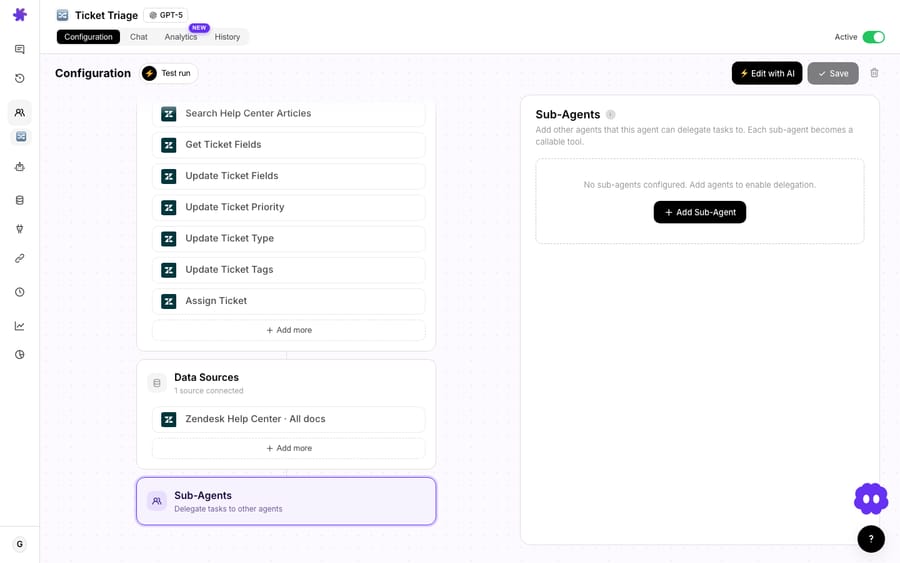
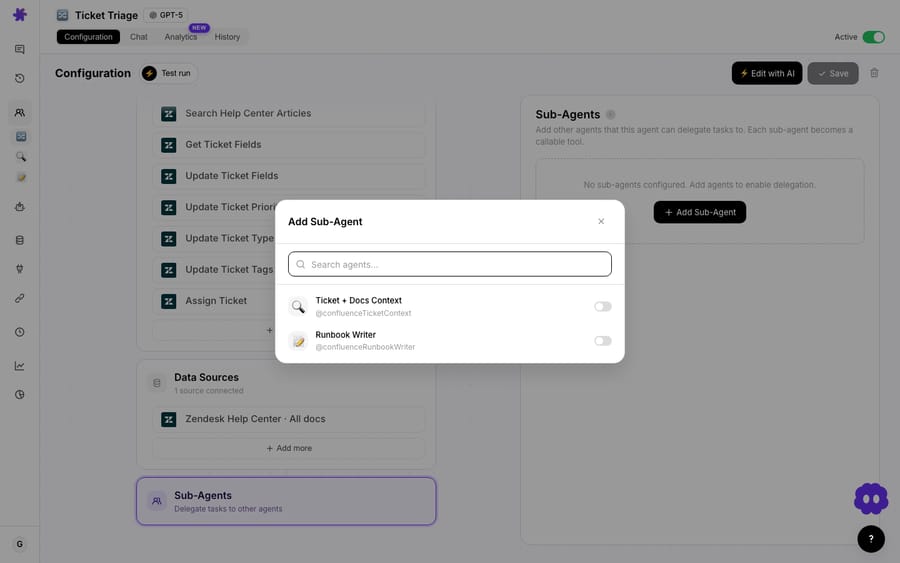
Sub-agents in Macha are a first-class feature: an agent can delegate to specialist sub-agents, each with its own tools, model and knowledge base, up to three levels deep with built-in circular-reference prevention. You wire them up on the parent agent's configuration by picking which agents it may call, and Macha treats each one as a tool the parent can invoke.
Before June 10, when a parent delegated, the sub-agent's tool calls streamed past with indentation in the status log and its tools showed up in the "Tools Used" popup. That was useful but ephemeral. Once the message was saved, the why behind a sub-agent's answer was effectively gone.
Now every sub-agent invocation produces its own conversation record, linked back to the parent. In the chat, a card appears directly under each delegated message. Collapsed, it shows who handled the work:
- the sub-agent's avatar and handle (which specialist ran),
- its model (so you can see a cheap mini model handled a simple lookup, or a stronger model took the nuanced reply),
- its connector logos and tool count (which systems it could touch),
- and a green "Handed off" badge marking the delegation.
Click it, and the card expands into the sub-agent's full nested conversation, rendered with the same styling as the main chat: the system prompt it ran under, every tool call with its arguments, every tool result it received, and the final reply it returned to the parent. It reads like a normal chat transcript because that's what it is, one level down. The docs add that the card also shows the model the sub-agent ran on and how long its full run took.
Why do the arguments and results matter more than the tool name?
Plenty of products will tell you that a tool was called. The useful part is what was passed and what came back. When a billing sub-agent calls zendesk_update_ticket_tags or a Stripe lookup, the post-mortem question is never "did it call the tool." It's "did it call it with the right order ID, and did the result say what the agent claimed it said." Macha shows both halves: the arguments the sub-agent chose, and the raw result it acted on. That's the difference between confirming an agent's intent and confirming its behavior, and on live customer tickets only behavior counts.
Do I need to set anything up, and does it cover autonomous runs?
No setup, and yes. Two design choices make this useful in production rather than a debug toy.
First, it's lazy-loaded with no configuration. Every new sub-agent run is captured automatically. There's nothing to turn on, no instrumentation to add and no separate observability bill. The trace is a by-product of running the agent.
Second, and this matters most for support teams, it works identically for autonomous triggers. Most interesting multi-agent runs don't happen while you're watching. They happen at 2 a.m. when a webhook fires, a triage agent picks up a new Zendesk ticket, and it delegates to a specialist that quietly takes a real action. Whether the parent was called by a person in chat or fired by a trigger, the sub-agent's run is captured the same way and shows the same card. The morning after, you can open the conversation and reconstruct what the chain of agents did unattended.
That pairs with a safety default worth knowing: sub-agents can write (post replies, update tickets) when running via autonomous triggers, but stay read-only during interactive chat. So the runs most likely to have changed something are the ones you'll most want to audit, and now you can.

The same June 10 release added a Sub-agents column to the Agents list (hover any row to see the names of the linked specialists) and fixed a quieter but nastier bug: opening an agent in the builder and saving any change, even just the description, could silently clear its sub-agent links. Those links now persist across edits. Observability is worth less if the topology under it keeps resetting, and this closes that gap.
Where does sub-agent visibility sit in the stack?
Macha is an AI agent layer on top of the help desk you already run (Zendesk, Freshdesk, Gorgias, Front, HubSpot or Intercom), not a replacement for it. Sub-agent visibility is observability for the agents you built inside that layer. It doesn't reach into native Zendesk automations or another vendor's bot. If you're standing Macha up on Zendesk, the Macha-on-Zendesk overview covers how the agent layer and your help desk fit together.
It also isn't a full evals platform. A trace tells you what one run did. Deciding whether your agents are systematically good is a different job, and that's what Macha's agent evaluation and Studies tooling are for. Think of sub-agent visibility as the per-incident microscope, not the population-level dashboard.
What are the limits of sub-agent visibility?
A few honest caveats:
- Visibility is not prevention. Seeing that a sub-agent made a bad tool call after the fact beats not seeing it, but a hard stop before an action is a job for scoping the sub-agent's tools and the read-only-in-chat default. The trace is how you learn; guardrails are how you block.
- Runs expire. Sub-agent runs stay available for 45 days under Macha's standard conversation retention policy, and they deliberately don't count toward your conversation count in History. That keeps your history clean, but a six-month-old incident won't have a nested run to open. If you need permanent audit retention for compliance, export what matters while it's live.
- Deeper chains mean more to read. Three levels of delegation is a lot of reach, and a run that fans out across several specialists produces a lot of nested transcript. The card structure keeps it navigable, but multi-agent designs are still something to reach for deliberately, not the default shape for every workflow.
- It's a debugging and trust tool, not a metric. If your question is "what's my overall resolution rate," sub-agent cards won't answer it. Pair them with reporting.
Does viewing or delegating cost extra?
Neither does. Viewing a sub-agent run costs nothing; it's a by-product of the run, with no observability surcharge. Delegating doesn't add a line item either. Macha bills per ticket: one conversation, charged once, however many agents it passes through. A parent that calls two specialists is still one ticket, whichever models those specialists run on. Plans start at $299 a month for up to 750 tickets, with setup and monitoring by the Macha team included. What the cards add is visibility: you can see each hop and its model on the card, which makes it obvious when a sub-agent sits on a slow model for a trivial lookup. See the pricing page for the tiers.
FAQ
What is multi-agent observability? It's the ability to see, step by step, what a system of delegating AI agents did: each agent's tool calls, tool results and handoffs, so you can debug failures and trust the outcome. In Macha, it's rendered directly in chat as an expandable run card under each delegated message, with no setup.
Do I have to configure or instrument anything? No. It's lazy-loaded and automatic for every new sub-agent run. There's no SDK, no tracing dashboard to connect and no extra configuration.
Does it work for agents triggered by webhooks, not just chat? Yes. Whether the parent agent was started by a person in chat or fired by an autonomous trigger, the sub-agent's run is captured identically and shows the same expandable card, so you can audit unattended runs after the fact.
Can I see the actual tool calls a sub-agent made? Yes. The expanded card shows every tool call with its arguments and every tool result the sub-agent received, plus its system prompt and final reply. You're auditing behavior, not just intent.
How long are sub-agent runs kept? 45 days, under Macha's standard conversation retention policy. They don't count toward your conversation count in History. For longer retention, export what you need while the run is still live.
How deep can delegation go? Up to three levels, with automatic circular-reference prevention so agents can't loop into each other. Beyond the third level, the call is blocked.
How do I try sub-agent visibility?
If you already run sub-agents in Macha, you don't have to do anything: open a conversation where an agent delegated and the card is there. If you don't, start a free trial ($50 of usage, no credit card required), connect your help desk, wire one specialist sub-agent to a parent and run a delegation. The sub-agents docs cover the setup; the visibility comes with it. For more on how the agent layer fits over Zendesk and the other desks, browse the blog.
Written by Abbas (Customer Support & AI, Macha) · Reviewed by Ankeet Guha (Co-founder & CTO) · Published 2026-06-24 · Last updated 2026-09-24.






