





 Shopify
 Stripe
 Slack
Slack Notion
 Google Workspace
 Confluence

What Are Sub-Agents? How to Build a Team of Specialist AI Agents in Macha


Macha sub-agents let one lead AI agent hand tasks to specialists, each with its own tools, model and knowledge base, instead of cramming every job into one prompt. They have been live since March 2026, and a whole delegation chain is billed as one ticket.
Key takeaways
- Macha sub-agents let a lead AI agent delegate work to specialist agents, each with its own tools, model and knowledge base, nesting up to 3 levels deep.
- Macha shipped sub-agents on March 8, 2026, and since June 10, 2026 every sub-agent run shows as an expandable Handed off card kept for 45 days.
- Macha sub-agents can reply or update tickets when the lead agent runs from a trigger, but stay read-only during interactive chat, a rule added on April 3, 2026.
- A Macha lead agent that fans out to three specialists is still billed as one ticket, and plans start at $299 a month for 750 tickets.
Sub-agents in Macha let a lead AI agent hand a task to a specialist agent, each with its own tools, model and knowledge base, with delegation nesting up to three levels deep. Instead of one overloaded generalist whose prompt tries to cover every scenario, you build a small team of specialist AI agents (one that triages, one that looks up orders, one that knows your billing policy cold) and the lead calls whichever specialist the situation needs, the way it would call any other tool, gets the answer back, and keeps going.
Sub-agents have been live in Macha since March 2026, gained write permissions on triggers in April, and got full run-by-run observability in June.
| Question | Answer |
|---|---|
| What is a sub-agent? | Any Macha agent that another agent is allowed to call as a tool |
| How deep can delegation go? | Up to 3 levels (A calls B calls C), with circular-reference prevention |
| Can sub-agents write? | Yes on trigger (autonomous) runs; read-only in interactive chat |
| Can you audit a run? | Yes: a "Handed off" card per run, kept for 45 days |
| What does it cost? | The whole delegation chain is one ticket; unlimited agents on every plan |
What is a sub-agent in Macha?
A sub-agent is just a regular Macha agent that another agent is allowed to call. There's no separate "sub-agent" object type — any agent in your workspace can be a lead, a specialist, or both. You wire the relationship up on the lead agent's configuration page, in the Sub-Agents panel.
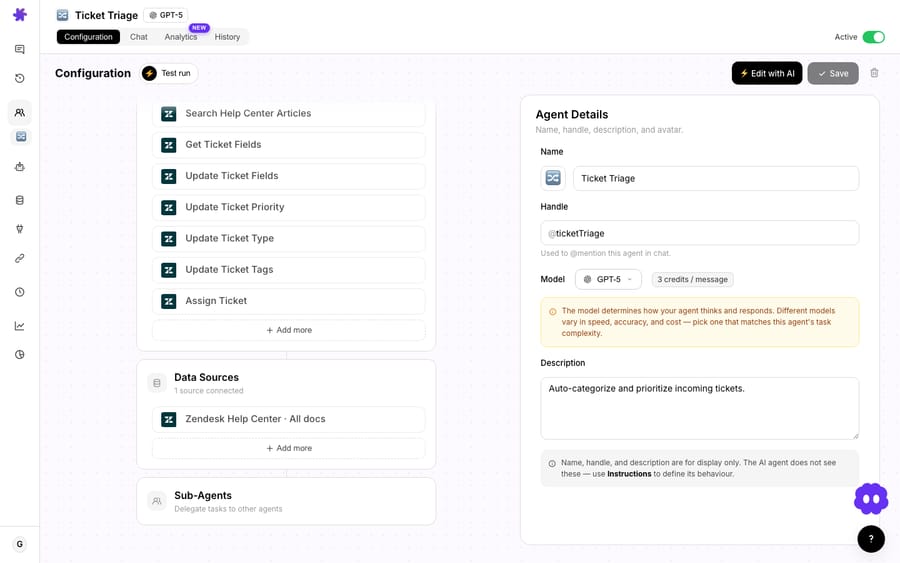
When the changelog first introduced this on March 8, 2026, the framing was deliberately plain: "Agents can now call other agents as tools, enabling hierarchical task delegation. Assign specialist sub-agents for specific workflows." That's the whole mental model. If your lead agent has a tool for "search orders" and a tool for "update a ticket," a sub-agent is simply a third kind of tool — one that happens to be a fully reasoning agent on the other end.
Mechanically, that means each specialist brings its own complete loadout:
- Its own tools — the billing specialist gets Stripe; the order-status specialist gets Shopify; the triage agent gets nothing but the ticket itself.
- Its own model — pay for a heavyweight reasoning model only on the agents that need it, and run a fast, cheap model on the simple classifiers.
- Its own knowledge base — point the policy specialist at your Confluence space and the escalation specialist at your runbooks, without cross-contaminating either.
By the April 9 release, Macha had formalised the guardrails: delegation can go up to three levels deep, with circular-reference prevention so an agent can't (directly or transitively) call itself into an infinite loop.
Why split one agent into several specialists?
The case for specialist agents is the same case you'd make for splitting a 600-line function into smaller ones: focus, testability, and reuse.
Focus. A short, single-purpose prompt beats a sprawling one. An agent whose entire job is "decide the topic and priority of this ticket" will classify more reliably than a generalist that also has to remember refund rules. The wider industry research backs this up — practitioners describe multi-agent orchestration as the canonical pattern for support precisely because it combines intent classification, domain routing, tool usage and context continuity, and each of those is cleaner as its own role (Talkdesk, Dataiku).
Reuse. Build an "Order Lookup" specialist once and let your triage agent, your reply agent, and your escalation agent all call it. Fix a bug in how it reads Shopify, and every agent that delegates to it gets the fix for free. You're composing behaviour instead of copy-pasting prompts.
Cost control. Because each sub-agent picks its own model, you can run a fast classifier up front and only invoke a heavyweight reasoner when the conversation actually warrants it. (More on the cost below — the answer is simpler than you'd expect.)
This is the same architecture the bigger vendors converged on: Forethought, which Zendesk finished acquiring on 26 March 2026, sells separate agents (Solve, Triage, Discover and QA, plus a copilot) rather than one monolithic bot. The difference with Macha is that you assemble the team yourself, on top of the helpdesk you already run.
What does a specialist support team look like in practice?
Here's a realistic lineup for an e-commerce store running on Zendesk. The agents list below is a real Macha workspace — note the dedicated Sub-agents column, added on June 17, which shows at a glance how many specialists each agent has wired up (hover and you get their names).

A sensible structure:
| Agent | Role | Model | Tools / knowledge |
|---|---|---|---|
| Ticket Triage (lead) | Reads every new ticket, decides topic + priority, delegates | Fast model | Zendesk; calls the specialists below |
| Order Lookup | Answers "where is my order" | Mid model | Shopify (read) |
| Billing Specialist | Refund eligibility, duplicate charges | Strong model | Stripe (read) + billing policy in Confluence |
| Escalation Writer | Bundles full context and posts to Slack | Mid model | Zendesk, Shopify, Stripe, Slack |
When a "I want to cancel order #2205, it hasn't shipped" ticket arrives, the lead triage agent recognises it as an order-cancellation case, delegates to Order Lookup to confirm fulfilment status, then delegates to Billing Specialist to confirm refund eligibility — exactly the kind of multi-tool flow Macha already powers in single-agent use cases like Handle order cancellation requests. The difference is that each step is owned by an agent that does nothing else, so each step is easier to get right and easier to debug.
You don't have to build all of this by hand. Macha's Build with AI panel can stand up a configured agent — tools, instructions, triggers, and sub-agent links — from a plain-language description, with the automatic circular-dependency checks that shipped on April 3.

Can sub-agents take actions, or only read?
One detail worth flagging because it's a real safety design, not marketing. As of the April 3, 2026 release, sub-agents have write permissions in autonomous mode but stay read-only during interactive chat.
In plain terms: when a human is chatting with the lead agent live, the specialists it calls can look things up but can't send replies or mutate tickets — so a delegated step can't surprise you with an irreversible action mid-conversation. When the same lead agent runs from a webhook trigger (a new Zendesk ticket, a Freshdesk update), the specialists are allowed to take their write actions — reply, update priority, add an internal note — because that's the whole point of an autonomous workflow. It's a sensible default that keeps the interactive surface safe while letting the automated surface actually do the work.
How do you see what each specialist did?
Delegation is only trustworthy if you can audit it. Early on, sub-agent activity streamed into the status log with indentation, and the tools a sub-agent used showed up in the "Tools Used" popup on the saved message. Useful, but shallow.
The June 10, 2026 release made it properly observable. Every sub-agent invocation now produces its own conversation record, linked back to the parent. In chat, a card appears under each delegated message showing the sub-agent's avatar, handle, model, connector logos and tool count, with a green "Handed off" badge. Click to expand and you get the specialist's full nested conversation — system prompt, every tool call with its arguments, every tool result, and the final reply — rendered like the main chat.
Three things make this practical rather than noisy:
- No setup. It's lazy-loaded and works automatically for every new sub-agent run.
- It covers automation too. Whether the lead was triggered by a user in chat or fired by a webhook, the sub-agent's run is captured the same way.
- It stays out of your way. Sub-agent runs don't pollute the user-facing conversation counter, but remain available for 45 days under the standard TTL policy.
For anyone who's tried to debug a multi-agent system elsewhere — where a delegated step is a black box and you're left guessing which agent hallucinated — this is the difference between "delegation we can ship" and "delegation we're scared of."
What do sub-agents cost?
Macha bills per ticket — one thread between Macha and one person, charged once — not per action and not per deflection. The important consequence for multi-agent setups: a lead agent that fans out to three specialists is still one ticket. Four agents' worth of reasoning, one charge.
That takes the usual multi-agent worry off the table. What a fan-out does cost is time: four models reasoning in sequence is slower than one, and on a live chat the customer feels it. Run a fast classifier as the lead and reserve the heavyweight for the one specialist that needs deep reasoning. Run four heavyweight models where one lightweight agent would have sufficed and you've built a slow ticket, not an expensive one. Architect deliberately.
On plan limits: there aren't any here — every plan includes unlimited agents, so a specialist team costs nothing extra to build. Plans start at $299 a month for 750 tickets, with setup and monitoring by the Macha team included, and you can start on the free trial ($50 of usage, no credit card required). Full numbers live on the pricing page.
When should you not build a team of agents?
Multi-agent is an architecture, not an upgrade. It's genuinely easy to over-engineer, and the research is blunt about it: a significant share of failed multi-agent deployments threw a team of agents at query classes that a single well-tuned agent would have resolved more accurately and at lower cost (SearchUnify, Ema). Honest places to not reach for sub-agents:
- Your workflow is genuinely one job. If "answer from the help centre" covers 90% of your volume, one agent with a knowledge source is simpler, cheaper, and easier to reason about. Don't split for the sake of it.
- Latency-sensitive live chat. Each delegation hop adds a model round-trip. For real-time chat where every second counts, a fan-out to three specialists can feel sluggish. Reserve deep delegation for asynchronous, trigger-driven work where a few extra seconds don't matter.
- You haven't nailed the single agent first. Specialists inherit the failure modes of the prompts inside them. If your one agent isn't reliable, five unreliable agents won't average out to reliability — they'll compound.
- Unclear ownership. A team only helps if each role has a crisp boundary. If two specialists both "kind of" handle refunds, the lead agent's routing gets fuzzy. Define one job per agent and test each in isolation (Macha's Simulations replay past tickets against a single agent before you wire it into a team).
The rule of thumb: start with one agent, watch where it strains, and promote the strained responsibility into its own specialist. Grow the team from real pressure, not from a diagram.
How do you set up your first sub-agent?
- Build and harden your lead agent first — most teams start with a triage or auto-reply agent. (See the Macha on Zendesk overview for the helpdesk-native setup.)
- Identify the one responsibility it does worst, and split that into a dedicated specialist with just the tools and knowledge that job needs.
- Wire the specialist into the lead's Sub-Agents panel, keep delegation shallow (one or two levels is plenty for most support flows), and pick the cheapest model that's accurate for each role.
- Run it from a trigger, watch the "Handed off" cards to confirm each specialist did its part, and add the next specialist only when you feel the next strain.
The full mechanics — assignment, depth limits, write-permission behaviour and audit cards — are in the sub-agents documentation.
FAQ
What's the difference between a sub-agent and a regular agent? None, structurally. Any Macha agent can act as a lead or a specialist. "Sub-agent" just describes the relationship — an agent that another agent is allowed to call as a tool. The same agent can be a standalone agent in one place and a specialist in another.
How deep can delegation go? Up to three levels, with built-in circular-reference prevention so an agent can't call itself into a loop, directly or indirectly.
Can sub-agents take actions, or only read? Both, depending on context. In autonomous (trigger-driven) runs they can perform write actions like replying or updating a ticket. During an interactive live chat they're read-only by design, so a delegated step can't take an irreversible action mid-conversation.
Will I be able to tell which agent did what? Yes. Since June 2026, every sub-agent run is recorded as its own linked conversation, surfaced as an expandable "Handed off" card under the delegated message — including the specialist's tool calls, results and final reply. Runs are kept for 45 days.
Does each sub-agent cost extra? No. Macha bills per ticket, and the whole delegation chain happens inside one ticket. What a long chain does cost is latency, so use fast models for simple specialists and reserve the heavyweight reasoners for the agents that genuinely need them.
Do I have to wire all this up manually? No. The Build with AI panel can create a fully configured agent — including sub-agent links — from a plain-language description, with automatic circular-dependency checks.






