





 Shopify
 Stripe
 Slack
Slack Notion
 Google Workspace
 Confluence

How Do You Set Up Sub-Agents on Macha? Multi-Agent Delegation Explained


A Macha lead agent can call your other agents as specialists, choosing which one fits each request from routing rules you write in plain language. You set it up in one card, and delegation nests up to 3 levels deep.
Key takeaways
- A Macha sub-agent is an existing agent added to a lead agent through the Sub-Agents card, where each one becomes a callable tool the lead can hand work to.
- The lead agent picks a sub-agent from plain-language routing instructions, such as sending audio files to a Transcription agent and order questions to an Order Lookup agent.
- Macha limits delegation to 3 levels deep, blocks agents from calling themselves or forming cycles, and gives each sub-agent up to 15 tool-call iterations.
- Every sub-agent handoff appears in chat as an expandable Handed off card and is saved as its own conversation record linked to the parent.
- A Support Lead with a Ticket Created trigger routes every new ticket to four specialists without wiring a separate trigger to each one.

To use sub-agents on Macha, open the lead agent's configuration, click the Sub-Agents card, press + Add Sub-Agent and toggle on the existing agents it may call; each one becomes a tool the lead can hand work to, nested up to 3 levels deep. The lead then picks which specialist to use from plain-language routing instructions you write.
| Question | Answer |
|---|---|
| Where you set it up | Sub-Agents card at the bottom of the lead agent's configuration |
| What a sub-agent is | An agent you already built, exposed to the lead as a callable tool |
| How deep delegation goes | Up to 3 levels, with cycles blocked |
| Work limit per sub-agent | Up to 15 tool-call iterations before it returns a result |
| Where you see what happened | A "Handed off" card in chat, backed by the sub-agent's own conversation record |
Watch it in action

What is a sub-agent on Macha?
A sub-agent is not a new kind of agent. It is one of your existing agents, made available to another agent. When you build or edit an agent, you can give it access to agents you have already created, and those become its sub-agents. The lead agent can then hand work to them.
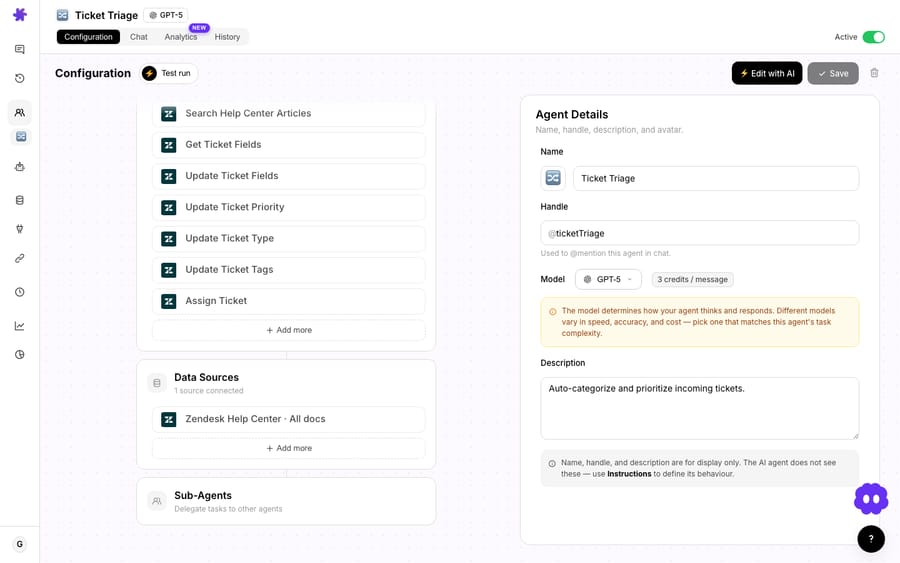
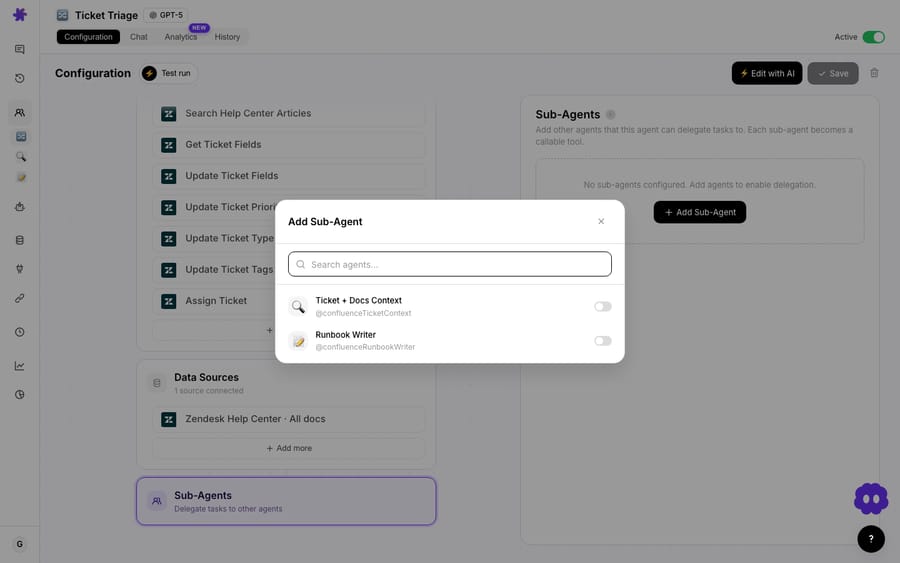
Click the Sub-Agents card and a panel opens on the right with a short explainer ("Add other agents this agent can delegate tasks to. Each sub-agent becomes a callable tool") and an + Add Sub-Agent button. That button opens a searchable list of your other agents. Toggle one on and the lead can call it.
Each sub-agent keeps its own tools, knowledge sources, instructions and model. A transcription agent has audio tools, a knowledge-base helper has your docs, and the lead agent doesn't need any of those tools itself. You can run a cheaper model on a simple lookup specialist and a stronger one on the agent that makes judgment calls.
How does the lead agent decide which sub-agent to call?
From its instructions. You describe, in plain language, when to use each sub-agent: "For audio files, use the transcription agent. For product questions, use the knowledge-base helper. For summaries, use the summarizer."
The lead reads the incoming request, matches it against those rules, and calls the specialist it picked. In the video, a Support Lead agent has sub-agents for ticket summarizing, call transcription and knowledge-base help. Ask it to transcribe a file and it picks the transcription agent without being told which one to use.
Each delegated step shows up in chat as a card with a green "Handed off" badge, the sub-agent's model and its tool count. Expand it to see the sub-agent's full run: its system prompt, every tool call with arguments, every result and its final reply. Since June 2026 every sub-agent run is saved as its own conversation record linked back to the parent, whether the lead was called in chat or fired by a trigger.
Why use sub-agents instead of one big agent?
You could put every capability into one agent, but delegation is usually cleaner:
- Specialization. Each sub-agent does one job with only the tools it needs, which makes it easier to write, test and trust.
- One entry point. The lead agent is a single front door, so you (or a trigger) only deal with one agent.
- Reuse. A good summarizer or KB-helper agent can be a sub-agent of several leads. Build it once and use it everywhere.
- Easier debugging. The handoff card tells you which specialist handled a request, so you fix one short instruction set instead of untangling one long one.
How do you set up sub-agents?
- Build your specialist agents first: a summarizer, a transcription agent, a KB helper, each with its own tools and knowledge.
- Build (or edit) the lead agent, scroll to its Sub-Agents card, click Add Sub-Agent, and pick those specialists from the list.
- Write the routing instructions: tell the lead agent when to use each sub-agent.
- Test it in chat: give it a few different requests and confirm it delegates to the right specialist each time.
You can also describe the team to Sidekick, Macha's in-dashboard agent builder, and it will wire up the sub-agents for you. Macha guards against runaway delegation: delegation stops at 3 levels deep, an agent can't call itself or form a cycle, and each sub-agent gets up to 15 tool-call iterations before it has to return a result.
What does a working sub-agent team look like?
A common setup is a Support Lead that fronts a small team of specialists:
- Summarizer: condenses long threads into a clear internal note.
- Order Lookup: pulls order status and tracking from Shopify.
- KB Helper: answers product questions from your help center.
- Transcription: transcribes audio attached to a ticket.
The Lead's instructions do the routing: "For audio, use Transcription. For 'where's my order', use Order Lookup. For product questions, use KB Helper. For anything you can't handle, summarize with Summarizer and hand to a human." A ticket comes in, the Lead reads it and delegates, so one front door serves four specialists. Add a Ticket Created trigger to the Lead and the whole team runs autonomously: every ticket gets routed without wiring each specialist to its own trigger.
Handoffs don't add a charge. Macha bills per ticket, one charge however many messages or tool calls it takes, and a sub-agent's work counts inside the parent ticket rather than as a second one.
What are the best practices for sub-agents?
- Keep specialists narrow. One clear job per sub-agent makes routing reliable.
- Be explicit in the routing instructions. Spell out which sub-agent handles which kind of request, and what the lead does when none fits.
- Reuse your best agents as sub-agents across multiple leads.
- Test the routing, not just each agent. Run the range of requests you expect and check the handoff cards to see who picked each one up.
Frequently asked questions
What is a sub-agent? An existing agent that you've given another agent access to, so the lead agent can delegate tasks to it.
How does the lead agent decide which sub-agent to use? From its instructions, where you describe when to use each one, plus its own reading of the request.
Do sub-agents keep their own tools? Yes. Each sub-agent keeps its own tools, knowledge and model, scoped to its job.
Why not just build one big agent? Focused agents are easier to write, test, trust and reuse, and a lead agent routes between them.
Can a sub-agent call its own sub-agents? Yes, up to 3 levels deep. Macha blocks an agent from calling itself or forming a loop.
Can I see what a sub-agent did? Yes. Each handoff appears as an expandable card in chat, and the sub-agent's run is saved as its own conversation linked to the parent.
Build your first agent team: create a couple of specialists and a lead to route between them. $50 of free usage, no credit card required. Start free.






