





 Shopify
 Stripe
 Slack
Slack Notion
 Google Workspace
 Confluence

How Do You Surface Daily and Weekly Trending Support Topics Automatically?


Run two scheduled agents: an hourly one that alerts Slack when a single topic spikes, and a daily or weekly one that posts the top topics to a team channel. Pair them with a monthly Study when you need a ranked topic chart across thousands of tickets.
Key takeaways
- Trending support topics surface automatically with two scheduled Macha agents: an hourly Slack spike alert and a daily or weekly topic digest posted at 9am.
- Macha's scheduled triggers run at most once an hour, cap out at 24 runs per trigger per day, and disable themselves after 5 consecutive errors.
- Macha allows 3 scheduled runs at the same time per organization, so an hourly, daily and weekly agent can all run without queuing.
- Macha Studies classify up to 20,000 tickets per run into a typed grid and chart choice columns as bar charts and number columns as histograms.
- Macha bills per ticket regardless of steps taken, starting at $299 a month for 750 tickets, about $0.40 per ticket.

To surface trending support topics automatically, run two scheduled Macha agents: an hourly spike agent that posts a Slack alert when one topic runs at about 3× its usual volume, and a daily or weekly digest agent that posts the top topics to a team channel every morning at 9am. Scheduled triggers run at most once an hour and 24 times a day, which is fast enough to catch an emerging issue within the hour.
Trend monitoring means knowing which issues are growing, which are concentrated and which are accelerating, before they turn into a flood. It splits into two jobs. Real-time spike detection is a fast alert when one topic suddenly jumps. The daily and weekly read is a steady digest of what customers actually contact you about, so you can fix root causes instead of mopping up symptoms.
What are the two patterns for tracking trending topics?
Good trend monitoring runs on two cadences at once.
| Real-time spike alert | Daily / weekly topic digest | |
|---|---|---|
| Question it answers | "Is something breaking right now?" | "What did customers actually contact us about?" |
| Cadence | Hourly checks (the minimum interval) | Once a day, once a week |
| Output | A Slack ping the moment a topic spikes | A breakdown of topics, ranked by volume and movement |
| Best for | Broken releases, emerging incidents, a bad email send | Root-cause work, staffing, deciding what to automate next |
| Macha mechanism | A scheduled agent with a Slack alert | A scheduled digest agent, or a Study for deep analysis |
Macha is an AI agent layer on top of the help desk you already run (Zendesk, Freshdesk, Gorgias, Front, HubSpot or Intercom), not a replacement for it. Your tickets stay where they are. Macha adds agents that read those tickets on a schedule, classify them by topic, and push the result to the channel your team actually watches: Slack.
The mistake most teams make is treating volume as the trigger. As Cobbai's anomaly-detection guide puts it, you shouldn't alert on "volume is high". You should alert on "volume is high and concentrated": one topic growing fast, one region spiking, one channel misbehaving. A useful alert answers three questions at once: what changed, where it's concentrated, and whether it's accelerating. That framing is the difference between an alert people act on and an alarm everyone learns to ignore.
How do you set up real-time spike alerts in Slack?
This is the Notify team of trending support topics use case, and it's the one that earns its keep on a bad day.
The shape is simple. A Macha agent wakes up on a schedule, searches your recent tickets, compares the topic mix against what's normal, and posts to Slack only if something is genuinely spiking. Two connectors do the work: Zendesk Search Tickets to read the queue, and Slack Send Message to raise the flag.
Step 1: Put the agent on a clock
Macha agents can run on a scheduled trigger, set with a cron expression and available since March 2026. Guardrails stop a clock-driven agent from running away with itself (per Macha's triggers docs):
- The minimum interval is 1 hour, with a cap of 24 runs per trigger per day.
- No more than 3 scheduled runs execute at the same time across your organization.
- If a scheduled trigger fails 5 times in a row, it disables itself and emails you, so a broken job stops instead of quietly repeating.
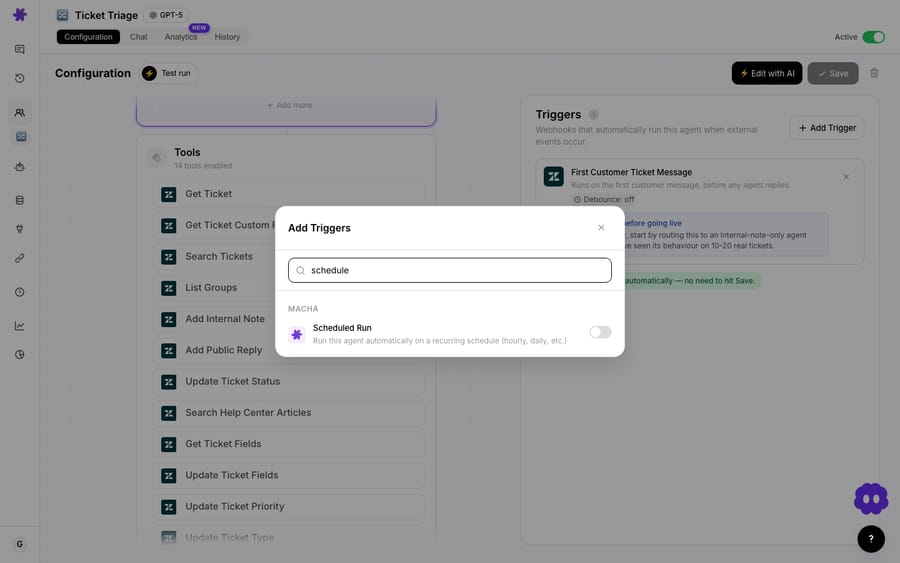
For spike detection, hourly (0 * * * *) is the right setting. You catch an emerging incident within the hour, and it's also the fastest the trigger allows.

Step 2: Tell the agent what "spiking" means
The logic lives in the agent's instructions. You give it the rule in plain language, for example: search the last two hours of tickets, group them by topic, and if any single topic is running 3× its typical hourly volume, raise an alert. Because the agent reads the actual ticket text (subject, description, the comment thread), it isn't limited to tags that were applied inconsistently months ago. It groups the words customers are using right now, like "can't log in", "502 error" or "card declined", into a topic on the fly.
That's also how you keep false positives down. Instead of "12 tickets is a lot," the instruction is "12 tickets about one thing, when that thing usually generates 3, and they all mention a 502 error." High and concentrated.
Step 3: Post an alert worth reading
When the threshold trips, the agent posts to Slack. A good alert carries the context that lets someone act in ten seconds:
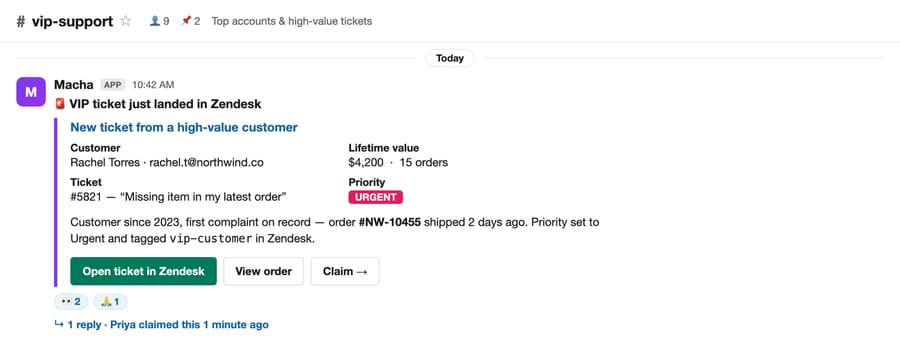
🔥 Trending Topic Alert "Login issues" is spiking — 12 tickets in the last 2 hours (normal: ~3). Common thread: customers reporting a "502 error" on the login page. This may indicate a service issue. Consider checking with engineering.
That alert passes the what changed / where concentrated / accelerating test in four lines. The same Send Message tool behind Macha's other Slack alerts (VIP-ticket pings, escalations) delivers it into whichever channel your team lives in.
How do you build a daily and weekly topic digest?
Spike alerts are for emergencies. The daily and weekly digest is for steering: the recurring read that tells you what your support load actually consists of, so you can fix the upstream causes.
The mechanism is the same scheduled agent on a slower beat. Macha ships it as the Daily support metrics summary in Slack use case: every morning at 9am, an agent pulls the previous day's ticket data from Zendesk and posts a summary to a Slack channel covering tickets created, tickets solved, response times, CSAT and the top topic. Change its cron from 0 9 * * * to 0 9 * * 1 (Monday at 9am) and it becomes a weekly review.
📊 Daily Support Summary — March 4 - Tickets created: 47 · solved: 52 - First response (avg): 12 min · resolution (avg): 2.4 hrs - CSAT: 94% - Top topic: Order tracking (18 tickets) ✅ Cleared backlog — 5 more solved than created
The "Top topic" line is the trend signal. Watch it across a week: if "Order tracking" leads three days running, that's not noise, that's a process to fix. Leadership gets the same view without anyone building a spreadsheet. The weekly metrics most guides recommend (ticket volume, backlog, first response time, top contact drivers) all fit into this digest.
When do you need a Study instead of a digest?
A Slack digest covers the daily heartbeat. When you want to quantify a trend, say "what share of last month's tickets were really about billing, broken out by sub-topic?", use Studies, Macha's batch-analysis tool (launched May 2026).
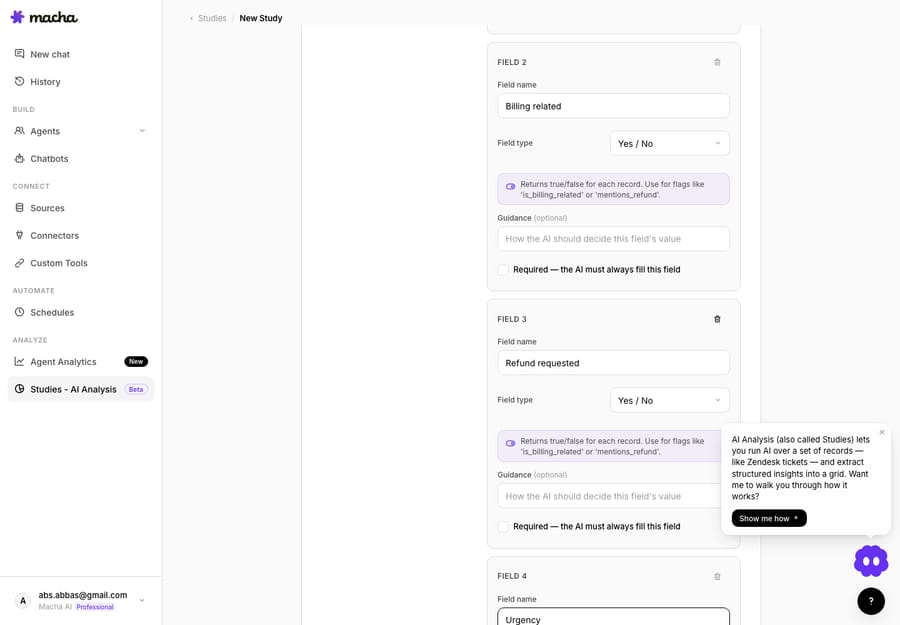
A Study points an AI model at a batch of tickets (scoped by a Zendesk search and date range, up to 20,000 records per run) and fills in a typed grid: one row per ticket, one column per question. Columns take six answer types: yes/no, single select, multi select, number, short text and long text. For trend work, your columns are the topic taxonomy: a single-select Category, a short-text Sub-topic, maybe a 1–5 Urgency number. The AI reads every ticket and applies the same rules to each one, which inconsistent human tagging never delivered.
The payoff is the Report view, which aggregates each column into a chart. Yes/no and choice columns become horizontal bar charts of your topics with counts and percentages; number columns become histograms. "Trending topics" stops being a hunch and becomes a chart you can click into. You can also export the grid to CSV.
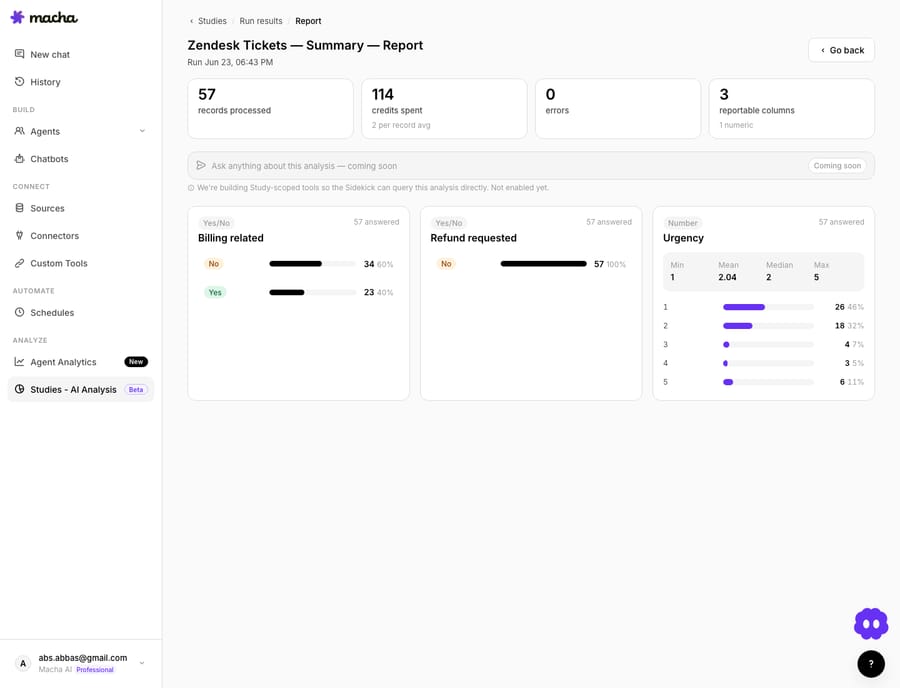
Run the same Study over two date ranges, last week against the week before, and the movement between the two breakdowns is your trend. That's the defensible version of "what's trending," and it's the one you bring to a product or engineering review. (We walk through a full worked Study in our Studies deep-dive.)
What cadence should a support team copy?
Here's a setup that covers a real team without over-engineering:
- Hourly spike agent: scans the last 1–2 hours and alerts Slack only on a concentrated spike. Your early warning.
- Daily 9am digest agent: yesterday's volume, response times and top topic into a team channel. Your heartbeat.
- Weekly Monday digest: the same digest over seven days, for the wider team and leadership.
- Monthly Study: a full topic breakdown with charts for root-cause and roadmap conversations.
Items 1 to 3 are the same building block, a scheduled agent with Zendesk and Slack, on three different clocks. Item 4 is Studies. Three scheduled triggers also fit inside the limit of 3 simultaneous scheduled runs, so none of them queue behind each other.
When is ticket-based trend monitoring the wrong tool?
There are trade-offs:
- Scheduled triggers run on a 1-hour minimum interval. If you need sub-minute detection of a hard outage, an APM or status tool watching your infrastructure will beat ticket analysis every time, because tickets are a lagging signal of an outage. Use trending-topic alerts for what your monitoring can't see: confusing UX, a bad email send, a policy change customers hate.
- Every run does real work. The 1-hour floor and the 24-runs-a-day cap exist so a schedule stays predictable. Match the cadence to the value.
- Thresholds need tuning. "3× normal" is a starting point. Build your baseline with day-of-week and time-of-day in mind: a Monday-morning spike isn't an incident, it's Monday. Expect to adjust the rule in the first week so the channel stays trustworthy.
If your volume is tiny, a few dozen tickets a week, you may not need automation at all; you can read your queue. This pays off once volume is high enough that nobody can hold the whole shape of it in their head.
How does trend monitoring fit with the rest of Macha?
Trend monitoring is the "watch" half of a loop. The "act" half is where Macha agents resolve, triage and route tickets directly on Zendesk and the other help desks. The same Slack connector that delivers your alerts can also relay urgent tickets, answer FAQs and route questions to the right channel. So the alert that says "login issues are spiking" can sit next to agents that are already first-responding to those tickets: you see the trend and the queue is being worked.
FAQ
What counts as a "trending" support topic? A topic whose volume is rising fast and is concentrated: one issue, region or channel behaving differently from the baseline. Raw high volume alone isn't a trend; concentration and acceleration are what make it worth an alert.
How quickly can Macha catch a spike? Scheduled agents run on a minimum 1-hour interval, capped at 24 runs per trigger per day, so hourly is the fastest cadence for trend detection. For real-time infrastructure outages, pair this with a dedicated monitoring tool, since tickets lag the actual incident.
Does this work on Freshdesk or Gorgias, not just Zendesk? Yes. Macha connects to Zendesk, Freshdesk, Gorgias, Front, HubSpot or Intercom; the agent searches whichever help desk you've connected and posts to Slack the same way.
Do I need Studies for this? No. The Slack digest covers daily and weekly trending topics on its own. Studies is for a chartable breakdown across thousands of tickets (up to 20,000 per run), which is overkill for a daily ping but suits monthly root-cause analysis.
How much does it cost to run? Macha bills per ticket, one customer conversation charged once however many steps the agent takes, from $299 a month for 750 tickets, about $0.40 each. There's one plan with every feature, and scheduled triggers are included on every tier. See the pricing page for current tiers.
What happens if a scheduled agent keeps failing? After 5 consecutive errors the trigger disables itself and Macha emails you, so a broken check stops instead of running all day.
How do you get started?
If you want to catch issues from the shape of your queue rather than the size of your backlog, this is a half-hour setup. Start a free trial ($50 of usage, no credit card, no time limit), connect your help desk and Slack, build a scheduled agent with a topic rule, and let it watch the queue for you. The docs cover scheduled triggers and Slack alerts step by step.
Written by Abbas (Customer Support & AI, Macha) · Reviewed by Ankeet Guha (Co-founder & CTO) · Published 2026-06-24 · Last updated 2026-09-24.






