





 Shopify
 Stripe
 Slack
Slack Notion
 Google Workspace
 Confluence

How Do You Sync Resolved Zendesk Tickets to Notion Automatically?


An AI agent triggered when a Zendesk ticket closes can read the whole thread and write issue type, resolution and sentiment into a Notion database. Notion's own Zendesk integration, Zapier and Unito move ticket fields but never read the conversation.
Key takeaways
- An AI agent on Zendesk's Ticket Closed event can read the full thread and write issue type, resolution, sentiment and time to resolve into a Notion database.
- Notion's Zendesk integration, a Zapier zap using Create Data Source Item, and Unito two-way sync all copy ticket fields verbatim without reading the conversation.
- Macha's Notion connector includes Create Page and Update Page write tools, so the agent adds a database row directly, with no custom tool to build, and the Macha team sets that agent up for you at about $0.40 a ticket, with setup by the Macha team and a dedicated success manager included.
- Notion allows each API connection an average of 3 requests per second, or 10 on Business and Enterprise, so large back-fills belong on a nightly scheduled trigger.
- A single Notion API request is capped at 1000 block elements and 500KB, so each logged record should stay a short summary rather than the full ticket transcript.

To sync resolved Zendesk tickets into Notion as insights rather than raw fields, run an AI agent on Zendesk's Ticket Closed event that reads the thread and writes one row (issue type, resolution, sentiment, time to resolve) to a Notion database through Notion's API. Notion's own Zendesk integration, Zapier and Unito all move ticket fields verbatim; none of them reads the conversation.
| Method | What reaches Notion | Direction | Best for |
|---|---|---|---|
| Notion's Zendesk integration | Live link preview and a Zendesk Ticket property | Read-only, pasted by hand | Referencing a ticket in a doc |
| Zapier | Mapped fields (subject, requester, status, tags) | One-way, automatic | Logging ticket metadata |
| Unito | Fields, comments, attachments | Two-way sync | Mirroring a Zendesk view |
| Macha agent | Issue type, resolution, sentiment, time to resolve | One-way, on Ticket Closed | A searchable log of what support learned |
Your support team closes tickets all day. Each one is a small case study (what broke, how you fixed it, how the customer felt by the end) and almost all of that signal evaporates the moment the ticket goes to Solved. A month later, when someone asks "are shipping complaints getting worse?" or "what did we do the last time this firmware bug came up?", the answer is buried in a thousand closed conversations nobody will re-read.
Below are the standard methods for pushing Zendesk tickets into Notion, covered fairly so you can pick one if a plain field sync is all you need, followed by the method that captures insight instead of fields: an AI agent running on top of your existing Zendesk that reads each solved ticket and writes a structured record into a Notion database.
What are the standard ways to sync Zendesk tickets to Notion?
All three conventional routes are legitimate; they solve different problems.
1. Notion's native Zendesk integration (link preview)
Notion ships a Zendesk integration it built itself, and it's handy, but it's a link preview. You paste a Zendesk ticket URL into a Notion page, choose "Paste as preview," and Notion unfurls a live card showing the ticket's status and key properties. You can also add a Zendesk Ticket property to a Notion database to attach a ticket to an existing record, then filter and roll up on it.
- Good for: referencing a specific ticket inside a project doc or PRD; lightweight visibility.
- Where it stops: it's manual (you paste links by hand). It doesn't push tickets into a database on its own, and it captures no understanding of the conversation. Details: Notion's Zendesk integration page.
2. Zapier (automated field copy)
A Zap with a New Ticket trigger in Zendesk and a Create Data Source Item action in Notion (the action Zapier used to call Create Database Item) copies the fields you choose (subject, requester, status, tags) into a new Notion row automatically.
- Good for: hands-off, one-way logging of ticket metadata as tickets are created.
- Where it stops: it's a literal field copy. There's no reading the thread, no resolution summary, no sentiment, only the columns you mapped. You maintain the mapping, and Zapier's per-task pricing scales with ticket volume.
3. Unito (two-way sync)
Unito goes deeper: you build a "flow" that keeps a Zendesk view and a Notion database in two-way sync, mapping native fields, comments, attachments, and custom fields. Edit the Notion row and it can write back to Zendesk. (Unito needs your Notion table to be a proper database.)
- Good for: mirroring ticket properties and keeping both systems current, a real system-of-record sync.
- Where it stops: it syncs fields, not understanding. Two-way mirroring of a high-volume queue is also more machinery than a "log what we learned" use case needs.
The thing none of them do
All three move data. The native preview shows you a ticket; Zapier copies its fields; Unito mirrors them both ways. None of them reads the ticket and tells you what it was about, and none pushes resolved-ticket insight back into Notion. That's the gap the rest of this walkthrough fills.
How is field copy different from insight extraction?
The difference is the whole point, so it's worth being precise.
| Native / Zapier / Unito | Macha agent | |
|---|---|---|
| What moves | Ticket fields, verbatim | Extracted insights from the conversation |
| Issue type | Whatever tag an agent happened to apply | AI-classified from the content |
| Resolution | Not captured (or the raw last comment) | A one-line summary of how it was solved |
| Sentiment | Not available | Inferred from the thread (e.g. Neutral → Positive) |
| Setup | Field mapping / flow config | Done for you by the Macha team, with a dedicated success manager, included |
| Intelligence | None; it's data movement | Reads and reasons over the thread |
Macha is the AI agent layer that sits on top of the help desk you already run (Zendesk, Freshdesk, Gorgias, Front, HubSpot or Intercom). You're not building a mirror of your ticket table in Notion; you're building a searchable log of what your support team has learned.
What does the workflow look like?
The use case is simple to state and useful in practice:
When a ticket is marked Solved, an agent reads it, extracts the issue type, resolution, and customer sentiment, and logs a new entry to a Support Insights database in Notion, tagged and summarized, ready to search.
Here's the shape of the workflow:
- Trigger: Zendesk Ticket Closed (fires when a ticket is marked solved or closed)
- Reads: the ticket and its full comment thread (
Get Ticket) - Extracts: issue type, resolution summary, sentiment, time to resolve
- Writes: a structured row into a Notion database, with the Notion connector's Create Page tool
The agent in our test org is configured to do exactly this: read a closed conversation and produce a structured summary instead of leaving it in the archive.
How do you connect Notion and Zendesk to Macha?
Macha authenticates the Notion connector over OAuth, so connecting is a click-and-authorize flow. The connector has read tools (Search Notion, Get Database Schema, Query Database, Get Page) and two write tools, Create Page and Update Page. The read tools let the agent find your Support Insights database and check what's already logged; Create Page adds the new row, and Update Page fills in a row that already exists.
When you authorize Notion, share the Support Insights database with the Macha integration so the write tools can reach it. The agent fills in the properties and Create Page makes the call, so this workflow needs no custom tool; you'd add one only to reach a Notion endpoint the connector doesn't cover.
Your help desk (Zendesk here) is connected the same way as any other Macha connector. Macha never replaces it: the tickets, the agents, the views all stay where they are. Macha adds an automation layer on top, which is the whole Macha-on-Zendesk model.
On the Notion side, create a database with the columns you want filled in. A sensible starting schema:
| Property | Type | Filled by |
|---|---|---|
| Ticket | Title / number | Get Ticket |
| Issue type | Select | AI classification |
| Resolution | Text | AI summary |
| Sentiment | Select (Neg / Neutral / Pos) | AI inference |
| Time to resolve | Text / number | computed from timestamps |
| Date solved | Date | trigger time |
Typed Notion properties (Select, Date, Number) are what make the log aggregatable later: a board view by Issue type, a rollup of sentiment, or a filter for everything that took over a day.
Which Zendesk trigger should the agent use?
In the agent's trigger picker, choose the Zendesk Ticket Closed event, which fires when a ticket is marked solved or closed. This is the most important design decision in the workflow: you want the agent to fire on resolution, not on creation or every update, so each ticket produces one insight record at the moment its story is complete.
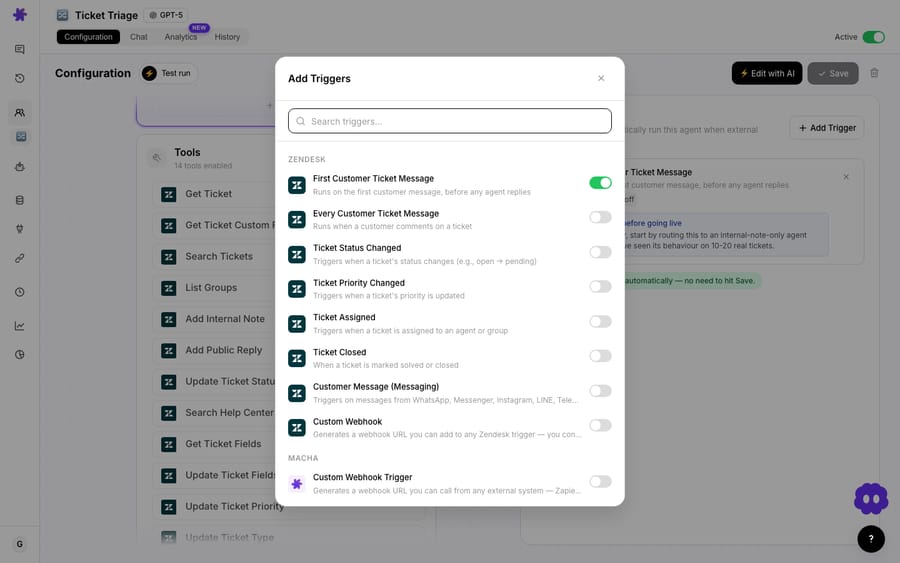
One thing to plan for: a ticket that's solved, reopened and solved again fires the trigger twice. Tell the agent to search the database for the ticket number first (the connector's Query Database tool does this) and skip the write if a row exists.
If you'd rather batch than run per ticket, Macha also supports scheduled triggers: point an agent at the last 24 hours of solved tickets on a nightly schedule. Per-ticket is closer to real time; scheduled is gentler on rate limits (more on that below). Most teams start per-ticket. More patterns like this are on the Macha blog.
What instructions does the agent need?
Attach the help desk's Get Ticket action, the Notion read tools and Create Page to the agent, then write the instructions in plain language. No field-mapping UI, no transformation expressions; you describe the job and the model does the reasoning:
When a ticket is solved, read the full conversation. Classify the issue type (shipping, billing, technical, account, other). Write a one-sentence resolution describing how it was fixed. Judge the customer's sentiment at the end of the thread (Negative / Neutral / Positive) and note if it shifted. Estimate time to resolve from the first and last timestamps. Then create a new entry in the Support Insights Notion database with these fields.
That's the part the field-copy tools can't do. "Classify the issue type from the conversation" and "judge sentiment" aren't column mappings; they're reasoning steps. The output for a resolved ticket in our test org looks like this:
Logged to Notion → Support Insights
• Ticket:        #6104
• Issue:         Shipping delay
• Resolution:    Proactive customer notification + tracking update
• Sentiment:     Neutral → Positive
• Time to resolve: 1.5 hours
In the Notion database, those records stack up into the searchable log you wanted: one row per solved ticket, with issue type, resolution, sentiment, and date solved filled in by the agent.
How much does it cost to log each ticket?
Macha bills per ticket: one conversation, charged once, not per resolution and not per "deflection." Logging one resolved ticket takes a handful of steps under the hood: read the ticket, run the extraction, check for a duplicate, write the Notion row. They all belong to the same ticket, so they're the same single charge; the Get Ticket read and the Notion write don't add anything on top. That holds whichever model does the extraction, so you can put a heavier model on the tickets where nuance matters without it showing up on the bill.
Because the cost scales with ticket volume and nothing else, the math is easy: pricing starts at $299 a month for 750 tickets, about $0.40 each. Setup is done for you on the trial and every plan: the Macha team builds the logging agent on your Zendesk and Notion and tests it on a sample of your solved tickets, and the price includes a dedicated success manager who handles your changes afterwards, such as new properties, instruction changes or new tools. You can start on a free trial ($50 of usage, no credit card required) to log a batch and see the real draw before committing. See the pricing page for the tiers; there's one plan, and every feature, custom tools and scheduled triggers included, is on every tier.
When is this the wrong tool?
A few caveats will save you grief:
- Notion API rate limits are real. Notion's request limits allow each connection an average of 3 requests per second (180 a minute), or 10 per second (600 a minute) on Business and Enterprise workspaces, plus a separate per-workspace limit across all connections. Overflow returns a
429error. For a normal support queue that's a non-issue, but if you're back-filling years of closed tickets, batch it on a scheduled trigger overnight rather than firing thousands of writes at once. - Notion payload limits. A single request maxes out at 1000 block elements and 500KB, and a rich-text value at 2000 characters, so keep the logged record a summary, not the full transcript pasted in.
- It's a log, not a system of record. If your goal is live, two-way, field-perfect mirroring of every ticket property, a dedicated sync tool like Unito is the better fit; that's its job. Macha's value is the extraction, not field parity.
- Sentiment and classification are inferences. Treat the log as a strong directional signal, not an audited ledger. For anything compliance-grade, keep Zendesk as the source of truth.
- Garbage in, garbage out. If your tickets are one-line "fixed it" closes with no context, the agent has little to extract. The richer the conversation, the better the insight.
Can the Notion log feed back into the agent's knowledge?
Yes, and this is where the field-copy tools can't follow. The Notion connector's Sync to Knowledge action syncs Notion pages as a live Notion knowledge source, and each row in a Notion database is a page. So the resolutions your team produced last month become context your front-line agents draw on this month: a new "shipping delay" ticket comes in, and the agent already knows how the last ten were resolved.
Analyze the past, feed the present. That's the difference between a Notion table that fills up and gets ignored and a continuous-improvement loop for support. Browse more of these patterns in the use-case library or read the docs for the full agent-builder walkthrough.
FAQ
What's the easiest way to sync Zendesk tickets to Notion? For a plain field copy, a Zap from Zendesk's "New Ticket" trigger to Notion's "Create Data Source Item" action is the quickest no-code route. For referencing a ticket inside a doc, Notion's native link preview is fine. For resolved-ticket insight (issue type, resolution, sentiment) you need an AI agent that reads the thread, which is what Macha adds on top of Zendesk.
Does this replace my Zendesk-to-Notion Zapier zap? For resolved-ticket logging, yes, and it does more, because it extracts insight instead of copying raw fields. For live two-way field mirroring of every ticket property, a dedicated sync tool like Unito is still the right call. They solve different problems.
Will it work with Freshdesk, Gorgias, or Front? Yes. Macha connects to Zendesk, Freshdesk, Gorgias, Front, HubSpot or Intercom. Swap the trigger to your help desk's equivalent event (on Freshdesk, a Ticket Updated trigger or a custom webhook fired by a "status is Resolved" automation) and the rest of the workflow is the same.
Can I control exactly which fields get logged? Yes. You define the Notion database schema and tell the agent which properties to fill in plain language. Add a "Refund issued?" Yes/No, a numeric "Urgency," or a free-text "Root cause" and the agent fills them per ticket.
Does Macha's Notion connector write to databases? Yes. Its Create Page tool adds a row to a database and Update Page edits an existing one, alongside read tools that search Notion and query databases.
What does each logged ticket cost? One ticket, about $0.40 on the entry tier, covering the extraction and the read and write calls around it, whichever model runs it. You can watch the real draw on a free trial ($50 of usage, no credit card required).
Won't this hit Notion's rate limits? Not at normal volume. Notion allows an average of 3 requests per second per connection (10 on Business and Enterprise). Only large historical back-fills risk a 429; for those, run the agent on a nightly scheduled trigger to spread the writes out.
How do you start logging solved tickets to Notion?
Connect Zendesk and Notion, give an agent the Create Page tool, point it at the Ticket Closed event, and let it write the record you'd never have time to write by hand. Start a free trial ($50 of usage, no credit card required) and log your first resolved ticket to Notion today.
Written by Abbas (Customer Support & AI, Macha) · Reviewed by Ankeet Guha (Co-founder & CTO) · Published 2026-06-24 · Last updated 2026-09-24.






