





 Shopify
 Stripe
 Slack
Slack Notion
 Google Workspace
 Confluence

How to Sync Resolved Zendesk Ticket Insights to Notion Automatically


The most useful part of a support ticket, what broke, how it was fixed and how the customer felt, usually disappears when the ticket is solved because tags are applied inconsistently. An AI agent can read each solved ticket and log those details to a Notion database without anyone tagging by hand.
Key takeaways
- A Macha agent can log every solved Zendesk ticket to a Notion database by reading it with Get Ticket, extracting four fields, and writing a row with Notion's Create Page tool.
- The Notion database should carry typed columns such as Issue type, Resolution, Sentiment, Time to resolve, Ticket link and Date solved so the agent's rows land cleanly.
- Notion's API allows 180 requests per minute per connection on most plans and 600 on Business and Enterprise workspaces, which only matters for a large backfill.
- Macha's Studies feature can backfill older solved Zendesk tickets, for example the last 180 days, into typed columns and export them to CSV before the live agent takes over.
- Each logged ticket costs about $0.40 on Macha's $299-a-month plan for 750 tickets, covering the read, the extraction and the Notion write as one ticket, with setup by the Macha team and a dedicated success manager included.

To sync resolved-ticket insights to Notion automatically, set up a Macha agent that fires when a Zendesk ticket is marked Solved, reads it with Get Ticket, extracts issue type, resolution, sentiment and time-to-resolve, and writes one row to a Notion database with Notion's Create Page tool. Nobody tags anything by hand. That's the workflow this post builds, end to end, on your existing Zendesk and Notion accounts.
Macha is the AI agent layer that sits on top of the help desk you already use; it doesn't replace Zendesk, it watches it and acts on it. So this isn't a migration or a new tool for your agents to log into. It's a background agent doing the bookkeeping your team keeps meaning to do.
What will you build?
A single Macha agent with one job: when a Zendesk ticket is solved, extract the insight and append it to a Notion database. In Macha terms, that's a trigger, a model, and two connector tools.
| Piece | What it does | Source |
|---|---|---|
| Trigger | Fires the agent when a ticket is marked Solved (or on a schedule for batches) | Zendesk |
| Read | Pulls the full ticket: subject, conversation, tags, custom fields | Zendesk → Get Ticket |
| Reason | LLM extracts issue type, resolution summary, sentiment, time-to-resolve | Macha (your chosen model) |
| Write | Creates a row in your Support Insights database | Notion → Create Page |
The data flow, in the words of the use-case definition, is: Ticket Solved → read ticket #6104 (shipping-delay complaint, resolved with proactive update) → log to Notion → "Issue: Shipping delay · Resolution: Proactive notification + tracking update · Sentiment: Neutral → Positive · Time to resolve: 1.5 hours."
Why log resolved tickets at all?
If you're not already doing this, it's worth being honest about the payoff before you build anything.
Most customer feedback disappears the moment a ticket closes. Conversations get resolved with messy or missing tags, and the patterns that should inform the roadmap get lost in day-to-day support work. A structured log of resolved tickets turns the queue into a voice-of-customer signal: support reports a problem, it gets categorized, similar issues group into a theme, and product, docs or support leadership decides what to fix next.
Teams reach for Notion because it's already where the rest of the company lives. It's a common home for support-ops dashboards, and Notion's database views (group by tag, chart volume over time, filter by sentiment) make the dataset readable by people who will never open Zendesk. The missing piece has always been getting the data in without a human transcribing it. That's the part Macha automates.
How do you set up the Zendesk-to-Notion sync?
1. Connect Notion (and confirm the write tools)
In Macha, go to Connectors and connect Notion over OAuth, then share the target database with the integration so it has somewhere to write. In our workspace the connector showed six tools, and the two that make this workflow possible are the Write ones:
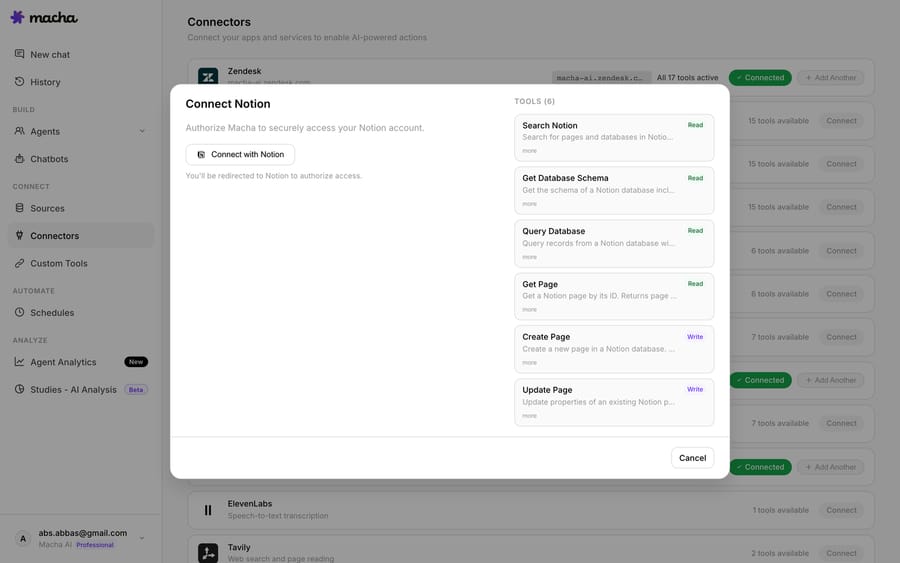
Create Page writes a new row into your database, and Update Page lets the agent enrich an existing entry instead of duplicating it. Under the hood this is the standard Notion API (POST /v1/pages with a database_id parent), so property names are case-sensitive and the database must be shared with the integration. Macha handles the call, but those Notion rules still apply.
Set up your Notion database first with the columns you want filled: Issue type (select), Resolution (text), Sentiment (select), Time to resolve (number), Ticket link (URL), Date solved (date). The closer your Notion schema matches what you ask the agent to extract, the cleaner the rows.
2. Point the agent at Zendesk and have it extract the insight
Connect Zendesk the same way. The agent's instructions are where the logic lives: you describe the brief you want, you don't write code. Something like:
When a ticket is solved, read the full ticket. Summarize the customer's issue in one short phrase, the resolution in one sentence, the customer's sentiment as Positive / Neutral / Negative (note if it shifted during the conversation), and the time from creation to resolution. Then create a page in the Support Insights database with those fields.
This is the same extraction Macha agents already do to brief human agents. Here's a real Macha agent turning a messy resolved ticket into a structured summary with Issue, Timeline, Actions taken, Current status, Outstanding and Recommended next step:
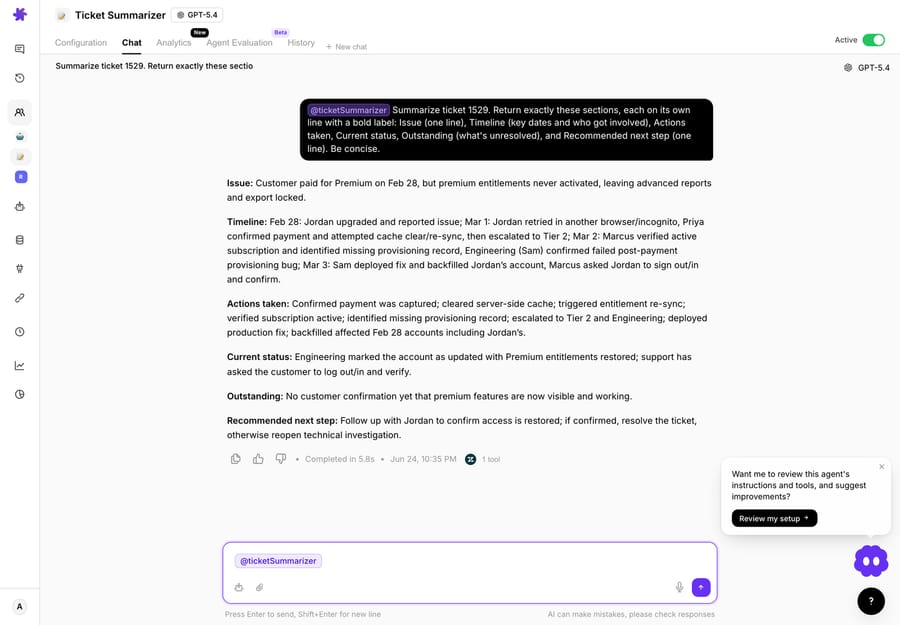
For the Notion sync you're capturing a narrower, more aggregatable slice of that: typed fields, not prose. It's the same capability pointed at a database instead of a teammate.
3. Trigger it automatically
You don't want to run this by hand. Macha gives you two options, and the right one depends on your volume:
- Per-ticket, real-time: an event trigger fires the agent the instant a ticket is marked Solved. Best when you want each row to land immediately and your volume is moderate.
- Scheduled batch: a Scheduled Run trigger wakes the agent hourly or daily, queries all tickets solved since the last run, and logs them in one pass. Best for high volume, where one batched job is easier to watch than thousands of individual fires.
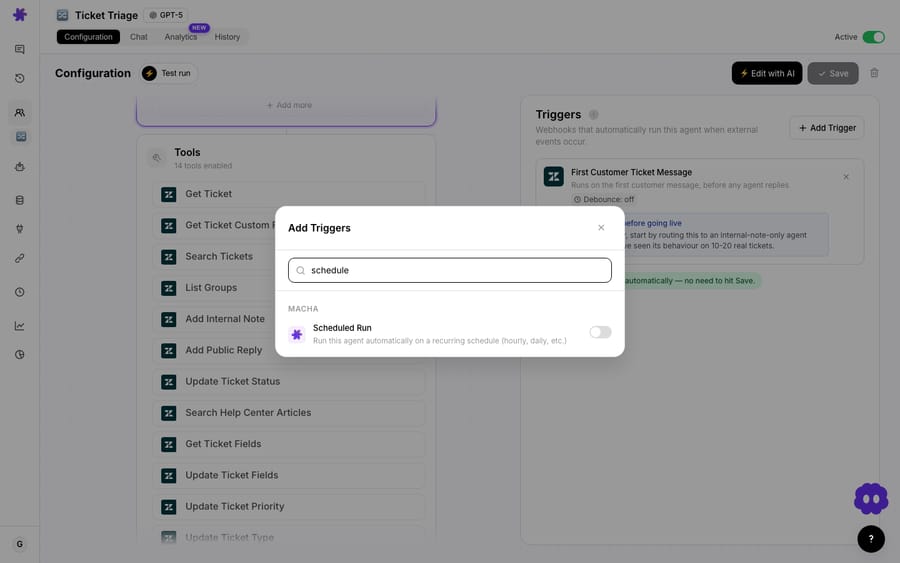
Set the trigger, hit save, and the agent is live. From here on, your Notion database fills itself.
How do you backfill older solved tickets?
A live sync only captures tickets from today forward. If you want the back catalog, six months of solved tickets graded into the same schema, running an agent ticket by ticket over thousands of records is the wrong tool.
That's what Studies is for. Studies is Macha's bulk AI analysis feature: point it at a Zendesk search (for example status:solved with a date range covering the last 180 days), define typed columns such as Issue type, Resolution, Sentiment, Urgency, and it reads every ticket in parallel into a structured grid you can export to CSV or push back as a knowledge source. The estimate it shows before you run uses the exact query the run will use, so a backfill never surprises you. Use Studies once to seed the database, then let the per-ticket agent keep it current.
What does the Notion sync cost to run?
Macha bills per ticket: one conversation, charged once, not per ticket "deflected" or "resolved." For this workflow, a single solved ticket is one read (Get Ticket), one reasoning pass to extract the fields, and one write (Create Page): three steps, one ticket. Pricing starts at $299 a month for 750 tickets, about $0.40 each, and tiers run up to $3,999 for 10,000 tickets. Model choice doesn't change the price, so pick whatever pulls four fields out of a closed ticket reliably; you don't need a frontier model for an extraction this light.
There's one plan, so the Notion sync doesn't need a particular tier: connectors, scheduled triggers and unlimited agents are included, and setup is done for you: the Macha team builds and tests the agent on your Zendesk and Notion, and about $0.40 a ticket also covers a dedicated success manager who handles your changes afterwards, such as instruction changes, new tools or tuning. Start with the free trial ($50 of usage, no credit card required) and run it against a week of real tickets before committing. See pricing for the full breakdown.
When is this the wrong build?
This workflow is useful, but it has sharp edges. Know these before you ship it:
- Garbage in, garbage out. The agent can only summarize what's in the ticket. If your team resolves tickets with a one-word "fixed" and no notes, the Resolution column will be thin. The log improves your data hygiene; it doesn't manufacture detail that was never written down.
- Sentiment is a judgment call. "Neutral → Positive" is a model's read of tone, not a measured CSAT score. Treat it as a directional signal, and if you need ground truth, pair it with an actual CSAT survey.
- Duplicates on re-opens. If a solved ticket re-opens and is solved again, a naive build writes a second row. Use Update Page keyed on the ticket ID (or store the ticket URL as a unique property) so the agent enriches the existing entry instead.
- Notion API limits. Notion allows 180 requests per minute per connection, an average of 3 per second, on most plans, and 600 per minute on Business and Enterprise workspaces. For normal solved-ticket volume this is a non-issue; for a massive backfill, use Studies plus a CSV import instead of hammering the live agent.
- Don't over-schema it. It's tempting to extract fifteen fields. Four or five typed columns you'll actually filter and chart beat a dozen you never look at, and fewer fields make the extraction faster and more reliable.
If your goal is real-time answering of customers rather than after-the-fact logging, this isn't the workflow you want. Look at Macha's use cases for auto-resolution and triage agents instead. This one is deliberately a quiet, background bookkeeper.
FAQ
Does this replace my Zendesk reporting? No. Zendesk Explore handles volumes and SLAs. This builds a qualitative layer Zendesk doesn't give you cleanly: a searchable, taggable Notion database of what each issue actually was and how it was resolved, in plain language your whole company can read.
Can it write to a Notion database, or only read? It writes. The Notion connector in our workspace includes Create Page and Update Page (Write) tools alongside the read tools, which is what lets the agent append a new row, or enrich an existing one, in your Support Insights database.
Do I have to tag tickets manually first? No. The agent infers the issue type and resolution from the ticket content at solve time, so you get structured categorization without relying on agents to remember to tag.
What if I use a different help desk instead of Zendesk? The pattern is the same. Macha sits on top of Zendesk, Freshdesk, Gorgias, Front, HubSpot or Intercom. Swap the trigger and read tool to your help desk; the Notion write side is unchanged. Studies backfills currently read Zendesk tickets only.
How far back can I log historical tickets? As far as your help desk retains them. Use Studies to grade your Zendesk archive into the same columns in one batch run, then let the live agent take over going forward.
Will Notion's rate limit slow the sync down? Not at normal volume. A per-ticket sync writes one page per solved ticket, far below Notion's 180 requests per minute per connection.
Ready to stop losing the most useful part of every ticket? Connect Notion and Zendesk, describe the brief you want, set the trigger, and let the agent keep your Support Insights database current. Start with the free trial ($50 of usage, no credit card required) and point it at a week of solved tickets to see the rows land for yourself.






