





 Shopify
 Stripe
 Slack
Slack Notion
 Google Workspace
 Confluence

How Do You Triage and Route Freshdesk Tickets by Topic with an AI Agent?


A duplicate-charge complaint that lands untagged in the general queue waits behind password resets while the customer gets angrier. An AI agent that reads every new Freshdesk ticket, sets its priority and tags, and assigns the right group fixes that in seconds.
Key takeaways
- An AI agent on Freshdesk's Ticket Created trigger can triage by topic using five actions: Get Ticket, Update Priority, Update Tags, Assign Ticket and Add Internal Note.
- Freddy AI Auto Triage predicts Priority, Group and Type, but Freshdesk recommends a minimum of 2,000 historical tickets and a Pro or Enterprise plan.
- Macha's Freshdesk connector exposes 15 actions through an API key, so a triage agent classifies from written instructions and works on a brand-new queue.
- Macha bills triage per ticket, starting at $299 a month for 750 tickets, about $0.40 each, with unlimited seats.

To triage and route Freshdesk tickets by topic, put an AI agent on a Ticket Created trigger that reads each new ticket, classifies the topic and urgency, then uses five Freshdesk actions (Get Ticket, Update Priority, Update Tags, Assign Ticket, Add Internal Note) to set the fields and hand it to the right group. Freshdesk's own tools cover parts of this: Omniroute distributes tickets inside a group, and Freddy AI Auto Triage predicts Priority, Type and Group once you have about 2,000 historical tickets on a Pro or Enterprise plan. A Macha agent does the whole pass from written instructions, with no history required.
| Method | Reads ticket content? | What it sets | Requirements |
|---|---|---|---|
| Omniroute / round-robin | No (only skill rules you configure) | The agent within a group | Any plan with automatic assignment |
| Freddy AI Auto Triage | Yes, subject and body | Priority, Type, Group, custom dropdowns | Pro or Enterprise; ~2,000 historical tickets recommended |
| Macha triage agent | Yes, subject, body and conversation | Priority, tags, group or agent, internal note | A Freshdesk API key; your written policy |
Macha doesn't replace Freshdesk. It's an AI agent layer that connects to your Freshdesk (and your commerce, knowledge and comms tools) and takes real actions inside it. Your agents keep working in the Freshdesk they already know.
What does triage and routing by topic actually require?
Topic-based routing is more than dropping a ticket into a round-robin pool. To do it well, something has to:
- Read the subject and body, and ideally the full conversation, in plain language.
- Classify the topic (billing, shipping, technical, cancellation…) and often a sub-topic.
- Judge urgency and sentiment. "Fix this immediately, this is unacceptable" is not the same priority as "whenever you get a chance."
- Act: set the priority field, apply tags, and assign the ticket to the correct agent group, not just a random available agent.
- Leave a trail so the human who picks it up sees why it landed there.
That's a sequence of judgment plus actions, which is the shape of work an AI agent with tools does well.
How does Freshdesk handle triage natively, and where does it stop?
Two native capabilities overlap with this job, and it's worth being precise about them.
Omniroute / automatic ticket assignment distributes tickets to agents within a group using round-robin, load-based or skill-based rules. (Freshdesk's round-robin docs walk through the setup.) It's good at balancing workload, but apart from skill-based rules you configure by hand, it doesn't read the content to decide which group or topic a ticket belongs to in the first place. It answers "who's next?" not "what is this about?"
Freddy AI Auto Triage does read content: it scans the subject and body of each new ticket and predicts values for Priority, Group and Type, plus custom dropdown and dependent fields. In manual mode Freddy suggests a value and an agent clicks Apply; in automatic mode it applies the value on ticket creation. (Freshdesk's Auto Triage setup guide, updated 29 July 2026, covers it.) Two constraints matter. First, Freshdesk recommends a minimum of 2,000 historical tickets, because Freddy learns statistically from your past data. Second, it needs a Pro or Enterprise plan (Freshdesk or Freshdesk Omni), so it isn't on Growth. eesel's Freddy auto-triage guide says it also needs the Freddy AI Copilot add-on, which Freshdesk's pricing page lists at $29 per agent per month; Freshdesk's own setup article lists only the plan.
So the native path is: balance the queue with Omniroute, and once you have enough ticket history and the right plan, let Freddy classify fields. If that fits you, use it.
Where Macha fits is the space around those edges:
- You don't have 2,000 tickets yet (new product, new queue, new category) but still want classification from day one.
- You want triage driven by written instructions you control, not a model trained on whatever your historical tags happened to be.
- You want the agent to do more than fill fields: assign a group, write an internal note, and in adjacent workflows draft a reply, pull the relevant policy from Notion, or post a heads-up to the on-call channel in Slack.
- You want one classification policy that can later extend across Freshdesk, Zendesk and Slack, because the agent layer is the same everywhere.
How do you build a topic-triage agent in Macha?
Here's the end-to-end build. It takes about ten minutes.
1. Connect Freshdesk
In Macha, open Connectors and connect Freshdesk with an API key. That gives your agents the full Freshdesk toolset: 15 actions including Get Ticket, Search Tickets, Update Priority, Update Tags, Assign Ticket, Add Internal Note and Read Attachment, plus Ticket Created, Ticket Updated and Custom Webhook triggers.
2. Create the agent and write its triage policy
Create an agent, call it Ticket Triage, and put your routing rules in plain English in the Instructions box. This is the part you fully own. A workable starting policy:
You are a ticket triage agent. When a new ticket arrives, read the subject and full description and classify it. Determine the topic (Billing, Shipping, Technical, Account, Cancellation, Other) and a short sub-topic. Judge urgency (Low/Medium/High/Urgent) from both the issue type and the customer's tone. Explicit anger, money lost, or service fully down means High or Urgent. Set the Freshdesk priority to match, add lowercase hyphenated tags for the topic and sub-topic, assign the ticket to the matching agent group, and add an internal note summarizing your classification and reasoning. Do not reply to the customer.
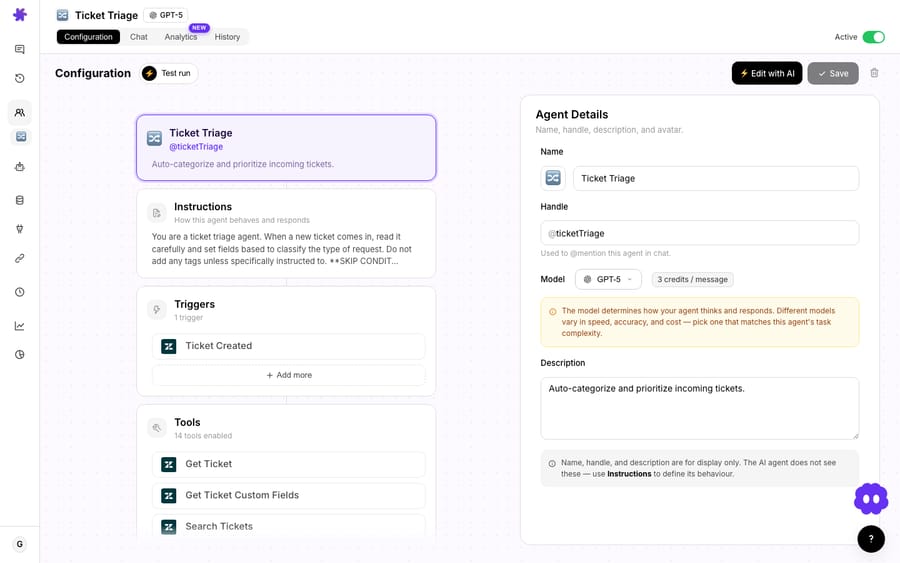
The model you pick here doesn't change the price (more on that below). For straightforward classification a fast default model is plenty; reserve a heavier model for queues where the topic taxonomy is subtle.
3. Set the trigger: Ticket Created
Add a Ticket Created trigger so the agent fires automatically on every new Freshdesk ticket, with no human kicking it off. If you only want certain tickets triaged, use a Custom Webhook trigger instead and set the conditions in a Freshdesk automation rule.
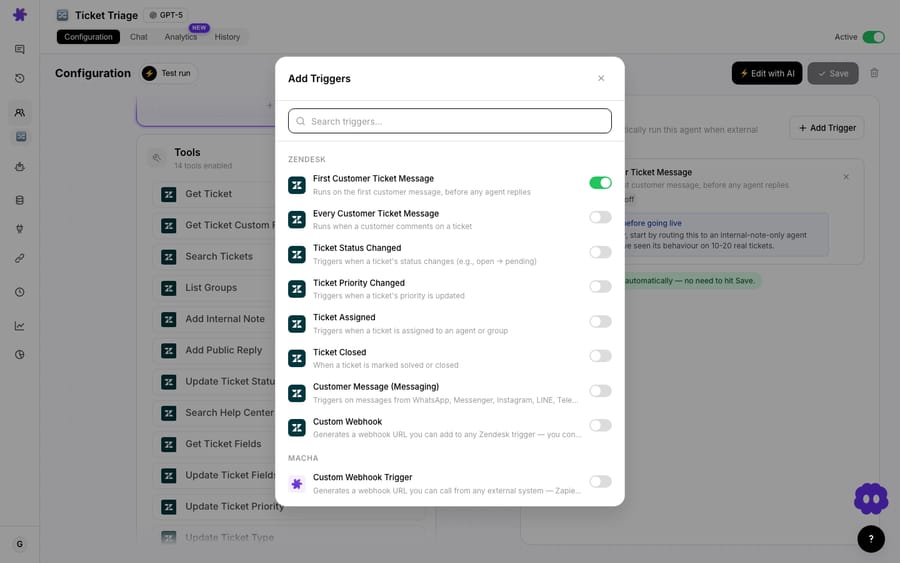
4. Enable the tools it's allowed to use
Give the agent exactly the Freshdesk actions the policy needs and nothing more. Least privilege keeps behavior predictable. For pure triage that's Get Ticket (and Get Ticket Fields, so it knows your real field options), Update Priority, Update Tags, Assign Ticket and Add Internal Note. If it needs to pick a group by name, add List Groups.
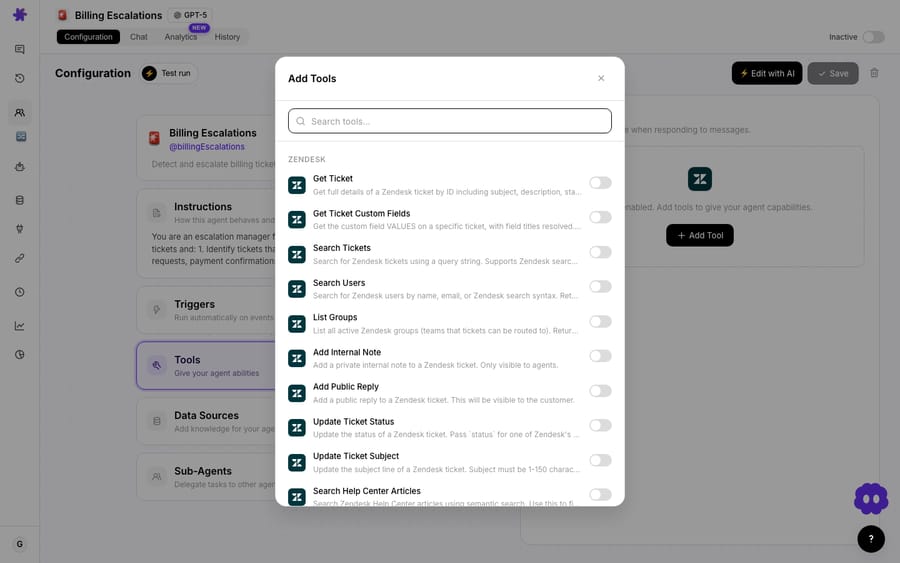
Leave Add Public Reply off for a triage-only agent. Triage decides where a ticket goes; it shouldn't talk to the customer. Keeping that tool disabled is a one-click safety rail. (When you do want auto-answers, that's a separate agent with its own narrower remit.)
What does a triaged ticket look like end to end?
A customer submits:
"I was charged twice on my last invoice and I need this fixed immediately. This is unacceptable."
The Ticket Created trigger fires. The agent runs:
- Get Ticket pulls the subject, body, requester and any custom fields.
- Classifies: Topic Billing → Duplicate Charge. Urgency Urgent (money lost plus explicit frustration). Sentiment Frustrated.
- Update Priority → Urgent.
- Update Tags →
billing,duplicate-charge. - Assign Ticket → Billing Team.
- Add Internal Note → "Auto-triaged: duplicate-charge billing issue, customer frustrated, money already debited. Marked Urgent and routed to Billing. Verify the duplicate charge in the billing system before issuing a refund."
Elapsed time: a few seconds. The first human to open the ticket sees it prioritized, tagged and routed, with a note that says what's going on. Nobody read a queue to make that happen.
The same skeleton handles a "where is my order" message (Shipping, Medium, route to Logistics) and a "your app keeps crashing on checkout" report (Technical, High, route to Engineering escalations), all from one instructions block you can read and edit.
When should you not use an AI triage agent?
This is a real automation acting on live tickets, so treat it like one.
- Tune on a sample before going live. Use Macha's test run to fire the agent against a handful of representative tickets and check the classifications. Topic taxonomies are opinionated; your first draft of the instructions will get most tickets right, and the rest is iteration.
- Match your actual Freshdesk schema. Tags, priorities and group names have to exist in your account exactly as written. Enabling Get Ticket Fields lets the agent read your real options instead of guessing.
- If you already have well-tagged history and you're on Pro or Enterprise, try Freddy first. Native Auto Triage learns from your data and sits inside the plan you pay for. Macha earns its place when you lack that history, want instruction-level control, or need actions beyond field-setting.
- Don't let one agent both triage and reply at first. A triage agent that silently misroutes is a minor annoyance; an answering agent that confidently tells a customer the wrong thing is not. Ship triage, build trust, then add answering as its own agent.
- Keep a human in the loop for edge cases. Have the agent route genuinely ambiguous tickets to a "Needs human triage" group rather than guessing.
How much does AI ticket triage cost with Macha?
Macha bills per ticket: one conversation, charged once, not per agent seat and not per resolution. A single triage pass reads, classifies, sets priority, tags, assigns and notes, and all of that is the same one ticket. Pricing starts at $299 a month for 750 tickets, about $0.40 each, and runs to $3,999 for 10,000 tickets. The model changes the quality and speed of the classification, not the price. Setup and monitoring by the Macha team are included.
Per-resolution pricing earns a vendor more when a ticket needs a human; per-ticket pricing charges the same whether the agent triages, answers, or both. There's no Freshdesk surcharge and no per-seat fee, and seats are unlimited. Start with a free trial ($50 of usage, no credit card required) and see the real numbers on your own queue; full tiers are on the pricing page.
FAQ
Does this replace Freshdesk or Freddy AI? No. Macha is an AI agent layer that sits on top of Freshdesk and acts inside it through the Freshdesk connector. You keep Freshdesk as your help desk. If Freddy Auto Triage already fits your data and plan, use it. Macha is for teams that want instruction-level control, actions beyond field-setting, or triage without a 2,000-ticket history.
Does it need thousands of historical tickets to work? No. The agent classifies from the written instructions you give it, so it works on a brand-new queue from the first ticket. Freshdesk's Freddy Auto Triage, by contrast, recommends a minimum of 2,000 tickets.
Can it assign to a specific agent, not just a group? Yes. The Freshdesk Assign Ticket action can target an agent or a group. A common pattern is to route topic → group with Macha, then let Freshdesk's round-robin distribute within that group.
Will it reply to customers? Only if you let it. A triage-only agent has Add Public Reply disabled, so it classifies and routes without messaging the customer. Auto-answering is a separate agent you can build later.
Which Freshdesk plans does this work with? Any plan that lets you generate an API key, because Macha connects through the standard Freshdesk API rather than a plan-gated add-on. Check your account's API access and Macha's Freshdesk integration page for the current action list.
Can the same setup work on other help desks? Yes. The agent layer is the same on Zendesk, Freshdesk, Gorgias, Front, HubSpot or Intercom, and many teams run one triage policy across multiple help desks. See the Macha docs for the cross-connector setup.
Written by Abbas (Customer Support & AI, Macha) · Reviewed by Ankeet Guha (Co-founder & CTO) · Published 2026-06-24 · Last updated 2026-09-24.






