





 Shopify
 Stripe
 Slack
Slack Notion
 Google Workspace
 Confluence

How Do You Integrate SMS with Gorgias? Attentive and Postscript Setup (2026)


Connecting Attentive or Postscript to Gorgias turns a shopper's inbound text into a ticket in the same queue as email and chat, and the agent's reply goes back out over the same number. Neither integration lets you start a text from Gorgias, and auto-reply Rules don't reach SMS customers.
Key takeaways
- Gorgias connects to Attentive from Settings, App Store, All Apps, while Postscript connects from the Postscript dashboard under Apps using the Gorgias Base API URL, username and OAuth.
- Connecting Attentive SMS Marketing to Gorgias creates two HTTP integrations, and each Attentive ticket shows the 10 most recent messages from the last 5 days.
- Postscript's Auto-Create Tickets option creates a Gorgias ticket for every shopper SMS reply, and a closed Postscript ticket reopens if the shopper replies within 24 hours.
- Neither Attentive nor Postscript lets an agent start an SMS conversation from Gorgias, because both integrations only create a ticket after the shopper texts first.
- Gorgias auto-reply Rules show in the thread but never reach customers on Attentive tickets, and they don't apply to Postscript tickets at all.

To integrate SMS with Gorgias, connect Attentive from Gorgias at Settings → App Store → All Apps, or connect Postscript from the Postscript dashboard under Apps → Gorgias with your Gorgias REST API URL, username and OAuth. Either way, a shopper's text becomes a Gorgias ticket and an agent's reply goes back out as SMS, but the shopper always has to text first (Gorgias docs, checked 24 September 2026).
What does "SMS as a Gorgias channel" actually mean?
Your SMS marketing tool keeps owning campaigns and opt-ins, and Gorgias becomes the place your team replies from. When a subscriber texts your number, the integration pushes that message into Gorgias as a ticket. An agent answers inside Gorgias as they would an email, and the reply is delivered back to the customer over SMS through the marketing platform's number.
Two things follow from that design. First, this is inbound-triggered: the customer has to text first. Neither Attentive nor Postscript lets you start an SMS conversation from the Gorgias helpdesk, so SMS here is a support reply channel, not an outreach one. Second, because the message arrives as a normal ticket, most of what Gorgias already does (tags, assignment Rules, macros, the customer sidebar with Shopify order data) applies to it. Auto-reply Rules are the exception, covered below. If you're still deciding whether Gorgias is the right desk for this at all, what is Gorgias covers the ecommerce-first fundamentals.
There's also a third route: Gorgias sells its own SMS add-on, a separate subscription that gives you a Gorgias phone number and SMS channel for sending and receiving texts in the helpdesk. SMS tickets there count against the add-on's own limit, not your regular ticket limit, and a reply after 3 days of inactivity creates a new billable ticket. This guide covers the marketing-platform route, which suits brands whose SMS list already lives in Attentive or Postscript.
Should you use the Attentive or the Postscript path?
You don't choose an "SMS integration" in the abstract. You connect the platform you already run campaigns on, and the two most common behave differently enough to matter.
| Attentive | Postscript | |
|---|---|---|
| Where you connect | Gorgias App Store → All Apps | Postscript dashboard → Apps → Gorgias |
| Auth method | Install in Attentive, enter Gorgias subdomain, authorize | Gorgias Base API URL + username, then OAuth |
| What appears in Gorgias | Two HTTP integrations | A Postscript app connection |
| Ticket channel | Created via the email channel, tagged Attentive | SMS tickets |
| Which texts become tickets | Every reply, or only confirmed ones with Support Confirmation | Every reply with Auto-Create Tickets on, or hand-picked |
| Inbound images | Not visible | Visible (receive only) |
| Auto-reply Rules | Fire but don't reach the customer | Not supported |
| Start SMS from Gorgias | No | No |
| In this trial's App Store | Present | Not surfaced |
The last row is worth being upfront about: in the Gorgias account we set this up in, the App Store surfaced Attentive but not Postscript. That's expected, since Postscript connects from its own dashboard and you review it in Gorgias afterward under Settings → App Store → All Apps → Postscript. Confirm both paths against your own accounts.
How do you connect Attentive SMS Marketing to Gorgias?
Attentive connects from inside Gorgias. Per the Gorgias Attentive SMS Marketing integration docs, the flow is:
- In Gorgias, go to Settings → App Store → All Apps and search for Attentive SMS Marketing.
- Open it and click Connect App. This is the connect screen shown below, not a live SMS thread yet.
- Log into your Attentive account and install Gorgias, enter your Gorgias subdomain, click Connect, then Authorize.
- In Attentive, go to Settings → Messages, enable the Autoresponder, and make sure your messages include your support keyword. Save.
- Check Settings → App Store → HTTP Integration → Manage in Gorgias: there should be two new Attentive integrations.
- Test: text your number, wait a few minutes for both systems to sync, and confirm a ticket appears in Gorgias.
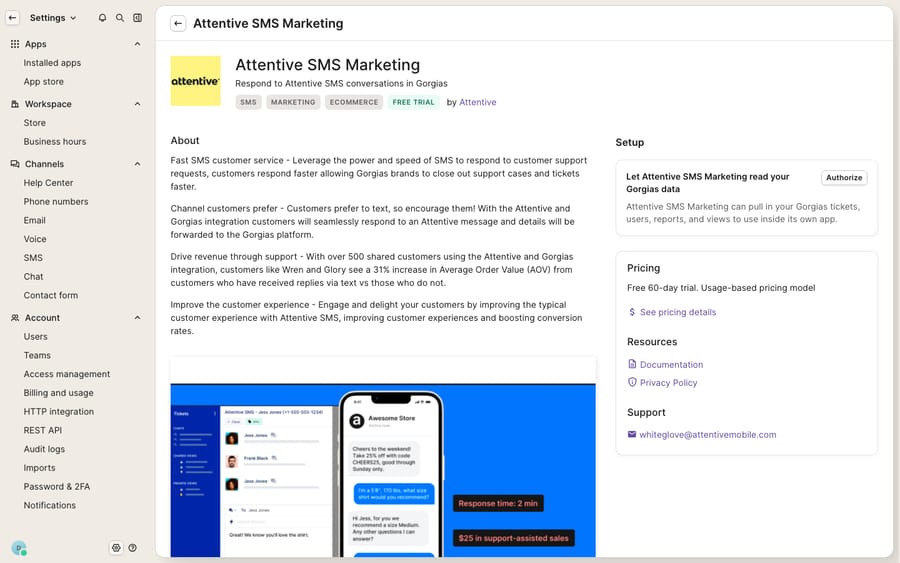
Once it's live, here's what lands in the ticket. Incoming SMS tickets are created via the email channel and stamped with the Attentive Tag, so you can build a separate View for them. Customer information merges into existing Gorgias contacts when the phone number matches, and the 10 most recent messages from the last 5 days display in the ticket's message history. Gorgias recommends turning on Support Confirmation, which asks the shopper to reply with a keyword before a text reaches your queue. With it on, closing a ticket ends the conversation, so the docs suggest snoozing Attentive tickets after each reply and closing only when the thread is done. Two more rules from the docs: don't merge Attentive tickets, and exclude the Attentive Tag from auto-reply Rules, because those replies show in Gorgias but never reach the customer.
How do you connect Postscript to Gorgias?
Postscript connects from its side, using your Gorgias REST API credentials. Per the Gorgias Postscript integration docs:
- In Gorgias, open Settings → You → REST API and copy your Base API URL and Username.
- In the Postscript dashboard, click Apps and select Gorgias (not the card labeled Gorgias (Legacy)).
- Paste the Base API URL (listed as Gorgias URL) and Gorgias Username, and optionally tick Auto-Create Tickets, which "automatically creates tickets in Gorgias for every SMS response you receive from your shoppers." Click Update.
- Under Authentication, add your account name (your Gorgias subdomain).
- Click OAuth, then Authorize.
- Switch the Enabled toggle to green.
Leave Auto-Create Tickets off if you'd rather hand-pick which replies become tickets from Postscript's responses screen. Shoppers can send images and GIFs, and those are visible in Gorgias, but only one way: you can't reply with an image. For merchants running multiple stores, Postscript supports multiple accounts in one Gorgias instance, and you can tell them apart with Rules that tag tickets by the subject line. Two quirks to plan for: a closed ticket reopens if the customer replies within 24 hours (after that, a new ticket is created), and replies sent directly from Postscript never show up in Gorgias.
What does SMS look like in a real ecommerce queue?
Texting becomes one more lane in your existing workflow. A shipping-confirmation SMS gets a "did this actually ship?" reply; it opens as a ticket with the customer's order already in the Shopify-powered sidebar, the agent checks the tracking, and answers. A subscription customer texts "skip my next box"; a return question comes in as "the shoes are too small." Because these route through Gorgias, they inherit your macros, your tagging and assignment Rules, and your SLA views, so nobody is watching a second inbox in the marketing tool. SMS also sits alongside the other channels in our roundup of the best Gorgias integrations.
What can't the native SMS integrations do?
The integrations are good at the one job they're built for: getting inbound texts into Gorgias and replies back out over the same number. The edges:
- No outbound start. You can't start an SMS from Gorgias on either path, so proactive "your order is delayed" texts stay in the marketing tool.
- One-way media. A shopper can send a photo of a damaged item on Postscript; you can't text one back, and Attentive tickets show no images at all.
- No auto-replies. Auto-reply Rules don't reach customers on Attentive tickets and don't apply to Postscript tickets, so the fast-lane automation you use on email doesn't carry over.
- Ticket quirks. Attentive tickets shouldn't be merged, closing one can end the conversation under Support Confirmation, and Postscript tickets reopen on a 24-hour window.
Can an AI agent answer SMS tickets in Gorgias?
The integrations move messages; they don't answer them. That's the seam an AI agent layer fills. The category of AI agents for customer service exists to do the reading and writing the pipe can't. Macha runs on top of the Gorgias you already use as a native connector, not as a replacement help desk. Once an SMS becomes a Gorgias ticket, Macha can read the thread, look up live order or subscription status through a custom tool that wraps your REST API, and draft or post a reply in the ticket. On Postscript, replies posted in the helpdesk go out over the same SMS number. On Attentive, test the round trip first: Gorgias doesn't fire the outbound webhook when Gorgias Bot is the sender, so confirm a reply posted by your integration user actually reaches the phone. The same pattern is in the Macha–Gorgias integration overview, and it means the WISMO text a shopper sends at 11pm can get a tracking-aware answer without an agent awake to write it.
The division of labor: let Attentive or Postscript own delivery and opt-ins, let Gorgias be the unified queue, and put an agent on top for resolving the message. Macha bills per ticket, not per resolution (see the pricing page), so an SMS answered, an order looked up and a tag applied are one conversation, charged once, at about $0.40 on the $299 plan for up to 750 tickets.
FAQ
Can I start an SMS conversation with a customer from Gorgias? Not through Attentive or Postscript. Both are inbound-initiated: the shopper must text your number first before a ticket exists. Campaigns still run from the marketing platform; Gorgias is where you reply from. For how an AI agent handles SMS opt-out and consent questions, see the Attentive AI support agent guide.
Where do I connect each SMS platform? Attentive connects from inside Gorgias at Settings → App Store → All Apps → Attentive SMS Marketing → Connect App. Postscript connects from the Postscript dashboard under Apps → Gorgias, using your Gorgias Base API URL and Username plus an OAuth authorization.
Does the customer's Shopify order show up on an SMS ticket? Yes. Because the SMS arrives as a normal Gorgias ticket, the customer sidebar shows order and account data like an email ticket, provided the phone number matches an existing customer. That's what makes WISMO texts fast to answer.
Can I send images back over SMS? Not through these integrations. Postscript shows inbound images and GIFs in Gorgias, but media is one-way, and Attentive tickets don't show images at all.
Can Macha answer SMS tickets automatically? Yes, once the SMS is a ticket in Gorgias. Macha's AI agents can read it, fetch live order or subscription status through a custom tool, and draft or post the reply inside Gorgias, without replacing your help desk or your SMS platform. Test the Attentive round trip before switching it on.
Ready to turn inbound texts into answered tickets instead of a second inbox to watch? Start a free trial of Macha and connect it to your Gorgias in minutes.






