Intercom
 Shopify
 Stripe
 Slack
Slack Notion
 Google Workspace
 Confluence

What Can an AI Support Agent Do in Attentive? 'Stop Texting Me', Opt-Outs and Privacy Requests (2026)


Attentive's REST API lets an AI support agent check whether a shopper can still receive texts or emails, unsubscribe them from one channel or all of them, and file a privacy deletion that Attentive completes within thirty days. All three calls authenticate with one private-app API key sent as a Bearer token. The unsubscribe endpoint is limited to 5 requests a second, against 150 for most of the API, a limit sized for one shopper at a time, from a ticket. Below are the endpoints, what the responses mean, the two identity traps that make an opt-out quietly miss, and what an agent should leave to a person.
Key takeaways
- Attentive's API lets an AI agent check SMS and email eligibility with GET /v1/subscriptions and opt a shopper out with POST /v1/subscriptions/unsubscribe, using a private-app key as a Bearer token.
- An Attentive unsubscribe call sent with no subscriptions listed removes the shopper from all subscriptions, while a phone number only reaches text subscriptions and an email only reaches email ones.
- In our 28 September 2026 test, the agent converted "(555) 555-0123" to +15555550123 before calling Attentive, got HTTP 401 with a dummy key, and never called the Write tool.
- Attentive's privacy deletion endpoint deletes a subscriber within thirty days and needs the Privacy Request permission set to Write on the custom app.
- Attentive's unsubscribe endpoint allows 5 requests per second, while most Attentive endpoints allow 150.

What can an AI agent do in Attentive through the API?
We checked Attentive's developer docs and the OpenAPI definitions embedded in them on 28 September 2026. These are the support jobs the public REST API documents, and who can do each one today.
| Support job | Endpoint | Read or write | Custom-app permission | Who can do it today |
|---|---|---|---|---|
| "Am I still signed up for texts?" | GET /v1/subscriptions?phone=+1... or ?email=... | Read | Subscribers | A human in Attentive; an AI agent with a custom API tool |
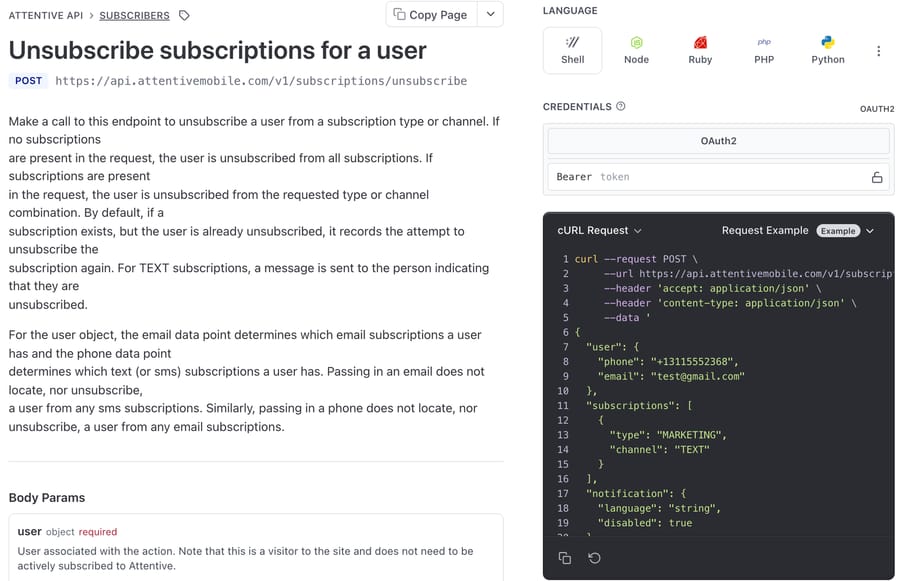
| "Stop texting me" / "unsubscribe me" | POST /v1/subscriptions/unsubscribe | Write | Subscribers: Write | A human in Attentive; Attentive itself for keyword replies; an AI agent with a Write tool |
| "Sign me back up" | POST /v1/subscriptions | Write | Subscribers: Write | A human; an agent, only with a sign-up source and legal disclosure (see below) |
| "Delete my data" | POST /v1/privacy/delete-request | Write | Privacy Request: Write | A human, ideally |
| Confirm a deletion finished | GET the delete request by its id | Read | Privacy Request | Same |
The lookup returns a list of subscriptionEligibilities: each is a subscription type (MARKETING, TRANSACTIONAL, CHECKOUT_ABANDONED or CONTACT) on a channel (TEXT or EMAIL) with an isEligible flag. So "am I still getting marketing texts?" has a yes-or-no answer per row, and the agent can see whether the shopper is off marketing but still eligible for order updates.
What do shoppers send about Attentive texts?
The tickets fall into a few shapes, and most of them arrive somewhere other than the Attentive inbox:
- "Stop texting me", sent by email or chat because the shopper doesn't want to reply to a marketing number, or already replied STOP and got a promotional text afterward.
- "Wrong number." A new owner of a recycled phone number is getting someone else's cart reminders.
- "I only want order updates." They want marketing off and shipping texts on.
- "Delete my information." A privacy request, sometimes quoting CCPA.
The first shape carries a deadline. The FCC's rule at 47 CFR 64.1200(a)(10) lets a consumer revoke consent to texts "in any reasonable manner" and requires the request to be honored within ten business days. The same rule allows one confirmation text afterward, presumed fine if it goes out within five minutes and carries no marketing. Attentive's unsubscribe endpoint sends that kind of confirmation text by default, as covered below. The email and SMS apps hub covers how the other marketing apps handle the same request.
How does an Attentive opt-out work from a ticket?
The lookup chain is short:
- Take the phone number from the ticket or the shopper's profile in the help desk, and convert it to E.164 (
+13115552368). Attentive's docs reject19148440001and anything with spaces or dashes. - Call
GET /v1/subscriptions?phone=...to see what they're eligible for. If the shopper wrote from an email address and mentions texts, you need the phone number too, for the reason below. - Call
POST /v1/subscriptions/unsubscribewith the user and, usually, the specific subscription to drop:
{"user":{"phone":"+13115552368"},"subscriptions":[{"type":"MARKETING","channel":"TEXT"}]}- Read the response. Each subscription comes back as
NEWLY_UNSUBSCRIBEDorPREVIOUSLY_UNSUBSCRIBED, and the call returns 202 because the change is applied asynchronously.
That PREVIOUSLY_UNSUBSCRIBED status is the useful one for support. A shopper who says "I replied STOP and you're still texting me" and comes back PREVIOUSLY_UNSUBSCRIBED on marketing texts is probably getting transactional messages, or texts to a second number. The agent can say which, instead of repeating an unsubscribe that already happened.
A synthetic example: a shopper emails "please stop the texts, I get three a day." The lookup on their phone shows MARKETING on TEXT eligible, TRANSACTIONAL on TEXT eligible, and MARKETING on EMAIL eligible. They asked about texts, so the agent unsubscribes MARKETING on TEXT, keeps shipping updates, leaves email alone, and says exactly that in the reply, with an offer to stop order texts and emails as well.
Which Attentive calls go wrong in production?
Phone and email are separate identities. The unsubscribe reference says passing an email "does not locate, nor unsubscribe, a user from any sms subscriptions", and a phone doesn't reach email subscriptions either. A shopper who emails "stop texting me" from their email address can't be opted out of texts using that address alone. The agent needs their phone number, from the help desk profile, the order, or by asking.
An empty subscription list means everything. If the request has no subscriptions array, Attentive unsubscribes the user "from all subscriptions". For "stop everything" that's right. For "stop the marketing texts", it also switches off order updates and email, which is how an agent turns one request into three complaints.
The API sends its own confirmation text. For TEXT unsubscribes, Attentive "sends a message to the person indicating that they are unsubscribed", unless the request sets notification.disabled to true. Leave it on. It's the confirmation text the FCC rule allows, and a shopper who asked by email gets proof on the channel they were complaining about. Only en-US and fr-CA are supported for the notification language.
Re-subscribing is a compliance act, not a support favor. The subscribe endpoint requires a legal disclosure when someone is opted in programmatically, plus either a sign-up source id or a locale and subscription type that match exactly one API sign-up unit. It also re-sends an "already subscribed" text if a TEXT subscription exists. That's a flow for a sign-up form, and the table above marks it for a human.
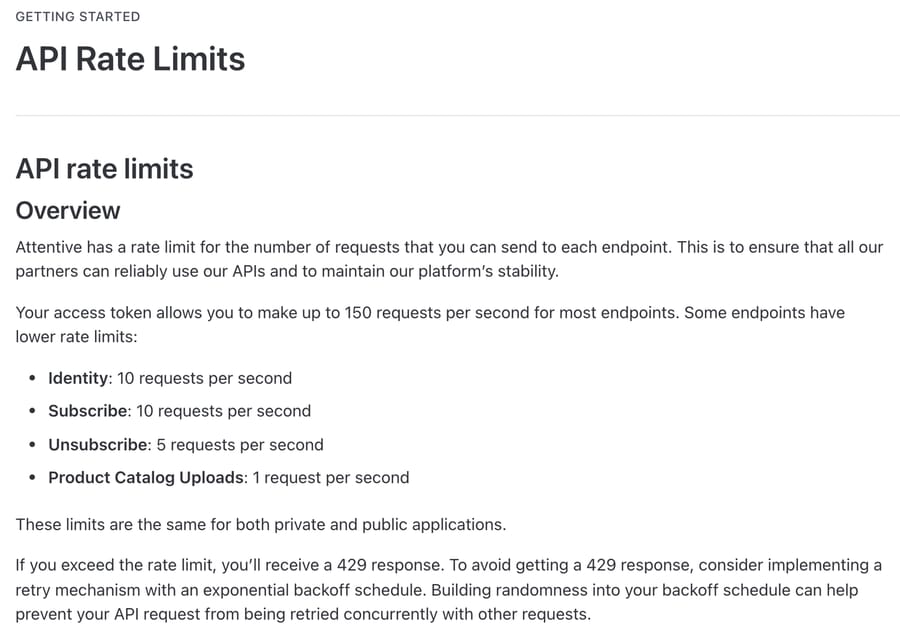
Rate limits. Unsubscribe is capped at 5 requests a second, subscribe and identity calls at 10, and most other endpoints at 150. A ticket-by-ticket agent will never notice. A bulk cleanup run through the same key will get 429s, and Attentive's docs recommend exponential backoff with some randomness.
What does Attentive or the help desk already handle?
Replies of STOP and the other standard keywords go to Attentive's own number, and the FCC treats those words as revocation by definition. The gaps are opt-outs that arrive anywhere else: email, chat, a contact form, a phone call logged as a ticket.
Attentive also sells its own conversational layer. Attentive Concierge answers shoppers' SMS replies with "live agents and conversational AI working together." Its page doesn't say it changes consent for an opt-out that arrives by email or chat, so those still need the API.
On the help-desk side, Attentive is a preferred partner on Gorgias's integration page. Per Gorgias's docs, inbound Attentive texts become Gorgias tickets, agents reply by SMS from Gorgias, and the ticket shows the 10 most recent messages from the last 5 days. That puts the conversation in front of an agent; the integration docs don't describe changing a subscriber's consent from the ticket. Our Attentive and Postscript with Gorgias setup guide walks through it.
Attentive also runs an MCP server, in beta (its docs were last updated 13 August 2026), that lets a marketer's own AI assistant work with Attentive. Its capability list has 74 tools for reporting, campaigns, journeys, segments and templates, and no unsubscribe or privacy tool. That fits the incentive of a marketing platform whose customers are marketers: the tools it builds for their AI clients are for sending and targeting, and removing people stays in the REST API. Support-side opt-outs are left to whoever connects that API.
Which Attentive actions should need a person?
- The agent can do it: unsubscribing the channel and type the shopper asked about, on a phone number or email that matches the ticket. It's the compliance-sensitive job with a 10-business-day clock, and it's reversible only through a real sign-up, so the agent should be exact about scope.
- Agent with a check: "stop everything" requests, where the empty-array call is correct but removes order updates too. Have the agent say so in the reply.
- A person: privacy deletions (they're irreversible, and a shopper who writes "delete me" often only means "stop messaging me"), re-subscriptions, and "wrong number" cases where the person writing isn't the subscriber on file.
How is it set up with Macha?
Attentive isn't a built-in Macha connector. It connects through a custom API tool that Macha's team sets up during onboarding, and custom tools are included on every plan.
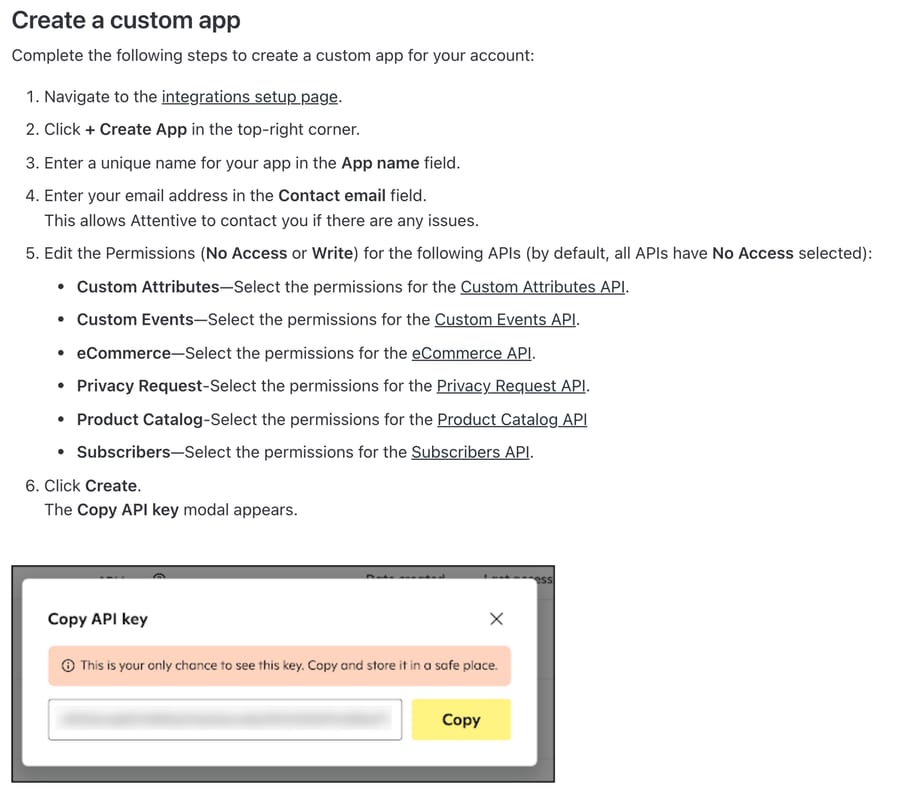
- A custom app in Attentive (Integrations, Create App). Set Subscribers to Write and leave everything else at No Access, unless you want the agent to file privacy requests too. The key appears once, in a Copy API key modal; regenerating it later breaks anything using the old one.
- Bearer auth on every tool:
Authorization: Bearer <key>, base URLhttps://api.attentivemobile.com/v1. Test it againstGET /v1/me, which Attentive provides for exactly this. Macha stores the credential encrypted and never shows it to the model. - Read tool first: "Attentive: Check subscriptions" on
GET /v1/subscriptions, with phone and email as optional parameters. - One Write tool per scope: "Attentive: Stop marketing texts" (a fixed body with
MARKETINGandTEXT, and the phone as its only parameter), "Attentive: Stop marketing email" (MARKETINGandEMAIL), and, only if you want it, "Attentive: unsubscribe from everything" (no subscriptions array). Separate tools mean the model picks a scope by name instead of composing a body. Mark each one Write. Don't count on a confirmation prompt to catch a wrong call: in our 28 September chat tests, a custom Write tool on Macha Demo ran with no confirmation card (built-in Zendesk writes did show one), and on triggered runs Write tools run directly when the instructions say to. The safety has to live in the instructions, which say which tool fits which request and when to stop. - Test each tool with the Test button against a test number before assigning it. The custom API tools guide covers parameters and body templates.
An instruction block for the agent, written for acting. It's the one we ran in the test below:
When a customer asks to stop texts or marketing messages:
1. Find their phone number (ticket, help desk profile, or latest Shopify order). Convert it to +1XXXXXXXXXX. If there is no phone number and they asked about texts, ask for it and stop.
2. Run "Attentive: Check subscriptions" with the phone (and the email, if they mention emails).
3. Unsubscribe only what they asked for: "stop texting" = "Attentive: Stop marketing texts". Use "unsubscribe from everything" only if they say everything, all messages, or order updates too.
4. If the result says PREVIOUSLY_UNSUBSCRIBED, tell them they were already off marketing texts and that remaining texts are order updates; offer to stop those too.
5. If an Attentive tool returns an error, don't say the texts will stop. Tell them a teammate will confirm today, and hand off to a human with the error attached.
6. Reply with exactly which messages will stop. Tag the ticket "sms-opt-out".
Hand off to a human for: data deletion requests, "wrong number" messages, or any request to sign back up.
Our test run: a "stop texting me" email on Macha Demo
On 28 September 2026 we set this up on Macha Demo, our own workspace, using a fake Attentive key, to watch an agent work through a text opt-out before recommending the pattern. No real Attentive account or shopper was involved.
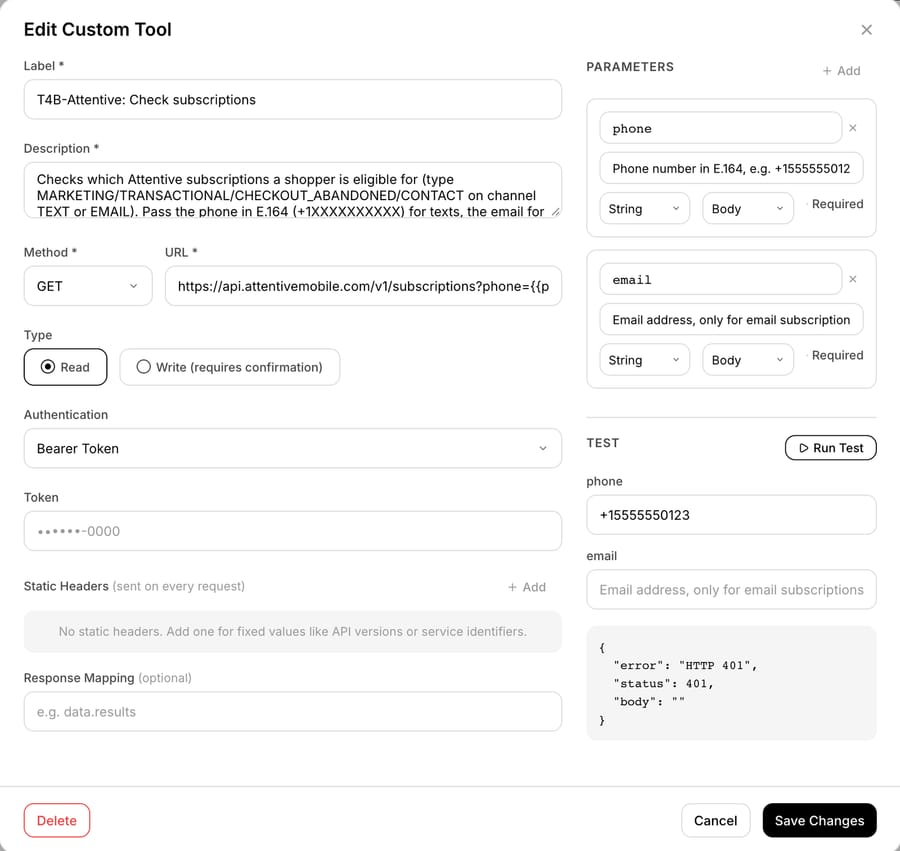
The tools. "T4B-Attentive: Check subscriptions" is a GET on https://api.attentivemobile.com/v1/subscriptions with Bearer Token auth and two optional parameters, phone and email. It needs no static headers, which makes it simpler than the Klaviyo tool, where every call also carries a pinned revision header. "T4B-Attentive: Stop marketing texts" is the unsubscribe POST with the fixed MARKETING and TEXT body from step 4, marked Write. Pressing Test on the lookup with +15555550123 returned {"error": "HTTP 401", "status": 401, "body": ""}. With a fake key that's the answer we wanted: Attentive's server received the request and rejected the key. It proves the request shape gets there, and nothing more. A 401 also can't show whether the phone number arrived in the query string, so a real key needs the same Test before the tool goes to an agent.
The agent. "T4B-Attentive opt-out helper" runs the instruction block above on GPT-5.4 with five tools: the two Attentive tools plus the built-in Shopify connector's Get Order, Search Orders and Lookup Customer, pointed at our test store. It's inactive and has no trigger. In the agent's Try it chat we sent a made-up message from "Daniel Okafor": promo texts three times a day this week, please stop texting, keep the shipping updates for order #T4B-1042, number (555) 555-0123.
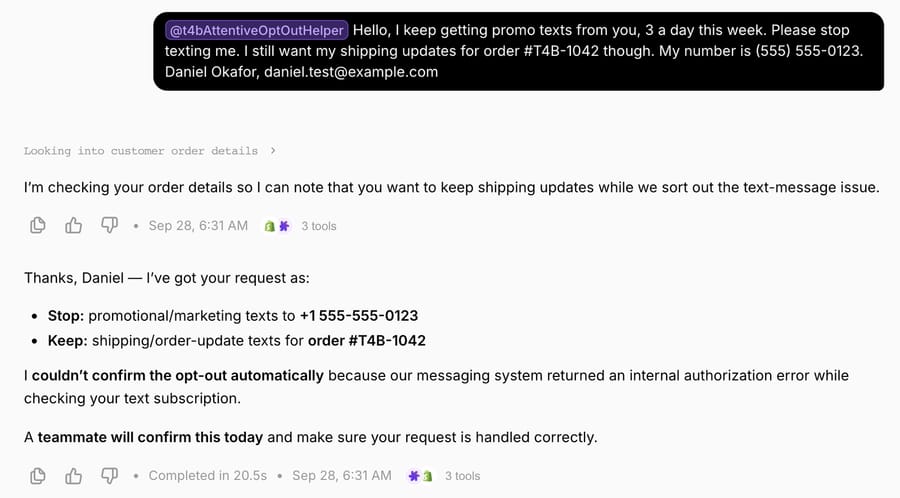
The conversation record shows six tool calls over two rounds:
| Round | Tool call and input | Result |
|---|---|---|
| 1 | Shopify Get Order, T4B-1042 | Order not found (the order number is made up) |
| 1 | Shopify Lookup Customer, [email protected] | No customer found |
| 1 | T4B-Attentive: Check subscriptions, phone: +15555550123, email: [email protected] | HTTP 401 |
| 2 | Shopify Get Order, 1042 | Order not found |
| 2 | Shopify Lookup Customer, Daniel Okafor, then (555) 555-0123 | No customer found, twice |
| n/a | T4B-Attentive: Stop marketing texts | Never called |
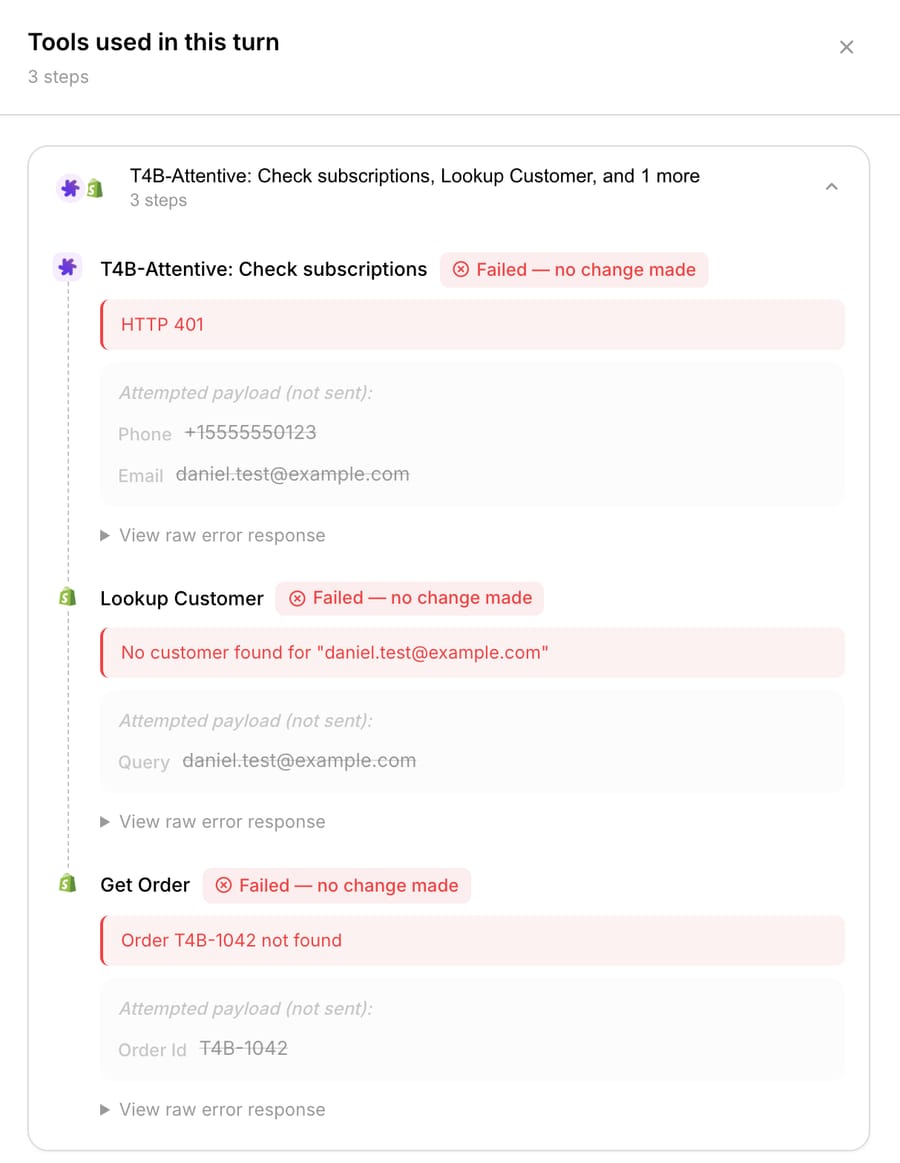
What the run showed:
- The phone format was right. The shopper wrote "(555) 555-0123" and the agent sent +15555550123 to Attentive, the E.164 form the docs require, because step 1 says to convert it. In round 2 it passed the raw "(555) 555-0123" to Shopify's customer search, so the conversion happens per tool, only where the instructions ask for it.
- The error rule held. The lookup failed, so the agent never reached the Write tool and never told Daniel his texts would stop. Its reply listed what he'd asked to stop and keep, said it couldn't confirm the opt-out, and promised a teammate today, which is step 5 almost word for word.
- The extra round bought nothing. The agent spent a second round of Shopify searches trying to find order #T4B-1042 so it could "note" that shipping texts should stay on. Attentive's
TRANSACTIONALeligibility belongs to the phone number, not an order, and the Stop marketing texts tool leaves it on by design, so the order didn't matter to the opt-out. The run took 20.5 seconds. - It said too much about the failure. "Our messaging system returned an internal authorization error" is a detail the shopper can't act on.
- The promised handoff had no tool behind it. This test agent had no Zendesk tools, so nothing tagged or assigned the ticket for the teammate it promised. The Klaviyo test showed the same gap. On a live ticket, give the agent Zendesk's tag and internal-note tools so step 5's handoff actually happens.
It also sent the email to the Attentive lookup, although step 2 says to add the email only when the shopper mentions emails. Daniel's email was in his signature. On a read that costs nothing, and the Write tool takes only a phone number, so it can't widen the unsubscribe. From this run we'd add two lines to the instruction block, not yet re-tested: "If the message includes a phone number, use it and skip the Shopify lookup," and "When a tool fails, don't describe the error to the customer."
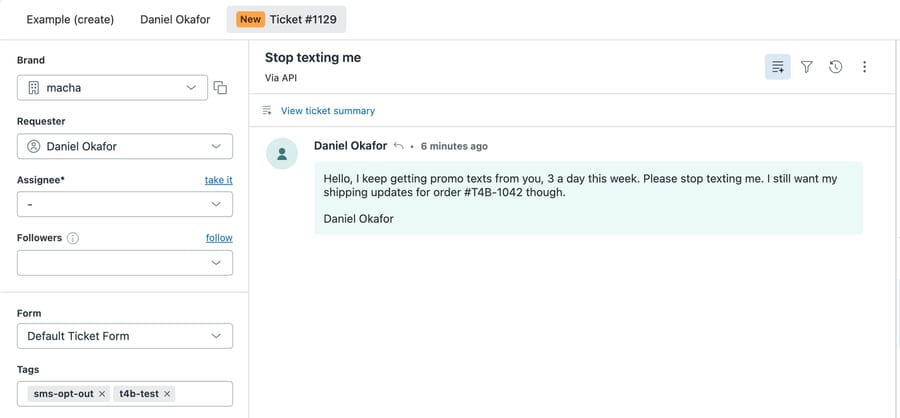
Daniel's message also exists as ticket #1129 in our Zendesk sandbox, so you can see the request as a support team would. The sandbox can't trigger production agents, which is why the run above happened in chat. Our API call that created it set both tags, sms-opt-out and t4b-test; the agent didn't touch it.
Where Macha fits
Macha fits teams already running Zendesk, Freshdesk, Gorgias, Front, HubSpot or Intercom who send SMS through Attentive and want "stop texting me" handled the hour it arrives in the help desk, whatever channel it came in on. Macha's team builds the Attentive tools during onboarding, alongside the built-in Shopify connector for the order questions that make up most of the queue; the Shopify apps hub maps the rest. Pricing is per ticket, from $299/month for 750 tickets, with setup and monitoring by the Macha team, included on every plan, so a store answering 750 tickets a month pays the same whether 20 are opt-outs or 200. If your email runs on Klaviyo, the Klaviyo page covers its consent, suppression and revision-header details.
Frequently asked questions
How do I authenticate with the Attentive API? Create a custom app in Attentive, choose No Access or Write for each API, and copy the key when it's shown. Private apps send that key as a Bearer token. Public apps distributed to other Attentive accounts use OAuth 2.0 instead.
Can the Attentive API unsubscribe someone from texts using their email address? No. Attentive's docs say an email only locates email subscriptions and a phone number only locates text subscriptions. To stop texts, the call needs the phone number in E.164 format.
Does Attentive send a message when someone is unsubscribed through the API? Yes, for TEXT subscriptions Attentive sends a confirmation text by default. Setting notification.disabled to true suppresses it, and notification.language supports en-US and fr-CA.
How long does an Attentive privacy deletion take? Attentive says a successful call to POST /v1/privacy/delete-request deletes the subscriber within thirty days. Its GET endpoint, called with the returned id, confirms completion.
What is the Attentive API rate limit? 150 requests per second for most endpoints, 10 for subscribe and identity calls, 5 for unsubscribe and 1 for product catalog uploads. Exceeding it returns a 429 with x-ratelimit-remaining and x-ratelimit-limit headers.
Is Attentive a built-in Macha connector? No. It connects through a custom API tool that Macha's team sets up during onboarding, using a private-app key as a Bearer token. To try Macha on your own tickets, start a trial with $50 of free usage (about 125 tickets), no credit card, no time limit.
How we researched this
We read Attentive's developer docs on 28 September 2026: Authentication, Create and Manage Custom Apps, API Rate Limits, Get subscription eligibility, Unsubscribe subscriptions, Subscribe user, Add a deletion request and the MCP capabilities page, including the OpenAPI definitions embedded in each reference page. The Gorgias details are from Gorgias's Attentive integration docs and its Attentive partner page. The FCC rule text is from 47 CFR 64.1200 on eCFR. The Shopify App Store listing showed 4.7 stars from 111 reviews on 28 September 2026 (a low count for a platform whose API and partner listings suggest a larger merchant base). Macha's custom-tool behavior is from the custom tools docs, the Macha team and our own tests. On 28 September 2026 we built the two custom tools and the test agent on Macha Demo with a dummy key: the Test button and the chat run both got HTTP 401 from Attentive's live API, so no real Attentive lookup or unsubscribe ran, and the response statuses and confirmation-text behavior above are as documented, not observed. The Shopify calls ran against Macha's test store, which has no order #T4B-1042. The chat run happened in the agent's Try it chat, and ticket #1129 was created separately on our Zendesk sandbox, whose webhooks don't reach the production agent. Daniel Okafor, his number and his order are made up, and so are the other shopper examples.
If "stop texting me" emails sit in your queue for a day before someone opens Attentive, start a trial with $50 of free usage (about 125 tickets), no credit card, no time limit and ask the Macha team to build the Attentive tools during onboarding. Tiers are on the pricing page.
Resolve tickets automatically with AI agents
Macha's AI agents work on top of the help desk you already use — no code.