Intercom
 Shopify
 Stripe
 Slack
Slack Notion
 Google Workspace
 Confluence

What Can an AI Support Agent Do in Klaviyo? Unsubscribes, Suppressions and Consent Checks via the API (2026)


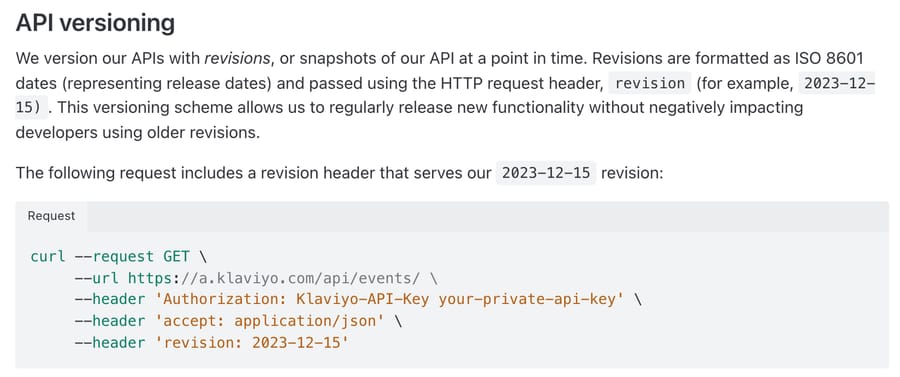
Klaviyo's API, at revision 2026-07-15, lets an AI support agent find a shopper's profile by email or phone, read their email and SMS consent, and then run six documented support writes: unsubscribe, subscribe, suppress, unsuppress, remove from a list and request deletion. Every call carries a private key in an Authorization: Klaviyo-API-Key header plus a revision header naming the API version. Klaviyo reported more than 205,000 customers in August 2026, so "stop emailing me" lands in a lot of support queues that run on some other help desk. Below are the endpoints, the scopes the key needs, three ways an unsubscribe call goes wrong, and which jobs an agent should finish without a person.
Key takeaways
- Klaviyo's API lets an AI agent read a profile's email and SMS consent with Get Profiles and change it through bulk jobs that accept up to 100 profiles per call.
- A Klaviyo unsubscribe call sent without a list ID unsubscribes the profile globally, and Klaviyo's docs warn to check list membership before calling the endpoint.
- Klaviyo suppression applies to email only, and the Unsuppress endpoint lifts only manual USER_SUPPRESSED suppressions, never hard bounces or unsubscribes.
- Klaviyo retires each API revision 2 years after release, so a custom tool pinned to revision 2026-07-15 needs updating before mid-2028.
- Macha reaches Klaviyo through a custom API tool that Macha's team sets up during onboarding; our test build was configured with the key plus a fixed revision header, and Klaviyo refused its dummy key with a 401.

What can an AI agent do in Klaviyo through the API?
We read Klaviyo's API reference and its published OpenAPI spec on 28 September 2026. These are the calls a support agent needs, with who can do each one today.
| Support job | Endpoint | Read or write | Key scopes | Who can do it today |
|---|---|---|---|---|
| "Am I subscribed?" / "Why am I getting these?" | GET /api/profiles?filter=equals(email,"...")&additional-fields[profile]=subscriptions | Read | profiles:read | A human in Klaviyo; an AI agent with a custom API tool |
| Which emails went to this person | GET /api/events filtered to the profile | Read | events:read | Same |
| Unsubscribe from email, SMS or both | POST /api/profile-subscription-bulk-delete-jobs | Write | lists:write, profiles:write, subscriptions:write | A human in Klaviyo; Klaviyo itself for SMS keywords; an AI agent with a Write tool |
| Stop marketing email regardless of consent | POST /api/profile-suppression-bulk-create-jobs | Write | profiles:write, subscriptions:write | Same |
| Lift a manual suppression | POST /api/profile-suppression-bulk-delete-jobs | Write | subscriptions:write | Same, but see the limits below |
| Take them off one list only | DELETE /api/lists/{id}/relationships/profiles | Write | lists:write, profiles:write | Same |
| Re-subscribe on request | POST /api/profile-subscription-bulk-create-jobs | Write | lists:write, profiles:write, subscriptions:write | Same, double opt-in may apply |
| "Delete my data" | POST /api/data-privacy-deletion-jobs | Write | data-privacy:write | A human, ideally |
All the subscription and suppression writes are asynchronous: Klaviyo returns 202, queues a job and applies it shortly after. The consent guide says so directly, so a lookup a second after the write can still show the old status. The rate limits are generous for support work: 75 requests a second burst and 750 a minute steady on Get Profiles and the bulk jobs, and 350 a second on Get Events. The exceptions are Remove Profiles from List at 10 a second and profile deletion at 3 a second, 60 a minute.
What do customers ask about Klaviyo emails and texts?
Four shapes of ticket cover most of it, and all of them arrive in the help desk, not in Klaviyo:
- "Unsubscribe me" or "stop texting me", often from someone who already clicked the footer link and still got a flow email the next morning.
- "Why am I still getting emails?" The honest answers differ: the unsubscribe hasn't processed yet, they're on a second address, the message was transactional, or they unsubscribed from one list rather than globally.
- "I never signed up." Checkout collects an email, which Klaviyo treats as implied consent with the status
NEVER_SUBSCRIBED. Klaviyo's consent guide says those profiles can still receive email and recommends emailing only profiles with express consent. Implied consent doesn't apply to SMS at all. - "Put me back on the list" after a mistaken unsubscribe, usually to get a discount code.
The first one carries legal weight for texts. Under the FCC's rule at 47 CFR 64.1200(a)(10), a consumer can revoke consent to marketing texts "in any reasonable manner", and the request must be honored within 10 business days. An email to your support address saying "stop texting me" is a reasonable manner. Klaviyo's own help center tells merchants the same thing from the other side: if you use exact-match keywords, "make sure your support team reviews your conversations regularly" and removes SMS consent by hand when someone means to opt out. The email and SMS apps hub compares how the other email and SMS apps handle that job.
How does the lookup work, from ticket to profile?
The chain is short, and every link is documented:
- The ticket gives the agent an email address or a phone number. Klaviyo needs phones in E.164 format (
+15005550006), so the agent normalizes "(555) 000-5006" first. GET /api/profileswithfilter=equals(email,"[email protected]")orequals(phone_number,"+1..."), plusadditional-fields[profile]=subscriptions, returns the profile and asubscriptionsobject.- That object answers the ticket. For email it carries
can_receive_email_marketing,consent(SUBSCRIBED,UNSUBSCRIBEDorNEVER_SUBSCRIBED), the consent timestamp, themethodit came from, and asuppressionarray with a reason. For SMS it carriescan_receive_sms_marketing, the consent status and timestamp, and a separate transactional flag. - If the ticket is "why am I still getting emails",
GET /api/eventsfiltered to that profile's id returns what Klaviyo sent and when, 200 events a page by default and up to 1,000 withpage[size].
Here's a synthetic example of what the agent gets back and what it means. A shopper writes in: "I unsubscribed last week, why did I get your Black Friday email today?" The lookup shows email consent: SUBSCRIBED with a consent timestamp from a pop-up form yesterday. They signed up again for the discount, and the agent can say so and offer to unsubscribe them for good. A second shopper's profile shows consent: UNSUBSCRIBED from last Tuesday, but the email that arrived was an order confirmation. Transactional mail isn't marketing, and the reply should explain that rather than promise it will stop.
Which Klaviyo writes can go wrong, and how?
Klaviyo documents three traps in these endpoints.
An unsubscribe without a list is global. The Bulk Unsubscribe endpoint takes an optional list relationship. With a list, it unsubscribes the profile and removes it from that list. Without one, Klaviyo's reference says profiles "will be globally unsubscribed", and the page carries a warning to verify list membership first. For a support request that's usually what the shopper wants, but "take me off the VIP texts, keep the newsletter" needs the list-scoped call or Remove Profiles from List, which changes membership and leaves consent alone.
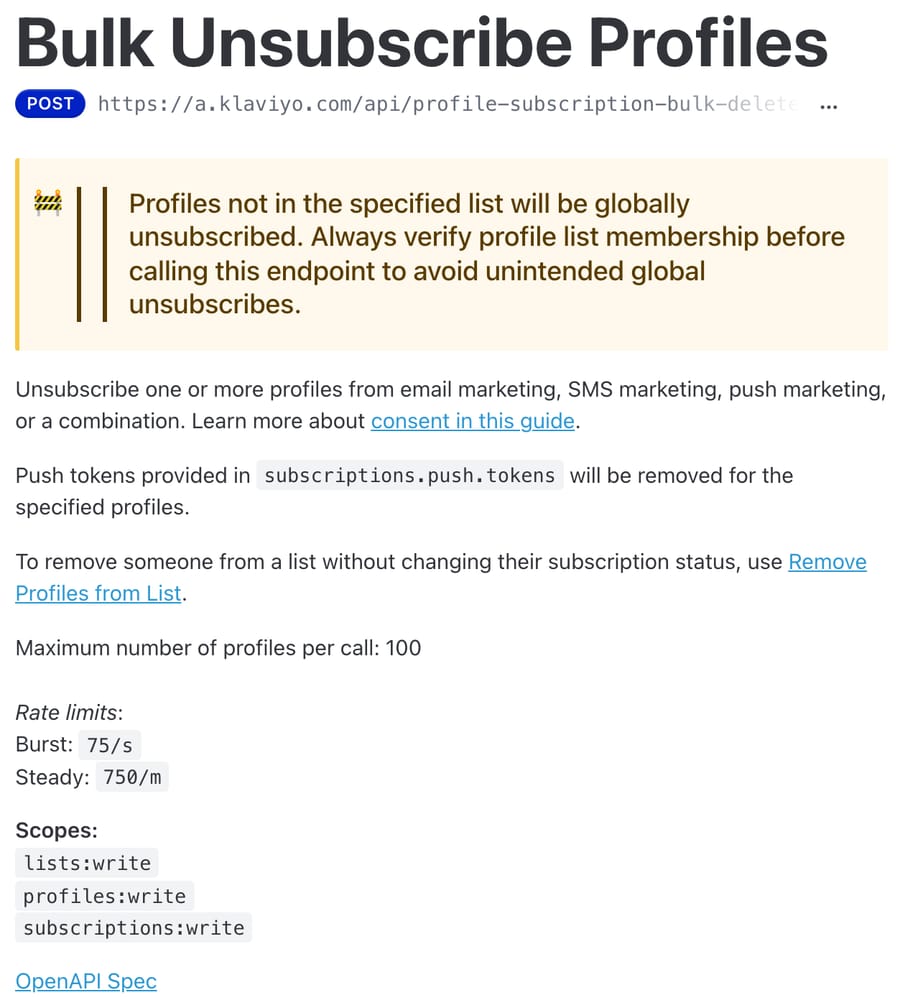
Unknown identifiers create profiles. The OpenAPI description of the unsubscribe job says that if no profile matches the email or phone, "a new profile will be created and then unsubscribed". Suppression does the same. So an agent that unsubscribes a typo creates a stray profile. The fix is procedural: look the profile up first, and only write against an address that exists.
Suppression isn't unsubscription. Suppression is Klaviyo's "never email this address" switch, and it works "independent of their consent status". It applies to email only; Klaviyo's consent guide says suppression status "does not yet exist for SMS". Undoing it is narrower still: the Unsuppress endpoint lifts only manual suppressions with the reason USER_SUPPRESSED. Hard bounces, invalid emails and unsubscribes stay in place. An agent asked to "fix my account so I get emails again" can't clear a hard bounce, and shouldn't say it can.
Re-subscribing has its own catch. If the list or the account default is double opt-in, the subscribe call triggers a confirmation message and the profile stays unconsented until the shopper confirms. Klaviyo's guide calls this out for API calls that "are being accepted, but the consent status of a profile isn't changing".
What does Klaviyo already handle without an agent?
A lot of opt-outs never reach a ticket, because Klaviyo processes SMS compliance keywords itself. STOP, QUIT, END and CANCEL remove SMS consent, and after the FCC's April 2025 change Klaviyo added REVOKE and OPT OUT and turned on an unsubscribe detection feature by default for US numbers that catches phrasing like "remove me".
The default keyword mode is "Contains word", which opts someone out if a keyword appears anywhere in the text. Klaviyo's own example is a customer texting "I want to cancel my order", which removes their SMS consent. Brands that switch to "Exact match" to avoid that are told to have support review conversations and remove consent by hand.
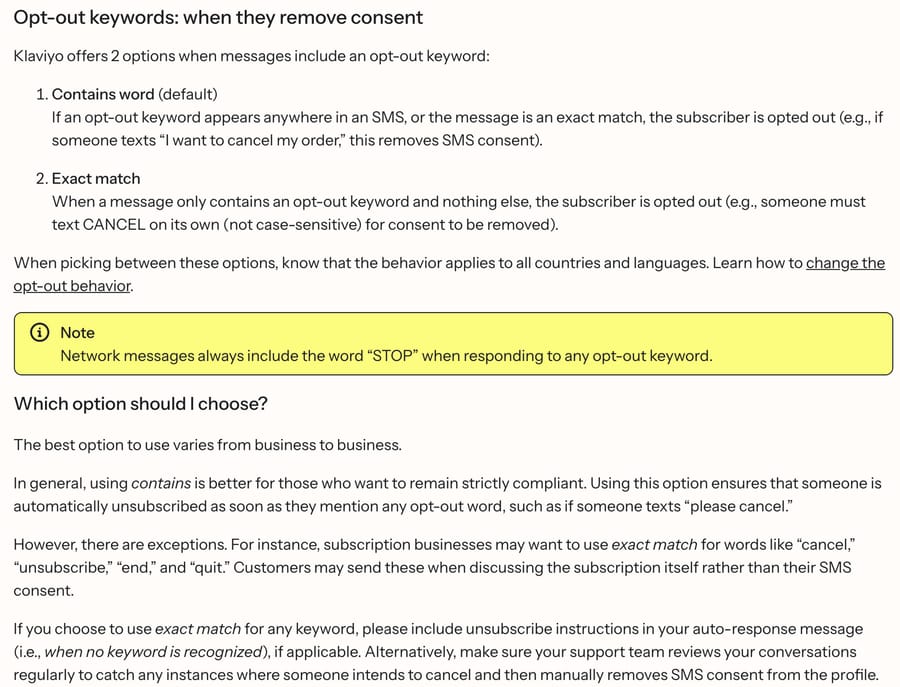
The default shows where Klaviyo's incentive sits. "Contains word" costs a merchant some subscribers who only wanted to cancel an order, and Klaviyo still made it the default, because a missed opt-out is the merchant's legal exposure and a lost subscriber is only list size. Klaviyo's help center also notes that unsubscribed profiles "do not contribute towards billing plans", so the conservative default shrinks what Klaviyo can bill as well. A merchant asking why their SMS list keeps shrinking should check the keyword mode first.
The help-desk integrations cover the plumbing. The Klaviyo integration for Zendesk syncs ticket events into Klaviyo and turns replies to campaigns into tickets; the Gorgias integration brings Klaviyo SMS, WhatsApp and low-star reviews into Gorgias and shows profile data on the ticket. Neither lets an AI agent change consent mid-conversation. A team whose support runs in another help desk is where an API-connected agent adds something.
Which Klaviyo actions should need a person?
Reads can run freely. For writes, a sensible line:
- Let the agent do it: email or SMS unsubscribes the shopper asked for in writing, from the address or number on the ticket. That's the compliance-sensitive job, and doing it the same hour beats a 10-business-day clock.
- Agent with a check: list-scoped unsubscribes and re-subscribes, where the wrong call either over- or under-reaches. Have the agent state which list and which channel before it runs.
- A person: profile deletion (it's irreversible and removes the consent history you may need to show later), suppressing someone who didn't ask, and anything where the ticket's email doesn't match the profile the shopper describes.
How is it set up with Macha?
Klaviyo isn't one of Macha's built-in connectors. It connects through a custom API tool that Macha's team sets up during onboarding, and custom tools are included on every plan. The setup we'd build, in order:
- A scoped private key. In Klaviyo, Settings, API keys, create a Custom Key with only the scopes the tools need:
profiles:read,events:read,lists:write,profiles:write,subscriptions:write. Klaviyo's authentication guide notes you can't add a scope to an existing key or view the key again after creating it, so decide the scopes first. Managing keys needs an Owner, Admin or Manager role. - The key plus fixed headers on every tool:
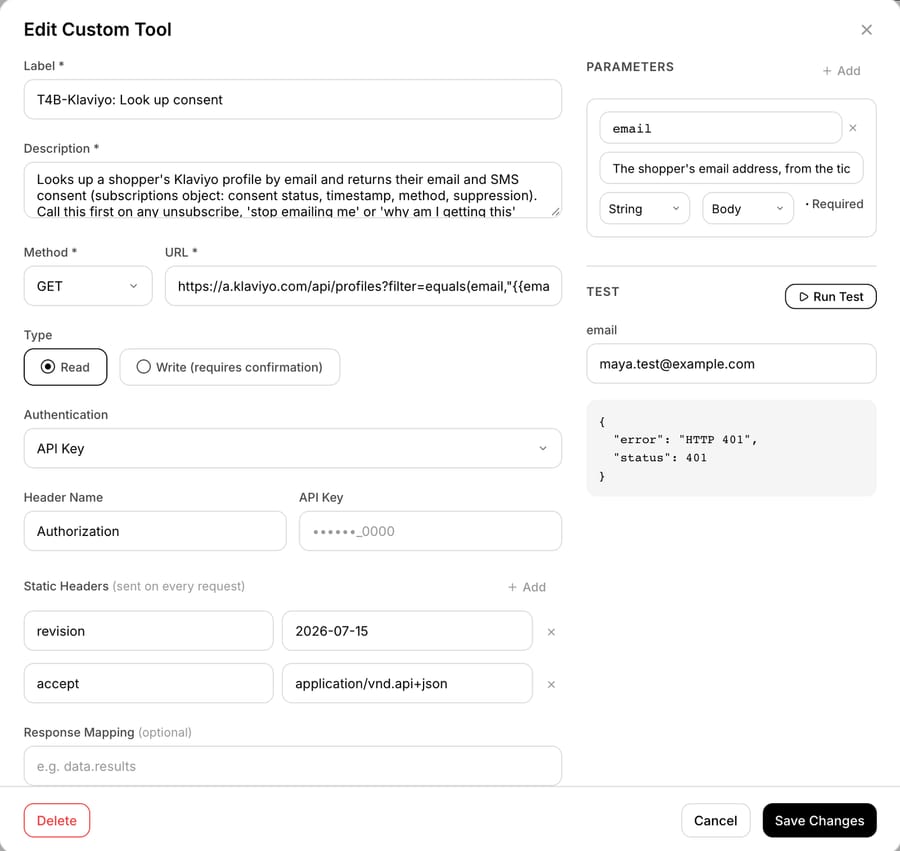
Authorization: Klaviyo-API-Key pk_...andrevision: 2026-07-15. In Macha's tool editor the key goes in the API Key auth type with the header name set toAuthorization, and because that type sends the value exactly as typed, the value itself starts withKlaviyo-API-Key. Therevisionheader (andaccept: application/vnd.api+json) go under Static Headers, which are sent on every request. The key is masked in the editor after saving and isn't shown to the model. - Read tools first: "Klaviyo: Look up consent" (Get Profiles with the subscriptions field, response mapped to the
subscriptionsobject) and "Klaviyo: recent emails sent" (Get Events). - Write tools marked Write: "Klaviyo: Unsubscribe email", "Klaviyo: unsubscribe SMS" and "Klaviyo: remove from list". Don't count on a confirmation card to catch a bad write. In our own tests the built-in Zendesk write tools paused for a card in chat, but a custom Write tool (on our Smile.io test agent) ran without one, and on a triggered run over incoming tickets a Write tool runs directly if the agent's instructions say to. That is why the instructions below spell out when to unsubscribe and when to hand off.
- The Test button on each tool, against a test profile, before the tools are assigned to an agent. See the custom API tools guide for how parameters and body templates work.
The unsubscribe body template for email looks like this, with the address filled in from the lookup rather than straight from the ticket:
{"data":{"type":"profile-subscription-bulk-delete-job","attributes":{"profiles":{"data":[{"type":"profile","attributes":{"email":"{{email}}","subscriptions":{"email":{"marketing":{"consent":"UNSUBSCRIBED"}}}}}]}}}}An instruction block for the agent, written for acting. It's the one we pasted into the test agent below:
When a customer asks to stop marketing emails or texts:
1. Run "Klaviyo: Look up consent" with the email on the ticket. If they mention texts, get their phone from their Shopify customer record and normalize it to +1XXXXXXXXXX.
2. If no profile exists, reply that we have no marketing subscription for that address and ask if they use another one. Do not call any unsubscribe tool.
3. If a profile exists, unsubscribe only the channel they named (email, SMS, or both if they say "everything"). Never pass a list ID unless they named a specific list.
4. Reply confirming the channel, and say changes can take a few minutes to show. Tag the ticket "klaviyo-unsubscribed".
5. If any Klaviyo tool returns an error, don't tell the customer they're unsubscribed. Tell them a teammate will confirm it today, and hand off to a human with the error attached.
6. If they ask to delete their data, or the profile's email differs from the sender, hand off to a human with the lookup result attached.
Never suppress, unsuppress or re-subscribe anyone unless a human asks.
Our test run on a made-up unsubscribe request
We built the lookup on our own Macha Demo workspace on 28 September 2026, with a made-up key, to check the setup above works as described before recommending it. Nothing here touched a real Klaviyo account or a real shopper.
The tool. "T4B-Klaviyo: Look up consent" is a GET on Get Profiles with the subscriptions field, the Authorization header from the API Key auth type, and two static headers, revision: 2026-07-15 and accept: application/vnd.api+json. A second tool, "T4B-Klaviyo: Unsubscribe email", is the bulk-delete job from the body template above, marked Write. Pressing Test on the lookup with [email protected] returned {"error": "HTTP 401", "status": 401}. That's the expected answer for a dummy key: the request reached Klaviyo and Klaviyo refused the credential. From a 401 alone we can't tell whether the revision header arrived intact, so it isn't a successful lookup, and with a real key the same tool needs testing again.
The agent. "T4B-Klaviyo unsubscribe helper" runs the instruction block above, on GPT-5.4, with four tools: the two Klaviyo tools plus Shopify's built-in Lookup Customer and Search Orders against our test store. It's inactive and has no trigger. We sent it a made-up message in the agent's Try it chat: Maya Torres, [email protected], asking to be unsubscribed from emails and texts after getting a Black Friday preview.
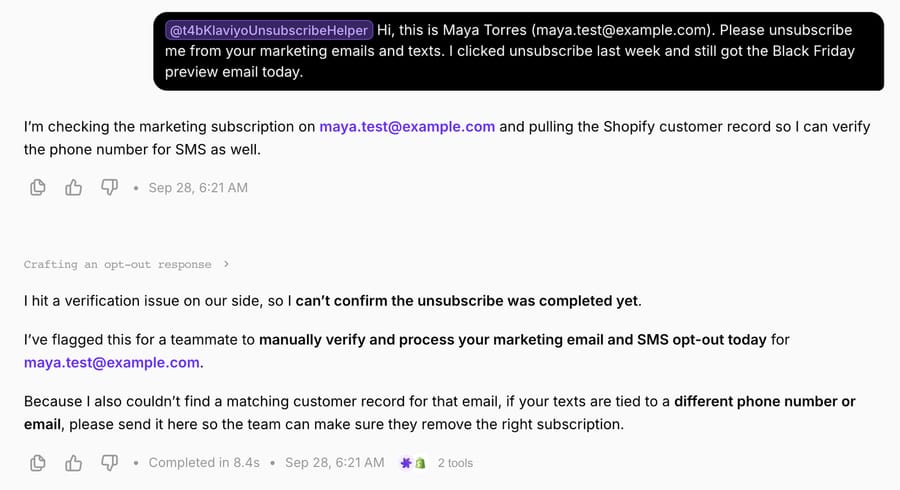
What it did, from the conversation record:
| Step | Tool call | Result |
|---|---|---|
| 1 | T4B-Klaviyo: Look up consent, email: [email protected] | HTTP 401 |
| 2 | Shopify Lookup Customer, query: [email protected] (same turn) | No customer found on the test store |
| 3 | T4B-Klaviyo: Unsubscribe email | Not called |
| 4 | Reply | "I can't confirm the unsubscribe was completed yet", a teammate will process it today, and a request for any other phone or email |
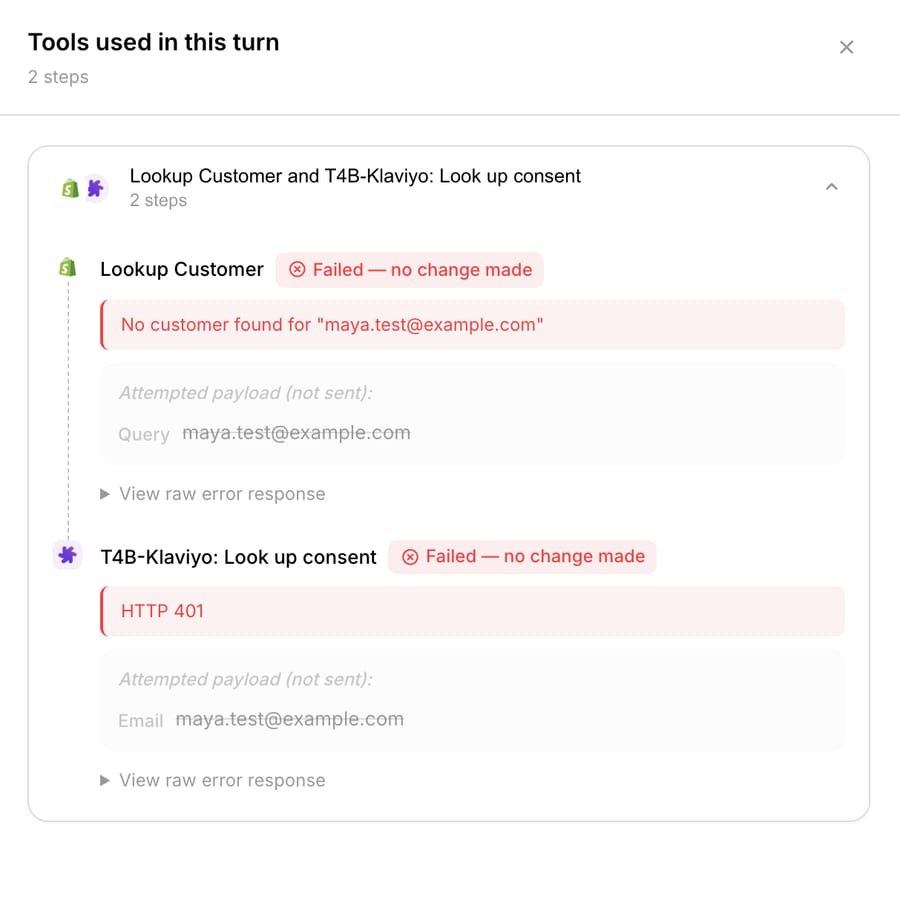
Three things we took from it. First, the error rule in step 5 of the instructions did its job: the lookup failed, so the agent never reached the Write tool and never told the shopper she was unsubscribed. No write was attempted, because the run stopped at the failed lookup. Second, the agent ran both lookups in the same turn and finished in 8.4 seconds, so the phone check for SMS costs no extra round. Third, a gap in our own test build: the agent said "I've flagged this for a teammate", but this test agent had no help-desk tools, so nothing was flagged. On a live Zendesk ticket you'd give it Zendesk's tag and internal-note tools so the handoff in step 5 is an action rather than a sentence.
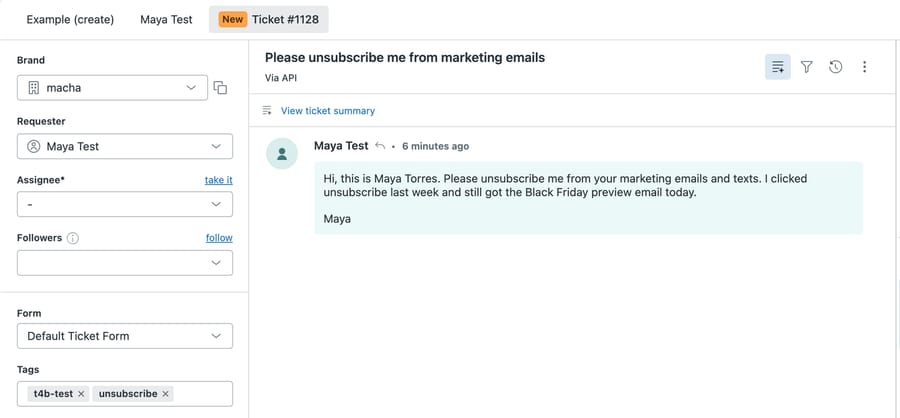
We also created the same message as ticket #1128 on our Zendesk sandbox. That sandbox's webhooks don't reach the production agent, so the run above happened in chat rather than on the ticket; the ticket shows what the request looks like when it lands in the queue. The requester reads "Maya Test" because that sandbox already had a user with the address.
Production failure modes: revisions, scopes, timing
- Revision drift. Klaviyo revisions are stable for a year, deprecated for a second, and retired two years after release, after which removed endpoints return 410. A tool pinned to 2026-07-15 keeps working into mid-2028, and should be moved to a current revision well before.
- Scopes. A key missing
lists:writefails the unsubscribe job even though the call looks like a subscription change. Scopes can't be edited, so a missing one means a new key. - Timing. Because writes are queued jobs, an agent that re-reads the profile straight after writing may report the old status. The instruction above tells it to say changes take a few minutes.
- Phone formats. Phone numbers must be E.164; a number with spaces fails the lookup.
- Two identities. Shoppers often have one profile per email. Unsubscribing the ticket's address doesn't stop email to the address they signed up with.
Where Macha fits
Macha fits teams already running Zendesk, Freshdesk, Gorgias, Front, HubSpot or Intercom who want an agent working the "unsubscribe me" and "why am I getting this" tickets inside the help desk, with Klaviyo as one of the systems it can read and write. Macha's team builds the Klaviyo tools during onboarding, next to the built-in Shopify connector for order questions; see the Shopify apps hub for the rest of the stack. Pricing is per ticket, from $299/month for 750 tickets, with setup and monitoring by the Macha team, included on every plan. A store handling 750 tickets a month pays the same whether 30 of them are unsubscribes or 300. If your SMS runs on Attentive rather than Klaviyo, the Attentive page covers its opt-out and privacy endpoints.
Frequently asked questions
Does Klaviyo have an API for unsubscribing profiles? Yes. POST /api/profile-subscription-bulk-create-jobs subscribes and POST /api/profile-subscription-bulk-delete-jobs unsubscribes, from email, SMS, WhatsApp or push, up to 100 profiles per call. Without a list ID, the unsubscribe is global.
What's the difference between unsubscribing and suppressing in Klaviyo? Unsubscribing changes the profile's consent to UNSUBSCRIBED on a channel. Suppression blocks marketing email whatever the consent says, and exists for email only. Klaviyo also suppresses automatically after a hard bounce, more than 7 consecutive soft bounces, or a spam complaint.
What headers does the Klaviyo API need? Authorization: Klaviyo-API-Key followed by a private key, and a revision header with a valid revision date such as 2026-07-15. Klaviyo's examples also send accept and content-type headers.
Can an AI agent read whether a customer is subscribed to Klaviyo SMS? Yes, with a key that has profiles:read. Get Profiles with additional-fields[profile]=subscriptions returns can_receive_sms_marketing, the SMS consent status and its timestamp.
Does Klaviyo handle "STOP" texts on its own? Yes. STOP, QUIT, END, CANCEL, REVOKE and OPT OUT remove SMS consent automatically, and unsubscribe detection is on by default for US numbers. Opt-outs that arrive by email or chat still need someone, or an agent, to remove consent.
Is Klaviyo a built-in Macha connector? No. It connects through a custom API tool that Macha's team sets up during onboarding, using a scoped private key and the revision header. To try Macha on your own tickets, start a trial with $50 of free usage (about 125 tickets), no credit card, no time limit.
How we researched this
We read Klaviyo's API reference and its stable OpenAPI spec (revision 2026-07-15) on 28 September 2026: Get Profiles, Bulk Unsubscribe Profiles, Bulk Suppress Profiles, Bulk Unsuppress Profiles, Remove Profiles from List, Get Events, the consent guide, the authentication guide and the versioning policy. Keyword behavior comes from Klaviyo's help center articles on compliance keywords, the April 11 opt-out change and suppressed profiles. The 10-business-day rule is from 47 CFR 64.1200 on eCFR. The customer count is Klaviyo's own figure from its Q2 2026 results (5 August 2026), a vendor self-report. The Shopify App Store listing showed 4.7 stars from 3,328 reviews on 28 September 2026. Macha's custom-tool behavior is from the custom tools docs, the Macha team, and our own build on 28 September 2026: on our Macha Demo workspace we created the two T4B-Klaviyo tools with a dummy key (the lookup's Test button returned HTTP 401), ran an inactive test agent in chat on a made-up request, and created the matching made-up ticket #1128 on our Zendesk sandbox, whose webhooks don't reach production agents. We didn't call Klaviyo with a real key, so the endpoint behavior, limits and warnings are as documented, not observed. Every shopper, email address and order in this page is synthetic.
If your team answers Klaviyo opt-outs by hand today, start a trial with $50 of free usage (about 125 tickets), no credit card, no time limit and ask the Macha team to build the Klaviyo tools during onboarding. Tiers are on the pricing page.
Resolve tickets automatically with AI agents
Macha's AI agents work on top of the help desk you already use — no code.