Intercom
 Shopify
 Stripe
 Slack
Slack Notion
 Google Workspace
 Confluence

How Does Zendesk Talk Call Routing Work? Groups, Overflow and IVR (2026)


Zendesk Talk offers each call to one online agent at a time, starting with whoever has gone longest since answering a call, and moves on after 30 seconds. Group routing works from Talk Team upward, while IVR and overflow numbers need Talk Professional or Enterprise.
Key takeaways
- Zendesk Talk never rings every agent at once; it offers a call to one agent at a time, waiting 30 seconds by default before moving to the next.
- Zendesk Talk IVR menus and overflow numbers require Suite Professional and above, or Support with Talk Professional or Enterprise.
- Omnichannel routing became the default for Zendesk Suite accounts and trials created after December 11, 2024, and it ignores a line's group routing once a call enters the queue.
- Zendesk defines an overflow call as one where no agent can take it and voicemail can't answer, listing five causes including exceeding the maximum queue wait time.
- Only Voice Enterprise can adjust the 30-second Call offering time limit before a Zendesk call moves on to the next agent.
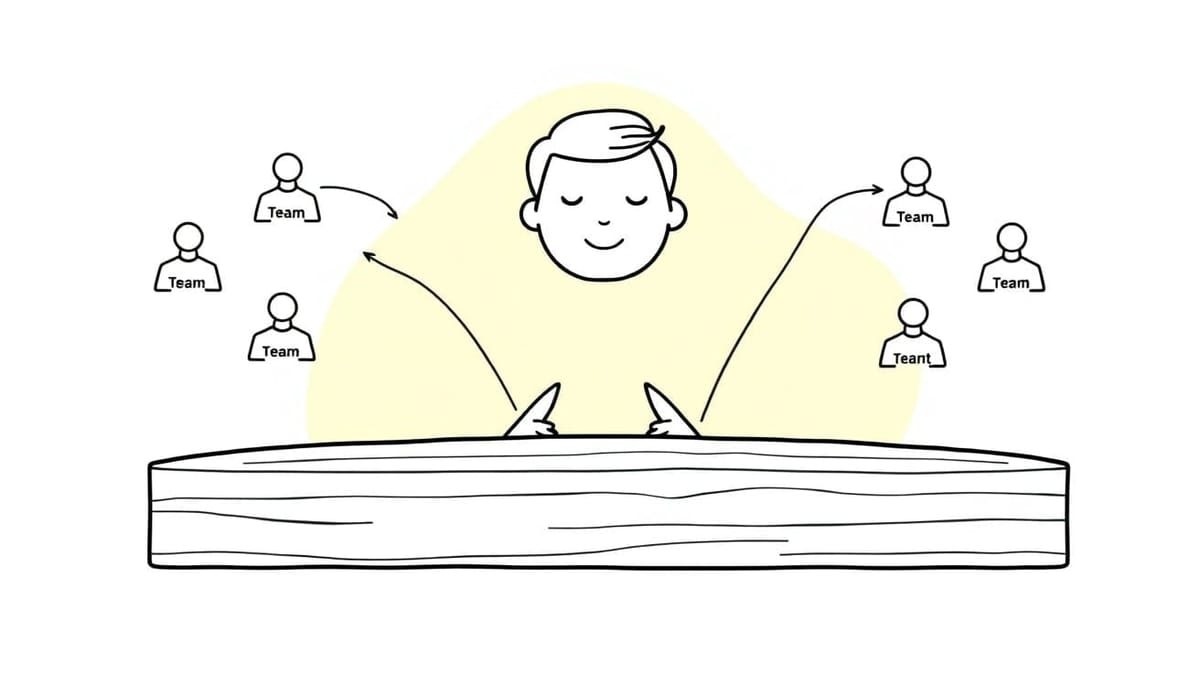
Zendesk Talk routes a call to one agent at a time: natively, the online agent with the longest time since they last answered a call gets it first, and after 30 seconds it moves to the next. You set this up on the phone line at Admin Center > Channels > Talk and email > Talk > Lines > your number > Routing, and your plan decides what you can put there: group routing from Talk Team upward, IVR and overflow numbers from Talk Professional.
One naming note before the mechanics. Zendesk is renaming Talk to Voice in its documentation, so the current article on this subject is titled "How are calls routed to my agents in Voice (formerly Talk)?" while the Admin Center menu still says Talk. Same product, mid-rename.
Which Zendesk plan includes IVR and overflow?
| Feature | Plan needed |
|---|---|
| Group routing, agent states, voicemail | Suite Team and above, or Support with Talk Team, Professional or Enterprise |
| IVR (multi-level phone trees) | Suite Professional and above, or Support with Talk Professional or Enterprise |
| Overflow numbers and after-hours routing | Suite Professional and above, or Support with Talk Professional or Enterprise |
| Adjusting the Call offering time limit | Voice Enterprise |
The current Talk plans map cleanly onto Suite: Talk Team comes with Suite Team and Suite Growth, Talk Professional with Suite Professional, and Talk Enterprise with Suite Enterprise and Enterprise Plus.
If your plan doesn't include IVR, group routing is the documented substitute. You lose the caller's ability to self-select, and you keep the ability to send a line to the right team.
Are you on native Talk routing or omnichannel routing?
This matters more than any individual setting, because the same question has two different answers depending on it.
Native Talk routing uses the phone line's own Group Routing configuration. Omnichannel routing ignores that configuration after a call enters the queue and uses queues, capacity rules and skills instead, alongside your email and messaging.
Omnichannel routing is the default for Zendesk Suite accounts and trials created after December 11, 2024. If your account is newer than that and you've never touched routing, you are on omnichannel routing whether or not you think of yourself as using it.
For the omnichannel side in depth, our omnichannel routing setup guide covers queues and capacity. The rest of this post is about the line-level Talk settings and the call behavior both systems share.
How do you set up group routing on a Talk line?
- In Admin Center, click Channels in the sidebar, then select Talk and email > Talk.
- Click the Lines tab.
- Click the number you want to edit.
- Click the Routing tab.
- In Group Routing, select one or more groups. Select none and calls go to all available agents.
- With more than one group selected, pick a Default group. Calls go there first when its agents are available, and voicemails land there when nobody from any selected group is available.
- Click Save changes.
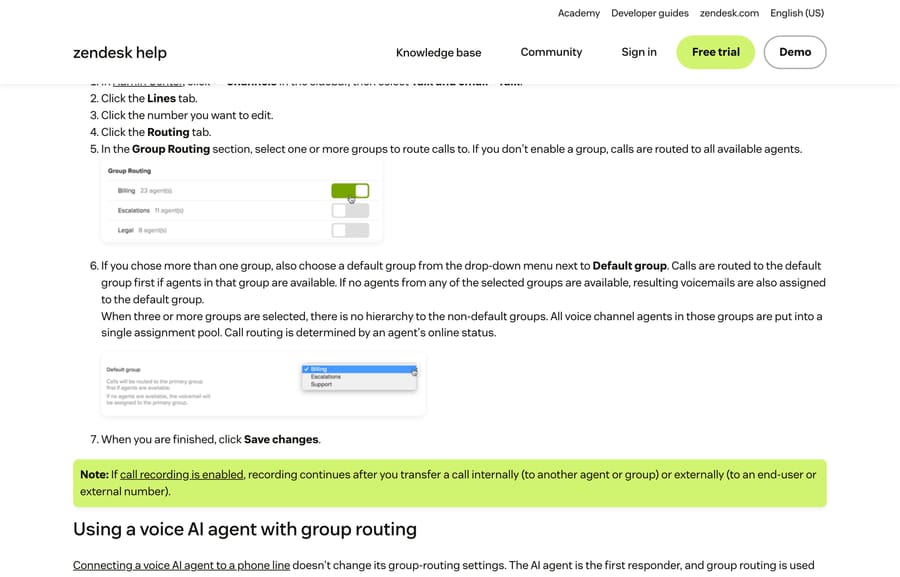
The behavior worth knowing is in step 6. With three or more groups selected, there is no hierarchy among the non-default groups. Every voice agent in them goes into a single assignment pool and routing is decided by online status. If you selected Billing, Escalations and Legal expecting a cascade, you built a pool.
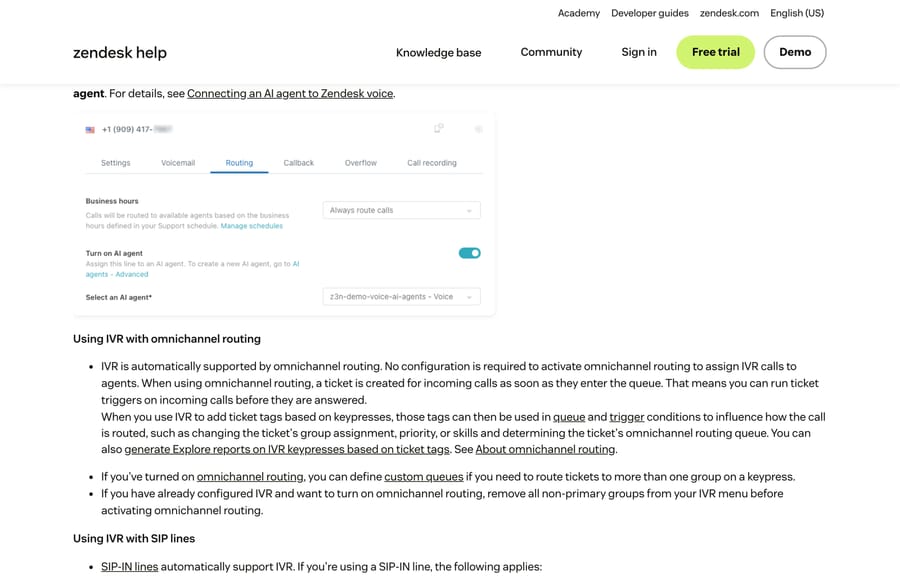
The Routing tab is also where business hours and a voice AI agent live. The line's tabs are Settings, Voicemail, Routing, Callback, Overflow and Call recording, which is a useful map when documentation tells you to go somewhere and you can't find it.
How do you get backup agents in Zendesk Talk?
People ask for backup agents constantly, and there's no Zendesk setting with that name. Three mechanisms cover the intent, and they behave differently.
The default group is the closest thing on native Talk routing, and it only does half the job: it decides who gets the call first and who owns the voicemail. It does not create a second tier that only gets called when the first tier fails.
Omnichannel routing custom queues do create that tier. A queue takes primary groups and secondary groups, routes to the primary pool first, and overflows to the secondary pool only when it needs to. This is the real answer if you want first-line and second-line behavior.
An overflow number is the escape hatch for when nobody in Zendesk can take the call, including an after-hours answering service or an on-call phone.
How do overflow and after-hours routing work?
An overflow call is one that no agent can take and voicemail can't answer. Zendesk lists exactly five causes: all agents offline, all agents declining, all agents missing the call, the maximum queue wait time being exceeded, or the maximum queue size being reached.
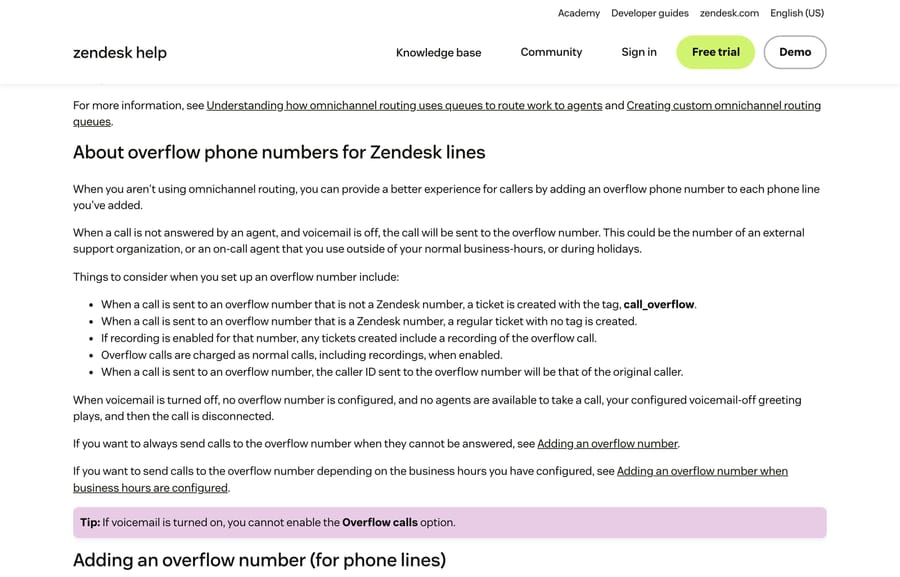
If you're not on omnichannel routing, add an overflow number per line. Five things happen that people don't expect:
- A call sent to an overflow number that isn't a Zendesk number creates a ticket tagged
call_overflow. Sent to a Zendesk number, it creates an ordinary untagged ticket. - If recording is on for that number, the overflow call is recorded too.
- Overflow calls are billed as normal calls, recordings included.
- The caller ID passed to the overflow number is the original caller's, not yours.
- A toll-free number cannot be an overflow number, because outbound calls can't be placed from toll-free numbers.
And the failure case: with voicemail off, no overflow number configured and no agent available, the caller hears your voicemail-off greeting and the call is disconnected.
On omnichannel routing you generally don't need an overflow number at all, because the primary and secondary groups in a custom queue already do it.
How do IVR menus change under omnichannel routing?
IVR needs Talk Professional or Enterprise. You build a menu of key presses, layer levels if your team structure needs it, record greetings, and assign the menu to a number.
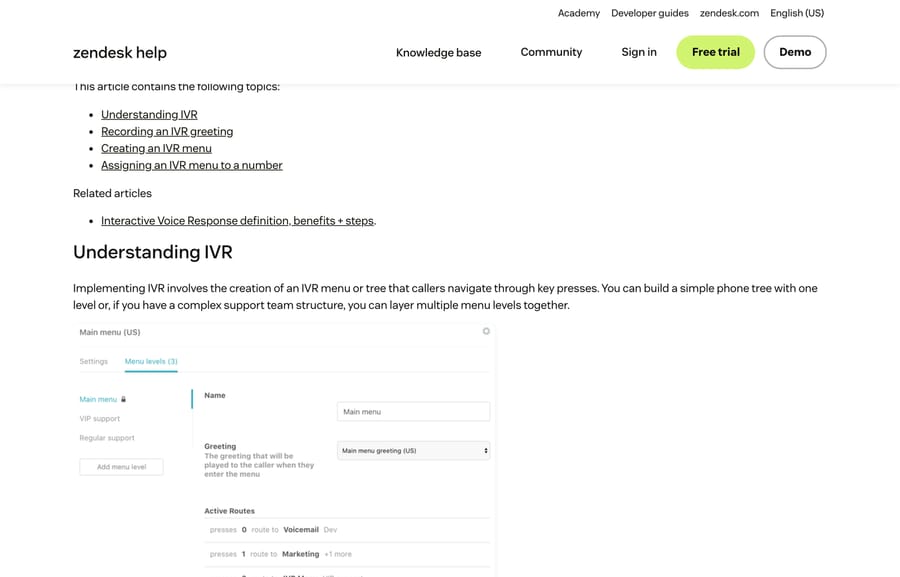
Three constraints from the documentation that shape what you can build:
- IVR doesn't work for incoming calls on a digital line.
- If a voice AI agent is on the same line, it answers first. IVR only starts if the AI agent escalates to a human.
- Before you turn on omnichannel routing, remove every non-primary group from your IVR menu. Do it in that order or you'll be debugging afterwards.
The interesting part is what IVR becomes under omnichannel routing. A ticket is created as soon as the call enters the queue, which means triggers can run on a call before anyone answers it. Tag the ticket from the key press, and that tag is then available to queue conditions, trigger conditions and Explore. A caller pressing 2 can change the ticket's group, priority, skills and queue before an agent's screen has lit up. That is a genuinely different tool from a phone tree.
How does Zendesk Talk pick which agent gets a call?
Native Talk routing sends the call to the agent with the longest time since they last answered a call who appears online. An outbound call resets that clock, which is a common surprise when distribution looks unfair.
The default wait before the call moves to the next agent is 30 seconds, and only Voice Enterprise can change the Call offering time limit.
Under omnichannel routing the rule changes: Voice offers the call to the available agent repeatedly until they accept it or the queue wait time expires, then sends it to voicemail if voicemail is on, or ends the call if it isn't.
And the rule that explains the most: Talk does not route calls to all agents at the same time. That applies to every option, IVR included. If you're expecting a hunt group where six phones ring together, Talk doesn't do that.
Why don't calls reach agents, or come back after a miss?
This is the cluster that generates the most community threads: agents not being allowed to accept calls, calls not being re-presented after a miss, and phones ringing when a call has already been answered. Zendesk has a troubleshooting article for the family, and the causes sort cleanly.
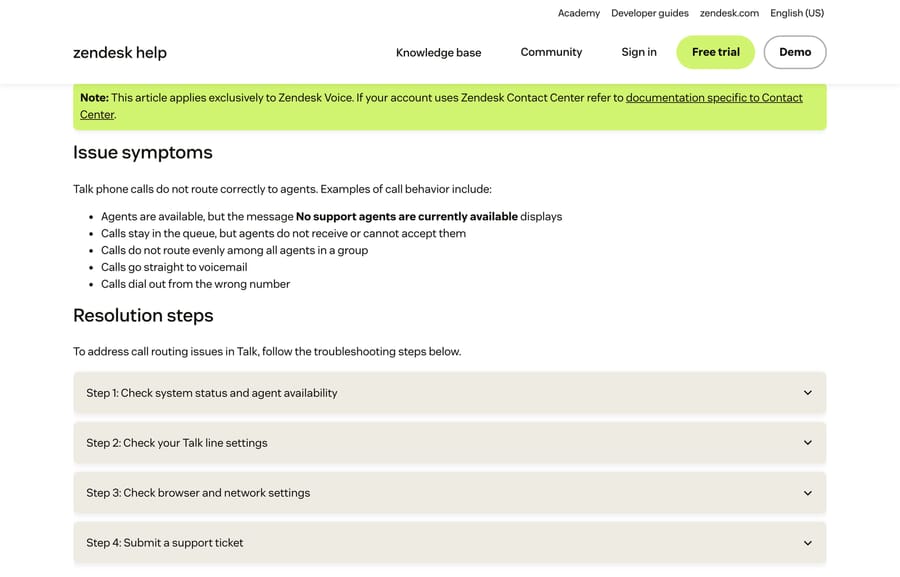
"No support agents are currently available" while agents are clearly online. Check the agent's role first: a user with an admin-only Talk role can't place or receive calls at all. Then check focus mode, because an agent handling a chat ticket with focus mode on won't be offered calls. Then check the line itself: is Enable Talk ticked, does the line have a destination configured, and did the call arrive outside business hours.
Calls queue and nobody gets them. Look at agent states. Away is not offline. An Away agent isn't routed calls, but the calls queue rather than falling through to voicemail or overflow, so a team that goes to lunch on Away leaves callers holding. All agents Offline or Transfers only sends calls to voicemail instead. And Transfers only accepts agent-to-agent transfers but not group transfers, which catches people who use it as a soft-available state.
The one that produces phantom agents: shutting down a computer does not set an agent's state to Offline. An agent who closed the lid on Friday is still Online on Monday morning, still first in line by the longest-idle rule, and still absorbing 30 seconds of every caller's patience.
Calls not re-presented after a miss. On native Talk routing this is by design. A missed or declined call goes to the next available agent, not back to the one who missed it, and when every available agent has missed or declined, the call goes to voicemail. There is no re-queue to the original agent. On omnichannel routing the opposite happens: the call is re-offered to the same available agent until they take it or the queue wait time runs out. If re-presentation is what you want, that difference is the actual answer, and it's a routing-system decision rather than a setting.
Uneven distribution. The longest-idle rule plus outbound calls resetting the clock explains most of it. The rest is usually the three-or-more-groups pool described above, where you thought you had a hierarchy.
Calls going straight to voicemail. All agents Offline or Transfers only, the maximum queue wait time being short, or the queue being full. Zendesk's own suggestion is to try setting the maximum queue wait time to five minutes and to consider a priority line if your queue fills regularly.
A call that rings after it's been answered, or a softphone that drops. We could not diagnose this one from documentation, and we're not going to guess at a cause. What Zendesk's troubleshooting article points at is the local environment: clear the browser cache, test another browser or machine, and check whether a VPN or firewall is interfering. There is one specific and very fixable cause in that list, though. In Chrome, go to Settings > Performance > General and add your Zendesk domain under Always keep these sites active, so Chrome doesn't put the call tab to sleep. If your agents keep a dozen tabs open, this is worth doing on every machine before you open a ticket.
If you do open a ticket with Zendesk, their article asks for at least three specific call examples with date, time and phone numbers, the affected agents and their browser versions, whether it hits one group or everyone, and a screenshot of a completed Twilio network test from an affected browser. Collecting that first will save a round trip.
What is the difference between missed calls and missed call legs?
The last recurring confusion is a reporting one. Call metrics such as Calls, Completed calls and Inbound calls count the whole call. Call legs count a segment event inside it. One inbound call that is offered to three agents before the third answers produces one call and several legs, so a "missed calls" figure built on legs will be much larger than one built on calls, and both are correct. Decide which question you're asking before you build the report.
Where does an AI agent layer fit alongside phone support?
Worth being blunt: Macha doesn't answer phones. It runs on Zendesk, Freshdesk, Gorgias, Front, HubSpot or Intercom. It works on tickets and chat, so nothing above is something we touch.
The honest connection is volume. Phone queues get ugly when the rest of the channel mix is backed up and the phone becomes the escape hatch customers use when email hasn't been answered. An agent layer that answers the repeat email and chat questions changes how many people reach for the phone in the first place. It suits teams already running Zendesk whose call volume is inflated by unanswered tickets elsewhere, and it's the wrong fit if your calls are genuinely phone-first work, in which case the routing configuration above is the whole job.
One incentive worth naming while we're on the subject of call volume: a vendor charging per automated resolution earns more the more contacts arrive, on any channel. Macha bills per ticket, one thread with one person as one charge however many replies it takes, from $299 a month for 750 tickets on published pricing, with setup and monitoring by our team included and $50 of free usage to start.
How we researched this
We checked this one against documentation rather than our own instance, and here is exactly why. Our Zendesk sandbox reports as a voice customer, but its Talk channel returns "There is a problem with your Talk account", so we could not open a line, build an IVR menu or set an overflow number.
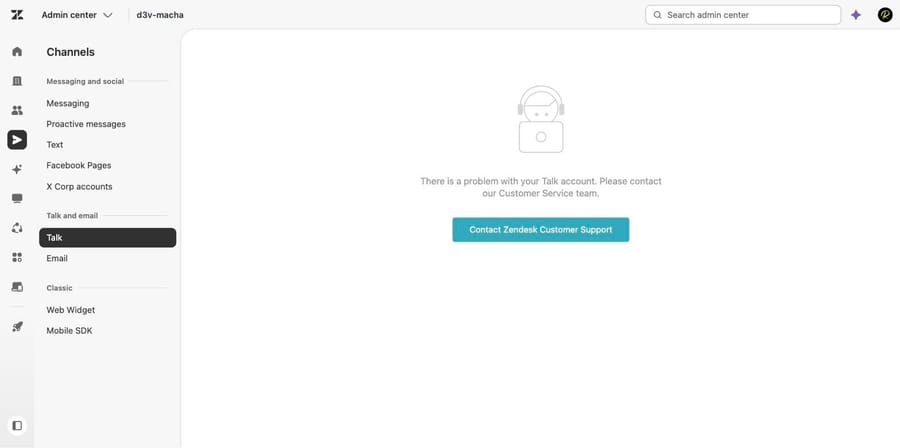
The other five images are captures of Zendesk's public documentation taken on September 21, 2026 (the plan gates, the 30-second default and the December 11, 2024 omnichannel date were re-checked against the same articles on September 24, 2026), which is the fallback we use when a UI is genuinely unreachable. Every plan gate above comes from the "What's my plan?" box on the relevant article, read the same day: routing incoming calls to agents (edited September 1, 2026), routing incoming calls with IVR (September 1, 2026), managing overflow calls and after-hours call routing (July 1, 2026), setting your agent state (June 5, 2026), how calls are routed in Voice (August 20, 2026), why phone calls in Voice are not routing to agents (September 2, 2026) and the Talk plan types article (August 18, 2026). We did not reproduce any of the failure modes, and we could not explain the ringing-after-answer reports, so we left that one open rather than inventing a cause.
For the basics underneath this, see Zendesk Talk explained and how to set up Zendesk Talk.
Frequently asked questions
What plan do I need for Zendesk IVR? Suite Professional, Enterprise or Enterprise Plus, or Zendesk Support with Talk Professional or Enterprise. On lower plans, Zendesk's documented substitute is group routing, which sends a line to chosen groups without letting the caller self-select.
Where do I configure call routing in Zendesk Talk? Admin Center, then Channels in the sidebar, then Talk and email > Talk, then the Lines tab, then the number, then the Routing tab. The line's tabs are Settings, Voicemail, Routing, Callback, Overflow and Call recording.
How does Zendesk Talk decide which agent gets a call? Natively, it offers the call to the agent with the longest time since they last answered a call who appears online, waits 30 seconds, then moves to the next agent. Outbound calls reset that clock. Only Voice Enterprise can change the 30-second Call offering time limit.
Does Zendesk Talk ring all agents at once? No. Zendesk documents that calls are never routed to all agents at the same time, and that this applies to every routing option including IVR. If you need several phones ringing together, Talk isn't built that way.
Why are calls sitting in the queue when agents are online? Most often because agents are Away rather than Online. An Away agent is treated as online but isn't routed calls, so the calls queue instead of falling through to voicemail or overflow. Check also for an admin-only Talk role, which cannot take calls, and for focus mode on agents handling chats.
Why isn't a missed call re-presented to the same agent? On native Talk routing that's by design: a missed or declined call moves to the next available agent, and when everyone has missed it the call goes to voicemail. Omnichannel routing behaves the opposite way, re-offering the call to the available agent until they accept or the queue wait time expires.
Does Zendesk Talk have backup agents? Not under that name. Use the phone line's default group for first-call preference, omnichannel routing custom queues with primary and secondary groups for true first-line and second-line behavior, or an overflow number to send calls outside Zendesk entirely.
What counts as an overflow call? One that no agent can take and voicemail can't answer. Zendesk lists five causes: all agents offline, all declining, all missing the call, the maximum queue wait time being exceeded, or the maximum queue size being reached.
Can I use a toll-free number as my overflow number? No. Outbound calls can't be placed from toll-free numbers, so they can't be used as an overflow destination. Overflow calls are also charged as normal calls, recordings included.
Why do my missed-call numbers look too high? You're probably counting call legs rather than calls. Calls, Completed calls and Inbound calls count the whole call, while legs count segment events inside it, so a single call offered to three agents produces several legs.
Sources: Routing incoming calls to agents · Routing incoming calls with IVR · Managing overflow calls and after-hours call routing · How are calls routed to my agents in Voice (formerly Talk)? · Setting your agent state for Talk calls · Why are phone calls in Voice not routing to agents? · About Zendesk Talk plan types · What is the difference between calls and call legs?
Add AI agents to your Zendesk
Macha reads the ticket, drafts the reply and takes the action, inside the Zendesk you already run.