





 Shopify
 Stripe
 Slack
Slack Notion
 Google Workspace
 Confluence

How Do You Integrate Klaviyo with Gorgias? Setup, What Syncs and Flows (2026)


Klaviyo and Gorgias connect in a few clicks from either app, and the sync then turns 3 support events into Klaviyo data while Klaviyo SMS, WhatsApp and reviews land in Gorgias as tickets. Below are both setup paths, what syncs in each direction, the sidebar widget's gate, and the limits the native integration leaves for you to handle.
Key takeaways
- The Klaviyo-Gorgias integration syncs 3 Gorgias events into Klaviyo: Opened ticket, Resolved ticket and Satisfaction survey responded, which teams use for segments, suppression and service-recovery flows.
- Klaviyo reviews create a Gorgias ticket when their star rating is at or below the chosen threshold, and the default threshold is 3 stars.
- The old Klaviyo integration marked DEPRECATED in Gorgias has not been supported since March 15, 2022, so accounts still running it should delete it and connect the current one.
- The live Klaviyo widget in the Gorgias sidebar appears only for accounts using Klaviyo SMS or Klaviyo Reviews, and only inside an SMS or Reviews ticket.
- Replies sent from the Klaviyo Inbox do not appear in Gorgias, while Gorgias replies do show in Klaviyo, so Klaviyo recommends answering customers from one platform.

You connect Klaviyo and Gorgias from either app (Gorgias: Settings → All apps → Klaviyo; Klaviyo: Integrations → Explore apps → Gorgias), and once authorized, 3 Gorgias events sync into Klaviyo: Opened ticket, Resolved ticket and Satisfaction survey responded. In the other direction, Klaviyo SMS, WhatsApp messages and low-star reviews become Gorgias tickets, and Klaviyo profile data can show on the ticket.
| Question | Short answer |
|---|---|
| Who can set it up? | A Klaviyo Owner or Admin, plus a Gorgias login to authorize |
| What goes Gorgias → Klaviyo? | Opened ticket, Resolved ticket, Satisfaction survey responded |
| What goes Klaviyo → Gorgias? | SMS and WhatsApp messages, reviews at or below your star threshold (default 3), profile fields |
| Is past data synced? | No. Only messages and events after setup |
| When does the sidebar widget show? | Only on Klaviyo SMS or Reviews tickets, for accounts using those products |
What does the Klaviyo–Gorgias integration do?
The integration runs in two directions, and it helps to keep them separate from the start. In one direction, Gorgias pushes support events into Klaviyo. When a ticket is created, closed, or a satisfaction survey is answered, Klaviyo records it against the customer's profile. In the other direction, Klaviyo can surface profile and marketing data inside Gorgias, either as fields synced onto the ticket or as a live widget in the sidebar.
Per Gorgias' Klaviyo 101 documentation, three events flow from Gorgias into Klaviyo: Opened ticket, Resolved ticket and Satisfaction survey responded. (Older versions of the doc also listed Satisfaction survey sent; the current Gorgias and Klaviyo docs list only these three.) That small set does more than it looks: once those events live in Klaviyo, you can build segments and flows off them. Gorgias' own launch note for the Klaviyo event sync spells out the retention plays it unlocks: suppress customers with an open ticket from a promotional send, win back anyone who left a poor CSAT with a targeted coupon, or upsell customers who just had a great support experience.
If you sell on Shopify, this pairs naturally with the order and customer context Gorgias already pulls in. See Gorgias for Shopify for that side of the picture, and what Gorgias is if you're still mapping the platform.
Step 1: Should you connect from Gorgias or from Klaviyo?
You can start the connection from either app, and the end state is the same. Most ecommerce teams connect from Klaviyo because that's where the sync options and channel toggles live. On the Klaviyo side you need to be an Owner or Admin to set it up.
Before you start, check which Klaviyo app you are looking at. An older listing marked Klaviyo (DEPRECATED) still shows up in some Gorgias accounts, and Gorgias' own Klaviyo 101 documentation is blunt about it: "the old one has not been supported since March 15, 2022." If a setup guide points you at that one, or you still have it connected, delete it and connect the current integration instead. Everything below is the current one.
From Gorgias:
- Go to Settings → All apps.
- Search for and click Klaviyo.
- Select Connect app.
- Enter your helpdesk URL in the format
yourdomain.gorgias.com. - Toggle the sync options you want (SMS, Reviews, customer profiles), then Authorize and Complete setup.
From Klaviyo (per the Getting started with Gorgias help article):
- Open the Integrations tab and choose Explore apps.
- Search for Gorgias and click Install.
- Enter your Gorgias helpdesk URL and select Connect to Gorgias, logging in if prompted.
- Click Authorize to grant Klaviyo access.
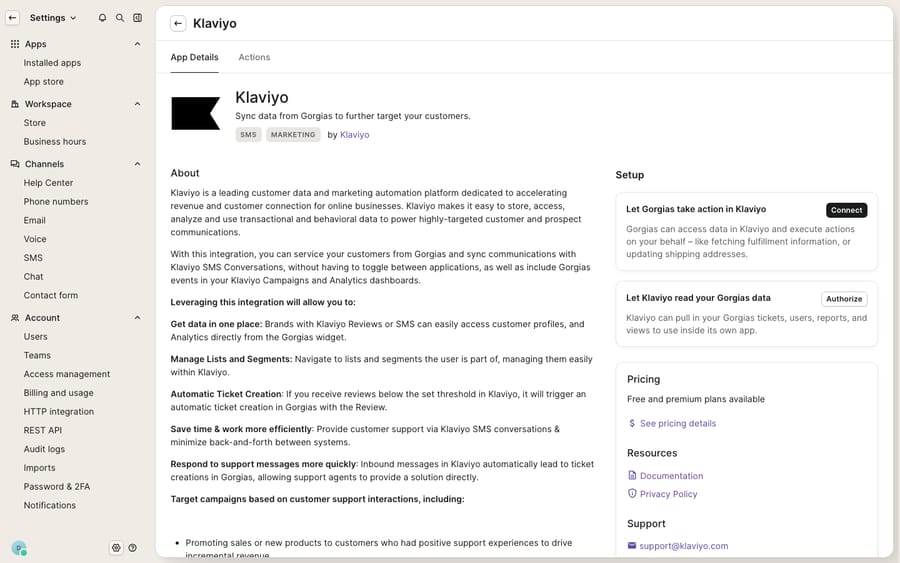
The screenshot above is the connect page: the App Store card and its Setup → Connect panel, before any Shopify store or live tickets are wired in. What you configure here is the plumbing; the populated widget and synced profile fields only appear once a real store, SMS, or Reviews product is connected on a paid Klaviyo account.
Step 2: Should you sync all tickets or only tagged ones?
During setup Klaviyo asks whether to sync all new Gorgias tickets or only tickets carrying specific tags. This choice matters more than it seems, especially for anyone running multiple brands. Klaviyo's guidance is to scope by tag for multi-brand accounts: create a Gorgias rule per brand that tags tickets by the address the customer wrote to, then sync one brand per Klaviyo account so Brand A's tickets stay out of Brand B's flows.
You also toggle the channels you want to bring across, and enable an optional profile sync from Klaviyo back into Gorgias.
| Sync option | What it does | When to use it |
|---|---|---|
| Sync all tickets | Every new Gorgias ticket becomes a Klaviyo event | Single-brand store, one Klaviyo account |
| Sync tagged tickets only | Only tickets with chosen tags sync | Multi-brand, or you only want retention flows off certain issue types |
| Sync SMS conversations | SMS subscriber texts appear as Gorgias tickets in real time | You run Klaviyo SMS and want it in the same inbox |
| Sync WhatsApp conversations | WhatsApp messages appear as tickets | You run Klaviyo WhatsApp |
| Sync reviews | Reviews at/below a star threshold create tickets | You run Klaviyo Reviews (default threshold: 3-star or lower) |
| Sync customer profile info | Email, phone, location, consent and custom properties flow Klaviyo → Gorgias | You run Klaviyo SMS or Reviews (Klaviyo says the profile data only syncs if you do) |
Step 3: How do you build a flow or segment off a support event?
Want an AI agent to answer unsubscribe and consent tickets from Klaviyo data? See the Klaviyo AI support agent guide.
Syncing events is only useful if you act on them. Once Opened ticket and Resolved ticket are landing in Klaviyo, head into Klaviyo and build the retention logic:
- Create a segment, say "customers with an open ticket in the last 3 days", and use it as a suppression filter on your next promotional campaign so you don't market to someone who's mid-complaint.
- Build a flow triggered by Satisfaction survey responded, branching on the rating: a thank-you-plus-loyalty-nudge path for happy customers, a service-recovery path (apology, coupon, human follow-up) for unhappy ones.
- For a WISMO-heavy store, tag "shipping" tickets in Gorgias and sync only those, then trigger a proactive shipping-update flow in Klaviyo for anyone who's asked.
One behavior to design around: profile creation is passive. Gorgias' docs are explicit that if a synced event has no matching Klaviyo profile, one is created but not subscribed, and the integration only creates profiles and does not add them to lists or segments. That's deliberate (it keeps you compliant), but it means a support-only contact won't magically start receiving marketing until they've actually consented.
Step 4: How do you see Klaviyo data inside Gorgias?
There are two ways Klaviyo data shows up in Gorgias, and they're easy to confuse. The profile sync (Step 2) writes fields onto the ticket. The Klaviyo widget is a richer, live panel, but it has a specific gate. Per Gorgias' documentation, the widget is available only for accounts with Klaviyo SMS or Klaviyo Reviews, and it is only visible inside a Klaviyo SMS or Reviews ticket.
Where it does appear, the widget is genuinely useful: it surfaces email, name, phone number, loyalty data, segments, lists, star ratings, review dates and reviewed products, image URLs, and Klaviyo's predictive properties, so an agent handling a review or an SMS thread sees the customer's full marketing profile without leaving the ticket. This is the same sidebar real estate other apps write into; if you're new to how that panel is composed, the Gorgias customer sidebar explained breaks it down, and the best Gorgias integrations round-up shows what else can live there.
What can't the native integration do?
The native integration is well-built for what it's scoped to do: it moves events and profiles between two systems reliably and in real time. But it has real edges worth knowing before you rely on it.
- No historical backfill. Only messages and events created after setup sync. Nothing before the connection is pulled in retroactively.
- Marketing email replies don't become tickets by themselves. The integration does not create a Gorgias ticket when someone replies to a Klaviyo email; that only happens if your Klaviyo sender address is also your Gorgias support address.
- Events, not attributes, on their own schedule. Ticket attributes are detected only after one of the synced events fires, so a tag you add mid-conversation may not reach Klaviyo until the ticket closes.
- Channel caveats. Branded SMS sender IDs can't receive inbound texts; images and GIFs don't render in synced SMS; WhatsApp media attachments don't transfer into Gorgias.
- Pick one reply surface. Replies you send from Gorgias also appear in Klaviyo, but replies sent from the Klaviyo Inbox do not appear in Gorgias, and Klaviyo's flow, campaign and auto-response messages stay out of Gorgias too. Klaviyo recommends answering from one platform.
And notice the bigger thing the integration structurally can't do: it moves data, not answers. A synced Opened ticket event tells Klaviyo a customer needs help; it does not read the ticket, look up order #4471's tracking, check the returns window on a subscription, and write the reply that resolves it. Every one of those events still lands on a human.
That's the seam an AI agent layer fills. The category of AI agents for customer service exists to do the reasoning-and-writing work the sync can't. Macha is one such layer, and the distinction matters: it runs on top of the Gorgias you already use through a native Gorgias connector and does not replace Gorgias, Klaviyo, or their integration. It reads and writes the same tickets your Klaviyo events are timestamped against, drafting or posting grounded first replies for WISMO, returns and subscription questions.
Giving the agent live Klaviyo access with a custom tool
The event sync moves what Klaviyo and Gorgias agreed to move. If you want the agent to answer a Klaviyo question inside the ticket, point it at Klaviyo's REST API directly with a custom tool. Three steps, no App Store listing and no code.
- Point the tool at the Klaviyo API. Klaviyo authenticates with a private API key. You supply the endpoint and the key once, and they live in the tool rather than in the conversation.
- Define the action. Give it a label and a description the agent reads to decide when to call it ("get the Klaviyo profile, consent status and engagement for a customer by email"), set the method and URL (a profiles query with an
{{email}}placeholder), and mark it Read or Write. A profile lookup is a Read; triggering a flow or updating consent is a Write. - Let the agent call it mid-ticket. It passes the customer's email, gets the live profile back, and reasons over it in the reply. A customer asks about a promo, the agent confirms they are subscribed and the discount applies, grounded in Klaviyo rather than a copy that synced at ticket creation.
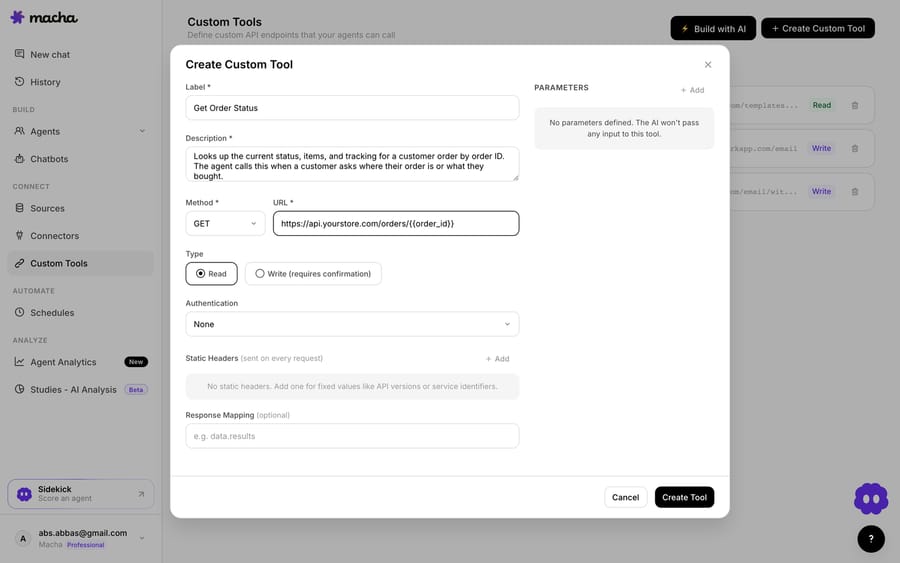
Read and Write, and the guardrails. Read tools (profile, consent and engagement lookups) run freely, because the worst case is a wrong answer. Write tools, meaning triggering a flow, updating a subscription or adding someone to a list, require a confirmation step before they fire. Each tool is scoped to one action, permissioned per agent, and every call is logged. Most teams end up with three: a profile lookup, a consent check, and an apology-flow trigger, grouped with the tools for their other systems.
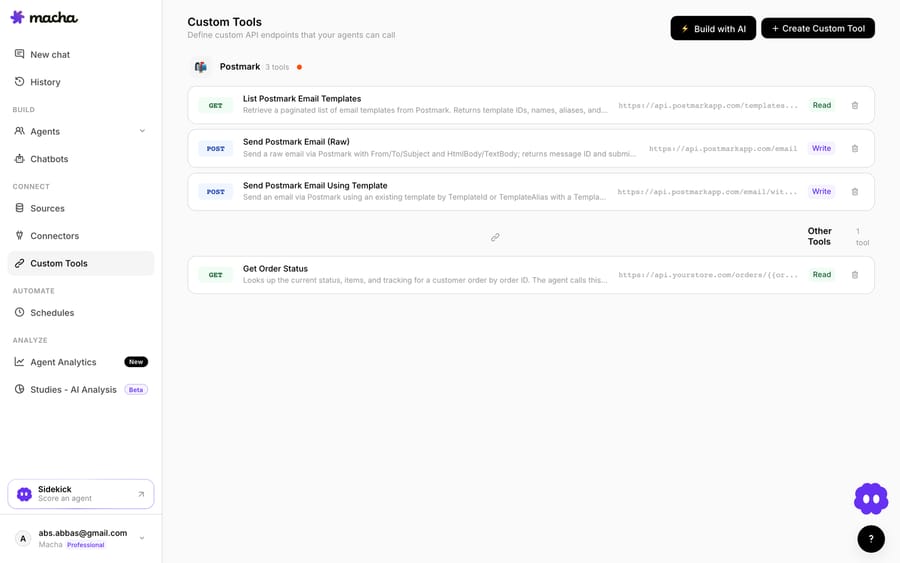
The same pattern covers more than one lookup: checking SMS or email consent before offering a channel, reading engagement to pitch the right thing, adding a frustrated customer to a win-back flow, or confirming which segment someone is in. It is not Klaviyo-specific either. The same approach reaches an order system, a 3PL, a subscription platform or an internal API, which is what the custom tools directory and the guide to building custom Gorgias integrations cover.
Which to use. Keep the native integration for what it is good at: turning Klaviyo SMS, WhatsApp and review events into Gorgias tickets, and feeding support events into Klaviyo flows. Reach for a custom tool when you want a live profile or consent lookup answered inside a reply, a specific query the sync doesn't expose, or a write decided in context. They coexist, and most teams that run both use the sync for reporting and the tool for answering.
On cost, Macha bills per ticket: one thread with one person is one charge however many replies it takes, from $299 a month for 750 tickets on published pricing, with setup and monitoring by our team included and $50 of free usage to start. It suits teams whose WISMO and returns volume is steady enough to be worth automating, and it is the wrong fit if your ticket count is a handful a day, where the native sync and a good macro set are the right amount of machinery.
The clean division of labor: let Klaviyo and Gorgias own the marketing and support data, and layer an agent on top for the part neither can do, which is answering fast enough to earn the good CSAT that then flows back into your Klaviyo win-back logic.
FAQ
Do I set this up in Gorgias or Klaviyo? Either. The integration is two-sided and lands in the same place. Start from Gorgias under Settings → All apps → Klaviyo → Connect app, or from Klaviyo under Integrations → Explore apps → Gorgias → Install. Both ask for your yourdomain.gorgias.com helpdesk URL and an authorization step. Most teams connect from Klaviyo because the sync and channel toggles live there.
Which Gorgias events sync into Klaviyo? Three: Opened ticket, Resolved ticket and Satisfaction survey responded. You build Klaviyo segments and flows off those, for example suppressing customers with an open ticket from a campaign, or triggering a service-recovery flow off a low CSAT response.
Why can't I see the Klaviyo widget in a ticket? The Klaviyo sidebar widget only appears for accounts with Klaviyo SMS or Klaviyo Reviews, and only inside a Klaviyo SMS or Reviews ticket. If you've only enabled event and profile sync (not SMS or Reviews), you'll see synced profile fields on the ticket but not the full live widget.
Will old tickets and subscribers sync retroactively? No. The integration only syncs messages and events created after you connect it, so there's no historical backfill. Plan the connection before a big campaign or peak, not during it.
Is the old Klaviyo integration in Gorgias still usable? No. An older listing marked Klaviyo (DEPRECATED) still appears in some accounts, and Gorgias' documentation says "the old one has not been supported since March 15, 2022." Delete it and connect the current integration, which is set up from the Klaviyo side.
Can an AI agent look up a Klaviyo profile from inside a Gorgias ticket? Not through the native sync, which moves events rather than answering questions. You get there with a custom tool pointed at Klaviyo's REST API: the agent passes the customer's email, reads back the live profile, consent status and engagement, and uses it in the reply. Writes such as triggering a flow sit behind a confirmation step.
Do I need a developer to connect Klaviyo to Gorgias? Not for the native integration, which is an authorize-and-toggle flow on either side. A custom tool against the Klaviyo API is also a form (endpoint, private API key, a parameter placeholder), though someone who knows your Klaviyo property names should decide what the tool reads and writes.
Can I add AI to Gorgias without disrupting my Klaviyo integration? Yes. An AI agent layer like Macha connects to Gorgias as a native connector and runs on top of your existing help desk, and it doesn't touch or replace the Klaviyo integration. It helps resolve the tickets that generate your Klaviyo events by drafting grounded replies and looking up order or account data, while Gorgias and Klaviyo stay the systems of record.
Sources: Klaviyo 101 (Gorgias docs) · Getting started with Gorgias (Klaviyo help) · Klaviyo push events is live (Gorgias updates)
We checked every path, event and gate above against Gorgias' and Klaviyo's own documentation on September 24, 2026. Both products revise their settings layouts periodically, so confirm the labels in your own account.






