





 Shopify
 Stripe
 Slack
Slack Notion
 Google Workspace
 Confluence

How Do You Build a Custom Gorgias Integration Without an App Store App? (2026)


Gorgias's App Store is deep on Shopify and payments, but the 3PL, subscription platform or internal ops panel a brand actually runs on often isn't there. If that tool has an API, you can connect it yourself with a Gorgias HTTP Integration or with an AI-agent Custom Tool.
Key takeaways
- A tool with no Gorgias App Store app can still be connected through a Gorgias HTTP Integration or a Macha Custom Tool, as long as the tool has an API.
- Gorgias HTTP Integrations are available on all Helpdesk plans, fire on ticket events such as ticket created, and switch off after 500 consecutive failed requests.
- A Macha Custom Tool is a single HTTP action marked Read or Write, and Macha's docs say Write tools need user confirmation before they run in chat.
- Macha's Custom Tools integration directory lists 210 entries across CRM, databases, e-commerce and ITSM systems that can be connected to Gorgias this way.
- Custom API tools are included in Macha's single plan at about $0.40 a ticket from $299 a month for 750 tickets, and the Macha team builds and tests them for you, with a dedicated success manager.

To connect a tool that has no Gorgias App Store app, you have two routes: build a Gorgias HTTP Integration, which is available on all Gorgias Helpdesk plans and fires on ticket events such as "ticket created", or define a Custom Tool in an AI agent layer like Macha, which the agent calls only when a ticket needs it. Both need the tool to have an API; neither needs an App Store listing.
| Route | Who decides when it runs | Setup | Best for |
|---|---|---|---|
| Gorgias App Store app | The app's own logic | Install and configure | Shopify, payments, loyalty and other tools with a maintained app |
| Gorgias HTTP Integration | Ticket events (created, updated, message created) | You define the request, headers and sidebar widget, and maintain it | A fixed call that should fire on every matching ticket event |
| Macha Custom Tool | The AI agent, based on what the customer asked | Done for you by the Macha team, with a dedicated success manager, included | Internal or niche systems, and teams running more than one help desk |
Gorgias's HTTP Integrations are useful: they pull data into a sidebar widget and trigger calls in external systems. But each one is a manual build. You define the request, map the variables, and maintain it, and it fires on ticket events rather than being reasoned about by an AI agent in the moment. Gorgias also switches an HTTP Integration off after 500 consecutive failed requests, so a broken endpoint needs watching.
If the tool you need has an API, there's a lighter path: connect it through AI-agent Custom Tools, where you describe the action and the same setup works across every help desk you run.
First, the framing. Macha isn't a Gorgias replacement. It runs on top of the Gorgias you already use. Your agents keep working in Gorgias with its rules, macros, and Shopify sidebar; Macha adds an AI layer that can read tickets, reason, and, through Custom Tools, reach into any other system to answer or act.
What does "custom integration" mean in Gorgias now?
Historically, "integrating X with Gorgias" meant one of three things: find an App Store integration, build an HTTP Integration against the tool's API, or pay a developer for a bespoke build. All three work, and all three are heavy. An App Store app is someone else's idea of the integration; an HTTP Integration or bespoke build is a project you maintain.
A Custom Tool is a lighter path. Instead of building an app or an event-fired HTTP call, you describe an action ("look up an order," "check a 3PL shipment," "cancel a subscription") and point it at the relevant API endpoint. Your Macha AI agent then calls that action while it works a ticket, decides when it's relevant, passes the right parameters, and reasons over what comes back. There's no code, and the same setup works if you also run Zendesk, Freshdesk, Front, HubSpot or Intercom.
The difference in practice is that the AI decides. An HTTP Integration fires when a ticket event matches; a Custom Tool is chosen by the agent in context, based on what the customer asked.
How do you build a Custom Tool in three steps?
Every Custom Tool follows the same shape, whether it wraps Shopify, a 3PL API, or an internal microservice.
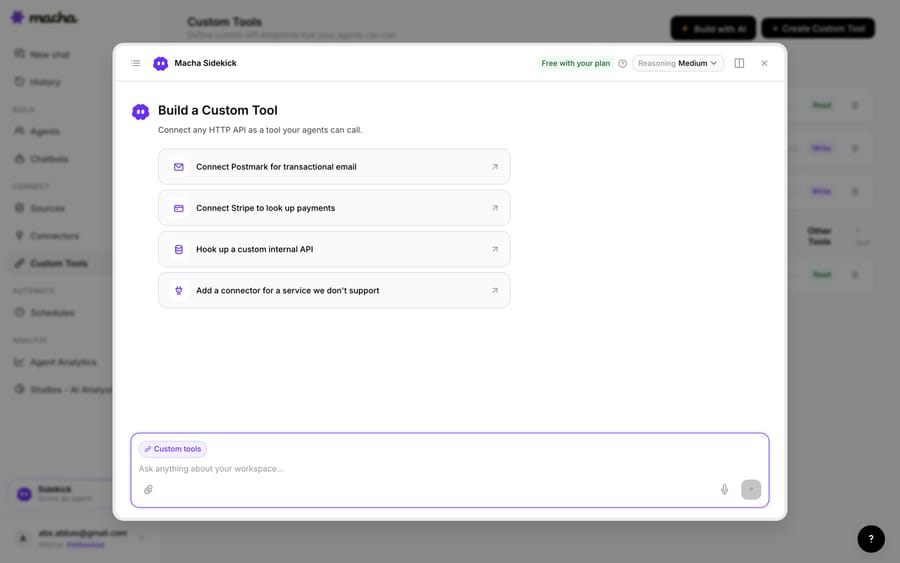
1. Point it at the API. You give Macha the endpoint, method, and credentials. If you'd rather not fill in a form, the AI Tool Builder (Build with AI on the Custom Tools page, currently in Macha Experiment Labs) drafts the tools from a plain-English description such as "connect Stripe to look up payments" or "hook up our internal orders API," tests your credentials, and proposes tools for you to confirm.
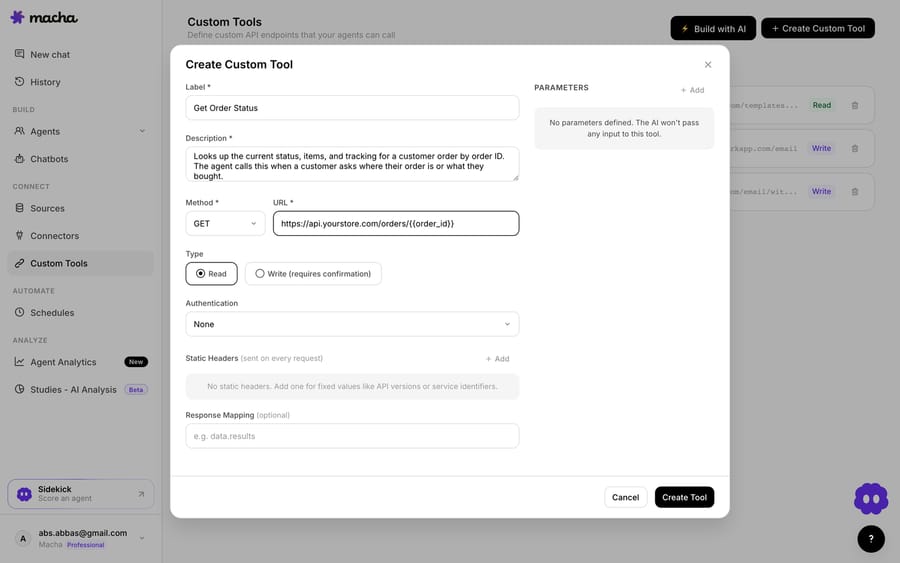
2. Define the action. Give the tool a label and a description the AI uses to decide when to call it, set the method (GET, POST, PUT, PATCH or DELETE) and URL, with placeholders like {{order_id}} for the parameters the agent will fill, and choose whether it's a Read or a Write. Reads fetch data; Writes (refunds, cancellations, address changes) create, update or delete it, and Macha's docs say Write tools require user confirmation before they run in chat. Authentication, a JSON body template, and response mapping are here too, so a real production endpoint drops straight in. A Test button lets you run the tool with sample values before any agent uses it.
3. The agent uses it live. Once the tool exists and is assigned to an agent, the agent calls it mid-ticket. A customer asks "where's my order?" in Gorgias; the agent recognizes the intent, calls Get Order Status with the order ID it pulled from the conversation, and answers with the real status and tracking, grounded in your system of record rather than a guess.
That's the whole loop: define once, and the AI decides when to use it on every relevant ticket after that.
What does a library of Custom Tools look like?
Custom Tools aren't a one-off escape hatch. Teams build a small library of them, grouped by the service they wrap. Here's a Macha workspace with tools for Postmark (list templates, send email) and a store's order-lookup endpoint, each tagged Read or Write with its API URL. Each tool group also shows up as a custom connector on the Connectors page.
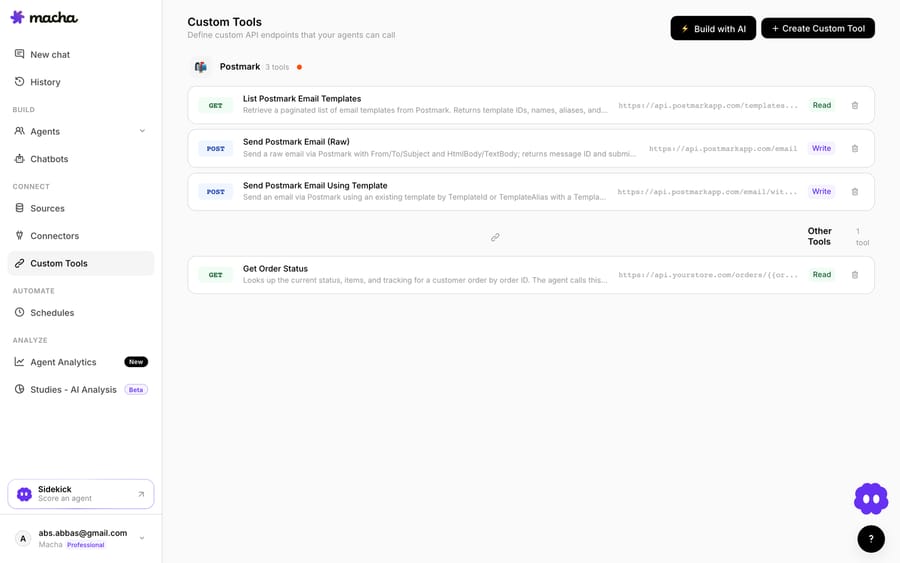
Notice the mix of GET/Read and POST/Write. An agent can be allowed to look up anything but only act (refund, cancel, update) through a Write tool with a confirmation step. You set that boundary per tool and per agent.
How do Read vs Write, auth and permissions keep Custom Tools safe?
Because a Custom Tool can reach into real systems, the guardrails matter as much as the capability:
- Read vs Write. Read tools only fetch data. Write tools change state and require confirmation before they run in chat, so an agent can't quietly issue a refund or cancel an order there.
- Scoped by design. A tool exposes exactly one action against one endpoint. It does the job you defined and nothing else.
- Permissioned per agent. Each tool is created once for the organization and then assigned to the agents that need it. Your triage agent might only read; a senior-support agent might be allowed to write.
- Credentials stay hidden. Credentials are encrypted at rest and never exposed to the AI model.
For authentication, the builder supports None, API key in a custom header, Bearer token, and Basic Auth, so tools that need credentials (most of them) work without exposing secrets in the conversation.
When should you use the App Store, an HTTP Integration, or a Custom Tool?
Custom Tools don't make Gorgias's App Store or HTTP Integrations obsolete; they cover what's slow or missing.
- Reach for an App Store integration when a well-maintained one already exists (Shopify, a payment app, a loyalty tool) and does what you need. If Macha has a native connector for it, use that; it goes deeper and needs no request-building.
- Reach for a native HTTP Integration when you want a call that fires on ticket events, lives entirely inside Gorgias, and shows data in the sidebar, and you have the time to build and maintain it.
- Reach for a Custom Tool when you want the AI agent to decide when to call it, you'd rather not hand-build the request, the tool is internal or industry-specific, or you run more than one help desk and want the same action everywhere.
The rule of thumb: if you've ever said "I wish Gorgias could just check X for me," and X has an API, that's a Custom Tool.
Which Custom Tools are worth building first?
The pattern applies to every category of tool an e-commerce support team touches:
- Orders & fulfillment: look up an order or shipment in Shopify, a 3PL, or ShipStation and answer WISMO from the source of truth.
- Subscriptions & billing: check or modify a subscription in Recharge, Chargebee, or Stripe.
- Warehouse & inventory: check stock or availability in your WMS before promising a customer.
- Engineering: open a Jira, Linear, or GitHub issue from a bug report and read its status back. (Jira also has a native Macha connector.)
- Internal systems: hit your own admin API to look up an account, reset a flag, or trigger a job.
For a browsable list of tools you can connect this way (210 entries across CRM, databases, e-commerce, ITSM, and more), see the Custom Tools integration directory. If it has an API, it belongs on that list.
Running more than one help desk? The same approach works on Zendesk, Freshdesk, Front, Intercom and HubSpot. Custom Tools are portable across all of them.
What does a Custom Tool cost, and how fast can you ship one?
A missing App Store integration used to mean "not supported," and an HTTP Integration meant "build and maintain it yourself." With Custom Tools, you describe the action, point it at the API, test it, and your Gorgias AI agents can read and write it live inside a ticket, with Read/Write guardrails and per-agent permissions. Custom API tools are included in Macha's single plan, which is priced by ticket volume from $299 a month for 750 tickets, and the free trial gives you $50 of usage with no credit card.
You also don't have to build the tools yourself. Macha is the done-for-you option: the Macha team analyzes your past tickets, builds and tests the Custom Tools, the knowledge base and the agent on your Gorgias, and runs it in safe mode, with drafts as internal notes, until the drafts are right. That's included on the trial and every plan at about $0.40 a ticket, which includes setup and a dedicated success manager who handles your changes, such as a new 3PL or subscription tool to connect.
Ready to try it? See how Custom Tools work, browse the integration directory, or start a free trial and wire up your first tool today.
Frequently asked questions
Do I need an engineer to build a Custom Tool for Gorgias? No. The Macha team builds and tests your Custom Tools for you as part of setup, included on the trial and every plan. If you'd rather build one yourself, you fill in the method, URL, auth and parameters in a form, or describe the integration in plain English and the AI Tool Builder drafts the request, authentication, and parameters for you to confirm. Technical teams can go deeper with full control over methods, headers, body templates, and response mapping.
How is this different from Gorgias HTTP Integrations? Gorgias HTTP Integrations are native API calls, available on all Helpdesk plans, that fire on ticket events such as ticket created or message created, and that you build and maintain inside Gorgias. A Custom Tool is chosen by the AI agent in context (it decides when to call it based on what the customer asked), needs no code, and works the same across every help desk you run.
Is this a Gorgias App Store app? No. A Custom Tool doesn't need an App Store listing. It's an action your AI agent calls against any API, so you can connect tools that will never have a native integration, including internal and industry-specific systems.
Can it change data, or only read it? Both. Read tools fetch data; Write tools (refunds, cancellations, address changes) require user confirmation before they run in chat, and you control which agents can use them.
Is it secure? Custom Tools are scoped to a single action and assigned per agent, credentials are encrypted at rest and never shown to the AI model, and you can test each tool before an agent uses it.
Does a Custom Tool cost extra? No. Custom API tools are included in Macha's plan, which is billed per ticket from $299 a month for 750 tickets, however many tool calls a ticket takes. That's about $0.40 a ticket, which includes setup by the Macha team and a dedicated success manager who handles your changes.






