





 Shopify
 Stripe
 Slack
Slack Notion
 Google Workspace
 Confluence

How Do You Connect a Tool to Freshdesk When There's No Marketplace App? (2026)


When the tool you run your business on has no Freshdesk Marketplace app, you can still connect it by defining a Custom Tool that points an AI agent at the tool's API. The four options, the three build steps, and the Read and Write guardrails are below.
Key takeaways
- A Freshdesk team can connect any tool with an API by defining a Macha Custom Tool, with no Marketplace listing, app review or integration code.
- A Macha Custom Tool is one API action marked Read or Write, and the Macha team builds and tests it for you, included at about $0.40 a ticket with a dedicated success manager.
- Freddy AI Agent can run Actions Library integrations and workflows, with MCP actions sold as an add-on at $15 per 1,000 actions.
- Macha Write tools such as refunds, status changes or record updates require a confirmation step before they run, while Read tools are free to call.
- Macha's Custom Tools integration directory lists 200+ tools across CRM, databases, e-commerce and ITSM that can be connected this way.

To connect a tool that has no Freshdesk Marketplace app, define it as a Macha Custom Tool: give it the tool's API endpoint and credentials, mark the action Read or Write, and your AI agent calls it mid-ticket whenever a Freshdesk conversation needs that data. Any tool with an API works, with no Marketplace listing, app review or integration code.
| Option | What you build | Best when |
|---|---|---|
| Freshdesk Marketplace app | Nothing; install someone else's app | A maintained app exists and does what you need |
| Custom app on the Freshworks developer platform | An app coded against the Freshdesk API and the target API | You have developers and want a sidebar app for human agents |
| Freddy AI Agent actions | Actions and workflows inside Freshworks' own AI agent | You run Freddy AI Agent and its Actions Library covers the tool |
| Macha Custom Tool | Nothing: the Macha team builds and tests the API action your AI agent calls, with a dedicated success manager, included | No app exists, the app is read-only, or the system is internal |
Freddy, Freshdesk's built-in AI, has moved on here too. Freddy Copilot suggests and drafts replies for human agents, and Freddy AI Agent can now run configured workflows and Actions Library integrations, with MCP actions sold as an add-on at $15 per 1,000 actions and connector app tasks at $80 per 5,000 (Freshdesk pricing page, checked 24 September 2026). That's useful if the system you need is in Freshworks' library. For the internal orders database or the niche billing platform, you're back to building something.
So a missing Marketplace app is no longer a dead end. If the tool you need has an API, you can connect it to Freshdesk yourself, without publishing a Marketplace app and without writing integration code. The rest of this walkthrough uses AI-agent Custom Tools.
First, the framing. Macha isn't a Freshdesk replacement. It runs on top of the Freshdesk you already use (the ticketing product; not Freshchat, Freshservice, or Freshcaller). Your agents keep working in Freshdesk; Macha adds an AI layer that can read tickets, reason, and, through Custom Tools, reach into any other system to answer or act.
What does a custom Freshdesk integration mean in 2026?
For years, "integrating X with Freshdesk" meant one of two things: find a pre-built Marketplace app, or pay a developer to build one against the Freshdesk API and the target tool's API. Both are heavy. A Marketplace app is someone else's idea of the integration; a bespoke one is a project with a maintenance tail.
A Custom Tool is a third path. Instead of building an app, you define an action: "look up an order," "check a subscription in our billing system," "reset a flag in our admin panel." You point it at the relevant API endpoint. Your Macha AI agent then calls that action while it works a ticket, passes the right parameters, and reasons over what comes back. No Marketplace listing, no app review, no glue code.
The difference in practice is control. A native app does what its author decided it should do. A Custom Tool does exactly what you describe, scoped to the one job you need, in the language your team uses.
How do you build a Custom Tool for Freshdesk?
Every Custom Tool follows the same three steps, whether it's wrapping Salesforce, a Postgres database, or an internal microservice.
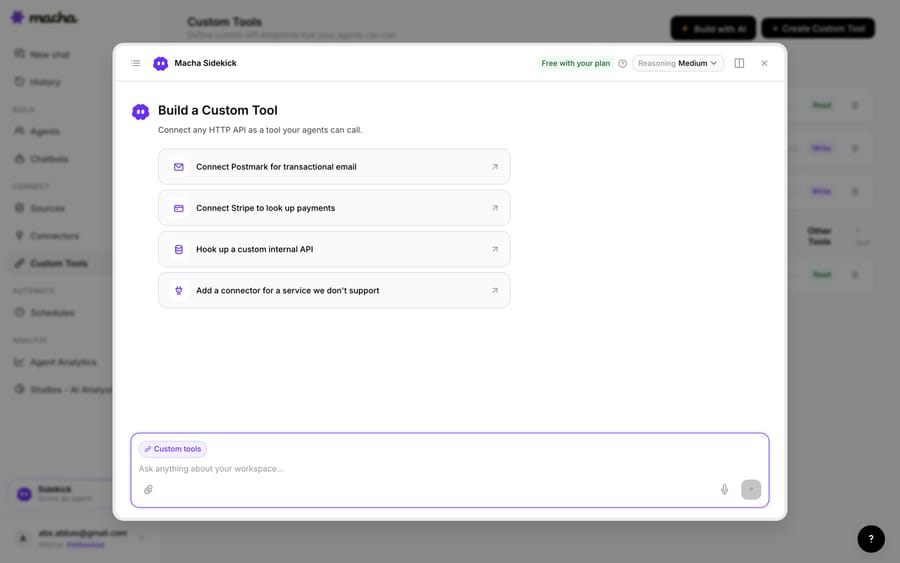
1. Point it at the API. You give Macha the endpoint, method, and credentials. If you'd rather not fill in a form, the built-in Sidekick will scaffold the whole thing from a plain-English description, such as "connect Stripe to look up payments" or "hook up our internal orders API."
2. Define the action. Give the tool a label and a description the AI uses to decide when to call it, set the method and URL (with placeholders like {{order_id}} for the parameters the agent will fill), and choose whether it's a Read or a Write. Reads are safe lookups; Writes (refunds, status changes, record updates) require confirmation before they run. Authentication, static headers, and response mapping are all here too, so a real production endpoint drops straight in.
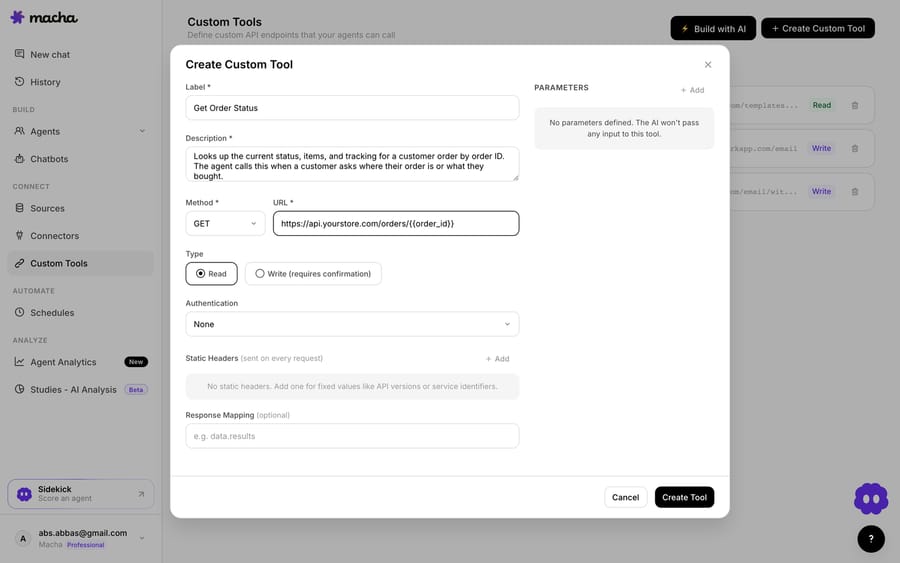
3. The agent uses it live. Once the tool exists, your agent calls it mid-ticket. A customer asks "where's my order?" in a Freshdesk ticket; the agent recognizes the intent, calls Get Order Status with the order ID it pulled from the conversation, and answers with the real status and tracking from your system of record, not a guess.
That's the entire loop: define once, and the AI decides when to use it on every relevant ticket after that.
What does a library of Custom Tools look like?
Custom Tools aren't a one-off escape hatch. Teams build a small library of them, grouped by the service they wrap. Here's a Macha workspace with tools for Postmark (list templates, send email) and a store's order-lookup endpoint, each tagged Read or Write with its API URL.
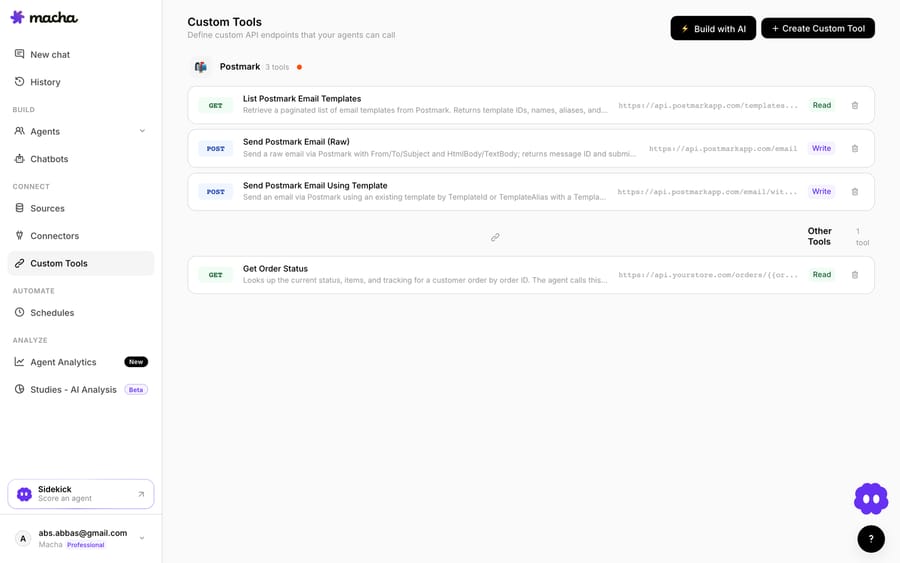
Notice the mix of GET/Read and POST/Write. A support agent can be allowed to look up anything but only act (send, refund, update) with a confirmation step. That boundary is enforced per tool and per agent.
How do Custom Tools stay safe with Read vs Write and auth?
Because a Custom Tool can reach into real systems, the guardrails matter as much as the capability:
- Read vs Write. Read tools are free to call. Write tools (anything that changes state) require confirmation, so an agent can't silently issue a refund or delete a record.
- Scoped by design. A tool exposes exactly one action against one endpoint. It does the job you defined and nothing else.
- Permissioned per agent. You decide which agents get which tools: your triage agent might only read; a senior-support agent might be allowed to write.
- Audited. Every call is logged, so you can see exactly what ran, with what inputs, and when.
For authentication, the builder supports the common patterns (API keys, bearer tokens, custom headers), so tools that need credentials, which is most of them, work without exposing secrets in the conversation.
When should you use a Marketplace app instead of a Custom Tool?
Custom Tools don't make the Freshdesk Marketplace obsolete; they cover what it can't.
- Reach for a Marketplace app when a well-maintained one already exists for a mainstream tool and does what you need out of the box. If Macha has a native connector for it (Shopify, Stripe, Jira, HubSpot, Slack and Notion all have one), use that, since it's deeper and needs no setup.
- Reach for a Custom Tool when there's no app, the app is limited or read-only, the tool is internal or industry-specific, or you need a specific action the app doesn't expose. That describes most real workflows.
The honest rule of thumb: if you've ever said "I wish Freshdesk could just check X for me," and X has an API, that's a Custom Tool.
Which Freshdesk integrations are worth building first?
The pattern generalizes across every category of tool a support team touches:
- CRM: pull a customer's account, plan, and owner from Salesforce into the ticket. HubSpot is a native connector already.
- Databases & warehouses: query orders, subscriptions, or usage from Postgres, Snowflake, or BigQuery to answer from source of truth.
- Billing & payments: check a subscription or issue a refund in Chargebee or Recurly. Stripe is a native connector.
- Engineering: open a Linear or GitHub issue from a bug report and read its status back. Jira is a native connector that searches, creates, comments on and transitions issues.
- Internal systems: hit your own admin API to look up an account, reset a flag, or trigger a job.
For a browsable list of tools you can connect this way (200+ across CRM, databases, e-commerce, ITSM, and more), see the Custom Tools integration directory. If it has an API, it belongs on that list.
Running more than one help desk? The same approach works on Zendesk, Front, Intercom, and Gorgias. Custom Tools are portable across Zendesk, Freshdesk, Gorgias, Front, HubSpot or Intercom.
How long does it take to connect a tool with no native app?
A missing Marketplace app used to mean "not supported." With Custom Tools, a single Read action against a documented API is a short job: describe the action, point it at the endpoint, test it on a ticket. Your Freshdesk AI agents can then read and write it live inside a ticket, with Read/Write guardrails, per-agent permissions, and a full audit trail.
You also don't have to build the tools yourself. Macha is the done-for-you option: the Macha team analyzes your past tickets, builds and tests the Custom Tools, the knowledge base and the agent on your Freshdesk, and runs it in safe mode, with drafts as internal notes, until the drafts are right. That's included on the trial and every plan at about $0.40 a ticket, which includes setup and a dedicated success manager who handles your changes, such as a new system to connect.
Ready to try it? See how Custom Tools work, browse the integration directory, or start a free trial ($50 of usage, no credit card) and wire up your first tool today.
Frequently asked questions
Do I need an engineer to build a Custom Tool for Freshdesk? No. The Macha team builds and tests your Custom Tools for you as part of setup, included on the trial and every plan. If you'd rather build one yourself, you can describe the integration in plain English and Macha's Sidekick scaffolds the request, authentication, and parameters. Technical teams can go deeper with full control over methods, headers, bodies, and response mapping.
Is this a Freshdesk Marketplace app? No, and that's the point. A Custom Tool doesn't need a Marketplace listing or app review. It's an action your AI agent calls against any API, so you can connect tools that will never have a native app, including internal and industry-specific systems.
How is this different from Freddy? Freddy Copilot drafts and suggests within Freshdesk, and Freddy AI Agent can run actions from Freshworks' Actions Library and workflows, with MCP actions billed as an add-on. A Custom Tool lets your Macha agent call any API you point it at, including your orders database, billing system, or internal admin API, then use the result in the reply.
Can it change data, or only read it? Both. Read tools are safe lookups; Write tools (refunds, updates, status changes) require a confirmation step before they run, and you control which agents can use them.
Is it secure? Yes. Custom Tools are scoped to a single action, permissioned per agent, and every call is audited, so you always know what ran, with what inputs, and when.
Does Freshdesk still have a free plan? No. The Freshdesk pricing page lists Growth, Pro and Enterprise with a 14-day trial of Enterprise; a separate Free program covers up to 2 agents for 6 months. Freddy AI Agent comes with 500 sessions as a one-time allowance per account, then $49 per 100 sessions.






