





 Shopify
 Stripe
 Slack
Slack Notion
 Google Workspace
 Confluence

How Do You Connect Klaviyo to Zendesk? Native Integration vs AI Agent Custom Tool (2026)


Klaviyo's native Zendesk integration syncs ticket events into Klaviyo and turns campaign and flow replies into Zendesk tickets. To let an AI agent check consent or trigger a flow from inside a ticket, you add a Custom Tool that calls Klaviyo's API.
Key takeaways
- Klaviyo's native Zendesk integration syncs Opened Ticket and Resolved Ticket events into Klaviyo and turns replies to campaigns and flows into Zendesk tickets.
- Since 23 April 2025 Klaviyo's Zendesk integration authorizes over OAuth and can sync tickets from specific Zendesk brands.
- A Macha Custom Tool calls Klaviyo's REST API with a private API key, which Klaviyo lets you create as read-only, full-access or custom-scoped.
- Read tools such as a Klaviyo consent lookup run freely, while Write tools that trigger a flow or update a property need confirmation before they run.
- Macha's Custom Tools directory lists more than 200 tools, and on the trial and every plan the Macha team builds and tests the Klaviyo tools for you, at about $0.40 a ticket including setup and a dedicated success manager who handles your changes.

You can connect Klaviyo to Zendesk two ways: install Klaviyo's native Zendesk integration, which syncs "Opened Ticket" and "Resolved Ticket" events into Klaviyo and turns replies to your campaigns and flows into Zendesk tickets, or give an AI agent a Custom Tool that calls Klaviyo's REST API with a private API key, so it can read a profile's consent and trigger a flow from inside the ticket. The native integration moves data between the two systems; the Custom Tool lets the agent act on it mid-conversation. Most e-commerce teams can run both.
| Klaviyo's native Zendesk integration | Macha Custom Tool | |
|---|---|---|
| What it does | Syncs ticket events and details to Klaviyo; campaign and flow replies become tickets; SMS and WhatsApp replies from Zendesk | Lets an AI agent read or write Klaviyo data during a ticket |
| Who uses it | Marketers (segments, flows) and human agents | The AI agent, with confirmation on writes |
| Setup | Install and authorize (OAuth since April 2025) | Done for you by the Macha team, with a dedicated success manager, included |
| Custom reads and writes | No, fixed behavior | Yes, one action per tool |
Framing first. Macha runs on top of the Zendesk you already use (and Zendesk, Freshdesk, Gorgias, Front, HubSpot or Intercom more broadly). It's an AI-agent layer, not a Zendesk or Klaviyo replacement. Your agents keep working in Zendesk; Macha reads the ticket, reasons, and reaches into Klaviyo to answer or act.
What does Klaviyo's native Zendesk integration do?
Klaviyo does offer a native Zendesk integration. You install it from the Zendesk Marketplace or from Klaviyo's app marketplace. Per Klaviyo's help center, it syncs ticket data to Klaviyo in real time as two metrics, "Opened Ticket" and "Resolved Ticket", carrying assignee, priority, tags, custom fields and channel, so you can segment customers and trigger flows (for example a win-back flow after a ticket resolves). Replies to your Klaviyo campaigns and flows land in Zendesk as tickets, and if you've set up SMS or WhatsApp in Klaviyo, inbound messages create Zendesk tickets and agents reply from Zendesk. Since 23 April 2025 the integration authorizes over OAuth and can sync tickets from specific Zendesk brands. If that data flow is all you need, it may be enough.
Where it stops:
- It's sync, not action. It moves ticket events and messages between the systems; it doesn't let an AI agent decide to check consent mid-conversation, read live engagement, and trigger a flow based on what it finds.
- It's fixed. You get the sync behavior the integration exposes, not the specific read or write your workflow needs (e.g. "is this contact suppressed?" or "enroll them in the win-back flow").
- It isn't built for an AI agent. It feeds Klaviyo and the Zendesk queue; it doesn't put Klaviyo in the AI agent's hands to act autonomously with guardrails.
For a lot of teams, the sync is fine. For anyone who wants their AI agent to actually use Klaviyo, there's a lighter, more flexible path. (The full API detail is in the Klaviyo AI support agent guide.)
What can an AI agent do with live Klaviyo data?
The high-value version of this integration isn't a synced field. It's the agent doing the work. A customer emails Zendesk asking why they stopped getting emails; the agent looks up their live Klaviyo profile, sees they're unsubscribed or suppressed, explains exactly why, and, with confirmation, re-triggers the right flow. That's what a Custom Tool enables.
How do you connect Klaviyo to Zendesk with a Custom Tool?
A Custom Tool is a single action you define once and point at Klaviyo's API. No marketplace app, no code.
1. Point it at the Klaviyo API. Klaviyo's REST API authenticates with a private API key sent as an Authorization: Klaviyo-API-Key header, plus a dated revision header (Klaviyo developer docs). You give Macha the endpoint and credentials. Create the key with the narrowest scope that works: Klaviyo offers read-only, full-access and custom keys, and a key's scopes can't be edited after it's created. The built-in Sidekick can scaffold the request from a plain-English description if you'd rather not fill in the form.
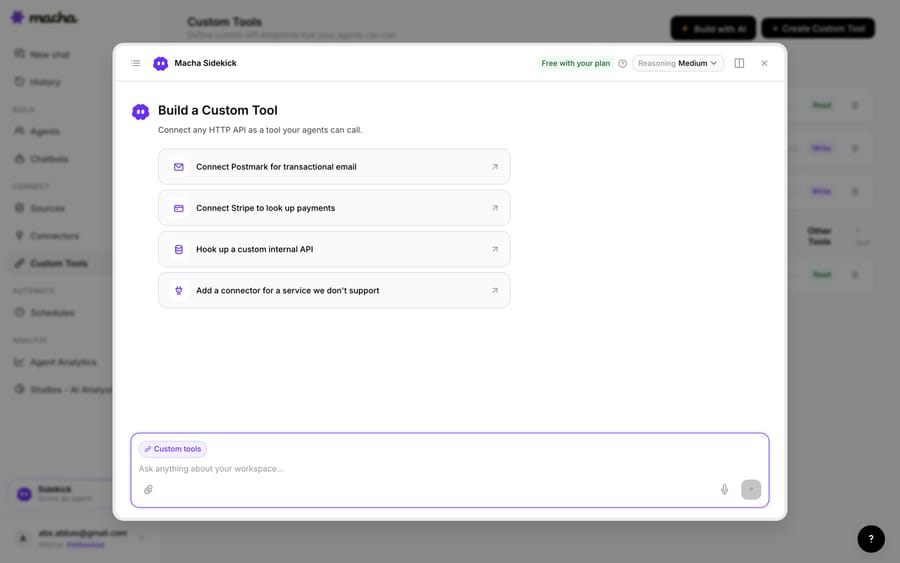
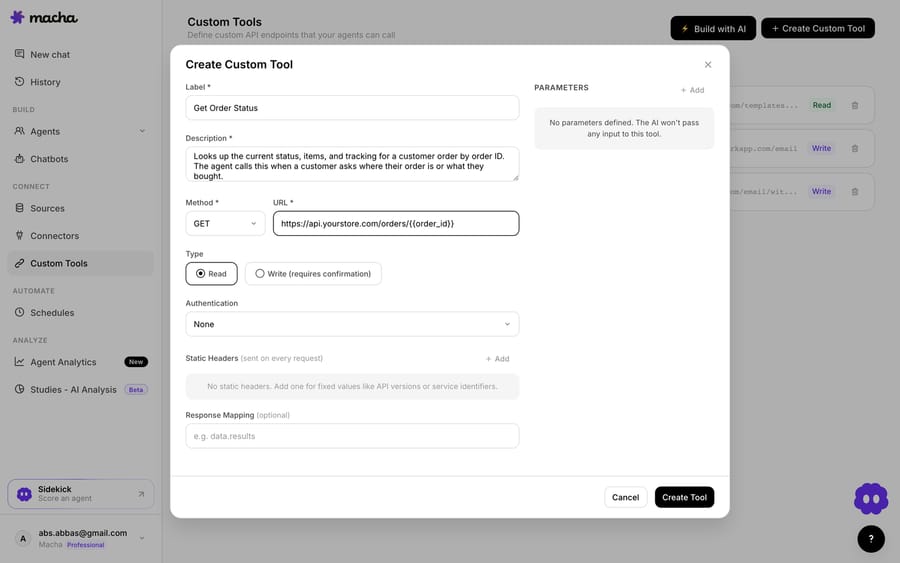
2. Define the action. Give it a label and a description the AI uses to decide when to call it, for example "Get a Klaviyo profile's consent and engagement by email" or "Enroll a profile in a flow" , set the method and URL (against the Klaviyo REST API, with an {{email}} placeholder), and choose Read or Write. Reading consent is a Read; triggering a flow or updating a property is a Write, which requires confirmation before it runs.
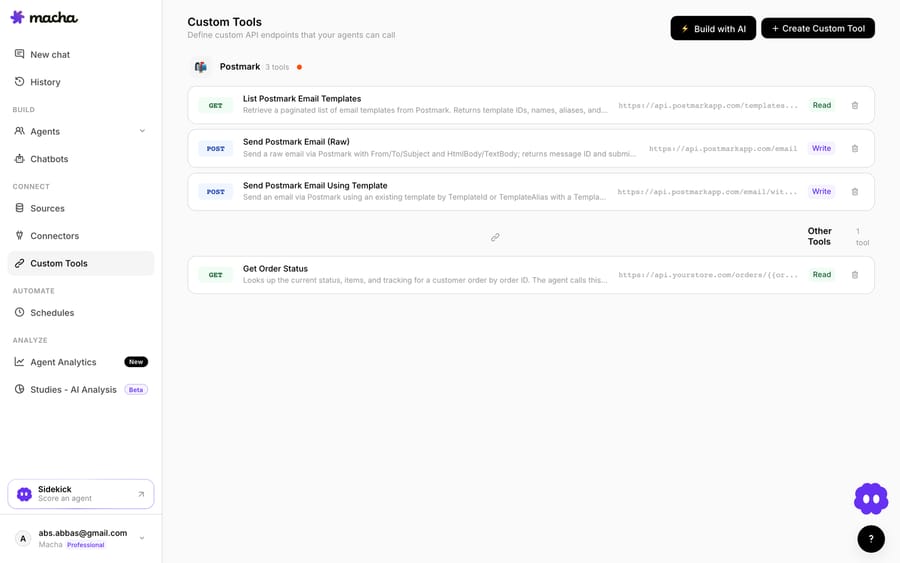
3. The agent uses it live. Once the tool exists, the agent calls it mid-ticket, passes the customer's email, and reasons over the Klaviyo profile it gets back, answering the consent question or triggering the next step.
How do you keep Klaviyo write actions safe?
Because a Custom Tool can reach into Klaviyo, the guardrails matter: Read tools (profile and consent lookups) are free to call; Write tools (trigger a flow, update a property, add to a list) require confirmation. Each tool is scoped to one action, permissioned per agent, and every call is audited. Klaviyo's private API key handles credentials, so secrets never live in the conversation, and a read-only key makes a lookup tool unable to change anything even by mistake.
Teams usually build a few Klaviyo tools and group them (a "get profile and consent," a "trigger flow," a "tag contact") alongside tools for their other systems.
Should you use the native app or a Custom Tool?
- Use the native Klaviyo app if you want ticket events in Klaviyo for segments and flows, campaign and flow replies routed into Zendesk, and SMS or WhatsApp handled from Zendesk.
- Use a Custom Tool when you want your AI agent to read live consent/engagement or trigger a Klaviyo action from the ticket, you need a specific read or write the app doesn't expose, or you want autonomous action with confirmation. The two can coexist. Macha is the done-for-you option: the Macha team builds and tests the Klaviyo tools and the agent on your Zendesk, then runs it in safe mode, with drafts as internal notes, until the drafts are right. That's included on the trial and every plan at about $0.40 a ticket, which covers setup and a dedicated success manager who handles your changes.
What else can the same pattern connect?
Once the agent can reach Klaviyo, the same pattern covers more: check consent before promising a resend, read engagement to gauge a VIP, enroll a churn-risk customer in a win-back flow, update a profile property, or explain exactly why someone stopped receiving email. And because Custom Tools aren't Klaviyo-specific, the same approach connects your e-commerce platform, billing system, or internal API. See the Custom Tools integration directory for 200+ tools, or the full pillar on building custom Zendesk integrations.
Which option fits your team?
Klaviyo's native integration moves ticket events and replies between the two systems. A Custom Tool puts Klaviyo in your AI agent's hands: live consent and engagement lookups and flow actions, decided in context, no code. You describe the action, point it at the Klaviyo API, and your Zendesk agents can use it inside a ticket with Read/Write guardrails and a full audit trail. Macha includes custom API tools on every plan, from $299 a month for 750 tickets, billed per ticket.
Ready to try it? See how Custom Tools work, browse the integration directory, or start a free trial and wire up your first Klaviyo tool today.
Frequently asked questions
Does Zendesk have a native Klaviyo integration? Yes. Klaviyo's native integration installs from the Zendesk Marketplace, syncs Opened Ticket and Resolved Ticket events into Klaviyo, and routes campaign and flow replies into Zendesk as tickets. It's sync-focused; a Custom Tool adds live, AI-agent-driven consent lookups and flow actions.
Do I need an engineer to connect Klaviyo to Zendesk this way? No. On the trial and every plan, the Macha team builds and tests the Klaviyo tools for you, with a scoped private API key. To build one yourself, you describe the action in plain English and Macha's Sidekick scaffolds the Klaviyo request, API key, and parameters. Technical teams can go deeper with full control over the REST call, headers, and response mapping.
Can the agent trigger flows in Klaviyo, or only read profiles? Both. Reads (profile and consent lookups) run freely; writes, such as triggering a flow or updating a property, require a confirmation step, and you control which agents can use them.
Is it secure? Yes. The tool is scoped to a single action, permissioned per agent, authenticated with a Klaviyo private API key you can scope to read-only, and every call is audited.






