





 Shopify
 Stripe
 Slack
Slack Notion
 Google Workspace
 Confluence

How Do You Fix an OAuth Token-Refresh Race Condition? Our Schmid Digital Postmortem


A Macha customer we call Schmid Digital stopped getting AI replies on their Zendesk tickets when two webhooks, arriving milliseconds apart, raced to refresh the same single-use OAuth token and left the connector holding a dead one. Here is how the race worked, the compare-before-write fix we shipped on April 17, 2026, and the recovery tooling that followed on April 23.
Key takeaways
- Macha fixed the Schmid Digital OAuth outage in its April 17, 2026 release by re-reading credentials inside the per-subdomain lock and skipping the refresh when another request had already refreshed the token.
- The race happened because two Zendesk webhooks read the same single-use refresh token before either took the lock, so Zendesk's refresh-token rotation left the database holding a retired token.
- On April 23, Macha moved the refresh locking into a shared utility used by every OAuth connector, covering Zendesk, Google and Shopify with the same compare-before-write check.
- Macha connectors now report a connected or auth_failed health status, and a broken connector deactivates its agents and emails the organization's admins instead of failing silently.
- Macha's in-memory lock is correct for a single process only; running several app replicas would need a distributed lock such as Redis or a database advisory lock.
We fixed the Schmid Digital outage in our April 17, 2026 release by re-reading the stored OAuth credentials inside the per-subdomain lock and skipping the refresh whenever another request had already refreshed the token. We call it compare-before-write. The cause was a textbook OAuth token-refresh race condition: two Zendesk webhooks arrived milliseconds apart, both saw a stale access token, both refreshed with the same single-use refresh token, and the database ended up holding a token Zendesk had already retired. We'd guarded against the obvious version of this race. We hadn't guarded against the version that actually happened.
| Date (2026) | What shipped |
|---|---|
| April 9 | Zendesk approved Macha's global OAuth client; OAuth became the default for new Zendesk connections, with proactive and 401-fallback refresh behind a per-subdomain lock |
| April 17 | Compare-before-write race fix, in-place Reconnect button for OAuth connectors, re-auth that preserves webhook IDs and signing secrets |
| April 23 | Shared refresh-lock utility for every OAuth connector (Zendesk, Google, Shopify), connected / auth_failed health status, 410 Gone after repeated webhook rejections |
If you run a service that holds OAuth tokens on behalf of customers, this failure is more common than it looks, and the fix is cheaper than the outage. The dates above come from the Macha changelog.
A quick frame, because it matters: Macha is an AI agent layer that sits on top of Zendesk (the full list today: Zendesk, Freshdesk, Gorgias, Front, HubSpot or Intercom). It isn't a help desk itself. The connector is the umbilical cord. When it dies, the agents die with it, silently, which is exactly why this class of bug is worth obsessing over.
How does Macha's Zendesk connector authenticate?
On April 9, 2026, Zendesk approved Macha's global OAuth client, and OAuth became the default authentication method for new Zendesk connections, replacing per-agent API keys. OAuth is the better model — scoped, revocable, no long-lived secrets sitting in a config — but it comes with a maintenance tax that API keys don't: access tokens expire, and you have to refresh them.
The refresh flow Macha runs is the standard one, and it runs in two situations:
- Proactively — before a token's known expiry, we refresh it ahead of time so live traffic never hits an expired token.
- As a 401 fallback — if a request comes back unauthorized anyway (clock skew, an early revocation, a missed proactive refresh), we refresh once and retry.
Each refresh is a read → HTTP exchange → write cycle: read the stored credentials, POST the refresh token to Zendesk's token endpoint, receive a fresh access token (and, critically, a new refresh token), and write the new pair back to the database.
We knew concurrent refreshes were dangerous, so the very first OAuth release shipped with a lock: per-subdomain locking around the refresh, so two flows for the same Zendesk subdomain couldn't refresh at the same time. That was the right instinct. It just wasn't the whole fix.
How did two webhooks lock the connector out?
Here's the part that makes refresh-token rotation unforgiving. Modern OAuth servers — Zendesk included — practice refresh-token rotation: every time you successfully use a refresh token, the server issues a brand-new refresh token and invalidates the old one. This is a deliberate security feature; it shrinks the blast radius of a stolen token and lets the provider detect reuse (Okta, Auth0/Frontegg both document the pattern). The consequence is that a refresh token is single-use. Use it once, and the copy you held is now worthless.
Now play out the Schmid Digital sequence. Two Zendesk webhooks — two ticket events — landed within milliseconds of each other and both kicked off work on the same connector:
- Request A reads the credentials, sees the access token is near expiry, and starts a refresh with refresh token
R0. - Request B reads the credentials at almost the same instant — before A has written anything back — sees the same near-expiry token, and starts its own refresh, also with
R0. - A's refresh succeeds first. Zendesk returns access token
A1+ refresh tokenR1, and invalidatesR0. A writes{A1, R1}to the database. - B's refresh — using the now-invalidated
R0— either fails outright or, in the messy timing window, succeeds and then writes its stale result over A's. Either way, the database ends up holding a refresh token that Zendesk has already retired. - The next refresh attempt sends a dead token. Zendesk answers
invalid_grant. There is no token left that works. The connector is locked out until a human re-authenticates.
Request A: read{R0} ──▶ refresh ──▶ Zendesk: {A1,R1}, kill R0 ──▶ write{A1,R1}
Request B: read{R0} ──────────────▶ refresh(R0) ──▶ ✗ / clobber ──▶ write{stale}
                                                              └─▶ DB now holds a dead token
So where was the per-subdomain lock? It was working — within a single refresh path. The problem was the read happened before the lock. Both requests had already snapshotted R0 into memory before either entered the locked section. Serializing the write doesn't help when both writers are carrying the same now-stale token. On a single-process Node server, an in-memory lock also only coordinates within that one process — which was fine here (it was one process) but is a trap to remember for later. This is the exact shape of the race that bites everyone from Nango to OAuth proxies and CLI tools: a read-modify-write cycle on a single-use token with no re-check after acquiring the lock.
What is the compare-before-write fix?
The April 17 release fixed it with compare-before-write logic. The rule is simple to state: don't trust the token you read before you took the lock; re-read it after.
The flow now is:
- Acquire the lock for the subdomain (as before).
- Re-read the credentials from the database inside the lock. This is the load-bearing change.
- Compare. If the access token already changed — i.e., another request refreshed it while we were waiting for the lock — we don't refresh again. We take the token that's already there and move on.
- Only if it's genuinely still stale do we perform the refresh and write the result.
In the Schmid sequence, Request B now does step 2, sees that the stored token is no longer R0 (A already wrote R1), and never sends the dead refresh token at all. The reuse never happens, so the rotation never strands a token. A single-use credential demands a check-then-act that is atomic with respect to the lock — and the re-read is what makes it atomic.
The same release hardened the 401 fallback with the same idea: on an unexpected 401, re-read from the database first (another request may have just refreshed), and only refresh if the freshly-read token still looks bad. It's the cheaper, more resilient cousin of "lock and refresh": often you don't need to refresh at all, you just need to notice someone else already did. (Nango describes the same lock-per-token approach so only one refresh runs at a time. Apideck takes a different route for its own API: force one refresh through its validateConnectionState endpoint before you fan out concurrent calls.)
A week later, on April 23, we pulled the locking out of the Zendesk-specific code into a shared refresh-lock utility used by every OAuth connector — Zendesk, Google, and Shopify — so the same guarantee covers all of them instead of one. A bug fixed in one connector that can recur in three is a bug half-fixed.
What happens when a connector loses auth anyway?
Prevention is half the job. The other half is what happens when a connector does end up logged out — because OAuth tokens get revoked for reasons that have nothing to do with races (an admin rotates the app, a user is deprovisioned, the grant is pulled). Three changes shipped alongside the race fix to make that recovery survivable.
Connector health and auto-deactivation. Connectors now carry an explicit health status — connected or auth_failed. When authentication breaks, the affected agents are automatically deactivated and the org's admins are emailed, so a dead connector surfaces loudly instead of failing silent the way Schmid's did.
Test connection. A one-click check validates a connector's credentials on demand, so you can confirm a fix before you trust it with live traffic.
In-place reconnect. When re-auth is genuinely needed, OAuth connectors get a Reconnect button that re-authenticates in place — same connector ID, no tools stripped, no agents broken — and a new email template points customers straight at it. Just as importantly, the OAuth re-auth path now preserves all existing credential fields (webhook IDs, signing secrets) instead of overwriting the whole credential blob, so reconnecting doesn't silently orphan your webhooks. The April 23 release gave API-key connectors the same treatment: a reconnect form that validates the new credentials before saving.
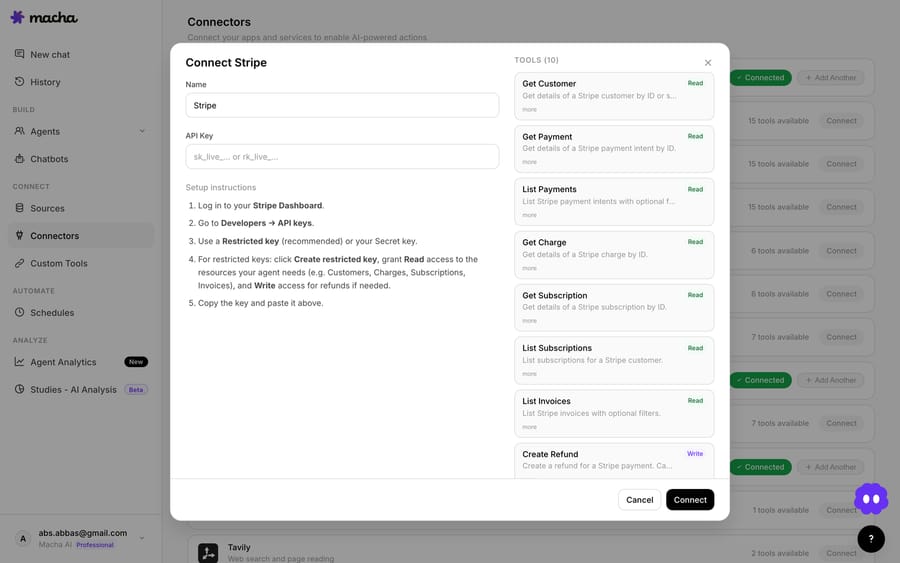
And to stop a broken connector from drowning in retries, webhook rejection tracking returns 410 Gone after a threshold of rejected webhooks, which prompts the upstream system to stop sending — a small courtesy that also keeps a dead connector from generating an endless stream of racing requests.
What should other teams that hold OAuth tokens do?
If you hold OAuth tokens on behalf of customers, the lessons generalize cleanly:
- A lock around the write is not enough. If both racers read the single-use token before the lock, serializing the write still strands a credential. Re-read inside the lock and compare.
- Refresh-token rotation turns a benign race into a fatal one. Without rotation, a duplicate refresh wastes a round-trip. With rotation, it can destroy the only working credential. Assume your provider rotates.
- Single-process in-memory locks don't scale to multiple instances. Our incident was one process, so an in-process lock was sufficient — but the moment you run two replicas, you need a distributed lock (Redis, a database advisory lock, or similar). Plan for it before you horizontally scale.
- Some providers offer a reuse grace window. A few authorization servers add a short overlap period (Connect2id ships a configurable one that defaults to 5 seconds) during which a just-rotated token can still be retried, to absorb exactly this kind of timing. Lean on it if your provider has it — but don't depend on one that doesn't.
- Prevention and recovery are different projects. Fix the race and build the loud failure + one-click reconnect, because tokens will still get revoked for reasons you didn't cause.
Where does this fix stop working?
This is an honest list, not a victory lap.
- It's correct for a single process, by design. The compare-before-write re-read is coordinated by an in-memory lock. That is exactly right for the architecture that had the outage, but it is not a multi-instance solution on its own — running several app replicas would reintroduce the race across processes and require a shared lock. We know this; it's the next stop if and when the deployment shape changes.
- It doesn't help if the provider already killed both tokens. If a customer revokes Macha's grant in Zendesk, no amount of locking brings it back — that's what the Reconnect flow and
auth_failedalerts are for. - Clock skew still exists. Proactive refresh leans on expiry timestamps; the 401 fallback is the safety net for when the clock lied. We kept both. Don't delete your fallback because your proactive path looks solid.
410 Goneis a blunt instrument. It tells an upstream to stop sending, which is great for a genuinely dead connector and bad if you trip the threshold on a transient blip — so the threshold is configurable and tuned conservatively.
FAQ
What is an OAuth token-refresh race condition? It's when two or more concurrent requests both notice an expired access token and both try to refresh it at the same time. Because refresh tokens are typically single-use (rotated on every refresh), one request invalidates the token the other is still trying to use — and you can end up storing a token the provider has already retired, which surfaces as invalid_grant on the next refresh.
Why didn't a lock fix it on its own? Both requests had already read the old refresh token before either acquired the lock. Serializing only the write doesn't help when both writers are holding the same now-invalidated token. The fix is to re-read the credentials after taking the lock and skip the refresh if someone else already did it — compare-before-write.
Does this require multi-instance / distributed locking? For the single-process server where this happened, an in-memory lock plus the re-read is sufficient. If you run multiple instances, you need a distributed lock (e.g. Redis or a database advisory lock) so the coordination spans processes. We call that out explicitly because it's the common next failure for teams that scale horizontally.
What happens now if a Macha connector loses auth anyway? The connector is marked auth_failed, its agents are automatically deactivated, and admins get an email. You can run a one-click Test connection to verify, and use the in-place Reconnect button to re-authenticate without losing the connector's ID, tools, or webhook configuration.
Which connectors are covered? The shared refresh-lock utility covers Macha's OAuth connectors — Zendesk, Google, and Shopify — so the same compare-before-write guarantee applies across all of them. See the connector docs for setup details.
How can you see connector health in Macha?
Macha's job is to keep an AI agent layer alive on top of the help desk you already run, which means the unglamorous reliability work (token refresh, connector health, graceful reconnect) is the product. If you want to see the connector and agent setup first-hand, start with $50 of free usage, no credit card required, connect Zendesk, and read the docs for the full walkthrough — or browse more engineering and product notes on the blog.
Written by Abbas (Customer Support & AI, Macha) · Reviewed by Ankeet Guha (Co-founder & CTO) · Published 2026-06-24 · Last updated 2026-09-24.






