





 Shopify
 Stripe
 Slack
Slack Notion
 Google Workspace
 Confluence

How Do You Run an AI Agent the Moment a Zendesk Ticket Changes? Webhook Triggers Explained


Most support automation waits for a person to open the ticket, and the gap between a ticket changing and someone acting on it is where SLAs slip. Webhook triggers close that gap by starting an AI agent the instant your help desk reports the change.
Key takeaways
- Macha runs an AI agent the moment a ticket changes by wiring the agent to an event trigger that fires when your help desk sends a webhook.
- Zendesk exposes eight event triggers in Macha: New Ticket, Customer Reply, Status Changed, Priority Changed, Ticket Assigned, Ticket Closed, Messaging, and Custom Webhook.
- Zendesk signs each outbound webhook with a base64 HMAC-SHA256 of the timestamp plus body, and Macha verifies a signing secret on every custom webhook call.
- A debounce interval of 60 seconds batches rapid-fire events on the same ticket so the agent runs once on the final state instead of three or four times.
- Macha scheduled triggers need a minimum 1-hour interval, cap runs at 24 per day, and auto-disable after 5 consecutive failures with an email notification.

To run an AI agent the moment a ticket changes, wire the agent to an event trigger in Macha: your help desk sends a webhook when a ticket is created, answered or escalated, and the agent runs on it within seconds. On Zendesk that means eight events, from New Ticket to a Custom Webhook you fire from your own Zendesk trigger. A debounce interval, such as 60 seconds, keeps a busy ticket from starting the agent three or four times. Here are the events each connector exposes today:
| Connector | Event triggers |
|---|---|
| Zendesk | New Ticket · Customer Reply · Status Changed · Priority Changed · Ticket Assigned · Ticket Closed · Messaging · Custom Webhook |
| Freshdesk | Ticket Created · Ticket Updated · Custom Webhook |
| Gorgias | Ticket Created · Ticket Updated · New Message Added · Custom Webhook |
| Front | Conversation Created · New Message Added · Conversation Assigned · Custom Webhook |
| HubSpot | New Ticket Created · Ticket Updated · New Contact Created |
| Intercom | First Customer Message · Every Customer Message · Conversation Assigned · Conversation Closed |
| Slack | App Mention · Direct Message |
A webhook is a real-time HTTP message your help desk sends the instant something happens. On its own it only delivers a notification. The interesting question is what receives it. In Macha, the receiver is an AI agent that reads the event, decides what to do, and takes real actions: drafts the reply, applies tags, routes the ticket, looks up the order in Shopify, posts to Slack, without a human pressing go.
That machinery is Macha's trigger system, and it's the difference between an agent you have to talk to and an agent that's already working when you wake up. Macha is a layer on top of the helpdesk you already run (Zendesk, Freshdesk, Gorgias, Front, HubSpot or Intercom), so none of this replaces your queue. It makes the queue act on itself.
What is a trigger in Macha?
In Macha, every agent can be wired to one or more triggers. A trigger is the answer to a single question: when should this agent run on its own? There are two families:
- Event triggers — fire on something that happens in a connected tool (a new ticket, a customer reply, a Slack mention).
- Scheduled triggers — fire on a clock (hourly, daily, a custom cron expression). Different beast; covered near the end.
Event triggers are the webhook-driven ones, and they're the heart of "run the moment a ticket changes." You pick the agent, pick the event, set an optional condition and debounce, and the agent now runs autonomously every time that event arrives.
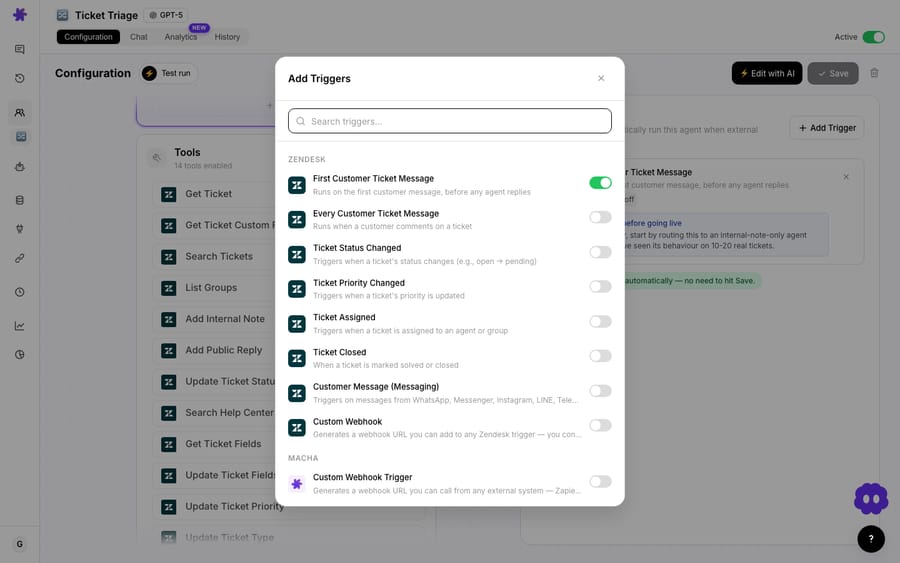
Crucially, the agent that fires is the same agent you can chat with — same instructions, same tools, same knowledge sources. The only thing that changes is who started the conversation: a webhook instead of a person. That's a deliberate design choice. You build and test an agent interactively, then flip on a trigger and it runs the exact configuration you already trust.
Which ticket events can start an agent?
Trigger types come from the connector, because each helpdesk exposes different events. The table at the top lists the menu Macha supports today, straight from each connector.
A few of these are worth calling out because the timing matters:
- New Ticket fires on the first customer message, before any agent replies — the right moment for first-touch triage, auto-acknowledgement, or an instant knowledge-base answer.
- Customer Reply fires on every subsequent customer comment, so a follow-up agent can keep a thread moving.
- Status Changed / Priority Changed / Ticket Assigned are the "something escalated" events — perfect for bundling context the instant a ticket is flagged urgent, instead of waiting for the human who'll work it.
- Messaging covers WhatsApp, Messenger, Instagram, LINE, Telegram, and web chat, so the same agent handles social DMs and email tickets through one trigger.
You're not limited to one. A triage agent might listen on New Ticket; a separate escalation agent listens on Priority Changed. Each agent's Triggers tab shows exactly what it's wired to.
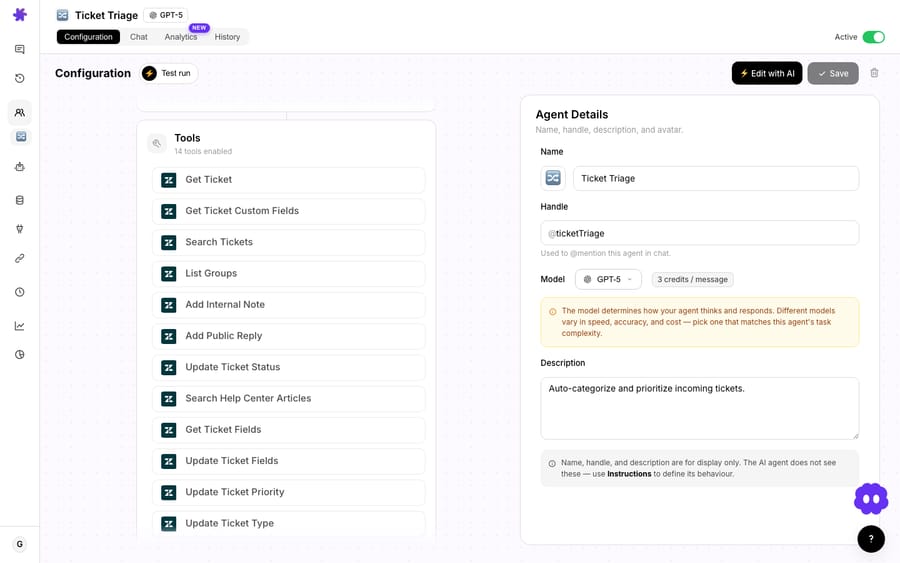
When should you use a custom webhook instead of a built-in event?
The built-in events cover the common cases, but real teams have oddly specific rules: only fire when a VIP tag is present and the order total is over $500 and the brand is EU. You don't want the agent waking up on every ticket and reasoning its way to "not this one" — that's slow, and it wakes the agent for tickets it was never going to help with.
That's what the Custom Webhook trigger is for. Macha generates a unique webhook URL with its own signing secret, and you attach that URL to a native rule in your helpdesk — a Zendesk trigger, a Freshdesk automation, a Front rule's "Send a webhook" action, or literally any external system that can POST HTTP. Your helpdesk's own condition builder decides which tickets fire; Macha just receives the ones that match.
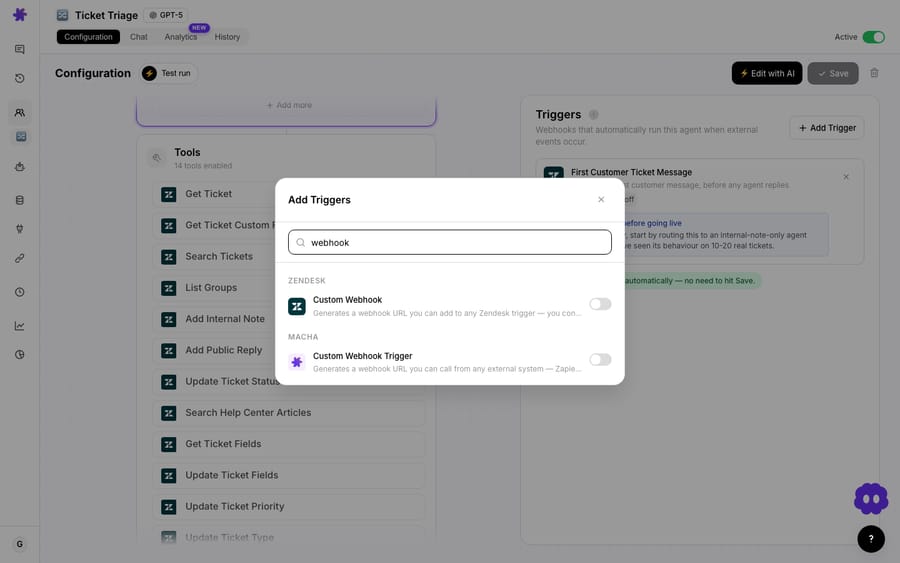
The signing secret is the part that makes this safe to expose. Macha verifies the signature on every incoming call, so a leaked URL alone can't trigger your agents — the payload has to be signed. This mirrors how Zendesk itself secures outbound webhooks, signing each request with a base64-encoded HMAC-SHA256 of the timestamp plus the body, sent in the X-Zendesk-Webhook-Signature header alongside X-Zendesk-Webhook-Signature-Timestamp (Zendesk webhook docs; verification guide). Most "how to set up a webhook" guides skip this detail, and it's the difference between a toy and something you'd point at production.
On the helpdesk side, you build the rule the way you always have. In Zendesk's Admin Center you create a trigger with your exact conditions and add a Notify active webhook action pointing at Macha's URL — the agent only ever sees the tickets you let through.
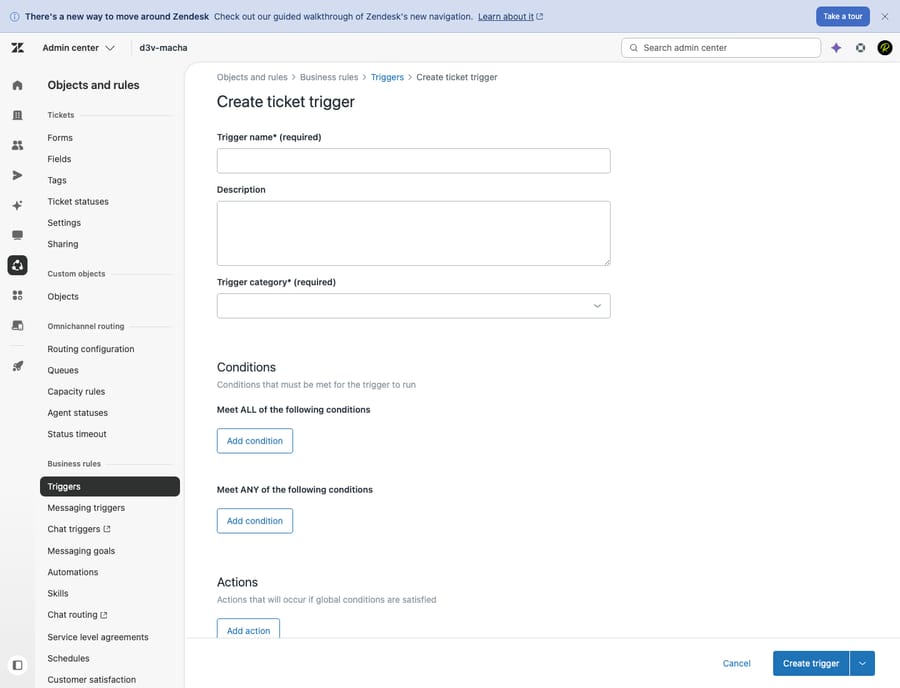
This is the pattern we recommend whenever precision matters: let your helpdesk's mature rule engine do the filtering, and let Macha's agent do the thinking and acting. (For a fuller walkthrough of standing up autonomous agents on Zendesk, see How to set up autonomous AI agents for Zendesk tickets.)
How do you stop one busy ticket firing the agent ten times?
Ticket events are bursty. A customer fires off three replies in a row; an agent edits a ticket's status, then its priority, then its tags within the same minute. Naively, each of those is a separate webhook, and a naive system would launch your agent three or four times for what is really one situation — quadrupling the work and the cost, and risking the agent stepping on its own half-finished reply.
Macha's trigger system has a configurable debounce interval for exactly this. Set a debounce of, say, 60 seconds and rapid-fire events on the same ticket are batched: the agent waits for the dust to settle, then runs once on the final state. It's the single most underrated setting in the whole system, because it's the one that keeps an event-driven agent from becoming an event-storm-driven agent.
Two sensible exceptions are baked in: scheduled (cron) triggers and unkeyed universal webhooks don't show a debounce option, because debouncing a clock or a per-org catch-all endpoint doesn't mean anything. Everywhere it makes sense, it's there.
What happens when a trigger fires?
When an event arrives and clears debounce, Macha spins up an autonomous conversation — the same kind of run you'd see in chat, just started by a machine. A few things happen that you'll appreciate the first time you have to debug one:
- The raw payload is preserved. Every autonomous conversation stores the full webhook payload it was born from, so when an agent does something surprising you can open the run and see exactly what it was handed. Audit and debugging aren't an afterthought.
- Runs are titled with real context. For Zendesk and Freshdesk custom webhooks, Macha pulls the
ticket_idandticket_subjectout of the payload and uses them as the conversation title, so your history reads like "#48213 — Refund for duplicate charge" instead of a wall of "Custom Webhook." - Sub-agents can write. If your agent delegates to specialist sub-agents, those sub-agents are allowed to perform write actions (replies, updates) when running via a trigger — but stay read-only during interactive chat, so you can safely poke at them by hand without side effects.
The result is an agent that reads the ticket, pulls whatever context it needs from its connected tools, and takes the action — all in the seconds after the event, with a full record of why.
Can an agent run on a schedule instead of an event?
Not everything is event-driven. Sometimes you want an agent to run because it's 9 a.m., not because a ticket moved — a daily metrics summary in Slack, an hourly trending-topics scan, a weekly refund report. Those are scheduled triggers: cron-based runs on a recurring interval.
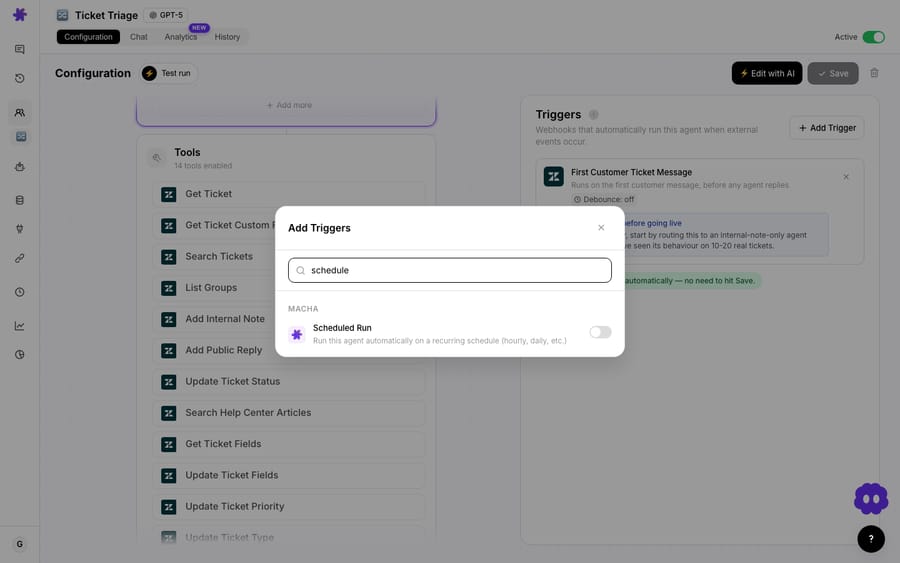
They come with deliberate guardrails so a runaway schedule can't quietly drain your account:
- Minimum 1-hour interval, a 24-runs-per-day cap, and a per-org concurrency limit so schedules can't pile on top of each other.
- Auto-disable after 5 consecutive failures, with an email notification, plus stale-lock cleanup at 30 minutes so a crashed run doesn't block the next one.
- No plan gate: scheduled triggers are available on every plan, and event triggers aren't capped either. (See the pricing page for current plan details.)
Scheduled and event triggers are complementary: events handle "react the instant something happens," schedules handle "do this on a rhythm." Most mature setups use both.
What happens to your Zendesk triggers when you pause an agent?
This is the kind of thing you only learn to care about after it bites you once. When you toggle an agent off in Macha, it does not delete the webhooks and triggers it created on the Zendesk side. It sets them to inactive instead, keeping the exact same Zendesk resource IDs. Toggle the agent back on and they flip to active again — so any Zendesk trigger you built in your own Admin Center that references Macha's webhook keeps working untouched across pause/resume cycles.
Same story for trashing an agent: its triggers are paused (so they stop firing) but their signing secrets and config are preserved, so restoring the agent brings everything back intact. Only an explicit trigger delete tears things down fully. It means you can safely pause an agent overnight, or while you're reworking it, without rebuilding your helpdesk-side plumbing afterward.
There's also a safety net on the connector side: if a connector breaks (revoked credentials, a deleted instance) and webhooks keep arriving, Macha tracks the rejections and eventually returns 410 Gone to prompt the sending system to stop hammering a dead endpoint — rather than silently swallowing or endlessly erroring.
When should you not point a trigger at a ticket?
Event-driven agents are powerful, which is exactly why they deserve a few honest cautions.
- Every fired trigger is an agent run, and every ticket it wakes on is a billable ticket. Macha bills per ticket — one conversation, charged once however many steps the agent takes inside it — so what drives the bill isn't how hard the agent thinks, it's how many tickets you point it at. A
New Tickettrigger with no condition and no debounce on a high-volume queue will run on everything. Scope it — use the helpdesk's own conditions via a custom webhook, set a debounce, and don't wake the agent for tickets it can't help with. - Don't auto-send where a mistake is expensive. For billing disputes, legal-adjacent issues, or anything irreversible, fire the trigger but have the agent draft an internal note for a human rather than auto-replying. Autonomy and auto-send are separate decisions.
- Mind double-firing across systems. If you have both a Macha built-in
Ticket Createdtrigger and a custom webhook from a Zendesk trigger that also matches new tickets, you can fire the same agent twice. Pick one path per outcome. - Test on real data first. Use the agent's Test Run with an actual ticket before you flip the trigger live — it's far cheaper to find a bad instruction in a sandbox run than across a thousand live tickets.
Used with those guardrails, webhook automation is the cleanest way to get from "ticket changed" to "ticket handled" with no one in the loop. Used carelessly, it's a fast way to burn through the month's tickets and annoy customers. The system gives you the controls; the discipline is on you.
FAQ
What's the difference between a webhook and a trigger in Macha? A webhook is the raw HTTP message your helpdesk sends when an event happens. A trigger is Macha's configuration that listens for that event (or a schedule) and runs a specific agent in response. Triggers consume webhooks; you configure triggers, not webhooks, in Macha.
Which events can fire an agent? It depends on the connector. Zendesk exposes eight event types (New Ticket, Customer Reply, Status/Priority changes, Assigned, Closed, Messaging, and Custom Webhook); Freshdesk, Gorgias, and Front expose their own created/updated/message events; HubSpot fires on new tickets, ticket updates and new contacts; Intercom on new conversations, customer messages, assignment and close; Slack on @mentions and DMs. Zendesk, Freshdesk, Gorgias and Front also offer a Custom Webhook for fully custom conditions.
How do custom webhooks stay secure? Each custom webhook gets a unique URL and a signing secret. Macha verifies the signature on every incoming request, so an exposed URL alone can't trigger your agents — only correctly signed payloads run.
Will pausing an agent break my Zendesk triggers? No. Pausing sets the agent's Zendesk webhooks and triggers to inactive (same resource IDs), and resuming reactivates them. Any Zendesk trigger you built yourself that references Macha's webhook keeps working across the cycle. Only an explicit delete tears them down.
How do I stop an agent firing too often? Set a debounce interval to batch rapid events, add conditions (either in Macha or in your helpdesk's rule that calls the custom webhook), and avoid overlapping built-in and custom triggers that match the same tickets.
Can agents run on a schedule too? Yes — scheduled (cron) triggers run an agent on a recurring interval with guardrails (minimum 1-hour interval, daily caps, auto-disable on repeated failure), and they're available on every plan.
How do you set up your first webhook-triggered agent?
If your team is still waiting on a human to notice every ticket, webhook automation is the upgrade. Start a free trial ($50 of usage, about 125 tickets, no credit card required), connect your helpdesk, build one agent, and wire it to a single trigger — New Ticket is the usual first move. Watch one run, read the preserved payload, and you'll see exactly what "the moment a ticket changes" buys you. The full setup is in the Triggers docs, and you can browse trigger-driven use cases for ideas, or see how it all fits on Macha for Zendesk.
Written by Abbas (Customer Support & AI, Macha) · Reviewed by Ankeet Guha (Co-founder & CTO) · Published 2026-06-24 · Last updated 2026-09-24.






