





 Shopify
 Stripe
 Slack
Slack Notion
 Google Workspace
 Confluence

How Do You Automate a Weekly Refund Report to Slack? A Scheduled AI Agent Setup (2026)


A weekly refund report to Slack takes one Macha agent with Stripe List Payments, Slack Send Message and a scheduled trigger set to the cron expression 0 9 * * 1, which runs at 9:00 every Monday. Each run totals the week's refunds, groups the reasons, compares the week with the one before and posts one digest.
Key takeaways
- A weekly Stripe refund report to Slack takes one Macha agent with two tools, List Payments and Send Message, and a scheduled trigger set to the cron expression 0 9 * * 1.
- Macha's scheduled triggers are set with a cron expression, so a report that posts every Monday at 9:00 uses 0 9 * * 1.
- Macha's scheduler checks every 60 seconds, enforces a 1-hour minimum interval, caps a trigger at 24 runs a day, and auto-disables it after 5 consecutive errors.
- In a sample week, the Macha refund digest showed $1,247.00 refunded across 14 refunds, an $89.07 average, and refunds down 12% on the prior week.
- Digest by Zapier and an n8n Stripe template can batch refunds on a schedule, but neither reads free-text refund notes to sort reasons like defective or wrong item.

To automate a weekly refund report to Slack, give one Macha agent two tools, Stripe List Payments and Slack Send Message, plus a scheduled trigger with the cron expression 0 9 * * 1, which runs it at 9:00 every Monday. Each run pulls the last seven days of refunds, totals them, groups the reasons, compares the week with the one before, and posts one digest to your finance or support channel. No spreadsheet, no Monday reminder, no workflow to babysit.
| Setup step | What you configure |
|---|---|
| 1. Connectors | Stripe (API key, read-only is enough) and Slack (OAuth) |
| 2. Trigger | Scheduled: cron expression 0 9 * * 1 (Monday 9:00) |
| 3. Tools | Stripe List Payments + Slack Send Message |
| 4. Instructions | A paragraph describing the totals, reason groups, trend and channel |
Macha is an AI agent layer that runs on top of the help desk and tools you already use (Zendesk, Freshdesk, Gorgias, Front, HubSpot or Intercom, plus Stripe, Slack, Shopify and more). It isn't a reporting tool you log into; it's an agent that does the reporting and drops the result where your team already works. Here's how to set this one up, and where it beats the alternatives and where it doesn't.
What does the weekly refund report look like?
The output is a single Slack message, posted on a fixed cadence. A sample week reads like this:
💰 Weekly Refund Report — Feb 25 to Mar 3 - Total refunded: $1,247.00 - Refund count: 14 - Average refund: $89.07 - Top reasons: Defective product (5), Wrong item (4), Changed mind (3), Duplicate charge (2) - 📈 Trend: refunds down 12% vs. the prior week
In Slack it lands as one message: totals up top, an AI-categorized reason breakdown, the week-over-week trend, and a one-line read on what changed.
The "top reasons" line, plus any closing note on which product is driving the defects, is the part a simple integration can't give you. Stripe stores a refund reason as free text (or a coarse enum like requested_by_customer), so a rules-based automation can only hand you raw strings. An AI agent reads the refund notes (and, because Macha sits on your help desk, the linked ticket context) and groups them into the categories your team actually talks in, then summarizes what moved. That's the difference between a notification and a report.
How does the scheduled agent work?
Four moving parts, all configured in the agent builder:
| Piece | What it is | In this workflow |
|---|---|---|
| Trigger | What starts the run | A scheduled trigger: cron 0 9 * * 1, every Monday at 9:00 AM |
| Tools | What the agent can do | Stripe List Payments + Slack Send Message |
| Instructions | What you want, in plain English | "Summarize last week's refunds and post to #finance" |
| Model | Which LLM reasons over the data | Your pick; the model doesn't change the price |
One accuracy note: the weekly cadence comes from Macha's scheduled trigger, not from Stripe. Stripe fires an event the instant a single refund happens, but it has no "every Monday" webhook, and a per-refund event gives you 14 separate pings, not one digest. Macha's scheduler is what lets you say "run this once a week and aggregate," which is the whole point of a report.
1. Connect Stripe and Slack
Add both connectors from the Connectors page. Stripe authenticates with an API key (a restricted, read-only key is fine for a report, because it only needs to read payments); Slack connects over OAuth so the agent can post to your channels.
You can connect more than one Stripe account if you run multiple entities. Each instance gets its own credentials and name, and you point the agent at the right one.
2. Schedule the trigger
On the agent's configuration page, add a Scheduled trigger and give it a cron expression, the standard five-field schedule (minute, hour, day of month, month, day of week). For a Monday-morning report, enter 0 9 * * 1: minute 0, hour 9, any day of the month, any month, Monday. The agent then runs at 9:00 every Monday.
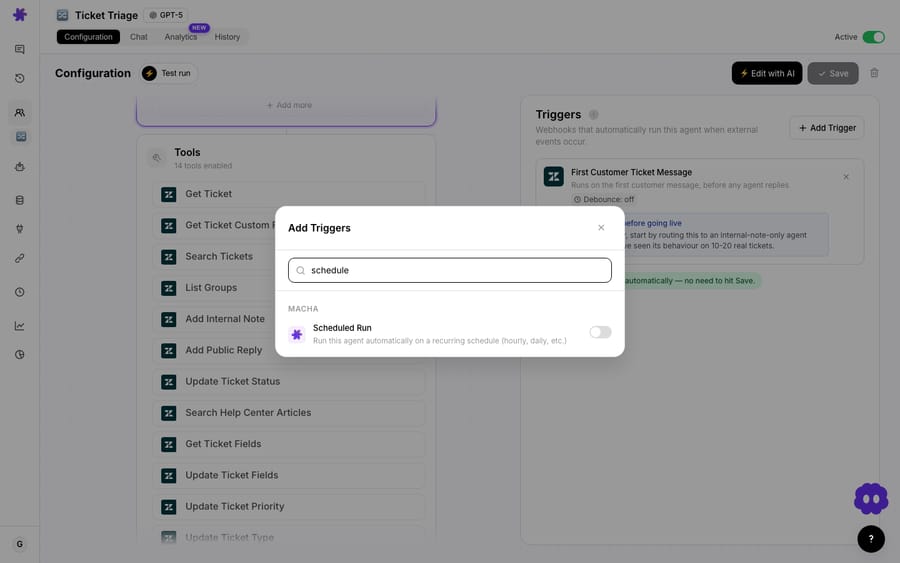
A few guardrails stop a scheduled agent from running away with itself: the scheduler checks every 60 seconds for due triggers, enforces a minimum 1-hour interval, caps each trigger at 24 runs a day, allows 3 simultaneous scheduled runs per organization, releases a run's lock after 30 minutes, and auto-disables a trigger after 5 consecutive errors (with an email so you know). A once-a-week report never comes near those limits, but they're the reason you can leave a scheduled agent running unattended.
Scheduled triggers are included in Macha's single plan at every ticket tier; the pricing page lists them alongside custom API tools and simulation. See the pricing page for the current details.
3. Pick the tools
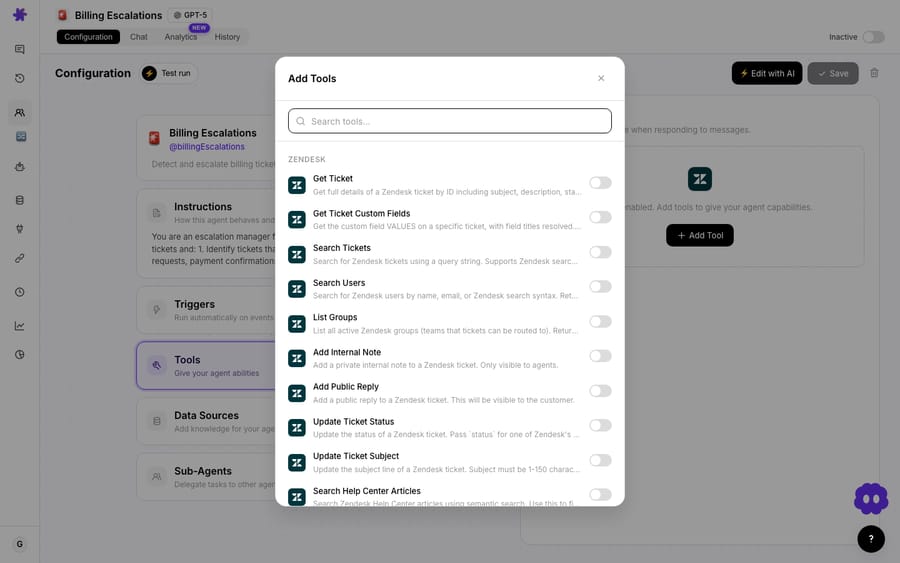
The agent needs two abilities: read refunds from Stripe and write to Slack. Add Stripe List Payments and Slack Send Message from the tool picker. List Payments can be filtered by status, amount, and date range, which is how the agent scopes the query to the last 7 days.
4. Write the instructions
This is the only "config" most people care about, and it's prose, not code. Something like:
Every Monday, list all Stripe refunds from the previous 7 days. Calculate the total refunded amount, the refund count, and the average. Group the refunds into reason categories (defective, wrong item, changed mind, duplicate charge, other) based on the refund notes. Compare the total to the previous 7-day window and report the percent change. Post a clean, scannable summary to the #finance Slack channel with emoji section headers.
Macha can also build the whole agent for you from a description like that. Its Build with AI flow (Sidekick) turns a plain-language spec into a configured agent with the trigger, tools and instructions wired up, which you then review and tweak. Either way, you end up with an agent you can read and edit in English.
How do you break refunds down by product or metadata?
The built-in Stripe List Payments action is enough for a solid weekly digest. But if you want the report to slice refunds by product, by reason code, or by your own Stripe metadata, you'll want to query Stripe's dedicated refunds endpoint, GET /v1/refunds, directly with exactly the parameters you choose.
That's what Custom API Tools are for. You define a tool that hits the Stripe refunds API, describe what it returns, and the agent calls it like any other action. It's the difference between "good enough" and "exactly the cut of the data we report on."

Custom API Tools are included in every Macha pricing tier. For most teams the native List Payments action covers the standard report, and the custom tool is the upgrade path when finance wants more dimensions.
How much does a weekly refund report cost to run?
Macha bills per ticket: one conversation, charged once, not per refund. A weekly digest is a single scheduled run, however many steps it takes to read the refund list, reason over it and post to Slack. The model you pick doesn't change what you pay either: one flat charge per ticket whichever model runs the agent. Pricing starts at $299 a month for 750 tickets, about $0.40 each, so you can size a plan against the volume you actually handle.
In practice a once-a-week report is one of the cheapest things you can automate: one scheduled run a week against a plan sized for your ticket volume. Start with the free trial ($50 of usage, no credit card required) to see real numbers on your own data before committing to a plan. Full tiers are on the pricing page.
Can Zapier, Make or n8n build the same report?
If you've shopped for this before, you've seen Zapier, Make, Relay.app, n8n, and tray.ai. To be fair to them: scheduled aggregation is a solved problem on all of them. Zapier ships Digest by Zapier, which batches entries and releases them daily, weekly, or monthly to Slack; Make's Aggregator module plus a scheduled scenario does the same; and n8n even has a ready-made template that pulls Stripe charges and refunds on a monthly/quarterly schedule and posts a formatted report to Slack. So "they can only fire one ping per refund" isn't the real gap; these tools can batch. The real differentiator is narrower:
| Approach | Scheduled digest? | The real catch for this job |
|---|---|---|
| Zapier (Digest by Zapier) / Make (Aggregator) | Yes: batch and release daily, weekly or monthly | Aggregates the numbers well, but reason grouping is literal-match: it can count requested_by_customer, not read a free-text note and decide it means "defective." No helpdesk/ticket context. |
| n8n / tray.ai | Yes: schedule trigger plus Stripe nodes (a monthly/quarterly template exists) | You build and maintain the workflow; categorizing free-text reasons means bolting an LLM node into the graph and engineering the prompt yourself. |
| Macha | Yes: a scheduled AI agent | Aggregates and reasons over free-text refund notes to categorize, pulls linked ticket context from the helpdesk it sits on, and writes the "what changed" summary, all described in plain English, no node graph to maintain. |
The honest summary: if you only need totals and counts on a schedule, Digest by Zapier or an n8n template will do it, and you may not need an agent at all. Macha earns its place when the categorization and context are the point: when you want refund reasons grouped the way your team actually talks, tied back to the tickets that explain them, and summarized into "here's what moved and why," without maintaining a workflow to keep it running. (For the underlying connectors, see the Stripe and Slack integration pages.)
When should you not use a scheduled refund agent?
A few things to keep in mind before you ship this:
- Stripe has no native weekly trigger. The cadence is Macha's scheduler. If you instead want an instant alert on every individual refund or dispute, that's an event-driven flow, not this scheduled report, and a simpler tool may be enough.
- Refund reasons are only as good as your data. If your team doesn't capture why a refund happened (in the Stripe note or the linked ticket), the AI can categorize less precisely. A short, consistent refund-reason habit pays off here.
- It's a report, not a control. This agent reads and summarizes; it doesn't approve or block refunds. If you want the agent to process refunds, that's the separate process refund requests automatically workflow with Stripe's Refund tool, and you'd gate it carefully.
- The schedule is Macha's, not Stripe's. Stripe has no "every Monday" webhook, so the scheduled trigger is the only thing making this weekly. If it's disabled after an edit or after 5 errors, the report stops.
- Read-only keys for a read-only job. Give the report agent a restricted Stripe key that can't write. There's no reason a reporting agent should be able to issue refunds.
FAQ
Does this fire on every refund, or once a week? Once a week (or whatever schedule you set). It's a scheduled trigger that aggregates the whole window into one digest, not a per-refund notification.
Can it post to multiple channels? Yes. Slack Send Message can target any channel the bot has access to; you can have the agent post the same digest to several channels, or run separate agents for separate teams.
Can I change the schedule or the window? Both. The cron expression controls when it runs; the instructions control the lookback window (last 7 days, last 30, month-to-date). For a monthly report, 0 9 1 * * runs at 9:00 on the 1st of every month; pair it with instructions to cover the previous calendar month.
What if Stripe is down or a run fails? A scheduled trigger auto-disables after 5 consecutive failures and emails you, so a silent breakage can't run forever. A single failed run simply skips that week's post.
Do I need Zendesk for this? No. This report only needs Stripe and Slack. But because Macha runs on top of your help desk, an agent can enrich refunds with ticket context if you've connected one.
How much does each report cost? Macha bills per ticket (one conversation, charged once, from $299 a month for 750 tickets), and the model you choose doesn't change the price. A weekly report is among the cheapest automations you can run. See pricing.
How do you get started?
A weekly refund report is the kind of small, boring discipline teams know they should keep and rarely do. Handing it to a scheduled agent takes it off everyone's Monday list. Start a free trial ($50 of usage, no credit card required), connect Stripe and Slack, describe the report in a sentence, and set it to run Monday at 9, or browse the rest of the use-case library for more agents you can put on a schedule. Full setup is in the docs.
Written by Abbas (Customer Support & AI, Macha) · Reviewed by Ankeet Guha (Co-founder & CTO) · Published 2026-06-24 · Last updated 2026-09-24.






