





 Shopify
 Stripe
 Slack
Slack Notion
 Google Workspace
 Confluence

What Is Data-Driven Onboarding? Macha's Welcome Conversation


Most products end onboarding on a "You're all set" screen and an empty dashboard. Macha ends it in a free welcome chat that already references real items from the tools you just connected.
Key takeaways
- Data-driven onboarding shows a new user value from their own data; Macha's welcome conversation opens by referencing real tickets, payments or conversations from connected tools.
- Macha's onboarding has three steps: pick your tools, choose up to three recommended agent templates, and connect integrations by OAuth or API key.
- Below the welcome message, Macha shows three AI-generated suggestion chips built from the agent templates you picked and the data it found.
- Macha's welcome conversation is free, marked by a "This chat costs no credits" badge, and each organization gets exactly one.
- After the welcome chat, Macha bills per ticket, starting at $299 a month for 750 tickets, about $0.40 each.

Data-driven onboarding means the product reads the user's own data during the first run and shows value from it, instead of a generic tour. Macha does this with a welcome conversation: after a three-step setup (pick tools, pick up to three agent templates, connect integrations), the first chat message references real tickets, payments or conversations from your connected tools, and that one chat is free.
| Welcome conversation detail | How it works |
|---|---|
| When it appears | After onboarding finishes with at least one connector |
| What it reads | A few recent items: tickets, payments, conversations |
| Follow-up prompts | Three AI-generated suggestion chips |
| Cost | Free, marked by a "This chat costs no credits" badge |
| How many | One per organization |
When a new organization finishes onboarding with at least one connector wired up, it doesn't land on a static "you're all set" page. It lands in a chat, and the first message streams in already referencing the real data Macha just found in your tools. Not a templated "Hi, I'm your AI agent." Something closer to: "I can see 12 open tickets in your Zendesk and a Stripe payment that came through this morning, want me to triage the queue?"
This is a small feature with an outsized point behind it: the fastest way to prove an AI agent layer is real is to have it know something about your business before you've typed a single word. The sections below cover how the welcome conversation works, where it sits among onboarding patterns, why it's built this way, and where it stops.
What's wrong with a "You're all set" screen?
The empty state is a measurable drop-off point, not a cosmetic one. Nielsen Norman Group's guidance on empty-state interface design treats the first blank screen as a core onboarding surface, get it wrong and users never reach the "aha." The whole modern push toward data-driven and AI onboarding exists to fix exactly this. ProductLed frames the goal as activating a user fast and shifting onboarding "from education to outcomes," and a UX Collective piece on AI product onboarding argues the first 30 seconds have to show value, not promise it.
How much does personalization actually move the needle? Honestly, the numbers floating around are softer than they look. Onboarding-research roundups like UserGuiding's statistics compilation list personalized first-run experiences boosting retention by 35% and personalized onboarding lifting retention by 40% over generic flows, but those figures are vendor-aggregated and rarely traced to a primary study, so treat them as direction, not gospel. The directional signal is consistent and uncontroversial: a first run grounded in the user's own context beats a one-size-fits-all tour. The exact percentage is less important than the mechanism.
And the mechanism is simple. A generic "all set" screen fails because it asks the user to do the imaginative work. Okay… so what can this thing actually do with my stuff? The user has to picture it. A welcome conversation that has already read your tickets removes the imagination step entirely, the proof is on the screen before you ask for it.
How does data-driven onboarding differ from tours and surveys?
It helps to place the welcome conversation on the map, because "onboarding" covers very different mechanics that get lumped together:
- Tours and checklists walk you through the UI ("click here, now here"). They teach the interface but not the value, you finish knowing where buttons are, not whether the product solves your problem.
- Segmentation surveys ask two-to-four questions ("What's your role? Team size?") and route you into a tailored path. This is the most common form of "personalized onboarding," but the personalization is shallow: it's based on what you say, captured through a dropdown.
- Empty-state CTAs turn the blank screen into a next step, a single prominent "Connect your data" or "Create your first X" button. Better than a dead end, but still a prompt to go do work, not a demonstration.
- Data-grounding, the pattern this feature uses, skips the survey and the tour and instead reads your actual connected data, then reflects it back. The personalization signal isn't a form field; it's your live tickets, payments, and conversations.
The throughline across all of them is time-to-value: how fast a new user reaches a moment that proves the product works for them. Tours and surveys defer that moment; data-grounding collapses it to second one. That's why the welcome conversation is deliberately a data-grounding pattern rather than a guided tour, it's optimizing for the single metric that predicts activation. The trade-off, which we'll come back to in the watch-outs, is that data-grounding only works if there's real data to ground in.
How does Macha's welcome conversation work?
The flow has two halves: a short guided setup that connects your tools, and the welcome chat that reads from them.
First, the three-step setup
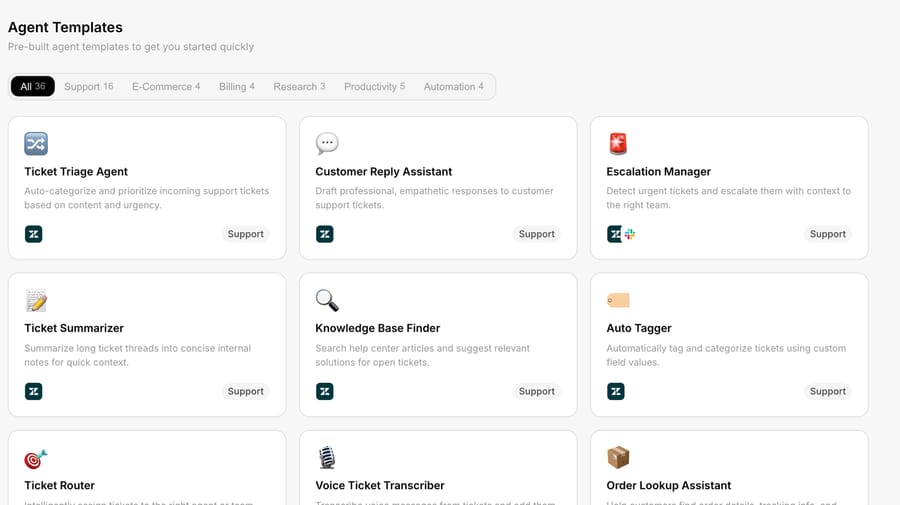
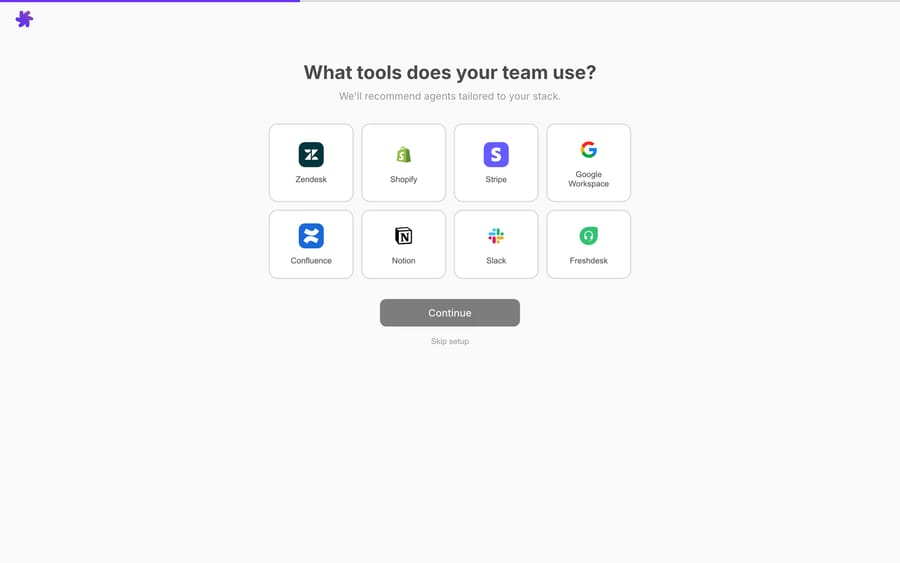
Before the welcome chat can say anything interesting, it needs at least one connector. Macha's onboarding is a three-step guided flow: pick the tools you use, choose up to three recommended agent templates, and connect your integrations. Macha's docs say getting started takes a few minutes, and you can skip any step and finish setup later.

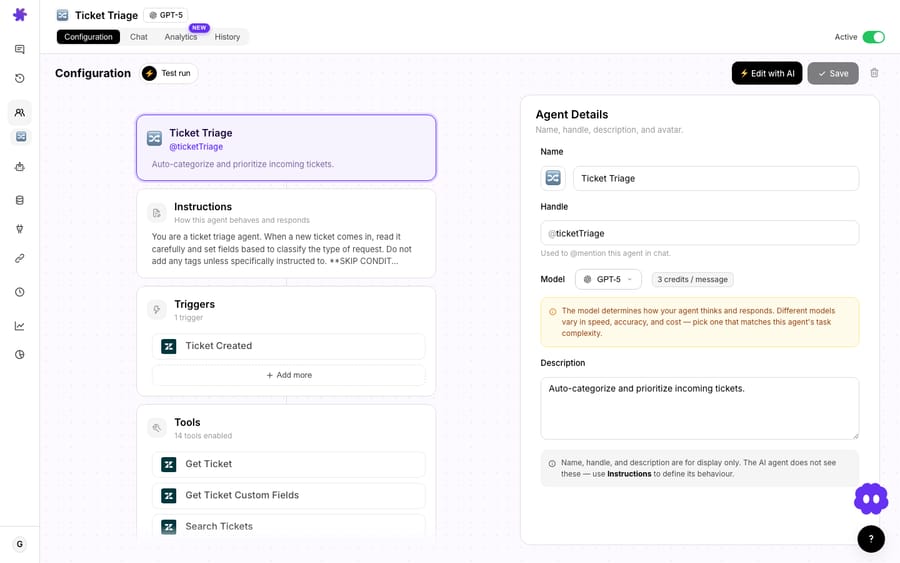
The connector step matters more than it looks. The connector modal shows the full tools list for each integration, so you can see exactly what an agent will be able to read and do, and each tool connects either through an OAuth approval or by pasting an API key, depending on the integration (Zendesk supports both). The agents you pick and the tools you connect are both inputs the welcome chat uses a minute later. (Macha connects to the help desk you already run, Zendesk, Freshdesk, Gorgias, Front, HubSpot or Intercom, plus commerce and comms tools like Stripe, Shopify, and Slack. See the full integrations list.)
Then, the chat that already knows things
The moment onboarding completes, Macha quietly queries the connectors you just authorized and pulls a few real items, recent tickets, recent payments, recent conversations, and the agent's opening message streams in referencing what it actually found.
Each of those three item types maps to a category of connector:
| What the welcome chat references | Where it reads it from |
|---|---|
| Recent tickets | Your help desk: Zendesk, Freshdesk, Gorgias, Front, HubSpot, Intercom |
| Recent payments | Commerce, Stripe, Shopify, or Razorpay |
| Recent conversations | Comms, Slack, or a shared inbox like Front |
So the message you see depends on what you connected. Wire up Zendesk only, and the chat talks about your open tickets. Add Stripe, and it can reference a payment that landed this morning. Connect a Shopify store, and it can ground itself in real orders. The point is that it's not a script, it's the same agents reading the same live tools they'll use on real work, just pointed at your data for the first time during a no-stakes hello.
Three suggestion chips, tailored to you
Below the welcome message, Macha surfaces three AI-generated suggestion chips. These aren't a fixed list of "Try asking…" prompts, they're generated from the combination of the agent templates you picked and the data Macha found. Connect a helpdesk and pick a triage template, and a chip might offer to sort your open queue by urgency. Connect Stripe and pick a billing template, and a chip might offer to look up a recent charge. They're the bridge from "this thing knows my data" to "this thing can act on it", one click and you're watching an agent do real work instead of reading about it.
The whole conversation is free
There's a detail here that signals confidence: the welcome conversation is free. A small badge reading "This chat costs no credits" sits next to the model picker and disappears when you start a new conversation, so you can poke at it, try a heavy model, and follow a suggestion chip without spending anything.
That matters because everything after it is billed: Macha bills per ticket, one conversation, charged once however many messages, lookups or drafts it takes, and the model you pick doesn't change the price. Pricing starts at $299 a month for 750 tickets, about $0.40 each (see the pricing page). Making the first conversation exempt means nobody hesitates to explore during the exact moment they're deciding whether the product is worth it. You get one welcome chat per organization; after that, you're in the normal metered product.
Why build onboarding around real data?
It would have been cheaper to ship the "you're all set" screen and a docs link. The welcome conversation is deliberately the opposite, and the design choices line up with what the onboarding research keeps pointing at:
- Show value, don't describe it. Reading your real tickets in the first message is a live demonstration that the agent layer works against your helpdesk, not a sandbox. That's the "outcomes over education" principle made concrete.
- Personalization without a survey. Most "personalized onboarding" means a two-to-four-question survey that routes you into a segment. Macha skips the questionnaire, your connected data and chosen agents are the personalization signal, which is richer than anything a dropdown could capture.
- One coherent surface. The thing that greets you is the same chat, same agents, and same tools you'll use forever. There's no throwaway onboarding UI to unlearn. The welcome chat is the product, just on a friendly first run.
It's the difference between a tour of a kitchen and being handed a plate of food someone cooked from ingredients in your own fridge.
When is the welcome chat underwhelming?
This feature is honest about its dependencies, so this section should be too.
- No connector, no magic. The welcome conversation only fires for orgs that finish onboarding with at least one connector. If you skip every integration during setup, there's nothing real to read and you'll get a plainer greeting. The fix is the obvious one: connect at least your helpdesk before you finish onboarding.
- A brand-new or empty account looks thin. This is the structural trade-off of any data-grounding pattern: it can only reflect data that exists. If your connected Zendesk has no recent tickets, or your Stripe just opened, there's little for the chat to reference. It shines on an established account migrating in, less so on a greenfield test instance.
- It's a one-time moment. There's one welcome chat per organization. It's an activation experience, not a recurring dashboard. Once you've had it, day-to-day work happens in agents, triggers, and the regular chat, so don't think of it as a standing "what's new in my data" feed. (For that, look at scheduled triggers and Studies.)
- Streaming ≠ instant. Because the opening message actually queries your tools live, it streams in rather than appearing all at once. That's a feature, it's reading real data, but it's a beat slower than a hard-coded string. Worth knowing so it reads as "thinking," not "lagging."
None of these are dealbreakers; they're just the seams of a feature that chose to use real data instead of faking it.
How does the welcome chat fit the rest of Macha?
The welcome conversation is a microcosm of how Macha works generally: it sits on top of the helpdesk and tools you already use, reads live data through connectors, and acts through the same agents. It's not a replacement for Zendesk or a separate inbox, it's the AI layer that makes the stack you already run do more. If you want the deeper version of that story, the Macha on Zendesk page walks through the same agents-on-your-data idea on a real queue, and the getting-started docs cover the onboarding flow end to end.
FAQ
What is data-driven onboarding? It's a first-run experience that reads the user's own connected data and reflects real value back immediately, instead of running a generic tour or survey. Macha's welcome conversation is a data-driven onboarding pattern: it queries your connected tools and opens with a message about your actual tickets, payments, and conversations.
What triggers the welcome conversation? Finishing Macha's onboarding flow with at least one connector authorized. New organizations land in the welcome chat instead of a static "you're all set" screen.
Does it really read my live data? Yes. Macha queries the tools you connected and pulls a few real items, recent tickets from your helpdesk, recent payments from a commerce connector, recent conversations from comms, and the opening message references what it actually found. It's not a templated greeting.
What are the three suggestion chips? AI-generated next actions shown below the welcome message, tailored to the agent templates you picked and the data Macha found. Click one to put an agent to work immediately.
Does the welcome chat cost anything? No. The entire welcome conversation is free, and a badge next to the model picker says so. You get one welcome chat per organization; normal agent work afterward is billed per ticket, from $299 a month for 750 tickets, about $0.40 each.
What if I connected no tools during onboarding? Then there's no live data to reference and you'll see a simpler greeting. Connect at least your help desk during setup to get the full experience; you can also connect tools later from the Connectors page.
How do you try the welcome conversation?
The best way to understand data-driven onboarding is to trigger one. Start a free trial ($50 of usage, no credit card, no time limit), connect your helpdesk in the guided setup, and watch the first message stream in already knowing what's in your queue. For the full walkthrough, read the getting-started docs, or browse the blog for more on what the agents do once they're past hello.
Written by Abbas (Customer Support & AI, Macha) · Reviewed by Ankeet Guha (Co-founder & CTO) · Published 2026-06-24 · Last updated 2026-09-24.






