





 Shopify
 Stripe
 Slack
Slack Notion
 Google Workspace
 Confluence

What Did Macha Ship in February 2026? Agent Data Sources and Credit Billing


Macha's February 22, 2026 release shipped agent data sources, so agents can read uploaded files and live Google Docs and Notion pages, plus metered billing with usage alerts and in-app checkout. The credit meter from that release has since given way to one plan sold in tickets, starting at $299 a month for 750 tickets.
Key takeaways
- Macha's February 22, 2026 release shipped agent data sources and metered billing, letting agents read live Google Docs and Notion pages instead of only static instructions.
- Macha injects CSV and XLSX files of 2,000 rows or fewer straight into the prompt, while PDFs, Word files and larger spreadsheets are chunked and searched.
- Macha sends automatic usage alerts by email at 50%, 80%, and 90% of an organization's monthly allowance, and agents pause rather than run up overages.
- Macha now bills per ticket, from $299 a month for 750 tickets, charging once per thread no matter how many tool calls or replies it takes.
- Intercom's Fin charges $0.99 per outcome and Zendesk bills AI agents per automated resolution, so both price outcomes while Macha prices tickets.
Macha's February 22, 2026 release shipped two systems: agent data sources (document uploads, live Google Docs and Notion sources, and per-agent scope filtering) and metered billing with automatic usage alerts at 50%, 80% and 90% plus in-app Chargebee checkout. If you joined Macha after the spring, these are the foundations under your feet; if you've been here a while, this is the changelog entry that turned "an agent that answers from a static prompt" into "an agent that reads your live docs." Everything below maps to the February 22 changelog, with notes where things have changed since.
| Shipped February 22, 2026 | What it does | Status in September 2026 |
|---|---|---|
| Knowledge base uploads | PDFs, spreadsheets and documents as sources | Live; spreadsheets of 2,000 rows or fewer go straight into context, larger files are chunked and searched |
| Live connector sources | Google Docs and Notion read in real time | Live; Confluence also shows as a Live source |
| Scope filtering | All documents from a source, or a hand-picked set, per agent | Live, across every source type |
| Credit billing | Usage metered in credits, charged once per complete response | Replaced in September 2026 by one plan sold in tickets, from $299/mo for 750 tickets |
| Usage alerts | Emails at 50%, 80% and 90% of the allowance | Live |
| In-app checkout | Subscribe and change plans inside Macha via Chargebee | Live |
What did the agent data sources release add?
Before this release, an agent's knowledge was whatever you typed into its instructions. That's fine for tone and rules of thumb; it's useless for the long tail of "what's our return window on opened products?" questions that make up most of a support queue. Data sources fix that by giving every agent a body of reference material it can read, and three different ways to feed it.

How do uploaded documents work?
The simplest path: upload PDFs, spreadsheets, and documents directly as knowledge sources, up to 10 files at a time and 20 MB each. What happens next depends on size and type, and the distinction matters more than it looks:
- Small spreadsheets are injected directly into the prompt. A CSV or XLSX with 2,000 rows or fewer rides along in context on every request. Nothing is lost to retrieval; the agent sees every row, every time. Best for a tight, authoritative table (a price list, a shipping-rate grid) you want the model to treat as ground truth.
- Everything else is chunked, embedded, and searched on demand. PDFs, Word files and spreadsheets over 2,000 rows go through retrieval-augmented generation (RAG): the file is split into pieces, each piece is turned into a vector, and at question time the agent pulls back only the chunks that match. Spreadsheets are chunked at about 75 rows with the header kept on each chunk. It scales to big manuals without blowing your context window, but the agent only ever sees the slices retrieval surfaces.
That second path is why how you structure a document matters. Retrieval quality lives and dies on chunking; as RAG practitioners put it, if you fix one thing, fix chunking, because small chunks improve precision while large chunks preserve context. A clean, well-headed document retrieves better than a 200-page PDF dump. If an agent keeps missing an answer that's "definitely in the doc," the doc is usually the problem, not the model.

How do live Google Docs and Notion sources work?
Uploads are a snapshot. The moment your policy changes, a static upload is stale until someone remembers to re-upload it. So this release also shipped live connector sources: connect Google Docs and Notion pages as data sources, and agents read the latest content in real time, with no re-uploading when the document changes. Under the hood the agent calls a read tool (google_read_doc or notion_get_page) each time it needs the page.
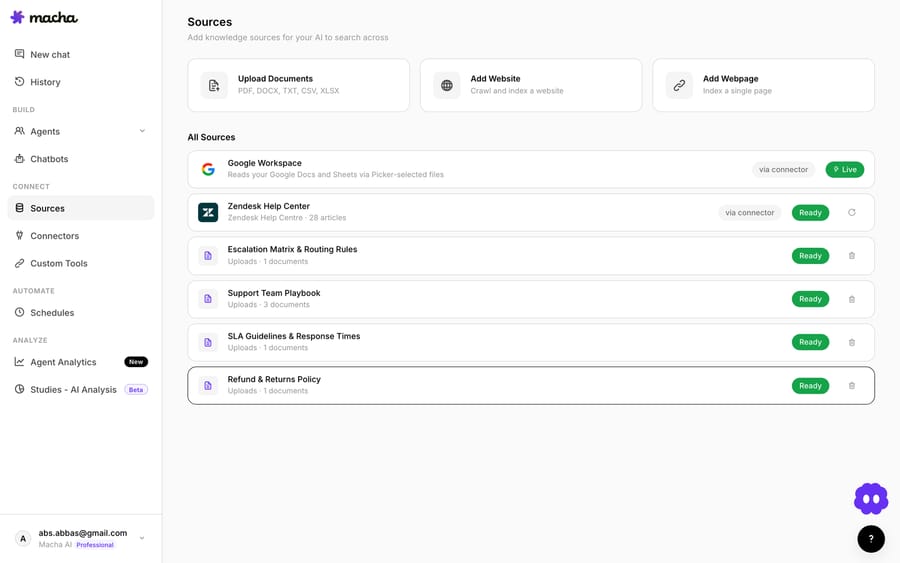
This is the right default for anything your team actively maintains. Keep your canonical returns policy in a Notion page or a Google Doc, connect it once, and every agent that references it is current the next time someone edits it. The most common knowledge-base failure in support, the bot confidently quoting a policy you changed three weeks ago, mostly disappears when the source of truth is the document your ops team already edits.
The trade-off is the mirror image of uploads: live sources are only as good as the page behind them, and they depend on the connection staying healthy. A messy, half-finished Notion page makes a messy agent.
Why does scope filtering matter?
The third piece is quieter, but it's what makes the first two usable at scale. Scope filtering lets you choose, per agent, between all documents from a source or a hand-picked subset. Your billing agent doesn't need the shipping playbook; your tier-1 triage agent shouldn't be reasoning over the internal incident runbook.
Narrow scope isn't just tidiness; it's accuracy and safety. Fewer, more relevant documents mean retrieval has less to get wrong and the agent has fewer ways to surface something it shouldn't. Treat data-source scope the way you'd treat permissions: give each agent the minimum it needs to do its job. The full mechanics live in the data sources docs.
What changed in billing, and how does Macha bill today?
The other half of this release was how Macha meters usage. AI agents cost real money to run, since every model call is tokens in and tokens out, and February 22 is when Macha made that cost visible instead of implicit. The February version was a credit system: each model carried its own credit cost, and credits came off once per complete agent response, not per tool call. In September 2026 Macha moved to what you buy today: one plan, sold in tickets.
How does per-ticket billing work?
Macha bills per ticket: one thread between Macha and one person, charged once no matter how many messages it takes. An email ticket and all its follow-ups is one ticket; so is a whole live chat, and so is a whole Copilot session. The model you pick per agent doesn't change what that ticket costs, so you can put the strong model on the hard queue without watching a meter.
The detail that trips people up coming from other tools: a ticket is charged once, not per tool call, not per token, not per reply. An agent that looks up an order in Shopify, checks a refund in Stripe, writes a reply, and then handles the customer's follow-up two days later is still one ticket. Fair use caps a ticket at 50 messages; past that the agent asks the customer to start a new one.
That's a deliberate choice, and it's worth contrasting with the market. In 2026, credit and usage-based billing has become the dominant model for AI platforms, but the unit varies a lot. Intercom's Fin charges $0.99 per outcome (fin.ai/pricing, checked 24 September 2026), and Zendesk bills its AI agents per automated resolution ($1.50 committed or $2.00 pay-as-you-go on its pricing page). Both bill per outcome. Macha bills per ticket. We think that's the honest unit: outcomes depend on your setup, your data and your customers, and a vendor charging per resolution is pricing in that variance. A ticket is something you can count in your own help desk before you sign anything. (More on that framing on the pricing page.)

When do usage alerts fire?
An allowance only feels safe if you can see it draining. So this release added automatic email alerts at 50%, 80%, and 90% of your monthly allowance. You find out you're running hot on a Tuesday with room to react (add a top-up, move up a tier, or tighten a trigger) instead of discovering it when agents pause. There are no overages: when the month's tickets run out, agents stop rather than keep charging.
How does in-app checkout work?
Finally, billing moved in-app. You can subscribe and manage your plan inside Macha via Chargebee-powered checkout, with no separate billing portal and no sales call to change tiers. Plans start at $299/mo for 750 tickets, about $0.40 a ticket, and run up to $3,999/mo for 10,000 tickets, with a custom quote above that. New accounts get $50 of free usage, roughly 125 tickets, with no credit card and no time limit.
How do data sources and billing work together?
These shipped on the same day for a reason. Data sources decide what an agent knows; your ticket volume decides what it costs to ask. Together they're the dials every Macha deployment turns:
| Dial | Lever | What it controls |
|---|---|---|
| Knowledge | Upload vs. live connector vs. scope | How accurate and current the agent's answers are |
| Cost | Which queues the agents handle | How many tickets you bill in a month |
| Visibility | Usage alerts (50/80/90%) | Whether spend surprises you |
A well-scoped live source pointed at your highest-volume queue is the sweet spot for most tier-1 work: current answers, a flat cost per conversation, no surprises. Model choice is a quality decision, not a budget one.
What are the limits of data sources and per-ticket billing?
A few honest caveats, because both systems have edges:
- Chunked sources only see what retrieval returns. For a big uploaded manual, the agent reasons over the chunks that matched, not the whole file. If a critical answer keeps getting missed, restructure the document (clear headings, focused sections) before you blame the model.
- Uploads don't refresh themselves. Edit the original file and Macha keeps the old copy until you delete it and upload again. Anything that changes weekly belongs in a live source.
- Live connectors inherit your doc's mess. A live Notion source is exactly as reliable as the page behind it. Half-written pages make half-right agents. Connect sources of truth, not scratchpads.
- Per-ticket billing doesn't punish a long thread, but your customer does. A tighter agent that resolves in one turn costs exactly what one that needs three back-and-forths costs. The reason to build the tighter one is the customer waiting on it, not the invoice.
- Pick the model for the job, not the bill. Model choice doesn't change what a ticket costs, so choose on quality and latency: the smallest model that clearly clears the work, not the most expensive one out of habit.
FAQ
What's the difference between an uploaded source and a live connector source? An upload is a snapshot: it reflects the file as it was when you uploaded it, and it goes stale when the underlying doc changes. A live connector (Google Docs, Notion) reads the current content on every request, so the agent always works from the latest version. Use live connectors for anything your team actively edits.
When does Macha inject a whole document vs. chunk it? CSV and XLSX files with 2,000 rows or fewer are injected into the prompt in full. PDFs, Word documents and larger spreadsheets are chunked, embedded, and retrieved on demand through search.
How is a ticket charged? Once per thread, whichever model the agent runs on. All the replies, tool calls and follow-ups inside that thread are covered by the one charge, up to the 50-message fair-use cap.
Will I get warned before I run out of tickets? Yes. Automatic emails fire at 50%, 80%, and 90% of your allowance, so you can react before agents pause.
Can I limit which documents an agent can read? Yes. Scope filtering lets you give an agent all documents from a source or a hand-picked subset, which is useful for keeping a triage agent away from internal runbooks.
How do you try data sources on your own tickets?
Start a free trial ($50 of usage, no credit card required), connect a Notion page or a Google Doc as a live source, point an agent at it, and edit the page while you test: the next answer quotes the new text. Macha runs on Zendesk, Freshdesk, Gorgias, Front, HubSpot or Intercom, so the agent works inside the help desk you already use. The full mechanics are in the data sources docs, and there's more shipping every month on the blog.
Written by Abbas (Customer Support & AI, Macha) · Reviewed by Ankeet Guha (Co-founder & CTO) · Published 2026-06-24 · Last updated 2026-09-24.






