





 Shopify
 Stripe
 Slack
Slack Notion
 Google Workspace
 Confluence

When Should You Split One AI Agent Into a Team of Sub-Agents?


Most AI support builds start as one agent, and most should stay that way until a specific failure shows up. The signals below tell you when splitting into a lead agent and specialists is worth the extra round-trips.
Key takeaways
- Splitting one AI support agent into sub-agents pays off only for a named failure, such as contradictory instructions, a tool list spanning 3 to 5 distinct functions, or knowledge bleed.
- Microsoft's Cloud Adoption Framework advises starting with a single-agent prototype and moving to multiple agents only when testing shows limits single-agent optimization cannot fix.
- In Macha, a parent agent can call sub-agents as tools up to three levels deep, and circular references between agents are blocked both at save time and at runtime.
- Macha sub-agents are read-only during interactive chat but can execute writes such as ticket replies when the parent agent runs autonomously from a trigger.
- Macha bills per ticket however many delegations a run takes, so splitting costs response time and debugging effort rather than a bigger bill.

Split one AI support agent into sub-agents only when you can name a specific failure that splitting fixes: instructions that contradict each other, a tool list spanning more than three to five distinct functions, tasks that need different models, knowledge from one domain leaking into another, or a hard security or team-ownership boundary. If none of those applies, keep one agent. In Macha, a parent agent calls each specialist as a tool, up to three levels deep, and weaves the result into its own reply.
| Split into sub-agents when | Stay with one agent when |
|---|---|
| The prompt asks for two tones or policies that fight | The domain is narrow, like an FAQ agent on one knowledge base |
| The agent spans more than 3 to 5 distinct functions | You need to ship fast and prove value first |
| Different tasks need different models | Response time is tight |
| Knowledge from one domain pollutes another | You haven't tried better retrieval, prompts or models yet |
| Separate teams or compliance rules own separate pieces | One place to debug matters most |
The rest of the industry converged on the same shape: keep a generalist out front and hand specialized work to focused sub-agents, one for billing, one for orders, one for escalations, each with its own model, tools and knowledge. But splitting isn't free, and more agents isn't automatically better. Below are the signals that say split now, the signals that say stay single, a checklist to run against your own setup, and the real overhead, because in Macha every delegation is another round-trip. Macha is an AI agent layer that sits on top of the help desk you already run (Zendesk and the rest of Zendesk, Freshdesk, Gorgias, Front, HubSpot or Intercom), so this decision is about your real tickets and your real connected tools.
Should you start with one agent?
Yes, in most cases, and it's the part most "multi-agent" content skips. Microsoft's Cloud Adoption Framework guidance (updated February 2026) on single- vs multi-agent systems is blunt about it: unless your use case has a hard reason to separate, you should "begin with a single-agent prototype to establish baseline capabilities. Transition to a multi-agent architecture only when testing reveals limitations that cannot be resolved through single-agent optimization."
That last clause matters. A lot of perceived "I need multiple agents" problems are actually retrieval problems (your knowledge is chunked badly), prompt problems (your instructions contradict themselves), or model problems (you're triaging refunds on a model that's too weak). Microsoft's framing is to exhaust those first: "model upgrades, caching, reranking, and prompt/chain optimization" before you reach for orchestration. A single agent is cheaper, faster, and far easier to debug — "all logic resides in one place." If yours is doing the job, leave it alone.
So the real question isn't "single or multi?" It's: what specific failure are you trying to fix by splitting? If you can't name it, you're not ready to split.
What are the signs you should split into sub-agents?
Here are the conditions where splitting genuinely earns its keep. You don't need all of them — one strong signal is usually enough.
1. Your prompt holds contradictory instructions
This is the clearest tell. A billing specialist should be terse and exact with numbers and dates. A frontline reply agent should be warm and reassuring. The moment your single prompt tries to be both — "be precise but empathetic, firm on policy but flexible on goodwill" — the model starts splitting the difference badly. The Towards Data Science guide frames it this way: a multi-agent system is the better choice "when you need specialised agents with clear roles." Different jobs, different agents, clear instructions for each.
2. The tool count is bloating the decision
A focused billing agent that sees only search_customers, get_invoices, and get_subscription makes better billing calls than a generalist juggling thirty tools across four systems. Every extra tool is another thing the model can pick wrong mid-conversation. When one agent is wired to so many connectors that you can't reason about what it might do next, that's a split signal. Microsoft's rough threshold is useful here: "solutions spanning more than three to five distinct functions benefit from" a modular split.
3. You want different models for different jobs
Triage is high-volume and wants speed; a deep refund judgment is rare and wants a stronger model. With sub-agents, each agent picks its own model, so the slow, careful reasoning runs only where it's actually needed. Trying to express that with one agent means running your entire queue on whichever model the hardest task needs — every simple question queued behind it — or on the fastest, which fails the hard task. Model choice doesn't change your bill either way; Macha charges per ticket whichever model answers it.
4. Knowledge needs to stay isolated
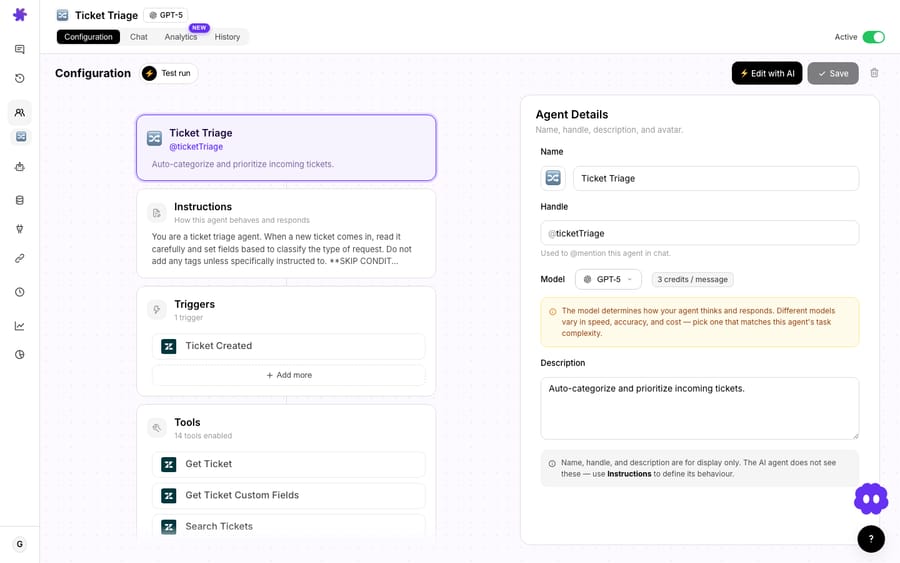
If your orders agent keeps surfacing finance docs, or your billing agent wades through shipping SOPs, retrieval is cross-contaminating. Each Macha sub-agent carries its own knowledge sources, so a specialist only ever searches its own corpus. Cleaner retrieval, fewer confidently-wrong answers.
5. There are hard security or ownership boundaries
This is the one case where Microsoft says start multi-agent immediately, no prototype: when work "crosses security and compliance boundaries," when "distinct teams manage separate knowledge areas," or when future growth across "diverse features, data sources, or business units" is already on the roadmap. If your finance team owns the billing logic and your ops team owns fulfillment, separate agents mirror that ownership and let each team ship independently — exactly the "separation of duties" pattern regulated industries require.
6. Steps span systems and want orchestration
Processing a refund might mean checking the order in Shopify, issuing the refund in Stripe, and updating the ticket in Zendesk. Building a specialist per system and letting a parent orchestrate the sequence keeps each step legible — and keeps a failure in one step from corrupting the others. This is the orchestrator-worker pattern Anthropic describes in Building Effective Agents, where "a central LLM dynamically breaks down tasks, delegates them to worker LLMs, and synthesizes their results."
When should you stay with a single agent?
Splitting has a real bill — pay it only when one of the above applies. Stay with one agent when:
- The domain is narrow and well-defined. An FAQ-style agent answering from one knowledge base, or one that runs a fixed API sequence, is a textbook single-agent job. Orchestration buys you nothing.
- Speed-to-ship matters more than polish. A single agent is faster to build, validate, and iterate. Prove the value first; add structure later.
- Response time is tight. More agents mean more LLM calls and redundant context — every guide above flags this. Your bill doesn't move (Macha charges per ticket however many hops it takes), but every hop is time the customer spends waiting, so the monolith is the quicker answer.
- You haven't exhausted the cheaper fixes. If the only problem is a wrong answer, try better knowledge, a sharper prompt, or a stronger single model before you split. Microsoft notes that "many scalability issues stem from retrieval design, not architecture."
- Debuggability is paramount. One agent means one place to trace a bad reply. The moment you split, you're debugging handoffs too.
A blunt rule of thumb: if you can't point to the contradictory instruction, the bloated tool list, the model mismatch, the knowledge bleed, or the ownership boundary, don't split. "We might need it later" is not a signal.
How do you decide in 60 seconds?
Run your current agent against this. Roughly two or more "yes" answers means a split is likely worth it; zero or one means stay single and fix the underlying issue instead.
| Question | If "yes" → |
|---|---|
| Does the prompt ask for two tones or two policies that fight each other? | Split by persona |
| Is the agent wired to more than ~3–5 distinct functions/systems? | Split by system |
| Do different tasks deserve different models for quality or speed? | Split by model tier |
| Is knowledge from one domain polluting another's answers? | Split by knowledge source |
| Do separate teams or compliance rules own separate pieces? | Split — start multi-agent now |
| Have you already tried better retrieval, prompt, and model — and still hit a wall? | Split is justified |
| Is the task narrow, latency-sensitive, or shipping tomorrow? | Stay single |
How do you set up sub-agents in Macha?
When you decide to split, the mechanics are deliberately simple. You build each specialist as a normal agent — own instructions, own model, own connectors, own knowledge — and test it on its own. Then you open the parent agent and assign the specialists as sub-agents; each one becomes a tool the parent can call.
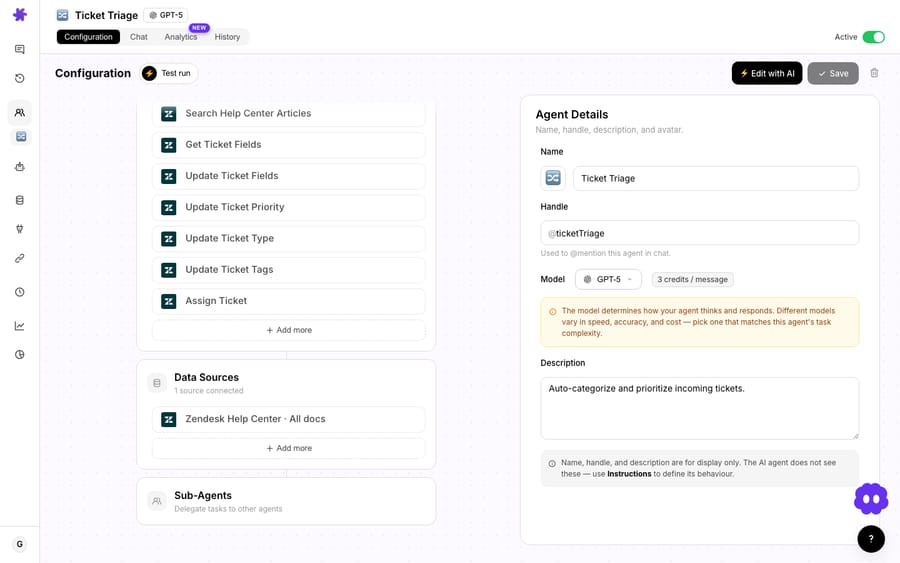
The parent stays in control of the conversation: it decides whether to delegate, what task to pass down, and how to use what comes back — verbatim, summarized, combined with other context, or discarded if it's unhelpful. The user sees one seamless reply; the delegation happens behind the scenes. Critically, you have to tell the parent about its sub-agents in its instructions — "you have a Billing Specialist; delegate billing, charges, invoices, and subscription questions to it." A sub-agent the parent doesn't know to call is just dead weight.
Once you have a few specialists, the agents list shows a Sub-agents column — how many each agent has wired up, with names on hover — so you can see your hierarchy at a glance instead of guessing.

The guardrails worth knowing before you design
Three product facts shape how you should structure a team:
- Three levels deep, max. A parent can call a sub-agent that calls another sub-agent (A → B → C); beyond that the call is blocked. Design hierarchies, not deep chains.
- No loops. If Agent A is a sub-agent of B, you can't also make B a sub-agent of A. Macha checks this both when you save and at runtime, so a delegation can't spiral.
- Permissions depend on run mode. In interactive chat, sub-agents are read-only — they can fetch and search but not write, keeping a human in the loop for anything that changes a record. When the parent runs autonomously via a trigger, sub-agents inherit that context and can execute writes. Design your specialists knowing a billing sub-agent will only read Stripe in chat but may act on it when fired by an automation.
What does splitting cost you?
Here's the honest trade-off, and it's a real one — but it isn't the one people expect. It isn't money. Macha bills per ticket — one conversation, charged once however many messages, delegations or lookups it takes — so a billing question that bounces from the parent to a specialist and through three Stripe calls costs the same single ticket as one answered in a single reply. What splitting costs you is time and traceability. That same question isn't one model call; it's the parent's reasoning, plus the sub-agent's reasoning, plus each Stripe lookup the sub-agent makes — every one of them a round-trip the customer waits through and a step you have to read back when something goes wrong.
This is the flip side of the model-flexibility benefit: splitting lets you put a fast model on routine work and a careful one on the hard task, but it also adds the parent's coordination overhead on top of every task. The Towards Data Science guide puts it plainly: multi-agent setups "usually increase latency, cost and maintenance complexity due to more LLM calls and more moving parts," and Microsoft adds that "latency accumulates at each handoff point." Latency accumulates at each handoff, and so does the number of places a bad answer can have come from. The win has to be worth that extra round-trip and that extra thing to debug. For a genuinely specialized, high-stakes task it usually is. For "answer this FAQ," it isn't.
What mistakes should you avoid when splitting?
- Don't split to organize your thoughts. A tidy diagram of six agents isn't a reason to build six agents. Split to fix a named failure, not to look architected.
- Don't over-nest. Three levels is the ceiling, but most support teams should live at one or two. A flat lead-plus-specialists shape is easier to reason about than a deep tree.
- Don't forget the parent's instructions. The single most common reason delegation "doesn't work" is that the parent was never told when to delegate. The routing lives in the prompt, not the wiring.
- Don't ignore the read-only/autonomous difference. Testing a specialist in chat (read-only) and then firing it via a trigger (can write) are different risk profiles. Test the autonomous path before you trust it.
- Don't split before you've tuned the single agent. If you haven't tried better knowledge, a cleaner prompt, and a stronger model, you may be paying for orchestration to fix a problem a one-line prompt edit would have solved.
FAQ
What's the difference between a sub-agent and just adding more tools? A tool is a single capability (one API call). A sub-agent is a whole agent — its own model, instructions, knowledge, and set of tools — that the parent calls like a tool. Reach for sub-agents when the reasoning needs to be specialized, not just the action.
How many sub-agents is too many? There's no hard limit on count, but depth caps at three levels. Practically, most support teams do best with a lead agent and a handful of specialists. If you're nesting deep trees, simplify.
Will splitting make my agents slower? Usually a little. Each delegation adds a round-trip, and latency accumulates at every handoff. That's the trade for better, more focused answers — worth it on hard tasks, not on simple ones.
Does each sub-agent cost extra? No. Macha bills per ticket — one conversation, charged once — so the parent's reasoning, the sub-agent's reasoning and every tool call in between are all part of that same single charge. What they do cost is time: each hop adds a round-trip. See the pricing page for the tiers.
Can a sub-agent take actions like sending a reply? In interactive chat, no — sub-agents are read-only so a human stays in the loop. When the parent runs autonomously via a trigger, sub-agents can execute writes. Design accordingly.
Should I start with multiple agents? Only if you have a hard boundary — security, compliance, or separate-team ownership — or guaranteed multi-domain growth. Otherwise start single and split when, and only when, a real limit shows up.
What's the short version?
The best multi-agent systems don't start as multi-agent systems. They start as one good agent that earns the right to specialize by hitting a real wall — a prompt at war with itself, a tool list nobody can reason about, a model that's too shallow for the hard task and too slow for the easy one. When you hit that wall, splitting into a lead and a few specialists is the move. Until you do, one well-tuned agent is the faster, simpler, more debuggable choice.
If you want to feel the difference, start a free trial ($50 of usage, no credit card required, and the Macha team helps set up and monitor your agents), connect your helpdesk and a tool or two, and build one agent first. When it starts straining, the sub-agents docs walk you through wiring up your first specialist — and you can browse integrations to see which systems each one could own.
Written by Abbas (Customer Support & AI, Macha) · Reviewed by Ankeet Guha (Co-founder & CTO) · Published 2026-06-24 · Last updated 2026-09-24.






