





 Shopify
 Stripe
 Slack
Slack Notion
 Google Workspace
 Confluence

How Do AI Agents Read Zendesk Custom Fields by Label Instead of Raw IDs? (2026)


The order number, plan tier, region and language on a Zendesk ticket usually live in custom fields, not the subject line. An AI agent on Zendesk is only as useful as its ability to read those fields by name.
Key takeaways
- Zendesk's ticket API returns custom fields as raw numeric IDs and values, such as field_1900003089273, with no field title in the payload.
- The field titles live in the separate Ticket Fields API, which returns each field's id, title, type and options for choice fields.
- Macha's Get Ticket Custom Fields tool, shipped on April 17, 2026, returns every populated custom field with its title resolved from the Zendesk field schema.
- Macha caches each connector's field schema for 5 minutes, so a renamed Zendesk field can take up to five minutes to show in agent output.
- Macha's per-ticket pricing starts at $299 a month for 750 tickets, about $0.40 each, charged once per conversation however many messages it takes.

Zendesk's ticket API returns custom fields as raw numeric IDs paired with raw values, such as field_1900003089273: 013724827106, so an AI agent needs a second lookup against the Ticket Fields API to learn that the field is called "Order number". Macha's Get Ticket Custom Fields tool, shipped on April 17, 2026, does that join for you: it returns every populated custom field with its title resolved from your field schema, cached per connector for 5 minutes.
| Source | What it gives you |
|---|---|
Ticket API (custom_fields) | Field id and value only |
| Ticket Fields API | id, title, type and options for choice fields |
| Macha Get Ticket Custom Fields | Field title plus value, for every populated field |
| Macha Update Fields | Writes values back, with drop-down options checked and dates formatted |
Without that join, the agent sees a long number and a string, with no hint that the string is an order number.
What does Zendesk actually return for custom fields?
When you fetch a ticket through the Zendesk API, custom fields come back like this (trimmed):
"custom_fields": [
  { "id": 1900003089273, "value": "013724827106" },
  { "id": 1900002847112, "value": "vip" },
  { "id": 1900002901559, "value": "de" }
]
That's it. An id and a value. No title, no type, no options. Zendesk's own ticket object reference confirms the shape: each entry "specifies a field ID and its value." The friendly name you gave the field in the admin panel — "Order number", "Account tier", "Language" — is nowhere in the ticket payload.
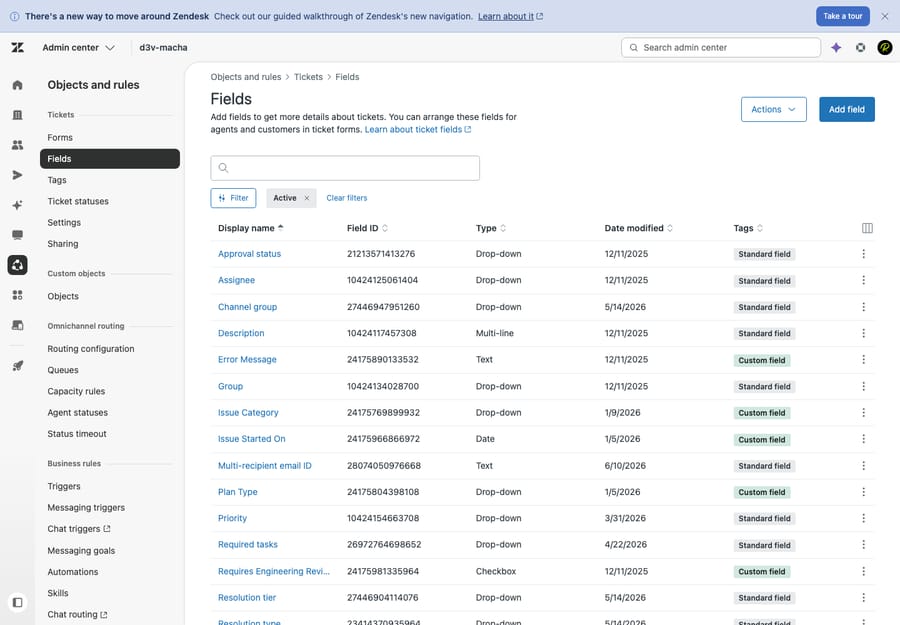
To get the names, you have to call a second, separate resource: the Ticket Fields API, which returns the schema — id, title, type, and (for drop-downs) the list of options. Only by joining the two can you turn 1900003089273 into "Order number."
There's a second twist for drop-down, multi-select, and checkbox fields. Those store the raw tag value of the selected option, not the label the customer saw. Zendesk's own docs note that these field types "generate tags" — so a field whose options read "Standard / Express / Overnight" might come back as shipping_overnight. The model reading that has to guess what it means.
So a model-ready view of one ticket's custom fields needs a join from ID to title through the field schema, readable values for choice fields, and ideally a skip of any empty fields so the model isn't drowning in nulls. That is exactly the plumbing you don't want to hand-build inside every agent prompt.
Why don't hard-coded field IDs work for AI agents?
If you've followed the existing guides on this — the eesel custom ticket fields walkthroughs or community write-ups like internalnote's "Working with custom fields in Zendesk Messaging and AI Agents" — you'll notice they're all ID-first. The standard advice is to hard-code a reference like zen:ticket_field:7662882404114 and assume you already know that number. That works for a single static automation. It falls apart for AI agents for a few reasons:
- You have to look up every ID by hand. Each field is a trip to Admin Center → Ticket fields → copy the number out of the URL. Miss one and the agent is blind to it.
- The model reasons over labels, not numbers. An LLM handles "Account tier: VIP" beautifully. Feed it "1900002847112: vip" and you've thrown away the part it needs to reason — the field's meaning — and kept the part it can't use.
- It breaks when fields change. Someone renames a field, adds a drop-down option, or spins up a new form, and your hard-coded ID list is silently stale.
- It doesn't generalize across brands. Multi-brand Zendesk instances have overlapping but non-identical field sets; a fixed ID list can't follow.
For a workflow that's supposed to read whatever ticket lands in front of it, "memorize the IDs" is the wrong primitive.
How does Macha's Get Ticket Custom Fields tool work?
Macha is an AI agent layer that sits on top of your existing Zendesk. It doesn't replace the help desk; it reads from and writes to it through tools. One of those tools, shipped in the April 17 release, is Get Ticket Custom Fields, and it does the join for you.
When an agent calls it, the tool fetches the ticket's custom field values and the connector's field schema, then returns every populated field as a clean label-and-value pair. Instead of this:
field_1900003089273: 013724827106
field_1900002847112: vip
field_1900002901559: de
the model sees this:
Bestellnummer: 013724827106
Account tier: vip
Language: de
The title comes straight from your Zendesk field schema, so it always matches whatever you named the field, including non-English labels like Bestellnummer (the example Macha's changelog uses). No mapping table, no per-agent configuration, no IDs in your prompt. Once the model knows a value sits in "Account tier" or "Language", a stored value like vip or de is easy for it to read.

A couple of design details worth knowing:
- Schema caching. Field definitions are cached per connector for five minutes, so the schema fetch happens once per connector window rather than on every single ticket. On a busy queue that's the difference between one schema call and thousands.
- Read, not write. Get Ticket Custom Fields is a read tool — safe to enable on any agent. When you need to write a value back, that's the separate Update Fields tool, which validates against the schema (drop-down options are checked, dates are formatted) so the agent can't push a value Zendesk would reject.
What can an agent do once it reads fields by label?
Once the agent can read fields by label, the field data becomes a first-class input to routing, replies, and downstream tool calls. A few patterns this enables directly:
- Order lookups that just work. An agent handling a where-is-my-order question reads the Order number field by name and passes it straight to a Shopify or Stripe lookup — no regex on the message body hoping the customer typed it.
- VIP-aware triage. A ticket-triage agent reads Account tier: vip and routes or prioritizes accordingly, then uses Macha's other Zendesk tools (Assign Ticket, Update Priority) to act on it.
- Language-correct replies. The Language field tells the agent to answer in German before it writes a word.
- Cleaner escalations. When an agent escalates with a context bundle, labelled fields make the internal note readable by a human instead of a wall of numbers.
The common thread: the agent reasons over what your fields mean, because it's reading what they're called.
When isn't label resolution the answer?
This tool solves one specific problem well. It's worth being clear about its edges.
- It reads, it doesn't reconcile. If your field schema itself is messy — three near-duplicate "Order #" fields from different forms — labels will be clearer than IDs, but they won't be clean. Resolving labels doesn't fix a sprawling field taxonomy; you still want to tidy that up in Zendesk.
- Empty fields aren't context. The tool returns populated fields; if a value was never set on the ticket, there's nothing to resolve. An agent can't read a field the workflow never filled in.
- Five-minute cache, by design. If you rename a field mid-shift, the new title can take up to five minutes to appear in agent output as the per-connector cache expires. That's a deliberate performance trade, not a bug — but worth knowing if you're testing a freshly renamed field.
- Reading isn't writing. Get Ticket Custom Fields never changes a ticket. If your goal is to populate a field from a conversation, reach for Update Fields instead — and gate it with a confirmation in chat mode before it goes autonomous.
- System fields vs custom fields. Status, priority, type, tags, subject and requester aren't custom fields — they come through other Zendesk tools (Get Ticket, Update Status, Update Priority). This tool is specifically for the custom fields your team defined.
If all you ever need is one fixed field on one fixed automation, a hard-coded ID in a native trigger is genuinely fine. The label-resolution approach earns its keep the moment an agent has to read whatever fields happen to be on whatever ticket arrives — which is most agent work.
FAQ
Why doesn't Zendesk just return the field names? Performance and normalization. The ticket object stores only the field ID and value; the names, types, and options live once on the Ticket Fields schema so they aren't duplicated onto every ticket. It's clean database design — it just means a consumer has to do the join, which is what Macha's tool handles.
How does the agent know what field_1900003089273 is called? Macha's Get Ticket Custom Fields tool fetches your connector's field schema and resolves each ID to its title before the model reads it. You never type an ID.
Can the agent update a custom field, not just read it? Yes — that's the separate Update Fields tool. It validates against the field schema (checks drop-down options, formats dates) so the agent can't write a value Zendesk would reject. Keep it behind a confirmation step until you trust the flow.
Does this work with drop-down and multi-select fields? Yes. Those fields store a raw tag like shipping_overnight instead of "Overnight", so the resolved field title ("Shipping speed") is what lets the model read the tag in context. If your tags are cryptic, rename them in Zendesk so the stored value is readable too.
Do I need to configure field mappings per agent? No. There's no mapping table to maintain — the tool reads your live Zendesk field schema, so renamed and newly added fields show up automatically (within the five-minute cache window).
How do I turn it on?
If your agents are reading order numbers off the subject line because the custom fields come back as numbers, this is the fix. Start a free trial ($50 of usage, no credit card, no time limit), connect Zendesk, and turn on Get Ticket Custom Fields for one agent — see the Zendesk integration page for the full action set, or the docs for setup. Macha runs on top of the Zendesk you already use; nothing about your fields, forms, or automations has to change.
Pricing is per ticket: one conversation, charged once, however many messages and lookups the agent takes to finish it, with no per-resolution surcharge. It starts at $299 a month for 750 tickets, about $0.40 each. See the pricing page for current plans.
Written by Abbas (Customer Support & AI, Macha) · Reviewed by Ankeet Guha (Co-founder & CTO) · Published 2026-06-24 · Last updated 2026-09-24.






