





 Shopify
 Stripe
 Slack
Slack Notion
 Google Workspace
 Confluence

Get Ticket vs. Get Ticket Custom Fields vs. Get Ticket Fields: Macha's Zendesk Tools Explained


Most Zendesk tools in Macha do what their names say, but the three "get" tools sound alike and return different data. Picking the wrong one is a common reason an agent misses information it needs.
Key takeaways
- Macha's Get Ticket tool reads a Zendesk ticket's content, Get Ticket Custom Fields reads the values in that ticket's custom fields, and Get Ticket Fields reads every field's definition.
- An agent that routes by a custom field like "Issue Category" needs Get Ticket Custom Fields, because Get Ticket alone never returns that field's value.
- Get Ticket Fields returns field definitions with their IDs and options, which an agent needs before it sets a dropdown field on a Zendesk ticket.
- Macha's Read Attachment tool extracts text from PDFs, DOCX, XLSX and CSV files and uses AI vision to describe screenshots and receipts on Zendesk tickets.
- Zendesk write tools such as Add Public Reply and Update Fields change what customers see, so a Macha agent should get only the write tools its job needs.

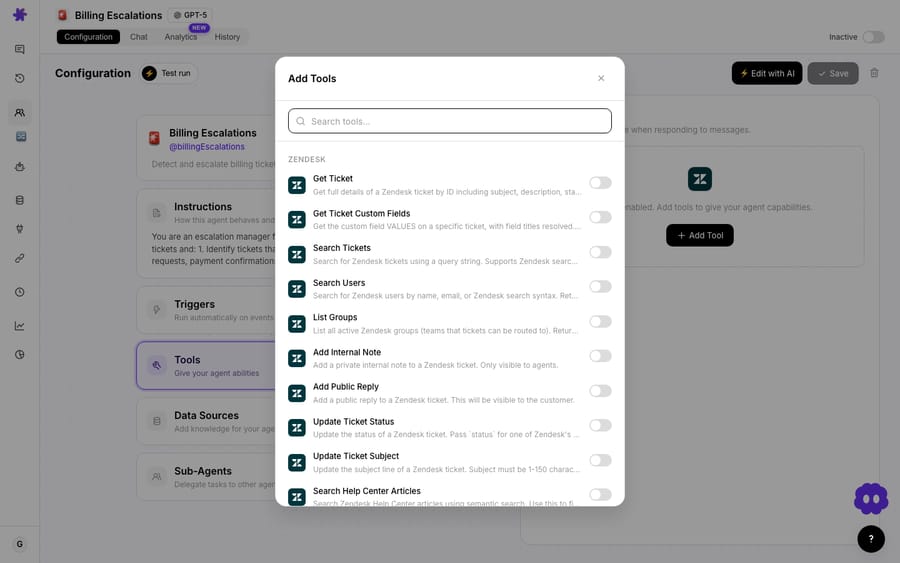
The Zendesk tools in Macha that need explaining are the three "get" tools: Get Ticket reads a ticket's content, Get Ticket Custom Fields reads the values in that ticket's custom fields, and Get Ticket Fields reads the definitions of every field in your Zendesk account.
| Tool | What it returns | Give it to an agent that… |
|---|---|---|
| Get Ticket | Subject, description, status, requester, comments | needs to read the ticket (almost every agent) |
| Get Ticket Custom Fields | The values in this ticket's custom fields | routes or answers by a field like "Issue Category" |
| Get Ticket Fields | The definitions of all fields, their IDs and options | has to set a field and needs the valid choices |
Watch the breakdown
What does each of the three "get" tools return?
Get Ticket fetches the core ticket: subject, description, status, requester, and comments. Most workflows start with it.
Get Ticket Custom Fields fetches the values of the custom fields on a specific ticket, with the labels resolved. If you have a custom field called "Issue Category," this is how the agent reads what's actually in it for the ticket in front of it: an order number, a brand, a language. (The integrations page lists this tool as "Get Custom Fields".)
Get Ticket Fields lists the field definitions in your Zendesk account, including custom fields and their IDs: the schema, not the values. It is how an agent learns which fields exist and which options they accept, which it needs before setting a dropdown.
Two other read tools are worth knowing: Search Tickets takes full Zendesk search syntax, so an agent can find a customer's earlier tickets, and Read Attachment extracts text from PDFs, DOCX, XLSX and CSV files and uses AI vision on screenshots and receipts.
What goes wrong when an agent has the wrong "get" tool?
It comes up short without telling you why. Ask an agent to route by your "Issue Category" custom field but give it only Get Ticket, and it never sees the field's value. Give it Get Ticket Custom Fields and it reads exactly what it needs. Ask it to set that field without Get Ticket Fields and it has to guess the valid options.
Which Zendesk write tools need the most care?
The write tools are clear from their names: add public reply, add internal note, update status, priority, subject or type, update tags, update fields, assign ticket. Two details help. Update Tags adds or removes tags without overwriting the ones already on the ticket, and Update Fields checks dropdown values against the field's options before writing. But every write tool changes real things a customer may see, and an agent running from a trigger writes without asking. Give an agent only the write tools its job needs, and lean on the read-vs-write distinction to keep it safe: read tools freely, write tools deliberately.
Frequently asked questions
What's the difference between Get Ticket and Get Ticket Custom Fields? Get Ticket fetches the ticket's core content (subject, description, status, comments); Get Ticket Custom Fields fetches the values in that ticket's custom fields.
What does Get Ticket Fields do? It lists the definitions of all your ticket fields (including custom), so the agent knows what fields exist and their valid options.
Which "get" tool should most agents have? Get Ticket, for the ticket content. Add Get Ticket Custom Fields if the agent needs your custom-field values, and Get Ticket Fields if it has to set fields.
How do I keep the write tools safe? Give an agent only the write tools its job requires; see read tools vs. write tools.
Can a Macha agent read attachments on a Zendesk ticket? Yes. Read Attachment extracts text from PDFs and office files and describes image attachments using AI vision.
Build a Zendesk agent: give it the right "get" tools and watch it work. $50 of free usage, no credit card required. Start free.






