





 Shopify
 Stripe
 Slack
Slack Notion
 Google Workspace
 Confluence

Zendesk vs. HappyFox (2026): Which Costs Less and Which Does More?


HappyFox suits teams that want predictable cost and simple ticketing, from $24 an agent a month or $1,999 a month for unlimited agents; Zendesk suits teams that need omnichannel depth, native voice and advanced AI, from $55 an agent on Suite Team. Prices are from both vendors' pricing pages, checked September 2026.
Key takeaways
- HappyFox suits teams wanting predictable cost and simple ticketing, while Zendesk suits teams needing omnichannel depth, native voice, advanced AI and a large app marketplace.
- HappyFox's unlimited-agent Growth plan costs $1,999 a month billed annually but includes only 20,000 tickets a year, with Scale at $3,999 for 150,000 tickets.
- HappyFox publishes per-agent prices of $24, $49 and $99 a month on annual billing, with Basic capped at 5 agents and a 14-day free trial on every plan.
- Zendesk Suite Team costs $55 and Suite Professional $115 per agent a month, and Zendesk bills AI agents per automated resolution at $1.50 committed or $2.00 pay-as-you-go.
- HappyFox Autopilot bills as low as $0.02 per successful action, which is not directly comparable to Zendesk's per-resolution meter because one resolution can take several actions.

Pick HappyFox if you want predictable cost and solid ticketing without complexity: its per-agent plans run $24 to $99 an agent a month (annual), and its unlimited-agent plans start at $1,999 a month. Pick Zendesk if you need depth, omnichannel with native voice, modern AI and scale: Suite Team is $55 and Suite Professional $115 an agent a month (annual), with AI agents billed per automated resolution on top.
| Zendesk | HappyFox | |
|---|---|---|
| Entry price (annual) | Support Team $19/agent/mo | Basic $24/agent/mo (up to 5 agents) |
| Main plans (annual) | Suite Team $55, Suite Professional $115, Enterprise custom | Team $49, Pro $99, Enterprise Pro custom |
| Unlimited-agent option | None | From $1,999/mo (20,000 tickets a year) |
| Autonomous AI pricing | Per automated resolution ($1.50 committed, $2.00 pay-as-you-go) | Autopilot, as low as $0.02 per successful action |
| Free trial | 14 days | 14 days, no credit card |
Which should you pick: Zendesk or HappyFox?
| If you are… | Pick |
|---|---|
| An SMB/mid-market team wanting predictable, flat pricing | HappyFox |
| Running a large team where per-seat cost balloons | HappyFox (unlimited-agent plans) |
| Wanting solid ticketing + Smart Rules without complexity | HappyFox |
| Needing deep omnichannel incl. native voice | Zendesk |
| Wanting the most advanced native AI + biggest ecosystem | Zendesk |
| Scaling to enterprise with deep analytics | Zendesk |
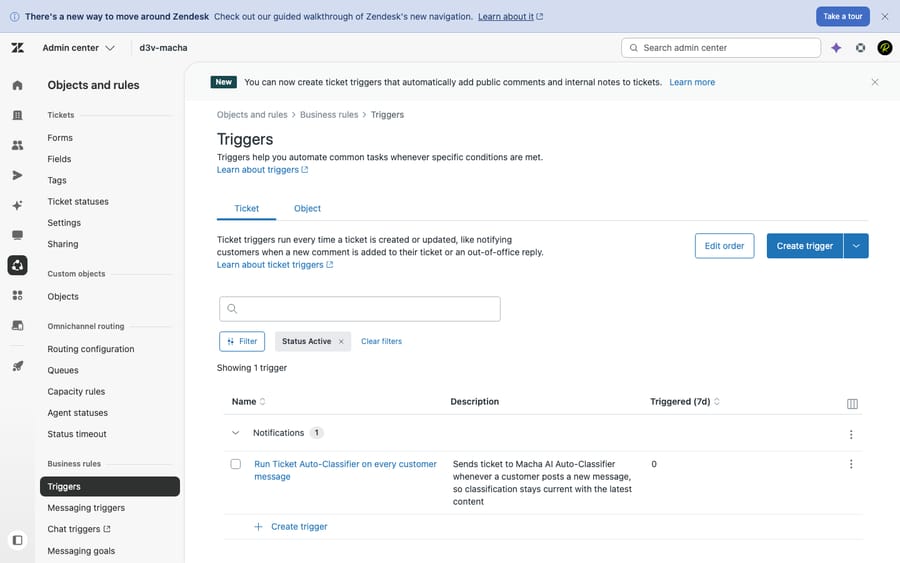
How we compared: both vendors' prices are checked against their official pricing pages (September 2026). HappyFox publishes its prices again, so the figures below come straight from happyfox.com rather than third-party teardowns. Features are checked against the products, and we ran Zendesk hands-on in a live test account (screenshot below). User sentiment comes from real G2, Capterra and TrustRadius reviews. Macha is our own product, and we flag that wherever it comes up.
How much do Zendesk and HappyFox cost?
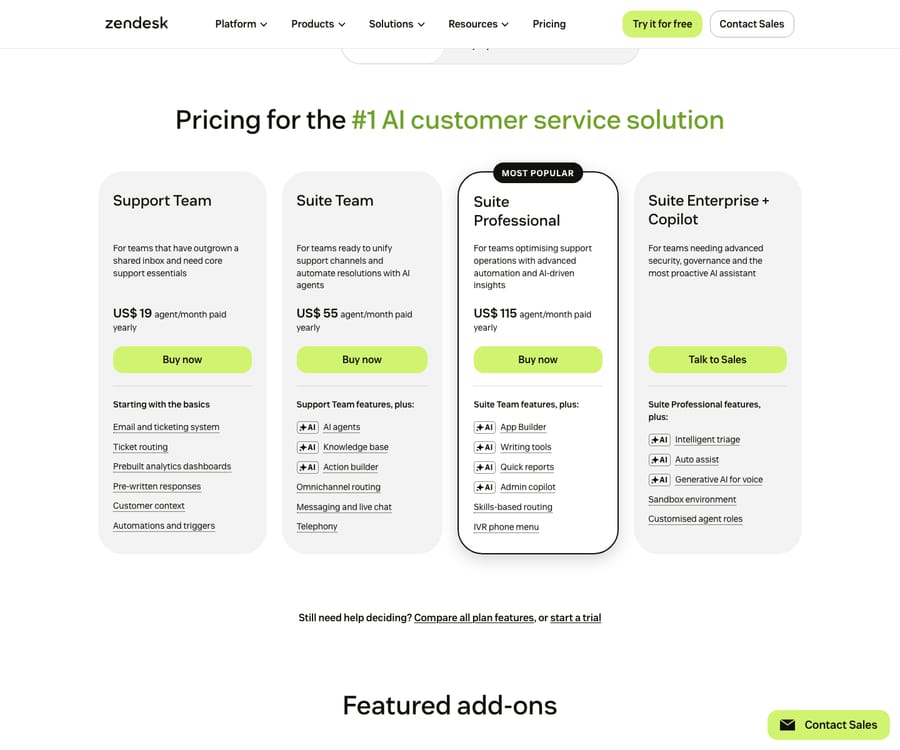
Zendesk Suite (per agent/month, annual): Support Team $19, Suite Team $55, Suite Professional $115, Enterprise contact sales. Copilot is $50/agent. Zendesk says AI agents are included in every Suite and Support plan and billed per automated resolution, and its pricing page lists the rate: $1.50 committed and $2.00 pay-as-you-go. The plan table includes 5 automated resolutions per agent a month on Support Team and Suite Team and 10 on Suite Professional; Zendesk's help center describes that allowance as a small monthly dollar amount per seat ($2, $5 or $10 by plan since 18 May 2026). Source: Zendesk pricing.
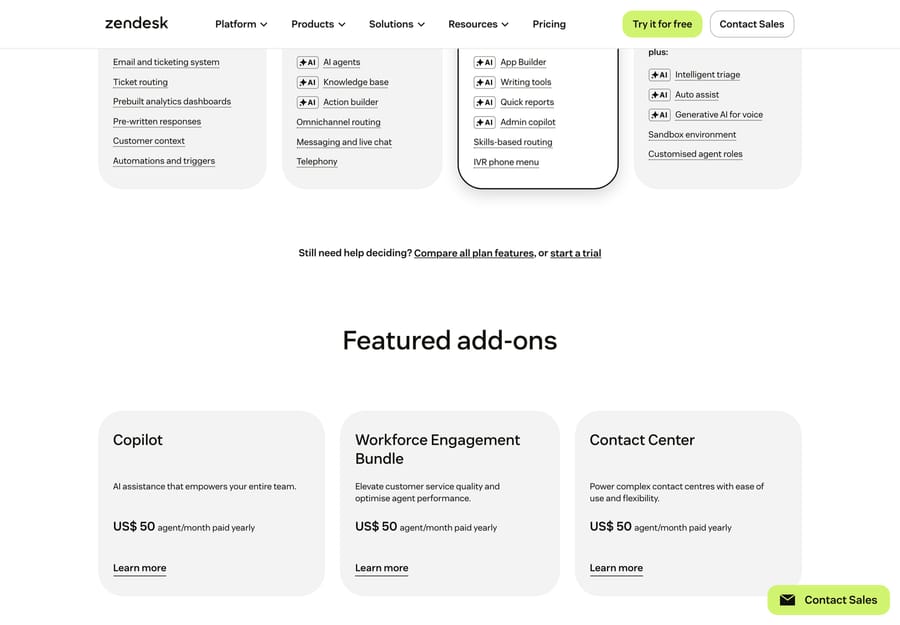
Beyond the per-seat plans, Zendesk sells several capabilities as per-agent add-ons on top of your base plan. Today's pricing page lists Copilot and the Workforce Engagement Bundle at $50 an agent a month and Contact Center at $83 (annual):
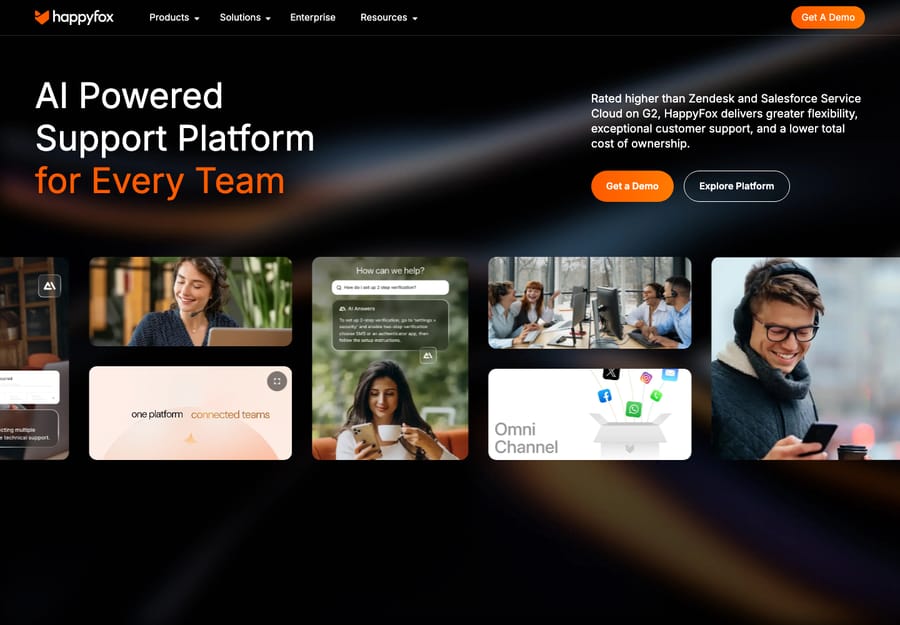
HappyFox publishes its prices on its pricing page (checked September 2026), with two models:
- Per-agent plans (annual / monthly): Basic $24 / $29 (capped at 5 agents), Team $49 / $69, Pro $99 / $119, Enterprise Pro contact sales. Two-year terms cut these to $21, $39 and $89. Every plan starts with a 14-day free trial, no credit card required.
- Unlimited-agent flat plans (billed annually, with a yearly ticket allowance): Growth $1,999/mo (20,000 tickets a year), Scale $3,999/mo (150,000), Scale Plus $5,999/mo (300,000), Ultimate custom (1,000,000). Overage runs $0.01 to $0.03 a ticket depending on tier.
HappyFox's structural pitch, in its own pricing FAQ: the unlimited-agent plans usually become more economical above roughly 20 to 25 agents, or at very high ticket volume. That's the "predictable cost as you grow" story. Note the allowance on Growth is small: 20,000 tickets a year is about 1,700 a month, so a busy team lands on Scale quickly. Zendesk has no flat unlimited-agent equivalent; its cost scales with seats plus AI usage.
Why can't you compare HappyFox and Zendesk AI prices directly?
HappyFox and Zendesk price AI on different units, and it matters:
- HappyFox Autopilot (autonomous agents) bills as low as $0.02 per successful action on a credit system, and new accounts get $50 of free credits. A single resolution can take several actions, so per-action pricing isn't directly comparable to a per-resolution number. Assist AI (agent assist) appears as an included integration on every plan in HappyFox's feature matrix; confirm what's metered in your quote.
- Zendesk bills autonomous AI per automated resolution ($1.50 committed or $2.00 pay-as-you-go on its pricing page), and Copilot for human agents is a separate $50/agent add-on.
So "HappyFox AI is cheaper" is only sometimes true. The incentive differs too: a per-action meter earns HappyFox more the more steps its agents take, while a per-resolution meter earns Zendesk more the more tickets the bot closes. Model it on your real actions-per-resolution, not the sticker.
Which help desk wins on features?
| Capability | Winner | Why |
|---|---|---|
| Ticketing & agent workspace | Tie (HappyFox for simplicity) | HappyFox is clean and fast to learn; Zendesk is deeper but heavier |
| Categories / Smart Rules / SLAs | HappyFox | No-code Smart Rules, category routing and SLA management are native from Basic, a genuine strength |
| Omnichannel (email/chat/social/voice) | Zendesk | Broader, more mature messaging, social and native telephony |
| Automation / workflows | Zendesk (depth) / HappyFox (ease) | Zendesk's triggers go deeper; HappyFox's are simpler and included earlier |
| Native AI | Zendesk | More advanced and autonomous; HappyFox AI is lighter and newer |
| Knowledge base & self-service | Zendesk (slight) | Both solid; Zendesk's Guide is more mature and AI-integrated |
| Reporting / analytics | Zendesk | Explore is far deeper; HappyFox native reporting is adequate for SMB |
| Integrations | Zendesk (decisive) | Zendesk lists 1,800+ apps, partners and integrations; HappyFox's list is far shorter |
| Ease of use & setup | HappyFox | Live in hours to a week vs Zendesk's multi-week setup |
| Scalability | Zendesk | Built for enterprise volume, governance and compliance breadth |
What are the strengths and weaknesses of each?
HappyFox strengths: predictable, flat pricing (including an unlimited-agent option); fast setup; intuitive UI; strong native ticketing, categories and Smart Rules from base plans; cheap modular AI ($0.02 per action); a separate ITSM/asset product if you need it. HappyFox weaknesses: smaller integration ecosystem; lighter, less mature AI and analytics; reported SLA quirks and occasional slow loads; no free tier (a 14-day trial only); a 5-agent Basic cap; AI sold on a separate credit meter adds line-item complexity despite the "simple" image.
Zendesk strengths: depth and scale; a huge app marketplace; mature omnichannel plus native voice; best-in-class reporting; the most advanced native AI; strong compliance and security. Zendesk weaknesses: expensive, and cost compounds (seat + Copilot + per-resolution + WFM/QA); steep learning curve; long setup; support access criticized.
What do real users say about Zendesk and HappyFox?
The headline ratings actually favor HappyFox, but the base tells the real story. (Observed June 2026.)
| G2 | Capterra | Other | |
|---|---|---|---|
| Zendesk | 4.3 / 5 (~6,000+) | 4.4 / 5 (~4,000+) | TrustRadius 8.7/10 |
| HappyFox (Help Desk) | 4.5 / 5 (137) | 4.6 / 5 (92) | TrustRadius (~14, tiny base) |
HappyFox scores higher on average, but on a fraction of the reviews: roughly 100 to 140 per platform versus Zendesk's thousands, and only about 14 on TrustRadius. Small bases skew positive and shift fast, so treat the gap as "both are well-liked," not "HappyFox is decisively better."
- HappyFox: the recurring praise is simplicity, value and responsive support: "I loved the quick and effective assistance that I received when I was having issues" (Allison L., Health Insurance CSR, Capterra, Jan 2026). The recurring knocks are a dated, dense UI, lighter reporting and a thinner integration list, and the knowledge base in particular draws fire: "The Knowledge Base editor is horrible compared to Zendesk" (Branko B., Training & Documentation Specialist, Capterra, Sep 2024). Reviewers also mention occasional sluggish load times.
- Zendesk: praised for breadth and everyday omnichannel usability: "a very good tool to provide customer support in an omnichannel way, it's easy to use" (Pablo T., CX Consultant, Capterra, Dec 2025). The two recurring complaints are add-on and pricing creep and reporting changes that removed familiar features: "latest updates with reporting are difficult to navigate and removed helpful features" (Melanie J., HR Manager, Capterra, Dec 2025).
The pattern fits the rest of this comparison: HappyFox users like the ease and price and wish it were deeper; Zendesk users like the depth and wish it were simpler and cheaper.
Who is each help desk for?
- HappyFox: SMB and mid-market teams (roughly 5 to 50 agents, or high-volume teams wanting a flat ceiling) that want solid ticketing, categories, SLAs and no-code Smart Rules without enterprise complexity or per-seat budget creep, especially teams that value predictable cost and a sub-week rollout over a giant app ecosystem.
- Zendesk: teams that need scale, channel breadth, deep analytics, a massive integration ecosystem and the most advanced native AI, and that have the budget and resources to absorb add-ons and a multi-week setup. Best for enterprise, high-growth and compliance-heavy orgs.
How should you handle AI on either help desk?
Zendesk's AI is the more advanced native stack (Copilot plus autonomous agents billed per resolution); HappyFox's is lighter and credit-metered (Assist AI plus Autopilot at $0.02 per action). Both share the same real-world limit: autonomous-resolution quality depends heavily on knowledge-base grounding and configuration, and both are tied to (and priced by) the help-desk vendor.
That's the case for an independent AI agent layer if you land on Zendesk. Macha (our product) runs on Zendesk, Freshdesk, Gorgias, Front, HubSpot or Intercom. It resolves tickets end to end, grounded in your existing knowledge base and connected systems, and prices per ticket: one conversation, charged once however many messages it takes, from $299 a month for up to 750 tickets. Macha doesn't connect to HappyFox, so on HappyFox your AI choice is Autopilot or another tool that integrates with it. The honest caveat for Zendesk teams: a layer is another vendor to manage, it only resolves as well as the knowledge you connect, and per-ticket pricing isn't free at high volume. (More: native AI vs. an AI layer.)
What should you know before switching?
Tickets, contacts, KB articles, tags, custom fields and SLA policies migrate with standard tools (both have importers; third-party movers are common). What doesn't port cleanly:
- Automation logic: HappyFox Smart Rules and Zendesk triggers/automations use different models, so you rebuild, not migrate them.
- Macros, SLA definitions and dashboards: plan rebuild time.
- The cost model flips: moving to Zendesk means re-modeling to seat + per-resolution; moving to HappyFox means re-modeling to per-agent or flat unlimited + per-action AI. Re-model before committing.
Frequently asked questions
Is HappyFox cheaper than Zendesk? Often, especially at scale. HappyFox's own pricing FAQ says its unlimited-agent plans usually beat per-agent pricing above roughly 20 to 25 agents, and its per-action AI can be cheaper. At small team sizes, Zendesk Support Team ($19) undercuts HappyFox Basic ($24), so model your real headcount and AI usage.
Does HappyFox publish its prices? Yes. As of September 2026, happyfox.com/help-desk-price lists every plan except Enterprise Pro and Ultimate, from Basic at $24 an agent a month (annual) to Scale Plus at $5,999 a month.
Is Zendesk's AI better than HappyFox's? Zendesk's is more advanced and autonomous; HappyFox's is lighter and priced per action ($0.02). They're not directly comparable on price, so model actions-per-resolution.
Which is easier to set up? HappyFox. Most teams are live in hours to a week, versus a multi-week Zendesk configuration.
Can I add autonomous AI to either? On Zendesk, yes: an AI agent layer like Macha adds end-to-end resolution priced per ticket, one conversation charged once. On HappyFox, the built-in route is Autopilot; Macha doesn't connect to HappyFox.
So which one should you choose?
Choose HappyFox if you want predictable, published pricing and solid ticketing without complexity; its unlimited-agent plans are genuinely attractive for larger teams, as long as the yearly ticket allowance fits. Choose Zendesk if you need depth, omnichannel including voice, the most advanced native AI and a huge ecosystem, and can absorb the cost and setup. Keep the AI decision separate: both native bots are KB-bound, and on Zendesk an AI layer on top is one way to get dependable autonomous resolution.
On Zendesk and want autonomous AI on top? See how Macha layers AI agents over your help desk, priced per ticket. $50 of free usage, no credit card required. Start Trial.






