Intercom
 Shopify
 Stripe
 Slack
Slack Notion
 Google Workspace
 Confluence

Zendesk vs. Spiceworks (2026): Paid Customer CX vs. Free IT Help Desk


Zendesk and Spiceworks get compared a lot, but they're built for almost opposite jobs. Zendesk is a paid, full-featured customer-support platform — omnichannel CX, automation, and modern AI. Spiceworks is a free (now freemium), ad-supported internal IT help desk — ticketing plus network/device inventory and a huge sysadmin community. The real question isn't "which is cheaper" (Spiceworks wins that by definition); it's "what is your help desk for — internal IT, or external customers?" This guide uses verified June-2026 details and is honest about the trade-offs.

Short version: Spiceworks for a budget-zero internal IT desk; Zendesk for customer support at any scale.
The 30-second verdict
| If you are… | Pick |
|---|---|
| A small internal IT team / sysadmin on a $0 budget | Spiceworks |
| Wanting native network/device inventory + IT community | Spiceworks |
| Running external customer support / CX | Zendesk |
| Needing omnichannel (email/chat/voice/social) | Zendesk |
| Wanting modern AI, automation, and analytics | Zendesk |
| An org needing enterprise security/compliance | Zendesk |
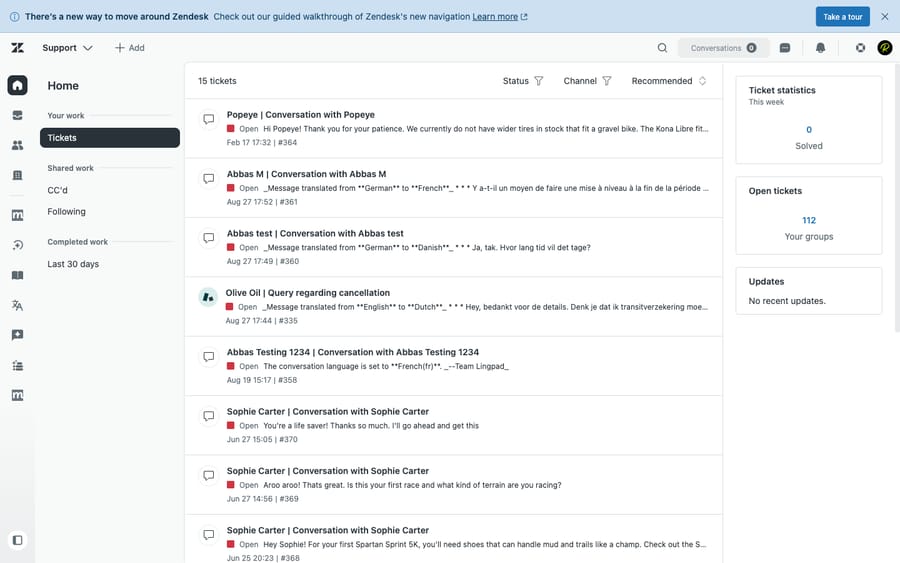
How we compared: Zendesk pricing is verified against its official page (June 2026); Spiceworks' pricing isn't (spiceworks.com blocks automated access), so its figures are third-party-sourced and flagged. Features are checked against the products — and we ran Zendesk hands-on in a live test account (screenshot below). User sentiment comes from real G2, Capterra, and TrustRadius reviews (observed June 2026). Macha is our own product — we flag that wherever it comes up.
Pricing: free(ish) vs. paid — but read the 2025 change
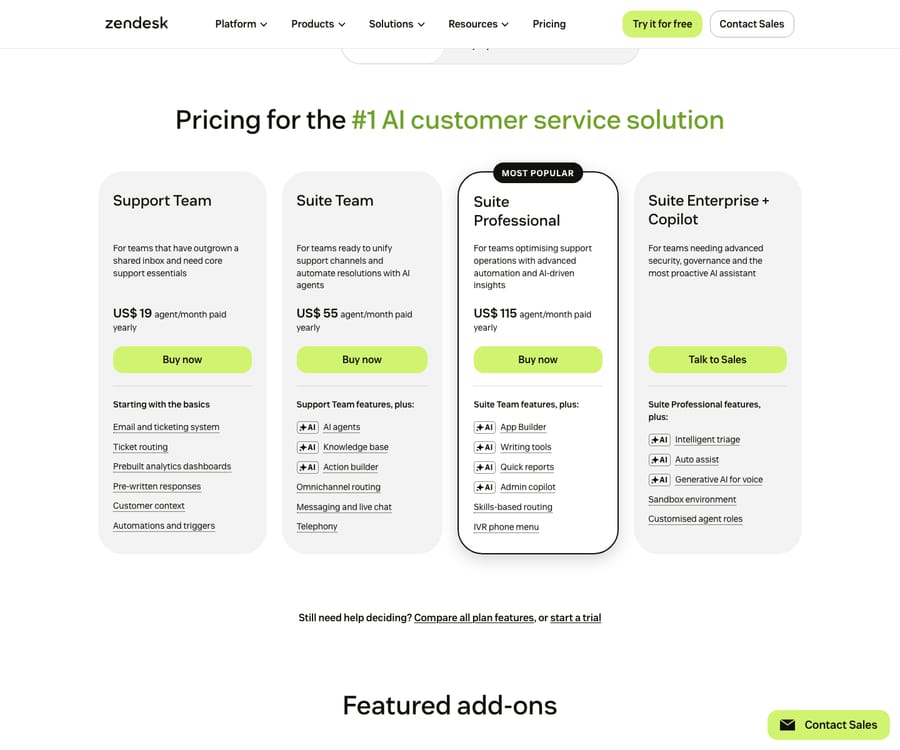
Zendesk Suite (per agent/month, annual): Support Team $19, Suite Team $55, Suite Professional $115, Enterprise contact sales; Copilot $50/agent; AI agents ~$1.50–$2.00 per automated resolution. Source: Zendesk pricing.
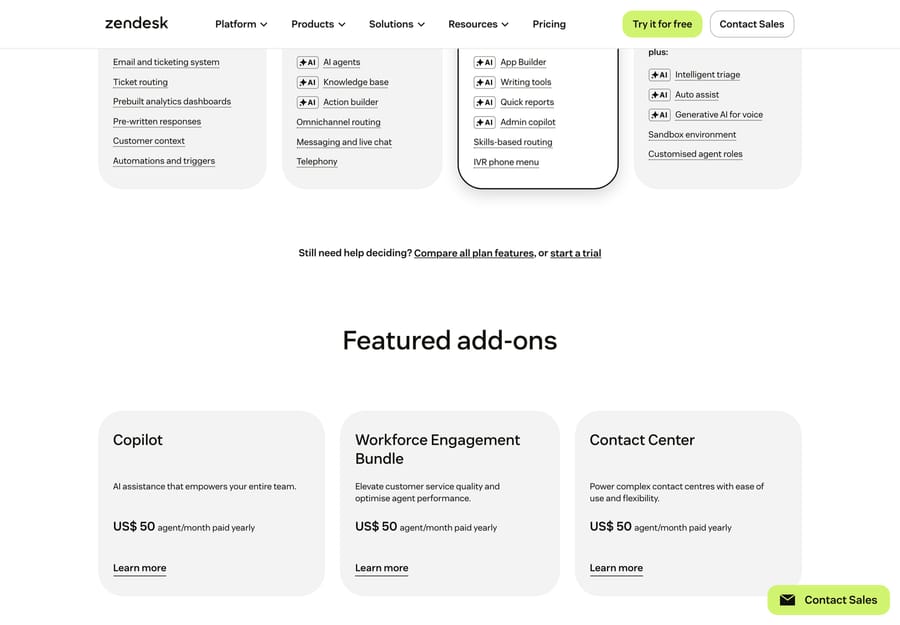
Beyond the per-seat plans, Zendesk’s AI and CX capabilities are sold as separate add-ons — each priced per agent on top of your base plan:
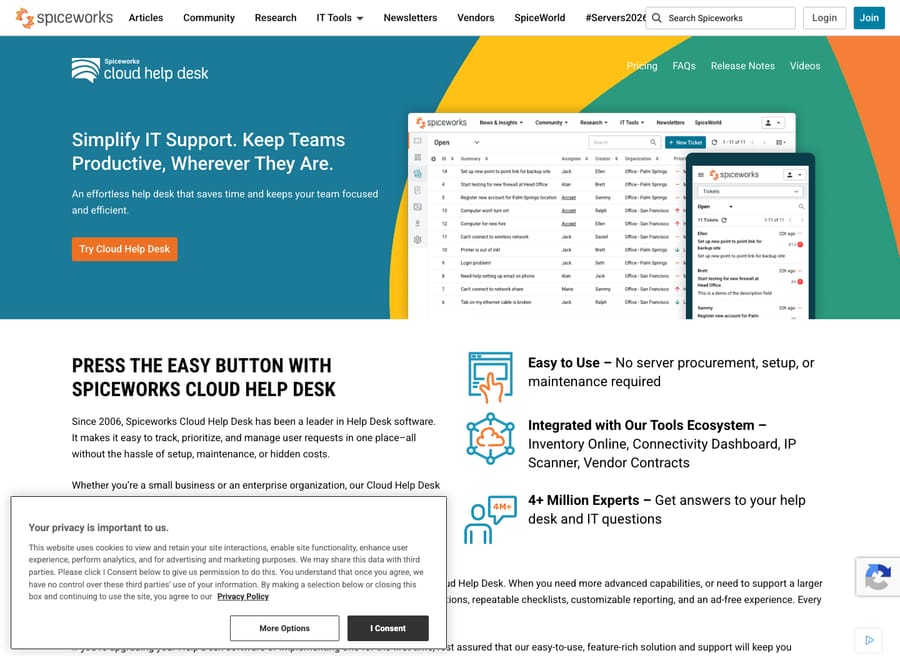
Spiceworks — here's the bit many older comparisons miss (a few current ones, like Hiver and SelectHub, do flag it). Spiceworks is no longer strictly free-only:
- Core: $0/month, ad-supported. Banner/marketing ads in the UI (Spiceworks' revenue comes from marketing to its IT-pro audience). Includes basic ticketing, network/device inventory, alerts, reporting, and unlimited agents and end users.
- Premium: ~$6/agent/month (launched June 1, 2025). Removes the ads and adds bulk actions, live chat, and productivity extras.
Source: figures via third-party teardowns (Desk365, Hiver, Capterra) — spiceworks.com blocks automated access, so confirm Core = $0 / Premium ≈ $6 directly before relying on it. The honest takeaway: Spiceworks is essentially free; Zendesk is a real per-agent investment. Cost is never the question here — fit is.
Feature-by-feature: who wins what
| Capability | Winner | Why |
|---|---|---|
| Help desk ticketing & agent workspace | Zendesk | Macros, skills-based routing, unified workspace; Spiceworks ticketing is basic |
| Internal IT focus (network/device inventory, IT tools) | Spiceworks | Native network scanning, device inventory, asset tracking — Zendesk has no native ITAM |
| Omnichannel / customer channels | Zendesk | Email, chat, voice, social, messaging; Spiceworks is email + portal only |
| Automation / workflows | Zendesk | Triggers, automations, SLAs, app/action builder; Spiceworks is basic rules |
| Native AI | Zendesk (decisive) | AI agents, Copilot, triage; Spiceworks has essentially none |
| Knowledge base & self-service | Zendesk | Branded help center + AI; Spiceworks KB is limited |
| Reporting / analytics | Zendesk | Explore + custom dashboards; Spiceworks is basic |
| Integrations | Zendesk | 1,500+ marketplace apps; Spiceworks is narrow/IT-focused |
| IT-pro community / network | Spiceworks (unique) | A massive sysadmin community and how-tos — no Zendesk equivalent |
| Customer-facing CX | Zendesk (decisive) | Purpose-built for external support; Spiceworks is internal-IT by design |
| Price / TCO | Spiceworks | Free-to-$6 vs $19–$115+ plus AI |
The two barely overlap: free internal IT vs paid customer CX.
Two things the table doesn't capture: asset management and security
Asset/network inventory is Spiceworks' real moat — and Zendesk's real gap. Spiceworks bundles a genuine IT asset layer: it scans your network, auto-discovers devices, tracks hardware/software inventory and warranties, and links assets to tickets — all free. That's not a help-desk feature Zendesk simply does "less well"; Zendesk has historically had no native ITAM/CMDB at all, so an IT team on Zendesk pairs it with a separate asset/RMM tool. (Zendesk has begun closing this: an asset-management capability entered early access in early 2026 — worth watching, but not yet the mature, free discovery engine Spiceworks ships today.) If device inventory is core to your help desk, that single line decides it.
Security and compliance run the other way. This is where "free" shows its price. Zendesk carries the enterprise compliance stack support buyers expect — SOC 2, ISO 27001, HIPAA eligibility, SSO/SAML, and data-residency options. Spiceworks, per its own positioning and third-party comparisons, is built for small internal IT and is reported to lack SOC 2 / ISO certification and enterprise SSO (confirm against your own security review before committing). For a regulated org, or anyone whose customers demand a security questionnaire, that gap is disqualifying regardless of price — and it's the clearest reason the "Spiceworks is free, so why pay?" framing breaks down.
Strengths & weaknesses, honestly
Spiceworks — strengths: a genuinely free Core tier; strong native IT/network inventory and free IT tools; a huge IT-pro community; unlimited agents and end users; fast to stand up for a small IT team. Spiceworks — weaknesses: ad-supported (with the data/privacy optics that implies); a dated UI and reported performance issues at scale; internal-IT only (weak omnichannel, not customer CX); minimal/no modern AI; limited customization, reporting, and enterprise security/compliance (reports of no SOC 2/ISO/SSO — verify for your needs).
Zendesk — strengths: deep omnichannel CX; best-in-class AI (agents/Copilot/triage); 1,500+ integrations; robust reporting (Explore); enterprise security and scale. Zendesk — weaknesses: expensive with steep tier jumps; AI is paid and metered (add-on plus per-resolution); complex setup and admin; overkill for a simple internal IT desk.
What real users say
The headline ratings are close, but the base and the recurring complaints tell the real story. (Observed June 2026.)
| G2 | Capterra | Other | |
|---|---|---|---|
| Zendesk | 4.3 / 5 (~6,000+) | 4.4 / 5 (4,081) | TrustRadius 8.7/10 |
| Spiceworks Cloud Help Desk | 4.3 / 5 (311) | 4.4 / 5 (585) | TrustRadius: reviewed, but current overall hard to isolate* |
\*Spiceworks' scores rest on a much smaller base than Zendesk's (311 G2 / 585 Capterra vs Zendesk's thousands), and a chunk of its review corpus is older (some cited complaints date to 2019–2021), so treat its averages as directional. TrustRadius lists feature-level scores but blocks automated access to a current overall — verify directly if it matters to you.
- Zendesk — praised for omnichannel breadth and everyday usability, with the recurring knocks being cost/budget fit and pricing creep as usage scales: "a very good tool to provide customer support in an omnichannel way, it's easy to use" (Pablo T., CX Consultant, Capterra, Dec 2025), but "packed full of features… [but] for organizations with a tighter budget, it might be hard to justify the price" (Alexandra V., People Business Partner, Capterra, Mar 2026).
- Spiceworks Cloud Help Desk — the praise is almost always the price and simplicity for a small IT team, and the dominant criticism is the ad-supported model: "When I use Spiceworks Cloud Help Desk, my life is simple, I have no worries, and, most importantly, it is free" (Gancho T., ICT Coordinator, Capterra, Feb 2026), while "I know that the ads are a necessity, and that a paid subscription could fix the ads, but we do not pay, and they sometimes get annoying" (Juan F., CIO, Capterra, Sep 2025). Other recurring gripes are limited customization and routing that doesn't scale to larger IT departments.
The pattern matches the framing: Zendesk users weigh what they pay; Spiceworks users accept ads and limits in exchange for free.
Who each is genuinely for
- Spiceworks → budget-zero internal IT help desks and sysadmins at small orgs (and MSBs/SMB IT teams) that want ticketing plus network/asset inventory and a community for free, and don't need customer-facing channels or AI. The $6 Premium fits small teams that just want to drop the ads.
- Zendesk → external customer-support / CX teams at any scale that need omnichannel, automation, modern AI, deep integrations, analytics, and enterprise security — and can pay per agent plus AI usage.
The AI question — none vs. metered, and a layer for either
The AI contrast is stark: Spiceworks offers essentially no modern AI (no copilot, no autonomous resolution), while Zendesk's AI is strong but paywalled and metered ($50/agent Copilot + ~$1.50–$2.00 per resolution). So a team on Spiceworks gets zero AI deflection, and a team on Zendesk pays for every resolution.
That's the wedge for an independent AI agent layer. A layer like Macha sits on top of your existing help desk to deflect and resolve tickets, surface KB answers, and draft replies — adding autonomous resolution to a lean/free desk that has none, or to a Zendesk shop without jumping to its full AI stack. It's helpdesk-agnostic, billed per ticket — one conversation, charged once however many messages it takes — and an automation layer on top, not a replacement. The honest caveat: a layer is another vendor and integration to manage, it only resolves as well as the knowledge you connect, and per-ticket pricing isn't free at high volume — it's additive, not a free win. (More: native AI vs. an AI layer.)
Before you switch: migration realities
The usual trigger is outgrowing free/internal-IT — needing customer-facing channels, SLAs, AI deflection, or enterprise security. Moving Spiceworks → Zendesk:
- Data: export tickets and users (Spiceworks has an API, though export fidelity is limited); use a migration tool or Zendesk's importers to move tickets, contacts, and KB content.
- Map: Spiceworks categories/statuses → Zendesk groups/forms/statuses; rebuild basic rules as triggers/SLAs; recreate KB articles in the Help Center.
- The catch: Spiceworks' asset/network inventory has no native home in Zendesk — plan a separate ITAM/RMM tool for that data. Also verify attachments and historical timestamps, and retrain agents on the richer workspace.
Frequently asked questions
Is Spiceworks still free? Yes — the Core Cloud Help Desk is still $0 and ad-supported, with unlimited agents and end users. As of June 2025 there's also a Premium tier (~$6/agent/month) that removes ads and adds a few extras.
Is Spiceworks a Zendesk competitor? Only loosely. Spiceworks is a free internal IT help desk; Zendesk is a paid customer-support platform. They serve different jobs — internal IT vs external CX.
Does Spiceworks have AI? Essentially no modern AI in 2026 — no copilot or autonomous resolution. If AI deflection matters, you'd add it via Zendesk's (paid, metered) AI or an external AI layer.
Why is Spiceworks free? It's ad-supported — Spiceworks makes money marketing to its large IT-professional audience. Factor the data/privacy trade-off into your decision.
Can I add AI to a free help desk like Spiceworks? Yes — an AI agent layer like Macha can sit on top of your existing help desk to add autonomous resolution, billed per ticket rather than per resolution.
The bottom line
This isn't really a head-to-head: Spiceworks is a free internal IT help desk; Zendesk is a paid customer-support platform. If you're a small IT team that needs free ticketing plus network inventory, Spiceworks is hard to beat on price — just accept the ads, dated UI, and near-total lack of AI. If you're supporting customers and need omnichannel, automation, and modern AI, Zendesk is the right category of tool (and if you're weighing the broader field, see our best Zendesk alternatives guide). And whichever desk you run, an AI layer on top is how you add autonomous resolution — free desks especially have none natively.
Add autonomous AI on top of any help desk — even a free one? See how Macha layers AI agents over your desk, billed per ticket. $50 of free usage, no credit card required. Start Trial.
Add AI agents to your Zendesk
Macha reads the ticket, drafts the reply and takes the action, inside the Zendesk you already run.