





 Shopify
 Stripe
 Slack
Slack Notion
 Google Workspace
 Confluence

What Can You Automate in Zendesk With an AI Agent? 12 Workflows for 2026


An AI agent can handle 12 kinds of Zendesk work, from order-status replies and triage to refunds, escalation bundles and scheduled Slack digests. Rules-based triggers and macros stop at requests that need a judgment call or a lookup in another system, and that's where an agent takes over.
Key takeaways
- An AI agent can automate 12 Zendesk workflows, including order status lookups, triage and routing, Help Center auto-replies, Stripe refunds, VIP alerts and scheduled Slack digests.
- Zendesk's intelligent triage docs frame use cases around six moves: Deflect, Route, Reduce, Forward, Escalate and Enrich, and using the classifications in workflows requires the Copilot add-on.
- Twig's review of Zendesk's AI tooling tells buyers to expect a 20 to 30 percent agent productivity gain from copilot-style help rather than true autonomous resolution.
- Zendesk publishes an 80%+ automation headline for its AI agents, while the customers eesel cites, Babbel and TeamSystem, report 50 to 80 percent deflection.
- Macha charges $299 a month for 750 tickets, about $0.40 per ticket, while Zendesk bills its AI agents per automated resolution at $1.50 committed or $2.00 pay-as-you-go.

An AI agent can take 12 kinds of Zendesk work off your team, from resolving "where is my order?" tickets end to end and triaging every new ticket to processing Stripe refunds and posting a scheduled Slack digest each morning. The table below maps each one to its trigger and connector. Macha, the agent layer we build, sits on top of the Zendesk you already run. It doesn't replace your helpdesk, your views, or your agents. It reads each ticket in plain language, decides what's actually being asked, pulls the data it needs from Shopify, Stripe, Notion or your Help Center, and then either resolves the ticket end-to-end or hands a fully-prepped draft to a human. Zendesk's native intelligent triage already classifies tickets by topic, sentiment, language, and entities; an agent layer takes the next step and acts on that understanding.
Which trigger and connector does each automation use?
| # | Automation | Trigger | Connects to | Auto-resolve or copilot? |
|---|---|---|---|---|
| 1 | Order status (WISMO) | Ticket Created | Shopify | Auto-resolve |
| 2 | Triage & route | Ticket Created | Zendesk | Auto-resolve |
| 3 | KB auto-reply | Ticket Created | Help Center | Auto-resolve |
| 4 | Draft replies | Ticket Created | Notion / Google | Copilot |
| 5 | Refunds / duplicate charges | Ticket Created | Stripe | Either (set a threshold) |
| 6 | Thread & reopen summaries | Reopened / Updated | Zendesk | Copilot |
| 7 | Escalation bundle | Ticket Updated | Shopify, Stripe, Slack | Copilot |
| 8 | VIP alerts | Ticket Created | Shopify, Slack | Copilot |
| 9 | Stock checks | Ticket Created | Shopify | Auto-resolve |
| 10 | Policy answers | Ticket Created | Notion / Google | Either |
| 11 | Scheduled digests / trends | Scheduled | Zendesk, Slack | Auto-resolve |
| 12 | Queue analysis (Studies) | Manual run | Zendesk | Analysis |
Browse the full library of use cases for the step-by-step on each.
The 12 workflows below run roughly in order from "safe to fully automate today" to "use it as a copilot, with a human in the loop." Every one maps to a real trigger and a real set of actions inside Macha. For the bigger picture of how the layer plugs in, see Macha on Zendesk.
1. Resolve "where is my order?" end-to-end
WISMO ("where is my order") is the single highest-volume ticket type for most ecommerce teams, and it's almost entirely mechanical: look up the order, read the tracking, reply. An agent does exactly that — Ticket Created fires, the agent pulls the order from Shopify, reads fulfillment and tracking, posts the reply, and sets the ticket to Solved. No human touches it.
This is the workflow most teams turn on first because the ceiling is high and the risk is low — the agent is reading order data, not making a policy decision.
2. Triage and route every new ticket
Zendesk's triage can classify a ticket; an agent can classify and route it with reasoning. On Ticket Created, the agent reads the content, sets topic and priority, infers sentiment, applies tags, and assigns to the right group — "billing → access issue, priority high, frustrated" lands in the billing queue in seconds instead of waiting for a human to skim it.
Zendesk's own triage docs frame the use cases around six moves: Deflect, Route, Reduce, Forward, Escalate and Enrich. An agent can drive all six because it understands the ticket rather than matching keywords. The native version has a price attached: Zendesk says intelligent triage classifications need a Suite or Support Professional plan or above, and using them in workflows requires the Copilot add-on, which is $50 per agent a month.
3. Auto-reply from your Help Center
For common, well-documented questions, an agent searches your Zendesk Help Center, finds the best-matching article, extracts the actual steps, and writes a clean, personalized reply — then solves and tags the ticket kb-auto-resolved. The customer gets an answer in their own context, not a bare link to an article they have to go read.
The quality of this one tracks the quality of your knowledge base. Thin docs, thin answers — which is exactly why a knowledge source you keep current is the prerequisite, not an afterthought.
4. Draft replies for agent review
Not every ticket should be auto-sent. For anything that benefits from a human eye, run the agent as a copilot: it reads the ticket, searches the relevant docs in Notion or Google Workspace, and drafts a reply your agent can edit, approve, or rewrite before it goes out. You keep full control of the send button; the agent kills the blank-page problem and the doc-hunting.
This is the best starting point for teams not ready to auto-resolve. Twig's review of Zendesk's AI tooling tells buyers to expect a 20 to 30 percent agent productivity gain from copilot-style assistance rather than true autonomous resolution. That's Twig's estimate, not a measured benchmark, but it's a sensible planning number.
5. Process refunds and duplicate charges
This is where the "actions, not just answers" point gets concrete. When a customer reports a double charge, the agent checks Stripe, confirms the duplicate, issues the refund for the extra charge, and replies with the explanation — all on the ticket. Straightforward refund requests can run the same way end-to-end.
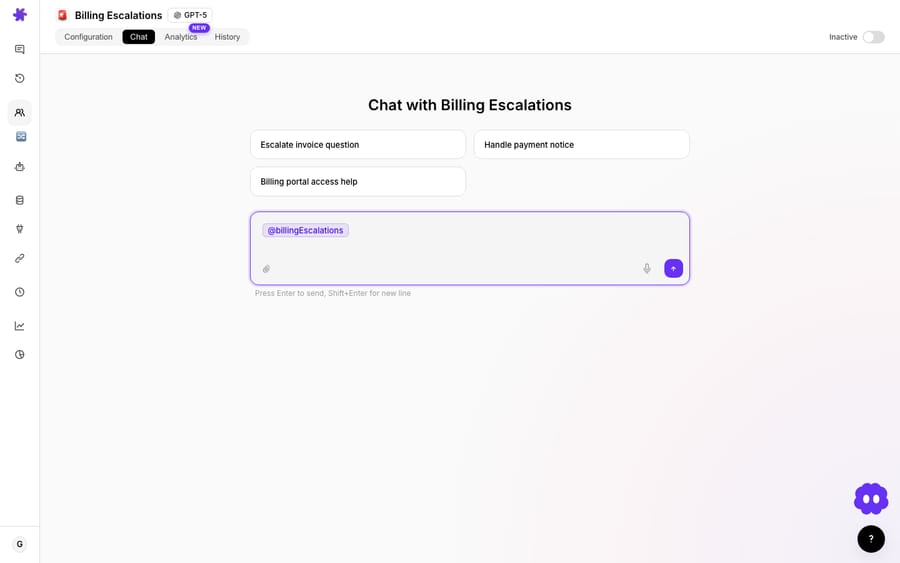
Refunds touch money, so this is a deliberate "decide your guardrails" workflow — many teams cap auto-refunds at a dollar threshold and route anything larger to a human draft (workflow #4). Macha lets you set that line; it doesn't force it.
6. Summarize long threads and reopened tickets
When an agent inherits a 23-message thread, or a solved ticket gets reopened, the agent reads the whole history and produces a tight summary — the issue, what's been tried, what's still open — plus any relevant order or payment context. The next person picks up where things left off instead of making the customer re-explain.
Reopens are where this earns its keep: the agent pulls the previous ticket's history automatically, so "the replacement is also defective" gets the full backstory attached before anyone replies.
7. Escalate with a full context bundle
When a ticket needs a human specialist, the agent does the prep work first: gathers ticket history, customer orders, and payment data, bundles it into a clean internal note, bumps priority, assigns to senior support, and posts an alert to your Slack #escalations channel. The escalation team opens the ticket already knowing the whole story.
This is automation in service of humans, not instead of them — the point is that nobody escalates a naked ticket that the next person has to reconstruct from scratch.
8. Flag and prep VIP tickets instantly
When a high-value customer writes in, the agent checks their lifetime value and order history in Shopify, escalates priority, and pings your #vip-support channel with the context — "$4,200 lifetime, 15 orders, never complained before, here's the issue." Your best customers get a fast, informed response instead of waiting in the general queue.
9. Answer stock and availability questions
"Do you have the hoodie in size L?" The agent searches Shopify, checks real-time inventory across variants, and replies with current stock and a link — turning a pre-sale question that often goes cold into an instant, accurate answer. It's a small workflow with an outsized revenue impact, because the alternative is the customer giving up.
10. Answer policy questions from your wiki
Warranty terms, return windows, SLA commitments — the answers live in Notion or Google Docs, not your Help Center. The agent searches the internal wiki, finds the relevant policy, and answers on the ticket (or in Slack for internal questions), with the source noted. Your documentation becomes a live support resource instead of a folder nobody opens. Browse the full set of connectors the agent can read from.
11. Run scheduled digests and trend alerts
Not every automation is reactive. On a schedule, an agent can pull yesterday's Zendesk metrics — created, solved, first-response time, CSAT — and post a clean summary to Slack each morning. Run it hourly and it can watch for spikes: "login-issue tickets up 300% in the last two hours" lands in your ops channel before the flood does.

Early warning is the value here. A trend agent catches the emerging outage from ticket patterns, often before engineering's own alerts fire.
12. Analyze your entire ticket history
The meta-automation: before you decide what to automate, have an agent read your queue and tell you what's in it. Macha Studies runs an AI analysis across thousands of past tickets at once — you define the columns (billing-related? refund requested? urgency 1–5?) and it fills the grid, then charts the results.
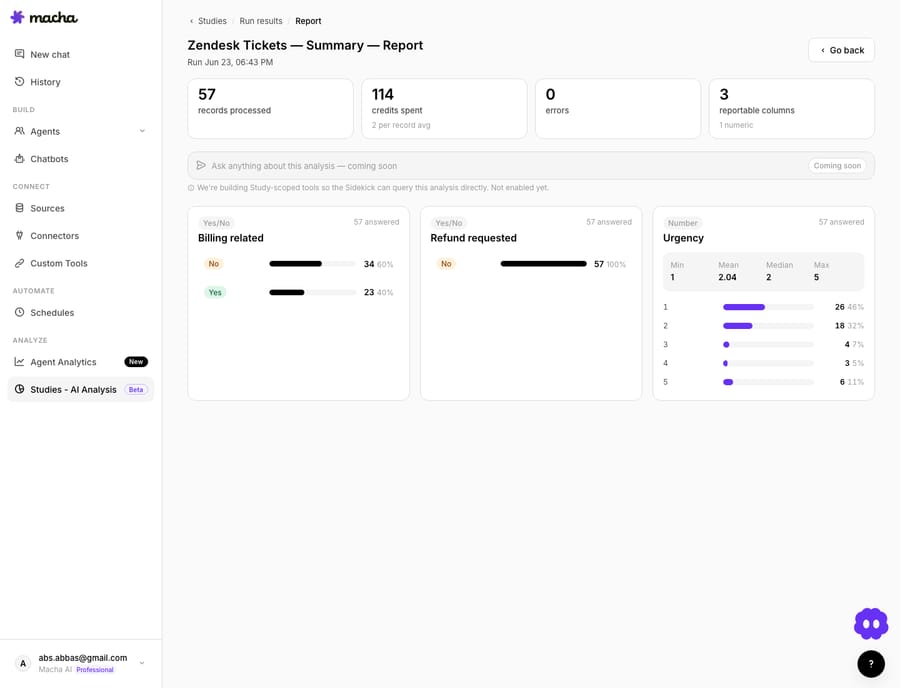
Run this first and the rest of the list stops being guesswork — you'll know that, say, 40% of your volume is billing-related and worth a connected agent, while refund-automation would sit idle. Studies run on the free trial as well as paid plans. There's a full worked example on 57 real tickets in our deep-dive, and more in the blog.
What should you not fully automate yet?
A roundup that only sells you the wins isn't useful. Some honest watch-outs:
- Anything irreversible or high-dollar. Large refunds, account deletions, cancellations with penalties — keep these as drafts (workflow #4) until you trust the agent's judgment on your data. Auto-resolution rates are easy to over-promise. Zendesk publishes an "80%+ automation" headline, and eesel's guide to Zendesk AI agents says hitting it "depends almost entirely on knowledge-base hygiene"; the customers it cites (Babbel, TeamSystem) report 50 to 80 percent deflection. Plan for your own number, not the headline.
- Thinly-documented topics. An agent answering from a sparse knowledge base will confidently fill gaps. Fix the docs first, or scope the agent to only auto-reply on topics you've verified.
- Emotionally charged tickets. An agent can detect an angry customer and route fast — but the actual reply on a serious complaint is usually a human's job.
- Edge-case billing logic. Pro-rations, tax quirks, partial refunds with store credit — let the agent gather the data and draft, then have a person confirm.
The pattern: automate the lookups and the obvious resolutions, keep a human on the judgment calls, and widen the auto-resolve set as your data proves the agent right.
How much does it cost to run these automations?
Macha bills per ticket, not per resolution — one conversation, charged once however many lookups, drafts and replies it takes. A workflow that does three lookups and a reply costs the same as a one-step triage, and the model you pick doesn't change it either. Pricing starts at $299 a month for 750 tickets, about $0.40 each. Every tier works out at about the same rate, up to $3,999 for 10,000 tickets, and setup and monitoring by the Macha team are included. There are no overages: agents pause when the month's tickets run out.
Compare that with Zendesk's own AI agents. Zendesk's pricing page says they're billed per automated resolution and lists the rate: $1.50 committed or $2.00 pay-as-you-go. Per-resolution pricing means the vendor earns more as the agent closes more tickets, while per-ticket pricing charges for the work whether a ticket ends in a reply, a route or a draft. See the pricing page for current plans, or spin up a free trial ($50 of usage, about 125 tickets, no credit card and no time limit) and try a workflow on your own tickets.
FAQ
Do I have to replace Zendesk to use an AI agent? No. Macha is a layer on top of Zendesk — your tickets, views, macros, and agents stay exactly where they are. The agent reads and acts inside your existing helpdesk.
Which of these can really run with no human? Order status, KB auto-replies, triage/routing, stock checks, and scheduled digests are the common "fully automated" set because they're lookups and well-documented answers. Refunds and policy answers can run autonomously if you set guardrails; escalations, drafts, and emotionally charged tickets are best kept human-in-the-loop.
How many tickets will an AI agent actually deflect? Be skeptical of blanket percentages. Zendesk publishes an "80%+ automation" headline, and the customers eesel cites report 50 to 80 percent deflection after serious knowledge-base work. The honest answer is "it depends on your ticket mix" — which is why Studies (#12) is worth running first.
What does it connect to besides Zendesk? Shopify, Stripe, Notion, Google Workspace, Slack, Confluence, Jira, Airtable and more — see the integrations list. Agents combine these in a single workflow (e.g. read Stripe + reply in Zendesk + alert Slack).
Where do I start? Pick one high-volume, low-risk workflow — usually order status or KB auto-reply — turn it on, watch it for a week, then expand. Don't try to automate all 12 on day one.
Which automation should you start with?
You don't need a grand AI strategy to get value here — you need one annoying, repetitive ticket type and an agent pointed at it. Order status is the classic first move; triage is the classic second. Connect Zendesk, start a free trial ($50 of usage, no credit card required) and automate one thing this week. The other eleven will make a lot more sense once the first one is quietly closing tickets.
Written by Abbas (Customer Support & AI, Macha) · Reviewed by Ankeet Guha (Co-founder & CTO) · Published 2026-06-24 · Last updated 2026-09-24.






