Shopify
 Stripe
 Slack
Slack Notion
 Google Workspace
 Confluence

Which Help Desks Can One AI Agent Layer Run On? Zendesk, Freshdesk, Gorgias, Front, Intercom and HubSpot (2026)


Macha adds AI agents to Zendesk, Freshdesk, Gorgias, Front, Intercom or HubSpot without moving your tickets, macros or SLAs anywhere. Zendesk gets the most capability, with 8 triggers, image vision and live Help Center sync.
Key takeaways
- Macha runs as one AI agent layer on Zendesk, Freshdesk, Gorgias, Front, Intercom or HubSpot, so teams add AI without migrating tickets, macros or SLAs to a new help desk.
- Zendesk is the deepest Macha connector, with AI vision on image attachments, live Help Center sync and 8 triggers including a Messaging trigger for WhatsApp and Instagram.
- Macha bills per ticket from $299 a month for 750 tickets, about $0.40 each, and the AI model the agent runs on does not change the price.
- Gorgias charges $0.90 per resolved interaction on most plans, and a ticket fully resolved by its AI Agent can also carry a normal ticket fee.
- The Macha free trial includes $50 of usage with no credit card and no time limit, enough to run real tickets on a connected help desk.
You can add one AI agent layer to the help desk you already run: Macha connects to six of them (Zendesk, Freshdesk, Gorgias, Front, HubSpot or Intercom) and bills per ticket from $299 a month for 750 tickets, so nothing moves out of your current desk. Macha is not a helpdesk and it isn't trying to replace yours. It sits on top of the one you run today, reading tickets, drafting and posting replies, updating status and fields, routing to the right queue, and pulling in commerce and knowledge context from tools like Shopify, Stripe, and Notion. The same agents, the same builder and the same knowledge base work on every connector, with the current list on our integrations page.
| Help desk | Auth | Triggers | What stands out |
|---|---|---|---|
| Zendesk | OAuth / API Key | 8 | AI vision on images, live Help Center sync, Messaging trigger |
| Freshdesk | API Key | 3 | Article search, agent and group routing |
| Gorgias | API Key | 4 | Macro search for Shopify teams |
| Front | API Token | 4 | @mentions in comments, inbox and teammate routing |
| Intercom | OAuth | 4 | Help Center article search, assign, tag and close |
| HubSpot | OAuth | 3 | Service Hub tickets plus contacts, deals and pipeline moves |

Why add an AI layer instead of switching help desks?
There are two ways to bring AI into support. One is to migrate to a platform that bundles its own AI: you move your tickets, your macros, your routing rules, your SLAs, and your team's muscle memory onto someone else's rails. The other is to leave the system of record where it is and connect an AI agent to it through the API.
Macha is the second kind. Your tickets keep living in Zendesk (or Freshdesk, Gorgias, Front, Intercom, HubSpot). Your agents, reporting, and SLAs don't move. Macha authenticates into the helpdesk, listens for the events you care about, and acts inside the same ticket your human agents see. Public replies are public replies, internal notes are internal notes, tags are real tags.
The rest of the "AI on top of your helpdesk" category works the same way. eesel AI connects to Zendesk and Freshdesk among other tools and sells monthly credit plans from $299 for 500 credits, where one ticket or chat is one credit however long (eesel pricing page, checked 5 October 2026). Fini runs its agent inside a similar spread of helpdesks. The premise everyone agrees on: teams want AI without the migration. Where Macha differs is less about which logos it supports and more about what the agent is allowed to do once it's in.
One distinction worth making: Gorgias is itself a Shopify-native helpdesk with its own AI Agent. Macha isn't a Gorgias alternative. It's a layer you can run on Gorgias (or bring the same agent logic to Zendesk and Front), so the choice of helpdesk and the choice of AI stop being the same decision.
What can the agent do on every help desk?
Before the differences, the baseline. Zendesk, Freshdesk, Gorgias and Front share the same core verbs, because Macha's agents are built once against a common action vocabulary. On each of those four an agent can:
- Read the full ticket / conversation: the message thread, requester or contact details, assignee, status, tags, and custom fields.
- Search tickets/conversations and the people behind them (users, contacts, customers).
- Reply publicly to the customer through the ticket's own channel: email, chat, and so on.
- Post a private internal note that only agents see.
- Update status, priority, and tags.
- Update custom fields (with validation, so dropdown values and dates are checked before they're written).
- Assign / route the ticket to a specific agent, group, team, or teammate.
- Read attachments: extract text from PDF, DOCX, XLSX, and CSV files a customer sent in.
- Fire automatically on new events via triggers (more on that below), so no human has to hand the ticket to the AI.
Intercom and HubSpot use a slightly different set. On Intercom the agent reads and searches conversations, looks up contacts, searches Help Center articles, replies, adds internal notes, assigns, tags and closes. On HubSpot it searches and updates Service Hub tickets, logs notes on tickets, contacts and deals, and moves tickets or deals through pipeline stages. Neither lists an attachment reader today.
In practice, that's enough to run an end-to-end workflow: new ticket arrives → agent reads it → looks up the order in Shopify and the policy in Notion → drafts a reply → either posts it or leaves an internal note for a human → sets status and tags → routes if it needs a specialist. The helpdesk underneath barely changes the recipe.
You build that workflow once, against Macha's agent builder and templates, not once per desk.

Where do the Zendesk, Freshdesk, Gorgias and Front connectors differ?
The differences are real but narrow. Here's the map for the four original connectors.
| Capability | Zendesk | Freshdesk | Gorgias | Front |
|---|---|---|---|---|
| Auth | OAuth / API Key | API Key | API Key | API Token |
| Read ticket + custom fields | ✅ | ✅ | ✅ | ✅ |
| Public reply + internal note | ✅ | ✅ | ✅ | ✅ (note supports @mentions) |
| Update status / priority / tags / fields | ✅ | ✅ | ✅ | ✅ (status = archive / reopen / trash) |
| Assign / route | Agent + group | Agent + group | User + team | Teammate |
| Read attachments (text extract) | ✅ | ✅ | ✅ | ✅ |
| Image attachment analysis (AI vision) | ✅ | - | - | - |
| Live knowledge-base sync | ✅ Help Center auto-sync | On-demand article search | - | - |
| On-demand article / macro search | Articles (semantic) | Articles | Macros (canned responses) | Tags list |
| Triggers (autonomous events) | 8 | 3 | 4 | 4 |
| Social / messaging channels in triggers | ✅ (WhatsApp, Messenger, IG, LINE, Telegram, web) | - | New-message events | New-message events |
A few of these deserve a sentence.
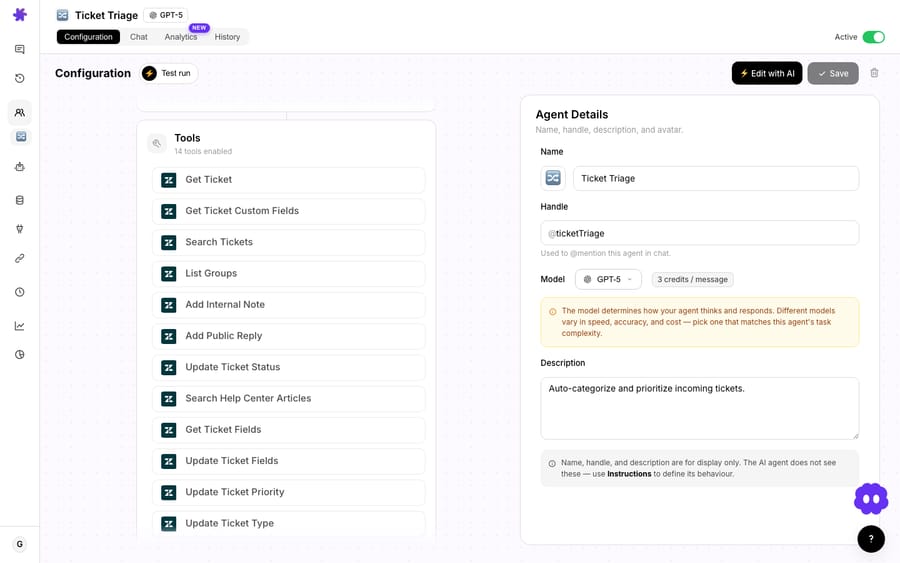
Zendesk is the deepest connector. It's the only one with AI vision on image attachments (the agent can see a screenshot, receipt, or damaged-product photo and describe it) and the only one with live Help Center sync, where your published articles flow into Macha's knowledge base and stay current. It also has the richest trigger set: eight events, including a dedicated Messaging trigger that fires on WhatsApp, Messenger, Instagram, LINE, Telegram, and web chat. We go deeper on it on the Macha on Zendesk page.
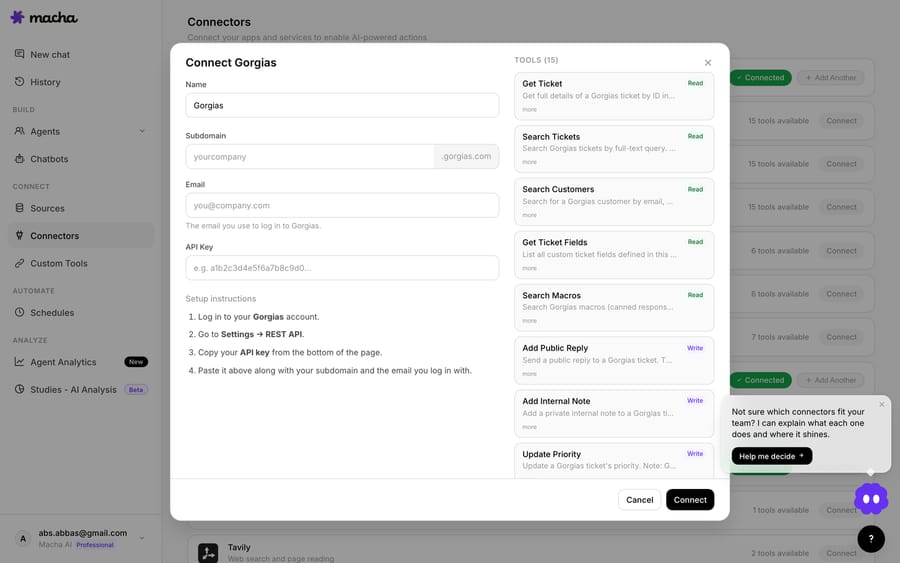
Gorgias adds macros. Gorgias teams run on canned responses, so the connector can search your macros and apply the right pre-written reply. That helps in Shopify support, where the same WISMO, returns, and cancellation answers repeat all day. Pair it with Macha's Shopify connector and the agent has live order context to drop into those replies.
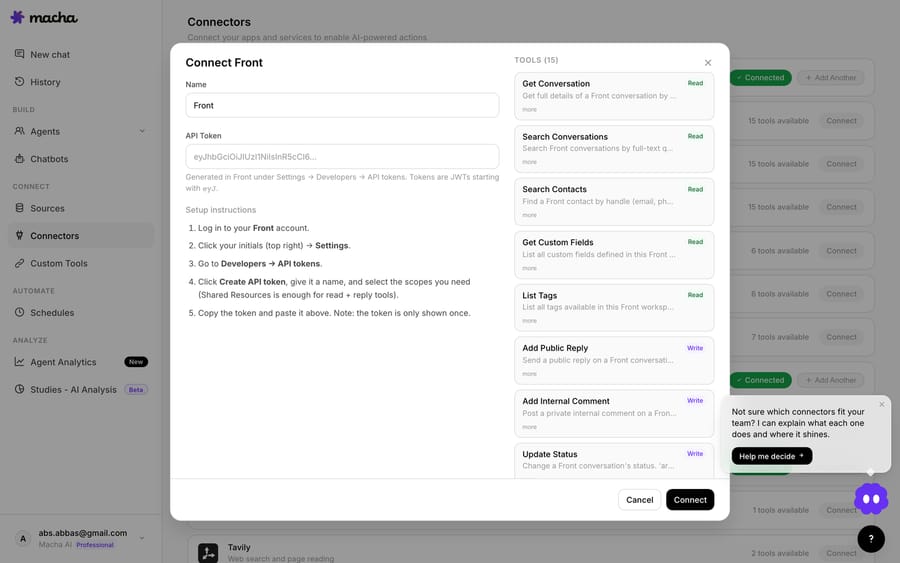
Front is the shared-inbox specialist. It's the one connector whose internal comments support @mentions, so the agent can tag a specific teammate when it escalates. It also exposes inboxes, teammates, and teams, and searches contacts across every handle (email, phone, social). Its status verbs match Front's model: archive (close), reopen, or trash.
Freshdesk is the clean middle. Full read/reply/note/status/priority/tags/fields/assign, plus knowledge-base article search and agent/group listing for routing. It doesn't do live KB sync or image vision yet, but for end-to-end ticket handling it has what an agent needs.
The headline: the workflow you design transfers across connectors. What changes is the trimming: image vision and Help Center sync on Zendesk, macros on Gorgias, @mentions and inboxes on Front.
How does the agent run without a human starting it?
A connector that can only act when a person asks it to is a copilot. The interesting part is autonomous triggers: Macha attaching to a helpdesk event so the agent runs on its own.
Every connector fires on new tickets or conversations. Zendesk, Freshdesk, Gorgias and Front also expose a Custom Webhook option: Macha generates a URL you drop into a native rule (a Zendesk trigger, a Freshdesk automation, a Gorgias HTTP integration, a Front rule's "Send a webhook" action) so you decide which tickets reach the AI. Zendesk adds customer-reply, status-changed, priority-changed, assigned, closed, and the omnichannel Messaging trigger; Front adds a conversation-assigned event. Intercom fires on the first customer message, every customer message, assignment and close. HubSpot fires on new tickets, ticket updates and new contacts.
The pattern most teams start with: gate the AI behind a native rule (for example, only tickets tagged ai-eligible, or only the billing inbox), watch it draft internal notes for a week, then let it post public replies once you trust it. The same pattern works on every helpdesk.
How much does an AI layer cost compared with per-resolution AI?
Macha doesn't charge per helpdesk or per resolution. You pay per ticket: one conversation, charged once, however many messages, tool calls and lookups the agent needs to finish it. Pricing starts at $299 a month for 750 tickets, about $0.40 each, and the tiers run up to $3,999 for 10,000 tickets. The model the agent runs on doesn't change the price, and setup and monitoring by the Macha team are included.
That's a different shape from outcome-based pricing. eesel sells credit plans from $299 a month for 500 tickets or chats, about $0.60 each, down to about $0.35 on its $1,749 plan for 5,000. Gorgias charges $0.90 per resolved interaction on most plans and $1 on Starter, and its billing docs say a ticket resolved entirely by AI Agent can carry both the automation fee and a ticket fee. Billing per ticket means you know the number before the month starts. New accounts start with a free trial ($50 of usage, no credit card required, no time limit), so you can connect a helpdesk and run real tickets before you decide. Full plans are on the pricing page; a single Macha workspace can connect multiple helpdesks at once, so a multi-helpdesk org isn't several subscriptions.
When is an AI layer the wrong fit?
- If you don't have a helpdesk yet, Macha isn't your starting point, because it layers onto one. Stand up Zendesk, Freshdesk, Gorgias, Front, HubSpot or Intercom first, then add the agent.
- Knowledge sync is a Zendesk advantage. On the other desks the agent can search articles on demand where the connector supports it (or you point it at Notion, Confluence, Google Docs, or uploaded files instead), but you don't get the live Help Center auto-sync Zendesk has.
- Image vision is Zendesk-only today. If "read the screenshot the customer attached" is core to your workflow and you're on another helpdesk, that trick isn't there yet.
- One helpdesk per workflow, not a merge. Macha connects to each desk, but it isn't a unified-inbox product that fuses tickets from multiple helpdesks into one stream. If you run two helpdesks, you build agents against each.
- It's only as good as its access. An agent that can't see the order, the policy, or the account won't resolve the ticket. Budget time to connect the commerce and knowledge tools that give it context; the helpdesk connector alone is half the picture.
FAQ
Does Macha replace my helpdesk? No. Macha is an AI agent layer that runs on top of Zendesk, Freshdesk, Gorgias, Front, HubSpot or Intercom. Your tickets, agents, SLAs, and reporting stay where they are.
Can one Macha account connect to more than one helpdesk? Yes. You can connect multiple tools to a single workspace and build agents against each. Macha doesn't merge tickets from different helpdesks into one unified queue; each helpdesk keeps its own.
Which helpdesk gets the most capability? Zendesk, currently. It's the only connector with AI image vision, live Help Center sync, and eight triggers including omnichannel messaging. Freshdesk, Gorgias, and Front share the same core ticket actions; Gorgias adds macro search and Front adds @mention escalation and inbox routing. Intercom adds Help Center article search, and HubSpot adds contacts, deals and pipeline moves.
Do I need engineering to set it up? No. Helpdesk connectors authenticate with OAuth or an API key/token, and agents are built in Macha's no-code builder and templates. Custom webhooks (optional) are a copy-paste URL into your helpdesk's native rules, and the Macha team handles setup on every plan.
How is this priced versus per-resolution AI? Macha bills per ticket (one conversation, charged once, however many steps it takes), not per resolved ticket. It starts at $299 a month for 750 tickets, about $0.40 each, whichever model you choose. See the pricing page.
Where can I read the connector details? The integrations directory has a page per helpdesk listing every action and trigger, and the docs walk through connecting one and building your first agent.
Macha is the AI agent layer for the helpdesk you already run. Connect Zendesk, Freshdesk, Gorgias, Front, HubSpot or Intercom, point it at your commerce and knowledge tools, and let agents resolve, triage, and route on the rails you already have. Start a free trial ($50 of usage, no credit card required).
Add AI agents to your Zendesk
Macha reads the ticket, drafts the reply and takes the action, inside the Zendesk you already run.