





 Shopify
 Stripe
 Slack
Slack Notion
 Google Workspace
 Confluence

How Does AI Ticket Triage Work? The 5 Stages Under the Hood


AI ticket triage turns a new ticket into a tagged, prioritized and assigned one in five stages: trigger, read, classify, act and hand off. Each stage has settings you control, from the fields the model sees to what it does when it isn't sure.
Key takeaways
- AI ticket triage runs in five stages: a trigger starts the run, the model reads granted fields, classifies intent, priority and sentiment, acts through tools, and hands off when unsure.
- IrisAgent, a vendor selling AI triage, reports 40% to 50% correct routing for rules-based systems against 85% to 95% triage accuracy on mature AI deployments.
- Zendesk intelligent triage classifies intent, sentiment, language and entities on Professional plans and above, but using it in workflows requires the Copilot add-on at $50 per agent a month.
- Macha triggers auto-disable and email the admin after a trigger errors 5 times in a row, and sub-agents can only write in autonomous mode.
- Macha bills triage per ticket at about $0.40 each, with pricing starting at $299 a month for 750 tickets.

AI ticket triage works in five stages: a trigger (usually a new-ticket webhook) starts an agent run, the model reads the ticket fields it has been granted, classifies intent, priority and sentiment in one model call, acts by writing tags, priority, type and assignment back to the help desk, and hands off to a human when it isn't sure. We'll walk each stage using triage in Macha, an AI agent layer that runs on top of Zendesk, Freshdesk, Gorgias, Front, HubSpot or Intercom rather than replacing it. The mechanics generalize; the difference with an agent-based approach is that triage doesn't end at a label, it ends at an action.
| Stage | What happens | What you control |
|---|---|---|
| 1. Trigger | A ticket event wakes an agent run | Which event, debounce delay, activation |
| 2. Read | The model sees the fields you grant | Subject, thread, tags, custom fields |
| 3. Classify | Intent, priority, sentiment, entities | The model and the taxonomy |
| 4. Act | Tools write priority, tags, type, assignment, notes | Which write tools the agent has |
| 5. Hand off | Unsure tickets go to a human with reasoning | The escalation rule in the instructions |
What is AI ticket triage?
AI ticket triage is the use of a language model to read an incoming ticket, classify it (topic, priority, sentiment), and route it to the right place, or resolve it outright, without a human dispatcher. Everything else is detail about how each of those verbs is implemented, and how the system behaves when it's wrong or unsure.
Rules-based triage (keyword filters and if subject contains "refund" automations) has been around forever. Teams replace it because of the ceiling: IrisAgent's ticket automation write-up puts rules-based routing at 40% to 50% correct, against 85% to 95% triage accuracy on mature AI deployments. That's a vendor's own figure, not an independent benchmark, and a vendor selling AI triage has every reason to put the rules number low. The direction still holds for a simple reason: an LLM reads meaning, not strings. "My card got hit twice" and "duplicate charge on my statement" never share a keyword, but they're the same intent.
How does the triage pipeline run, stage by stage?
Here's the full path. We'll take each stage in turn.
Trigger → Read → Classify → Decide → Act → (Handoff if unsure)
Stage 1: how does the agent wake up?
Nothing happens until an event fires. In a help desk, the cleanest signal is a new ticket webhook. When a ticket is created, the help desk POSTs the payload to the AI layer, which starts an agent run scoped to that ticket.
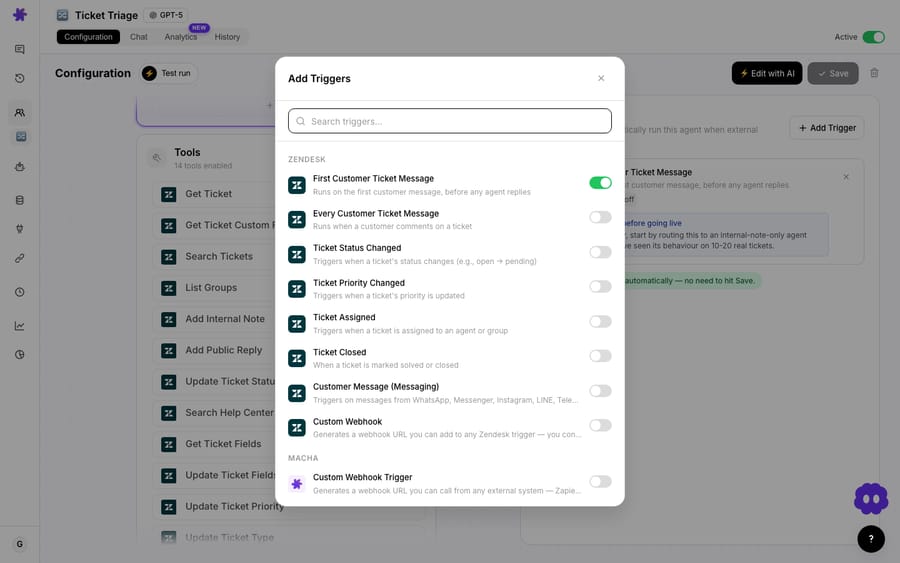
A few things matter here that the brochure never mentions:
- Debounce. Customers fire off three messages in ten seconds. Without a delay, you get three agent runs racing each other. Every event-driven trigger has a debounce setting (in seconds) so the agent waits for the burst to end before reading. It's a small detail that prevents a lot of double-replies.
- Activation guardrails. High-impact triggers like New Ticket (and the write tools they unlock, such as Add Public Reply and Update Ticket Status) show a confirmation modal when you switch them on, plus a persistent advisory card on the agent's config page. You don't accidentally point an autonomous agent at your whole inbound queue.
- Failure containment. If a trigger errors 5 times in a row, it auto-disables and emails you, rather than silently looping on a broken integration.
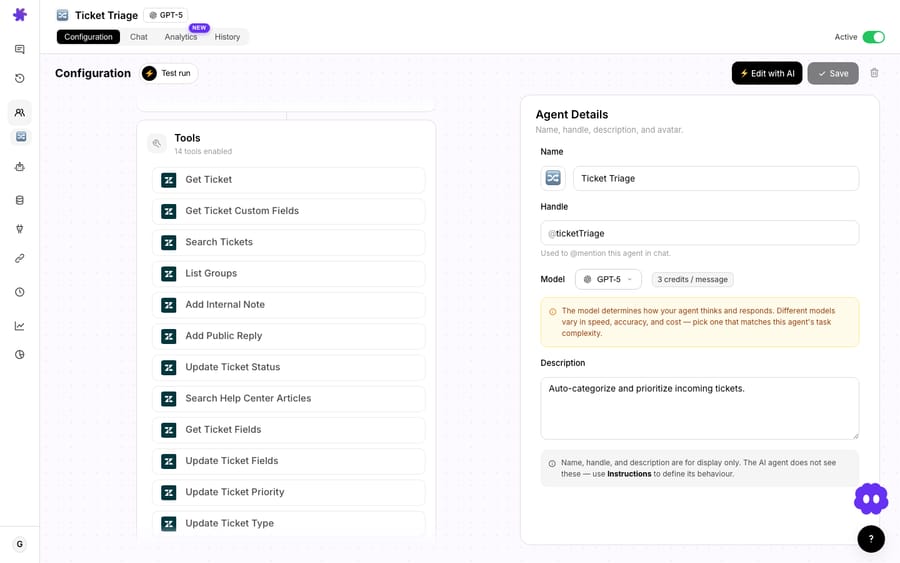
Stage 2: what does the model actually see?
This stage separates good triage from coin-flip triage, and it's almost entirely about scope. The agent gets the fields you grant it, nothing more. In Macha that's the ticket's subject, description, status, current priority, tags, custom fields, and the full comment thread: the same context a human agent would scan before deciding what to do.
What you feed in is a real lever:
- Give it the full thread and it can triage a reopened ticket with the history in view.
- Restrict it to subject + first message for a faster, cheaper first-touch classification.
- Custom fields (plan tier, region, product line) let the model weigh who is asking, not just what they're asking.
A triage model is only as good as its input window. "The AI got it wrong" is, more often than not, "the AI never saw the field that would have made it obvious."
Stage 3: how does the model classify intent, priority and sentiment?
Now the model reasons over what it read. The job breaks into a few parallel classifications, and they map cleanly onto what a triage agent produces:
| Classification | What it answers | Example output |
|---|---|---|
| Intent / topic | What does the customer actually want? | Billing → Access Issue |
| Priority | How urgent is this, really? | High |
| Sentiment | How does the customer feel? | Frustrated |
| Entities | What concrete things are referenced? | order #, plan, region |
These signals interact. A technically trivial issue from a frustrated VIP can outrank a complex bug from a calm free-tier user, because sentiment and customer tier bump priority, not just the literal problem. Rules can't encode that judgment; an LLM does it naturally because it weighs several signals at once rather than matching one.
Under the hood this is a single model call per agent, and which model you pick is a real knob. Bigger models reason better on ambiguous tickets; smaller, faster ones are fine for clean, high-volume queues. On Macha the model choice doesn't change the price, since billing is per ticket.
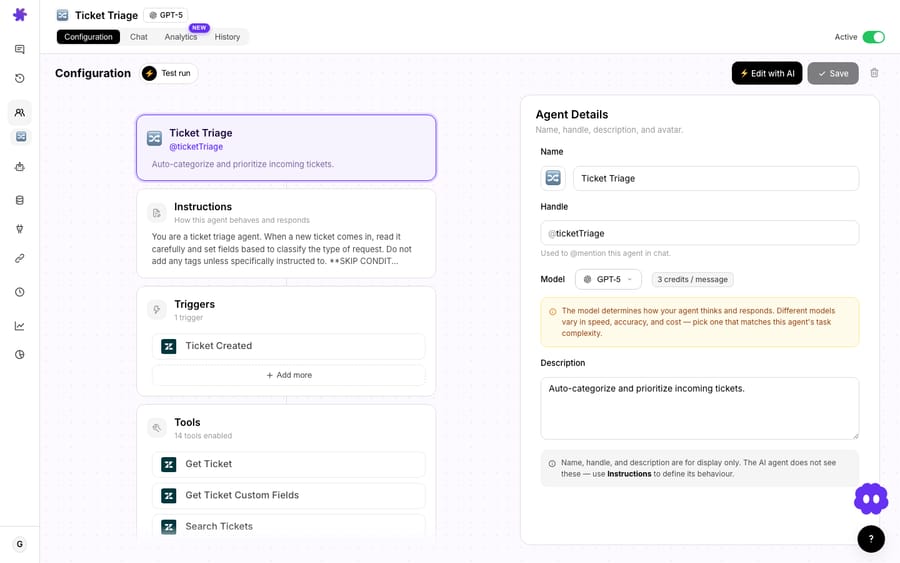
Stage 4: how does an agent act on the classification?
Here's the fork in the road. A pure classification product stops at Stage 3: it hands you a label and a confidence score, and a human still has to do something with it. An agent keeps going and takes the action, by calling tools against your help desk:
- Update Ticket: set the priority, apply tags (
billing,access-issue). - Update Ticket Type: mark it a problem, incident, question, or task, so triage categorizes cleanly without abusing custom fields.
- Assign Ticket: route it. This accepts a group, a specific agent, or both, so the agent can send a ticket straight to the Billing or Tier 2 Support queue rather than always picking one person.
- Add Comment: drop an internal note explaining its reasoning, so the human who picks it up sees the why.
So the triage-and-route use case resolves to something concrete: ticket arrives → classified as Billing → Access Issue, High, Frustrated → priority set to High, tagged billing + access-issue, assigned to the Billing group, internal note added, in seconds, before a human opens it. And because the agent has tools, triage can branch into adjacent jobs: a high-sentiment VIP ticket can fan out to a Slack alert instead of sitting in a queue.
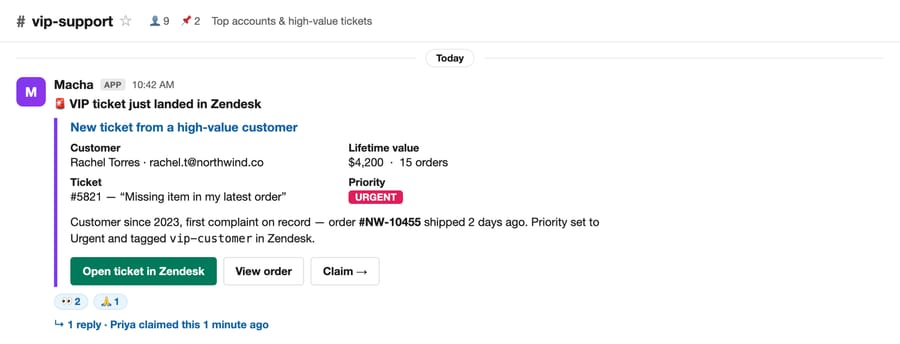
A safety detail worth knowing: when triage runs delegate to sub-agents, those sub-agents can perform write operations only in autonomous (trigger-fired) mode. In interactive chat they stay read-only. The system distinguishes "an automation is running on a verified webhook" from "someone is poking at this in a chat window," and only grants write power to the former.
Stage 5: what happens when the AI isn't sure?
This stage separates a system you can trust from one you can't, and it's the one most marketing pages skip. Good triage has an explicit low-confidence path: when the model isn't sure, it should not force a decision. IrisAgent's own guidance is that a low-confidence ticket goes to human triage "with its reasoning attached," so the person sees the model's read and decides. Zendesk's intelligent triage stores a confidence field next to each prediction for the same reason; where you set the cut-off is your call, and it's worth tuning against your own tickets rather than copying someone else's number.
You engineer this in the agent's instructions and tool grants. If a ticket is ambiguous, the safe move is "tag needs-review, leave priority untouched, add an internal note, and stop," not "guess and assign." The internal-note tool is what makes the handoff honest: a human inheriting the ticket gets the AI's read, not a silent mystery routing.
Does AI triage replace your help desk's own triage?
No. AI triage like this is a layer on top of your help desk, not a new help desk. Zendesk, for instance, ships its own intelligent triage, which classifies new tickets by intent, sentiment, language (about 150 languages) and entities. Zendesk says the classifications are available on Suite and Support Professional plans and above, and using them in triggers and other workflows requires the Copilot add-on, which is $50 per agent a month. An agent layer can run alongside it, reading the same ticket and taking richer, tool-driven actions (pull order data, post to Slack, draft a reply) that a built-in classifier doesn't.
The ticket stays in Zendesk. Your agents, views, SLAs and reporting don't move. The AI layer reads the ticket, makes its decision, and writes the result back as priority, tags, type, assignment and notes: fields your team already lives in.
When shouldn't you lean on AI triage?
Triage AI is useful, and it's also easy to over-trust. Real limits:
- Garbage-in queues. If your tickets are one-liners with no context ("it's broken"), the model has nothing to reason over. The dispatcher's first job, collecting the missing information, matters more than classification here. Fix intake first.
- Brand-new categories. A model reasons well over patterns it has seen described; a novel issue type (a fresh outage, a new product line nobody documented) is exactly where confidence should drop and a human should look. If your system never escalates, it's overconfident.
- Auto-replies on high-stakes tickets. Classifying and routing is low-risk. Publicly replying is not. That's why write tools like Add Public Reply sit behind confirmation modals. Keep auto-send off for billing disputes, security and legal until you've watched the agent get the routing right for a few hundred tickets.
- Accuracy claims. The 85% to 95% figures are vendor-reported on their own deployments. Treat them as plausible upside, then measure your triage accuracy on your taxonomy before you trust it unattended.
The sane rollout is staged: start the agent in classify-and-tag only mode (no assignment, no replies), watch the labels for a week, then turn on routing, then, much later and selectively, auto-replies. Triggers can be toggled on and off without tearing down their webhook config, so dialing autonomy up or down is a switch, not a rebuild.
FAQ
Is AI ticket triage the same as a chatbot? No. A chatbot talks to the customer; triage works behind the ticket, reading, classifying, prioritizing and routing it. They're complementary: triage can decide a ticket is a simple FAQ and hand it to an auto-reply flow, or decide it's complex and route it to a human.
Does AI triage replace my helpdesk? No, and you shouldn't want it to. The triage we've described is a layer on top of Zendesk, Freshdesk, Gorgias, Front, HubSpot or Intercom. The ticket stays in your system of record; the AI reads it and writes back priority, tags, type and assignment.
How does it decide priority? By weighing several signals at once (the literal issue, sentiment, and customer context like plan tier or VIP status) rather than matching a keyword. A frustrated VIP with a simple problem can correctly outrank a calm user with a hard one.
What happens when the AI is unsure? With a well-built agent, a low-confidence ticket gets tagged for human review with the AI's reasoning attached, instead of being force-routed. The escalation path is part of the design, not an afterthought.
How much does running triage cost? Macha bills per ticket: one conversation, charged once, however many classifications, lookups and routing steps the agent takes. A clean classification and a heavy multi-tool escalation cost the same, about $0.40. Pricing starts at $299 a month for 750 tickets, with setup and monitoring by the Macha team included. See the pricing page for current plans.
How do you try AI triage on your own queue?
Start a free trial ($50 of usage, no credit card required), connect your help desk, and point a triage agent at Ticket Created in classify-and-tag mode first. The triggers docs cover the event side; the triage-and-route use case covers the full flow.
Written by Abbas (Customer Support & AI, Macha) · Reviewed by Ankeet Guha (Co-founder & CTO) · Published 2026-06-24 · Last updated 2026-09-24.






