





 Shopify
 Stripe
 Slack
Slack Notion
 Google Workspace
 Confluence

How Do You Auto-Resolve "Where Is My Order?" Tickets With AI?


An AI agent can close most "where is my order?" tickets by looking up the order in Shopify and replying with the carrier, tracking number and ETA. Here is the exact trigger, toolset and escalation rules, with the cost compared against a human-handled ticket.
Key takeaways
- An AI agent auto-resolves "where is my order?" tickets with a Ticket Created trigger, a Shopify Get Order lookup, a reply with carrier and tracking, and a Solved status update.
- Ringly puts WISMO at 30-50% of direct-to-consumer support contacts, citing Gorgias's 2024 ecommerce CX report, while Fin puts it at 20-40% of tickets.
- Fin's comparison table shows the average cost of an order-tracking ticket falling from $4.50 to under $1 once an AI agent handles the lookup.
- Macha bills about $0.40 per ticket with pricing starting at $299 a month for 750 tickets, however many steps the order-status agent takes.
- WISMOlabs treats a WISMO rate of 3-4% of orders as healthy and under 2% as world class, which proactive shipping notifications do more to reach than automation.

An AI agent auto-resolves "where is my order?" tickets in four moves: a Ticket Created trigger wakes it, a Shopify Get Order lookup finds the order by number or email, it posts a reply with the carrier, tracking number and ETA, and it sets the ticket to Solved. Anything it can't confirm (no order found, no tracking yet, a lost parcel) goes to a human with the order already attached.
| Step | Tool | What happens |
|---|---|---|
| 1. Trigger | Help desk: Ticket Created | A new ticket that reads like an order-status question wakes the agent |
| 2. Read | Get Ticket | The agent reads the message, requester email and any order number |
| 3. Look up | Shopify: Get Order | Fulfillment status, carrier, tracking number, ETA |
| 4. Reply | Add Comment | A public reply with the tracking details, in your tone |
| 5. Close or escalate | Update Ticket | Solved if everything checked out, otherwise handed to a human |
The volume is why it's worth doing (to size your own, see support tickets per order by ecommerce vertical). Ringly puts WISMO at 30–50% of direct-to-consumer support contacts, citing Gorgias's 2024 ecommerce CX report, and Fin puts it at 20–40% of tickets. Fin's own comparison table shows the average cost per order-tracking ticket falling from $4.50 to under $1 once an AI agent handles the lookup. Fin sells per-resolution AI, so read that figure as a vendor's case, but the direction isn't in dispute.
The work is lookup-and-relay, not judgment, which makes it the best candidate for end-to-end automation in most commerce help desks. The build below watches for order-status tickets, pulls the live order from Shopify, replies on the ticket, marks it solved, and knows when to back off and hand a human a clean ticket instead of guessing.
New to WISMO automation? If you want the strategy-level why and a Zendesk-AI-agent overview first, start with our companion piece, Automate WISMO responses with AI in Zendesk. This post is the hands-on build — the exact trigger, tools, and escalation rules, step by step.
What Macha is matters for the design. Macha is an AI agent layer that sits on top of the helpdesk you already run — Zendesk, Freshdesk, Gorgias, Front, HubSpot or Intercom — connected to your commerce stack. It is not a chat widget bolted onto your storefront, and it is not a helpdesk replacement. That distinction matters here. Most "WISMO automation" tools only deflect questions asked in a live-chat bubble. The agent below resolves the email and helpdesk tickets your customers actually open, on the same ticket, in your brand voice — then closes it.
What does an order-status agent do, end to end?
Here is the flow in detail, taken from the order-status use case:
- Trigger — A new ticket arrives in your helpdesk and looks like an order-status question.
- Get Ticket — The agent reads the ticket: the message, the requester's email, any order number they gave.
- Get Order (Shopify) — It looks up the order in Shopify by number or by the customer's email, and reads fulfillment and tracking.
- Add Comment — It writes a reply on the ticket with the carrier, tracking number, and ETA, in your tone.
- Update Ticket — If it had everything it needed, it sets the ticket to Solved. If it didn't, it escalates instead.
A real exchange, end to end, looks like this:
Customer: "Hi, I placed an order 3 days ago and haven't received any updates. Order #1847." (Macha looks up order #1847 in Shopify → order shipped via FedEx, tracking #7829401, estimated delivery tomorrow.) Macha: "Hi! Your order #1847 shipped on March 2nd via FedEx. Your tracking number is 7829401 and it's estimated to arrive tomorrow. Let me know if you need anything else!" (Ticket → Solved.)
No agent touched it. That's one of your highest-volume ticket types handled in seconds, around the clock, in any timezone your store sells into.
What do you need before you build it?
You need two connectors and one agent.
| Piece | What it does | Connector |
|---|---|---|
| Helpdesk | Where the ticket lives; where the trigger fires and the reply is posted | Zendesk, Freshdesk, Gorgias, Front, HubSpot, Intercom |
| Shopify | The source of truth for order, fulfillment, and tracking | Shopify |
| The agent | The instructions + tools + trigger that tie it together | Macha |
We'll use Zendesk + Shopify as the worked example because that's the pairing in the source use case, but the same agent and tools map onto the other supported desks, including Gorgias, which is Shopify-native and a natural fit for commerce teams. If you sell on Shopify and run any of Zendesk, Freshdesk, Gorgias, Front, HubSpot or Intercom, you can build this today.
Connect Shopify and your helpdesk
In Macha, connect both: your helpdesk (so the agent can read tickets and post replies) and Shopify (so it can look up orders). The Shopify Get Order action looks up an order by ID or order number and returns full line items, fulfillment, and payment status. From that payload the agent reads exactly the four fields a WISMO reply is built on: fulfillment status (is it shipped?), carrier (FedEx, UPS, USPS…), tracking number, and estimated delivery / ETA. That's the whole reply, and nothing the agent doesn't need. See the Shopify integration and Zendesk integration pages for the full tool lists, and the docs for connector setup.
How do you build the agent, step by step?
Step 1: Create the agent and give it a tight job
Create a new agent and name it something honest like "Order Status (WISMO)." The narrower an agent's job, the better it performs — a single-purpose order-status agent will beat a do-everything mega-agent every time, because its instructions, tools, and escalation rules are all pointed at one outcome.
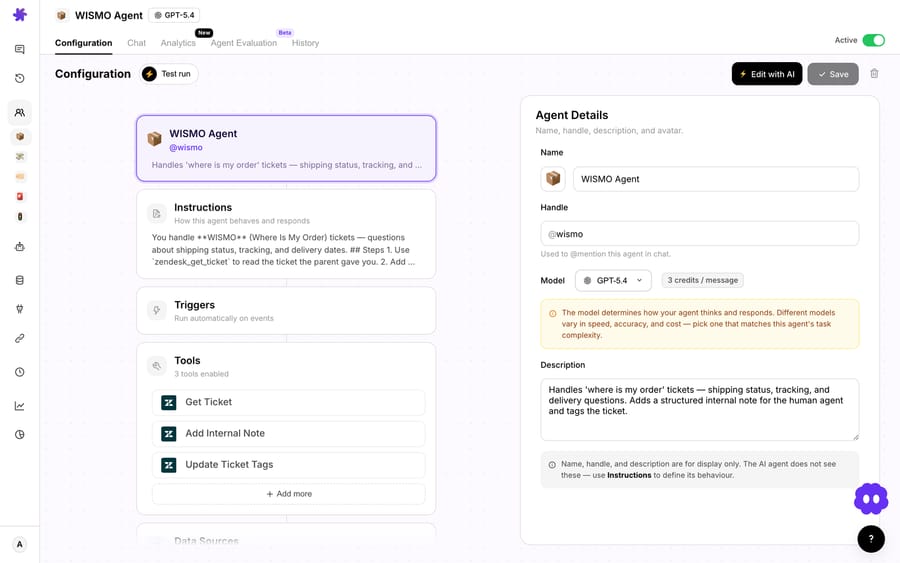
Write its instructions in plain language. The job description does most of the work:
You are the order-status agent for [Store]. When a customer asks where their order is, find their order in Shopify — by order number if they gave one, otherwise by their email — and reply with the fulfillment status, carrier, tracking number, and estimated delivery. Be warm and brief. If you cannot confidently identify the order, or the order has shipping trouble, do not guess — escalate to a human with a short note. Never invent a tracking number or a date.
That last line is not optional. The fastest way to destroy trust is a confident wrong tracking number, so the instruction to never fabricate and to escalate on doubt is the backbone of a safe agent.
Step 2: Give it the tools it needs (and only those)
Add exactly the four actions the use case calls for, in this order of use:
- Zendesk → Get Ticket — read the incoming ticket and requester.
- Shopify → Get Order — look up the order by number or customer email, with fulfillment and tracking.
- Zendesk → Add Comment — post the reply on the ticket.
- Zendesk → Update Ticket — set status to Solved (or escalate).
Two of these — Add Comment (a public reply) and Update Ticket (status change) — are high-impact tools that actually write back to the customer and the queue. Macha surfaces an activation confirmation and a persistent advisory card on those, so you enable them deliberately. Keep the toolset this tight: an agent with only the tools its job requires can't wander off and do something you didn't intend.
Step 3: Wire the trigger
The trigger is what makes this autonomous instead of a button you press. In the agent's Triggers tab, add a trigger, pick Zendesk → Ticket Created as the event, and then fill the condition field with plain English: "Customer asks about order status." This isn't a rules engine of subject CONTAINS "order" clauses — the condition is a natural-language description of when this agent should wake up, and Macha evaluates each new ticket against it semantically. So "where's my package," "hasn't arrived yet," and "any update on #1847?" all match, while a refund request or a product question does not. You can tune it later by tightening the wording (e.g. "Customer is asking about the shipping or delivery status of an existing order, not requesting a return or cancellation") to narrow what fires.
The result: every new ticket that reads like a WISMO question wakes the agent automatically — no human triage in front of it.
Two trigger settings are worth setting on purpose:
- Debounce. Customers often fire off a ticket and then immediately add "oh, order #1847" in a second message. A short debounce (a few seconds) lets the agent wait for the dust to settle and read the complete thread, instead of replying to half a question. Zendesk and Freshdesk ticket events both support a debounce delay.
- Scope it to new tickets only. You want this on freshly created order-status tickets, not retriggering on every internal update to an existing one.
Step 4: Test before you let it loose
Don't point a brand-new agent at your live queue on faith. Run it against a handful of real past order-status tickets first and read its replies the way a customer would. Check three things: did it find the right order, is the tracking number actually correct, and did it escalate the messy ones instead of bluffing? When the replies are ones you'd happily send yourself, turn the trigger on. You can pause an agent at any time — toggling it off sets its triggers inactive rather than tearing anything down, so you can flip it back on the moment you're comfortable.
When should the agent not auto-resolve?
Every WISMO automation vendor will show you the happy path — order shipped, tracking exists, customer delighted. The real world has a tail of cases where auto-resolving is the wrong move, and a good agent is defined by how it handles them. Build these escalation rules in explicitly:
- The order isn't found. Wrong order number, guest checkout under a different email, or a marketplace order that isn't in Shopify. The agent should ask one clarifying question or hand it to a human — never assert "we have no record of your order," which reads as an accusation.
- No tracking yet (pre-fulfillment). The order is paid but not shipped. The honest reply is "it's confirmed and being prepared, you'll get tracking when it ships," not a fabricated date. If a customer is anxious about a pre-fulfillment delay, that's often a human conversation.
- Shipping trouble. Tracking shows delivered but the customer says it never arrived, or the parcel is stuck/returned-to-sender. These are lost-package and address-correction tickets wearing a WISMO costume. The agent should recognize the signal and escalate with the order context attached, not loop the customer through tracking links.
- It's not really about the order. "Where's my order, and also I want to cancel it" or "...and the discount didn't apply." A blended ticket needs a human or a different agent. Keep this agent's lane narrow and let it hand off.
The design principle: the agent's job is to resolve the easy 80% perfectly and route the hard 20% cleanly — with the order already looked up and a one-line summary attached, so the human who picks it up starts ten steps ahead instead of from scratch. That handoff quality is what separates a deflection gimmick from real support automation.
A second honest caveat: this agent is only as good as Shopify's data. If your tracking is unreliable, your carrier feeds lag, or fulfillment is handled in a system Shopify can't see, automate WISMO after you've fixed the data — not before. And the durable win isn't deflecting more WISMO tickets; it's reducing them at the source with proactive shipping notifications and a clear tracking page. WISMOlabs calls a WISMO rate of 3–4% of orders healthy and under 2% world class, the latter reached with proactive, multi-channel notifications. Automation handles the ones that still slip through.
What does it cost to run, compared with a human?
Macha bills per ticket — one conversation, charged once, however many steps the agent takes to finish it — never per "resolution" or "deflection." A WISMO answer that reads the ticket, looks up the order, replies and updates the status is one ticket, about $0.40, exactly the same as one that takes a single lookup, and the model the agent runs on doesn't change that. Pricing starts at $299 a month for 750 tickets.
Compare that with a manually handled WISMO ticket. Ringly puts an email ticket at $5–$10 fully loaded, and Kustomer, citing Qualtrics, puts a service call at $3–$7. Multiply that by your highest-volume ticket type and the math is the easy part.
A back-of-envelope model, where every input is an assumption to replace with your own queue: say WISMO is 40% of a 5,000-ticket month (2,000 tickets), and a tight order-status agent resolves 60–70% of them end to end. That's ~1,200–1,400 tickets your team never opens. At a conservative $3 of loaded cost each, below the low end of both ranges above, that's $3,600–$4,200 a month back, before you count faster first responses and an instant answer at 2 a.m. Running those resolutions on Macha costs about $0.40 a ticket, roughly $480–$560 a month.
Two honest caveats on the model. First, deflection rate is not a number we can promise — it depends on how clean your Shopify data is, how clearly customers phrase tickets, and how aggressively you tune the escalation rules. Measure it on your own queue for a week before you bank any of it. Second, the durable win isn't a high deflection percentage; it's a lower WISMO volume in the first place (see below). You can try the whole thing on the free trial ($50 of usage, no credit card required) — see pricing for plan details.
Why resolve WISMO on the ticket instead of in a chat widget?
Most tools that "automate WISMO" are storefront chat widgets — they answer the question if the customer happens to ask it in the live-chat bubble before they email. But a huge share of WISMO arrives as email and helpdesk tickets, contact-form submissions, and post-purchase replies. Those never touch a chat widget.
Because Macha lives inside your helpdesk, it resolves WISMO wherever the customer actually raised it — on the Zendesk, Freshdesk, Gorgias, Front, HubSpot or Intercom ticket — and leaves a clean audit trail in the tool your team already lives in. No new inbox, no migration, no asking customers to change how they reach you. That's the whole point of an agent layer on top of your existing stack rather than another silo beside it. (If you're on Zendesk specifically, the Macha on Zendesk page walks through exactly how the agent operates inside the Agent Workspace.)
Frequently asked questions
Does this replace my helpdesk? No. Macha sits on top of Zendesk, Freshdesk, Gorgias, Front, HubSpot or Intercom and works your existing tickets. You keep your helpdesk, your macros, your reporting — the agent just handles the WISMO volume inside it.
What if the customer doesn't include an order number? The Get Order action can look up orders by the requester's email, so most tickets resolve without an order number. When there's genuine ambiguity — multiple recent orders, a guest checkout under a different email — the agent asks one clarifying question or escalates rather than guessing.
Will it ever invent a tracking number or delivery date? It shouldn't, and your instructions should forbid it explicitly. The agent only relays fulfillment and tracking data it actually read from Shopify; if that data isn't there (pre-fulfillment, or no tracking), it says so honestly and escalates the anxious cases instead of fabricating.
Does it work on help desks other than Zendesk? Yes. The example uses Zendesk + Shopify, but the same four actions and trigger map onto the other desks Macha runs on: Zendesk, Freshdesk, Gorgias, Front, HubSpot or Intercom. Gorgias is Shopify-native, so it's an especially natural pairing for commerce teams.
How is it billed — per resolution? No. Macha bills per ticket — one conversation, charged once, however many steps it takes. A WISMO thread is one ticket, about $0.40, whether the agent answers it in a single lookup or escalates it to a human. See pricing.
What WISMO rate should a store aim for? WISMOlabs treats 3–4% of orders as healthy and under 2% as world class. Proactive shipping notifications and a clear tracking page move that number more than any agent does; the agent handles what still arrives.
How long does it take to set up? If Shopify and your helpdesk are already connected, building and testing this agent is an afternoon, not a project. The longest part is reading its test replies carefully before you switch the trigger on.
Ready to take WISMO off your team's plate? Connect Shopify and your helpdesk, build the order-status agent above, and try it on the free trial ($50 of usage, no credit card required). Read the order-status use case and the docs to go deeper.






