





 Shopify
 Stripe
 Slack
Slack Notion
 Google Workspace
 Confluence

What Should You Automate First in AI Support? A 6-Level Maturity Model (2026)


Modern AI can draft, classify, look up an order and issue a refund, so the hard question is which of those to switch on first. Teams that start with full auto-resolution spend a month firefighting, and teams that stay too cautious never get past suggesting help-center links.
Key takeaways
- AI support automation should start with FAQ deflection (Level 1) and human-approved drafting (Level 2) after measuring the queue, and leave refunds and account changes (Level 5) for last.
- The six-level maturity model runs from Measure (Level 0) through Deflect, Assist, Retrieve and Triage to Act (Level 5), ranked by how reversible a wrong AI action is.
- In a real Macha Studies run over 57 tickets, 40% touched billing and none was an outright refund request, so a billing-context agent beat a refund-automation flow.
- A good first write action at Level 5 is narrow, such as refunding duplicate charges under $50 with a matching Stripe record, behind a confirmation gate.
- Macha bills per ticket regardless of automation level, from $299 a month for 750 tickets, about $0.40 each, so climbing a rung does not change the per-ticket cost.

Automate first the high-volume questions your knowledge base already answers (Level 1, deflection) and reply drafting a human approves (Level 2, assist), after you have measured your queue; leave refunds, cancellations and account changes (Level 5) for last. That order comes from a six-level maturity model that ranks every task by how much autonomy you hand over and how reversible the action is: start where the blast radius is smallest, prove the model on your real tickets, and only climb a rung once the rung below it is boringly reliable.
| Level | Name | What the AI does | Autonomy | Reversibility |
|---|---|---|---|---|
| 0 | Measure | Reads your history, quantifies the queue | None (analysis only) | n/a |
| 1 | Deflect | Auto-answers repetitive, known questions | Customer-facing, read-only knowledge | High |
| 2 | Assist | Drafts, summarizes, suggests; a human sends | Agent-facing only | Total (human gate) |
| 3 | Retrieve | Pulls live order, payment and account context | Read-only tool calls | High |
| 4 | Triage | Classifies, prioritizes, routes, alerts | Internal actions | High |
| 5 | Act | Refunds, cancellations, account changes | Write actions on systems of record | Low: needs guardrails |
The frame matters because automation risk is not evenly distributed. Suggesting an article to an agent is a near-zero-risk action. Auto-issuing a $400 refund is not. A good roadmap treats those as different problems and earns its way up. Most teams should expect to live happily at Levels 1 to 4 for a long time, dipping into Level 5 only for narrow, well-bounded actions. Climbing isn't the goal; matching the rung to the risk is.
Why order automation by reversibility instead of difficulty?
Public maturity models agree on the shape if not the labels. Kustomer's four-level CX AI maturity model moves from foundational RAG retrieval, to personalized agentic workflows, to autonomous multi-agent resolution, to an AI-driven enterprise. Other vendors and analysts describe the same arc in different words. The recurring advice is blunt: don't automate everything first; classify and route first, and start with high-volume, low-risk, pattern-based tasks while keeping a human in the loop.
We'd push that one step sharper. The right ordering variable isn't volume and it isn't technical difficulty. It's reversibility. Rank every candidate task by "if the AI gets this wrong, how bad is it and how fast can we undo it?" Drafting a reply a human approves is fully reversible. Posting a public reply is mostly reversible. Refunding money or changing an account is not. Automate in that order and your worst-case failure on each new rung is always something you can take back. That gives the six levels in the table above.
Level 0: what is actually in your queue?
Before you automate a single ticket, you need a real answer to "what is actually in our queue?" Almost every team operates on a gut guess ("most of our tickets are about shipping") that turns out to be half wrong once you count. A handful of categories usually carries most of the volume, and the entire point of Level 0 is to find your handful, not the generic ones from someone else's guide.
This is what Macha's Studies feature exists for: point an AI analysis at a set of historical Zendesk tickets, define the columns you want (category, billing-related yes/no, refund-requested yes/no, urgency 1 to 5), and get a structured grid back that you can filter or export to CSV. In a real run over 57 tickets, it surfaced that 40% touched billing and not a single ticket was an outright refund request. That immediately tells you a billing-context agent would earn its keep and a refund-automation flow would sit idle.
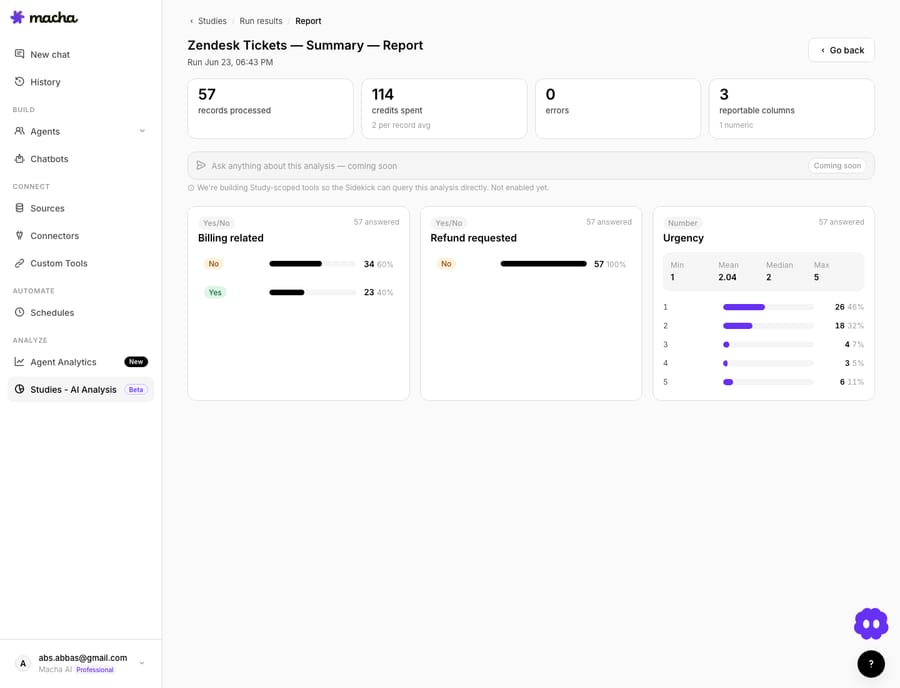
The output of Level 0 is a ranked list: for each category, its share of volume, its average handle time, and its risk (does resolving it require a write action or a refund?). High-volume, low-risk, high-AHT categories are your Level 1 candidates. Spend an afternoon here and the rest of the roadmap writes itself.
Level 1: which questions can AI answer on its own first?
The first thing to automate is the cluster of questions whose answers are already written down and never change: return policy, business hours, "how do I reset my password," "where's my tracking link." These are repetitive, low-stakes, and fully covered by your knowledge base, which makes them the textbook starting point.
In Macha terms this is an auto-reply agent grounded in a knowledge source (your help center, a Notion or Confluence wiki, uploaded docs). It only answers when it has a confident, sourced match; everything else falls through to a human. Macha ships agent templates so you don't start from a blank canvas: pick the auto-reply pattern, connect the knowledge source, and constrain it.

The guardrail that makes Level 1 safe: confidence-gated answering. The agent must be allowed to say "I'm not sure, routing you to a person" rather than confabulate. A deflection agent that answers 30% of tickets correctly and hands off the rest cleanly is worth far more than one that answers 90% with a 10% confident-but-wrong rate.
- Automate here: policy questions, FAQ, order-status questions a knowledge base covers, "how do I" articles.
- Don't yet: anything needing live customer data (that's Level 3) or any judgment call.
- Metric: deflection rate and hand-off accuracy. Track both, never just the first.
Level 2: is AI drafting safer than AI answering?
Yes. Running in parallel with deflection, and arguably even safer, is agent assist: the AI drafts a reply, summarizes a long thread, or surfaces the relevant article, but a human reviews and sends. Because there's a human gate on every output, this level is fully reversible by construction. Nothing reaches the customer the team didn't approve.
This is where nervous teams should start if customer-facing automation feels like too big a first step. Macha's library has the patterns ready: draft ticket responses for agent review, summarize long ticket threads, and surface relevant help-center articles while an agent is typing. Adoption is voluntary and the downside is essentially zero; worst case, an agent ignores a bad draft.
The reason assist matters in the roadmap and not just as a feature: every accepted or edited draft is a labelled signal. You're watching the model's judgment on your real tickets with a human backstop, which is exactly the evidence you need before you let it answer anyone directly. Level 2 is how you de-risk Levels 1, 3, and beyond.
- Automate here: reply drafting, thread summarization, internal knowledge lookup for agents.
- Metric: draft acceptance rate (how often agents send with minimal edits), your single best leading indicator for higher autonomy.
Level 3: when should AI read live order and billing data?
Levels 1 and 2 work off static knowledge. Level 3 connects the AI to systems of record, read-only: look up an order in Shopify, pull a customer's payment history from Stripe, check a subscription status. Now "where's my order?" gets a real answer with the real tracking number, not a link to a tracking page.
This is a genuine step up in usefulness and still a low-risk one, because reading is reversible. The worst case is the AI surfaces the wrong record, which a human catches. The action it takes is "fetch and show," never "change."
The architectural point: at Level 3 you stop thinking of the AI as a chatbot and start thinking of it as an agent with tools. Macha connects Shopify, Stripe, Notion, Confluence, Jira, Google Workspace, Airtable and more, and the agent decides which tool to call based on the ticket. Crucially, you scope tools by permission: a retrieval agent gets read tools only (Stripe's Get Customer and List Payments, not Create Refund). That permission boundary is the safety rail between Level 3 and Level 5.
- Automate here: order and shipment lookups, payment history, subscription status, account details: anything read-only.
- Don't yet: any tool call that writes (refunds, cancellations, address changes).
- Metric: retrieval accuracy (right record, right field) and the share of tickets where context was found automatically.
Level 4: why put triage after retrieval?
With measurement, deflection, assist, and retrieval working, the next high-leverage move is triage, and notably this is the one most maturity frameworks tell you to do first. We put it at Level 4 deliberately: triage is low-risk, but it's far more valuable once the AI can already read context (Level 3), because routing decisions improve a lot when the model can see the order, the tier, and the sentiment, not just the subject line.
Triage covers classifying every incoming ticket by topic, setting priority, routing to the right queue or team, and firing alerts: relay urgent tickets to Slack, alert the team when a VIP customer submits, escalate with a full context bundle. These are internal actions. A mis-route is annoying but instantly correctable, so reversibility stays high.
Triage is where AI quietly pays for itself even if you never automate a single customer-facing resolution. Faster, more accurate routing compresses first-response time across the whole queue, and good prioritization means your urgent tail (there's always one) gets seen first.
- Automate here: topic classification, priority scoring, queue routing, VIP and urgent alerting, escalation bundles.
- Metric: routing accuracy and first-response-time reduction.
Level 5: when is it safe to let AI issue refunds or change accounts?
This is the rung everyone wants to skip to and the one that earns the most caution. Level 5 is write actions on systems of record: issue the refund in Stripe, cancel the order in Shopify, update the account, change the subscription. These are the use cases that genuinely close tickets without a human: process refund requests automatically, handle cancellations, handle account update requests.
They're also the only ones that are hard to reverse. A wrongly issued refund is real money out. A wrong account change is a security and trust event. So Level 5 is not "let the AI do whatever." It's "let the AI propose and execute a bounded action behind explicit guardrails."
The guardrails Macha gives you for this rung:
- Confirmation cards and human approval gates: the agent prepares the action and asks for a one-click confirm before it executes, so a person stays on the hook for the irreversible step.
- Bounded limits: only auto-refund under $X, only cancel orders not yet shipped, only for accounts in good standing. Outside the bounds, it escalates.
- A full audit trail: every action the agent takes is logged, so you can see exactly what ran and why.
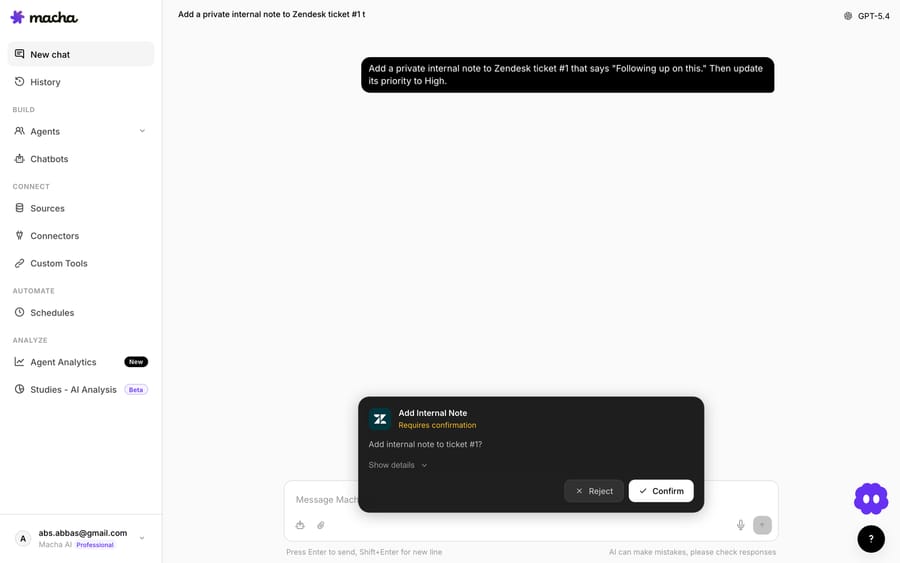
The discipline here is to automate one narrow, well-defined action at a time. "Refund duplicate charges under $50 with a matching Stripe record" is a great Level 5 starter. "Handle all billing disputes" is not. Earn each action; don't grant a category.
- Automate here, carefully: bounded refunds, pre-fulfillment cancellations, low-risk account updates, each with a limit and (initially) a confirm gate.
- Metric: action accuracy, escalation rate, and reversal rate (how often a human had to undo what the AI did).
What comes after the six levels?
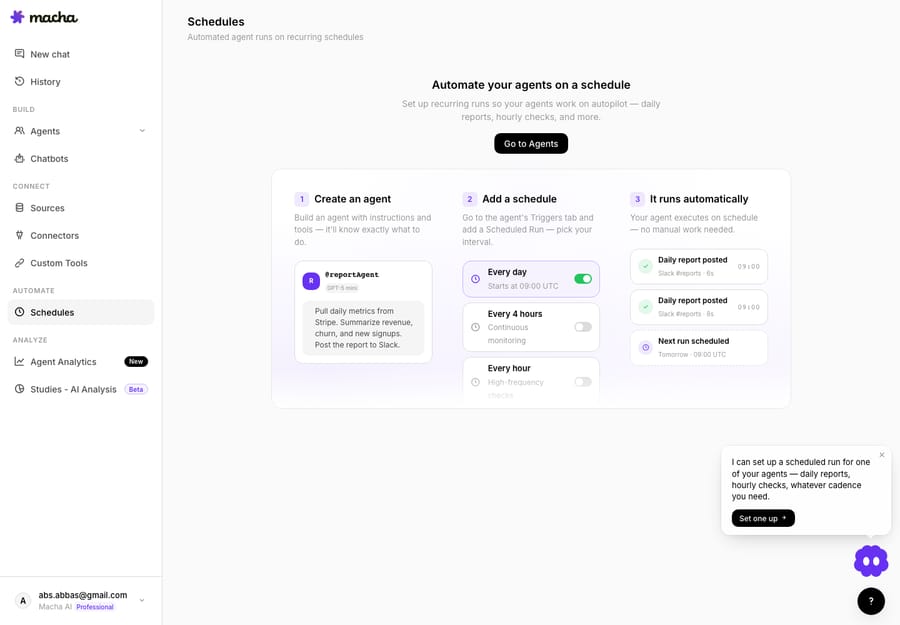
There's a layer that sits across all six levels rather than above them: making the AI proactive instead of purely reactive, and orchestrating multiple agents. Once the reactive rungs are solid, scheduled and event-driven automations are the multiplier: notify customers about shipping delays the moment fulfillment slips, post a daily support-metrics summary to Slack, send a weekly refund report. Macha's scheduled triggers run these on a clock or on an event, no ticket required, and they are included on every plan.
Orchestration is the other dimension: a lead agent that routes to specialized sub-agents (a billing agent, a shipping agent, a policy agent), each with its own tools and guardrails. That's how you scale without building one monolithic prompt that's impossible to reason about. But, and this is the whole thesis, orchestration is something you grow into after the individual rungs are reliable, not the place you start.
How long does it take to climb the levels?
A workable cadence, drawn from how this tends to go in practice:
- Week 1: Measure (Level 0). Run a Study over your last few thousand tickets. Get your real top categories and their risk profile.
- Weeks 2 to 3: Deflect and Assist (Levels 1 and 2) together. Auto-reply the safest FAQ cluster; turn on drafting and summarization for everything else. Watch deflection accuracy and draft acceptance.
- Weeks 4 to 5: Retrieve (Level 3). Connect read-only tools so agents (AI and human) stop tab-hopping for order and billing context.
- Week 6: Triage (Level 4). Layer classification and routing on top of the now context-aware agents.
- Later, selectively: Act (Level 5). Pick one bounded write action, ship it behind a confirm gate, watch the reversal rate, then loosen the gate only when it's boring.
Track progress with real numbers at each stage rather than vibes. Macha's agent analytics show resolution, deflection, and volume per agent so you can see whether a rung is actually reliable before you climb the next one. Setup and monitoring by the Macha team are included on every plan, so the team can build and watch the early rungs with you.
Where do AI support rollouts go wrong?
- Skipping Level 0. Automating the wrong category is the most common failure. If you don't measure, you'll build a beautiful refund agent for a queue that has almost no refunds. Measure first, every time.
- Confusing deflection rate with resolution. A 70% deflection rate that includes confidently wrong answers is worse than a 40% rate with clean hand-offs. Always pair an automation metric with an accuracy or escalation metric.
- Jumping to Level 5 for prestige. "We let AI issue refunds" sounds impressive in a board deck and is the fastest way to a trust incident. The irreversible rung should be the last one you touch and the narrowest in scope.
- Treating automation as free. Macha bills per ticket (one conversation, charged once however many steps the agent takes), so climbing a rung doesn't change the bill, but it does cost build time, review time, and the risk of a wrong action. Map that effort to value as you climb: automation that takes more of your team's time than it saves is a step backward.
- When NOT to automate at all: genuinely novel, emotionally charged, legal, or high-value-account situations. These should route to a human fast (Level 4) and stop there. A mature program is as good at recognizing what to escalate as it is at resolving the rest.
FAQ
What should I automate first in customer support? Measure your queue, then automate the highest-volume, lowest-risk category, usually FAQ and policy questions your knowledge base already answers (Level 1 deflection), alongside agent-assist drafting (Level 2). Avoid starting with refunds or account changes.
Is triage really lower priority than deflection? They're close, and many frameworks put triage first. We rank triage at Level 4 because routing decisions get much better once the AI can read live context (Level 3), but it's low-risk, so if your biggest pain is mis-routing, do it early. The ordering is a default, not a law.
How do I know when to move up a level? When the rung below is boringly reliable: its automation metric is stable and its accuracy or escalation metric is within tolerance for a few weeks. Use agent analytics, not gut feel.
Does this require replacing my helpdesk? No. Macha is an AI agent layer on top of the help desk you already use (Zendesk, Freshdesk, Gorgias, Front, HubSpot or Intercom); see Macha on Zendesk. The maturity model applies to the agents you build on top, not to swapping out your system of record.
How much does it cost to climb? Macha bills per ticket (one conversation, charged once, however many steps the agent takes to finish it) on one plan priced by volume: $299 a month for 750 tickets, about $0.40 each, up to $3,999 for 10,000. Start a free trial ($50 of usage, no credit card required) and see the pricing page for the tiers. Higher rungs take more steps per ticket but cost the same, so what to weigh at each rung is build and review time against the human time saved.
Where should you start this week?
Don't ask "what's the most impressive thing AI can do for support?" Ask "what's the highest-volume, most reversible thing it can do today?" and start there. Measure your queue, automate the safe and repetitive, keep humans on the irreversible, and climb only when the rung below is boring.
Start a free trial ($50 of usage, no credit card required), connect your help desk, and measure your queue before you build anything, or browse the use-case library to see what each rung looks like in practice.
Written by Abbas (Customer Support & AI, Macha) · Reviewed by Ankeet Guha (Co-founder & CTO) · Published 2026-06-24 · Last updated 2026-09-24.






