





 Shopify
 Stripe
 Slack
Slack Notion
 Google Workspace
 Confluence

What Are the Best Freshdesk Automations to Set Up in 2026 (and Where Does AI Fit)?


Most Freshdesk accounts use a small slice of the automation engine, so agents still hand-sort tickets and chase SLAs. Five native rules cover the routing and escalation, and an AI agent takes the tickets that need someone to read the message.
Key takeaways
- The five Freshdesk automations to set up first are routing by product or channel, auto-prioritizing VIP tickets, SLA escalations, stale-ticket cleanup, and reopening tickets when a customer replies.
- Freshdesk renamed its rule types: Dispatch'r is now Ticket Creation, Observer is now Ticket Updates, and Supervisor is now Hourly Triggers.
- Freshdesk Hourly Triggers run every hour, check only tickets updated within the last 30 days, and cannot add notes or fire webhooks.
- Freddy AI Agent includes 500 sessions as a one-time allowance per account, then Freshworks charges $49 per 100 sessions.
- Macha connects to Freshdesk as a native connector, fires from a Ticket Creation or Ticket Updates webhook, and costs $299 a month for up to 750 tickets, with setup by the Macha team and a dedicated success manager included.

The best Freshdesk automations to set up first are five native rules: route by product or channel, auto-prioritize VIP tickets, escalate overdue SLAs, clean up stale tickets, and reopen tickets when a customer replies. Freshdesk now files its rules under three names: Ticket Creation (formerly Dispatch'r), Ticket Updates (formerly Observer) and Hourly Triggers (formerly Supervisor, then Time Triggers). Once those are running, an AI agent layer handles the tickets that need someone to read the message.
| Automation | Freshdesk rule type | When it runs |
|---|---|---|
| Route by product or channel | Ticket Creation | The moment a ticket arrives |
| Auto-prioritize VIP tickets | Ticket Creation | The moment a ticket arrives |
| SLA escalations | Hourly Triggers | Every hour, on tickets updated in the last 30 days |
| Stale-ticket follow-up and cleanup | Hourly Triggers | Every hour, on tickets updated in the last 30 days |
| Reopen on customer reply | Ticket Updates | On any ticket update |
| Read, look up, answer | AI agent (Freddy or Macha) | On a webhook from a Ticket Creation or Ticket Updates rule |
What are the two layers of Freshdesk automation?
It helps to separate Freshdesk automation into two layers, because they solve different problems.
The native layer is Freshdesk's own rules engine, plus Freddy, Freshworks' AI suite (a customer-facing AI agent, an agent-assist Copilot, and analytics). The rules engine is deterministic: you define conditions, and matching tickets get acted on. It's fast, reliable, and included with your plan. Freddy's customer-facing agent is not unlimited: each account gets 500 Freddy AI Agent sessions as a one-time allowance, then pays $49 per 100 sessions.
The AI agent layer reads a ticket in plain language, decides what to do, and takes action. That's the judgment-based work rules can't express. Freddy is one option here; Macha is another that runs on top of Freshdesk as a native connector, grounded on your own help center. The two layers don't compete. Native rules handle the deterministic plumbing and an AI agent handles the interpretation, and a good setup uses both.
Which native Freshdesk rule type should you use?
Freshdesk's automation engine has three rule types, and knowing which one to reach for is half the battle.
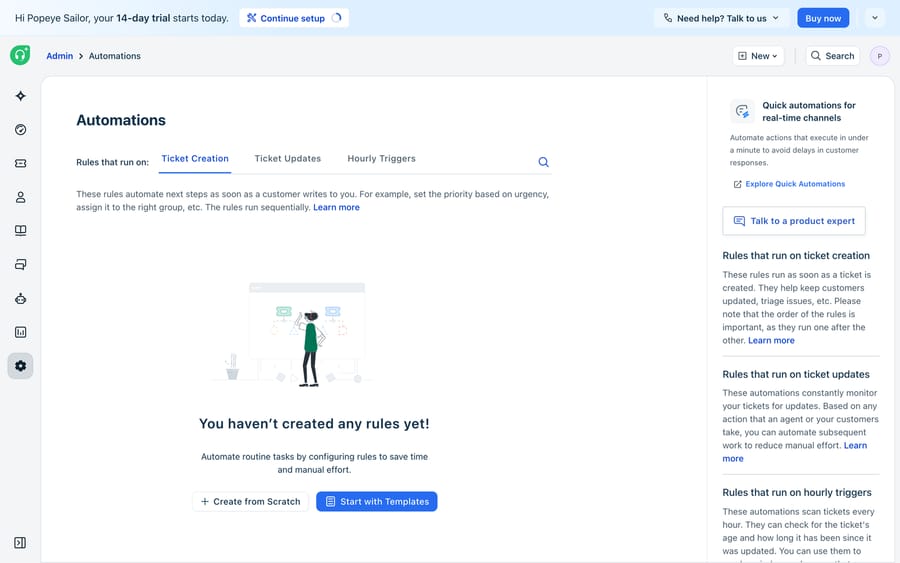
- Ticket Creation (formerly Dispatch'r): runs the instant a new ticket is created. This is your intake sorter: set priority, assign to a group or agent, add tags, pick a product. Anything that should happen before a human looks at the ticket belongs here.
- Hourly Triggers (formerly Supervisor): a time-based rule that runs every hour and checks only tickets updated within the last 30 days. It's built for the passage of time: escalate anything untouched for four hours, nudge a customer who hasn't replied in two days, auto-close resolved tickets after a week. Two catches from Freshdesk's Hourly Triggers documentation: these rules can't use tags, subject or description as conditions, and they can't add notes or fire webhooks. Timing is approximate too; Freshdesk's own example is a five-hour rule that may run after five hours and 58 minutes.
- Ticket Updates (formerly Observer): runs the moment a ticket is updated: a reply lands, a status flips, a field changes. Use it for reactive logic: reopen a ticket when a customer replies, alert a manager when priority jumps to Urgent, re-tag on a status change.
Which Freshdesk automations should you set up first?
If you do nothing else, set up these five. They cover most of the manual toil:
- Route by product or channel (Ticket Creation). Send billing tickets to the finance group, chat to the front-line team, and enterprise domains to a named queue. No more triaging by hand.
- Auto-prioritize (Ticket Creation). Bump anything from a VIP domain, or containing an SLA-relevant keyword, to High or Urgent on arrival. Do the keyword matching here, because Hourly Triggers can't read the subject or description.
- SLA escalations (Hourly Triggers). Escalate to a lead when a first response is overdue, so breaches surface before the customer complains.
- Follow-up and stale-ticket cleanup (Hourly Triggers). Nudge customers waiting on a reply, and auto-close resolved tickets after a quiet window.
- Reopen on reply (Ticket Updates). When a customer responds to a resolved ticket, reopen it and notify the owner so it doesn't get lost.
Set those up and Freshdesk runs a chunk of your queue for you. That's the ceiling of the native rules, though, and it's worth being clear about where it sits.
Why can't Freshdesk rules answer tickets?
Every native rule is deterministic. It acts on structured conditions you define in advance: a field value, a tag, a group, a time elapsed. That's a feature for routing and SLAs, and a hard wall for everything else.
A Ticket Creation rule can route a ticket tagged billing, but it can't read "I was charged twice this month and need the second one refunded" and understand that's a billing refund. It can't pull the customer's last order, decide the charge really was a duplicate, and draft the reply. An Hourly Trigger can escalate an aging ticket, but it can't answer the question inside it. The moment automation needs to interpret free text, reach outside Freshdesk for data, or compose a response, a rules engine is the wrong tool. That's the gap an AI agent layer fills.
What does an AI agent add on top of Freshdesk?
An AI agent connected to Freshdesk reads the ticket the way a person would, then acts. With Macha, which runs on top of Freshdesk as a native connector and doesn't replace it, an agent can triage and tag by actual intent, look up an order or payment in an external system, answer from your knowledge base, add a summarized internal note, update the ticket, and escalate to a human with full context when it should.
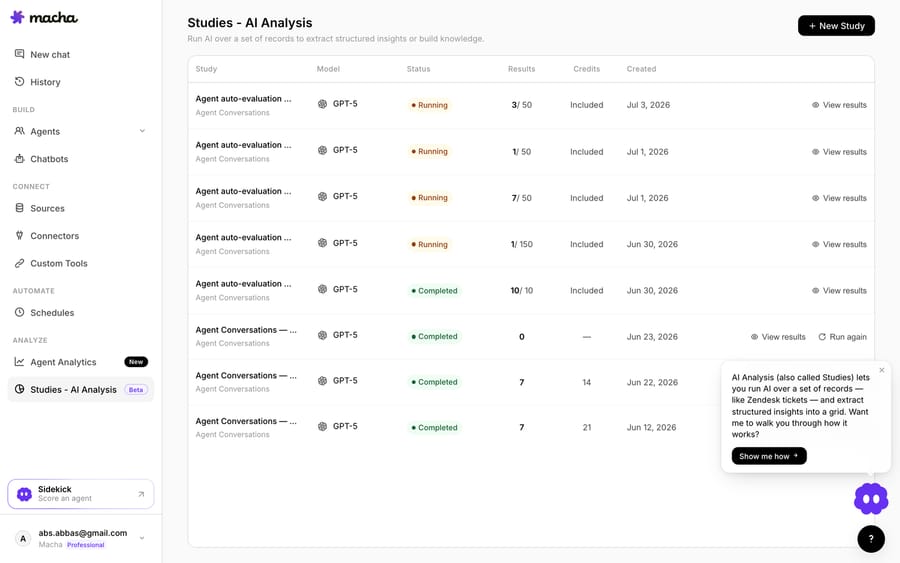
Two pieces matter most for going live safely. Custom Tools wire any REST API into an action the agent can call (your order system, your billing platform, an internal lookup), so the agent isn't boxed into Freshdesk's own data. And testing happens before customers see anything: Sidekick, Macha's agent builder, can create a real test ticket in your Freshdesk and run the agent against it while you watch every tool call. After launch, continuous evaluation grades every autonomous run against rules you set, and every run is logged in Analytics, so you can see what the agent did and why.
The setup: connect Freshdesk with your subdomain and API key, build the agent in plain English, and point a Freshdesk Ticket Creation (or Ticket Updates) rule at Macha's webhook. Use one of those two, since Hourly Triggers can't fire webhooks. Matching tickets fire the agent, and it runs autonomously. The deep dive lives in how to automate Freshdesk with AI. One note: Macha connects to Freshdesk specifically, not Freshchat, Freshservice or Freshcaller.
Macha costs $299 a month for up to 750 tickets, billed per ticket rather than per message, about $0.40 a ticket. Setup is done for you on the trial and every plan: the Macha team connects Freshdesk, builds the knowledge base and the agent, tests it on a sample of your past tickets, and runs it in safe mode, with drafts as private notes, until the drafts are right. The price also covers a dedicated success manager who handles your changes afterwards, such as a new category, an instruction change or a new tool. Freddy's per-session pricing charges for each AI Agent session after the first 500, so the two bills grow differently as volume climbs. Whether you build that agent yourself or buy the layer is its own decision; we cover the trade-offs in building an AI agent from scratch vs. using a platform, and the broader landscape in our guide to AI agents for customer service.
FAQ
What are the best Freshdesk automations to set up first? Start with five native rules: route tickets by product or channel (Ticket Creation), auto-prioritize VIP and SLA-relevant tickets (Ticket Creation), escalate overdue SLAs (Hourly Triggers), nudge stale tickets and auto-close resolved ones (Hourly Triggers), and reopen tickets when a customer replies (Ticket Updates). Those cover most of the manual sorting and chasing.
What's the difference between Dispatcher, Supervisor, and Observer rules? Those are the old names. Dispatch'r is now Ticket Creation and runs once, when a ticket is created. Supervisor is now Hourly Triggers: it runs every hour and checks tickets updated in the last 30 days for anything matching its conditions (SLAs, follow-ups, cleanup). Observer is now Ticket Updates and runs on any ticket update (reply, status change, field change). See Freshdesk's Hourly Triggers documentation for the conditions and actions available.
Can Freshdesk automations answer tickets on their own? Native rules can't. They act on structured conditions and can't read free text or fetch external data, so they route, prioritize and escalate rather than answer. To automate answering and resolving, you add an AI agent layer (Freddy, or Macha) that interprets the message and takes action.
How does Macha automate Freshdesk? Macha connects to Freshdesk as a native connector via your subdomain and API key. You build an agent, add a trigger to get a webhook, and point a Freshdesk Ticket Creation or Ticket Updates rule at it. Matching tickets fire the agent, which reads the ticket, uses Custom Tools to reach your systems, answers from your knowledge base, and updates or escalates. You can test it on a real Freshdesk ticket first. See pricing for how it's billed.






