





 Shopify
 Stripe
 Slack
Slack Notion
 Google Workspace
 Confluence

Can an AI Agent Generate a Spreadsheet for You? Macha's File Tools Explained (2026)


A Macha agent can pull data from your help desk and hand you a finished Excel, CSV, PDF or Word file as a download link, with no connector to set up. The spreadsheet is the output, not a workspace you have to open.
Key takeaways
- Macha's File Tools connector, released April 9, 2026, lets any agent generate XLSX, CSV, PDF and DOCX files with no setup, returned as download links.
- Macha's weekly report example runs every Monday at 9:00 AM and delivers a multi-sheet Excel workbook with Summary, Tickets, Agent Performance and Topics sheets.
- Generating files with Macha costs nothing extra because billing is per ticket, with plans starting at $299 a month for up to 750 tickets.
- Spreadsheet assistants such as Shortcut, with a Pro plan at $100 a month billed annually, work inside a sheet you open rather than handing you a finished file.
- Macha's generated files are in-memory snapshots, not archived storage or live dashboards, so recurring reports should be routed to Slack, email or a drive.

Yes. A Macha agent can pull ticket data from your help desk and hand you a finished Excel .xlsx file, or a CSV, a PDF or a Word .docx document, as a download link in the conversation. It does this with the built-in File Tools connector, which shipped on April 9, 2026 and needs no setup or authentication.
That flips the usual direction of "AI for spreadsheets." Most of those tools ask you to bring the data to the spreadsheet. In Macha the spreadsheet is the output, not the workspace: the agent already lives in your help desk, compiles what matters, and returns the file. No tab to open, no template to maintain, no copy-paste.
| Question | Answer |
|---|---|
| File types | XLSX (multi-sheet), CSV, PDF, DOCX |
| Setup | None. Auth is "Built-in (no auth)" |
| Released | April 9, 2026 (changelog) |
| Delivery | Generated in memory, returned as a download link |
| Triggers | On request in chat, or on a schedule |
| Extra cost | None. Macha bills per ticket, from $299 a month for up to 750 tickets |
First: if you actually want a spreadsheet builder
Be honest about what you're looking for. If your goal is "an AI that sits in my spreadsheet and writes formulas, pivots, and charts for me," Macha is the wrong tool. The category you want is AI spreadsheet assistants. Four worth a look in 2026: Shortcut (an Excel agent aimed at finance modelling, with a free plan of 20 weekly credits and a Pro plan at $100 a month billed annually), GPT for Work (a multi-model Sheets and Excel add-in by Talarian), Kimi (Moonshot AI's chat assistant, which has marketed a chat-driven Excel agent; check its current features), and Ajelix (formula generation plus BI dashboards, with 10 free requests a month and paid plans from $39 a month). Prices were checked on each vendor's pricing page in September 2026 and change often. All of them assume you are in a spreadsheet, bringing the data.
Macha is for the opposite job: you don't want to be in a spreadsheet at all. You want a finished file handed to you, built from data that already lives in your help desk. If that's the goal, read on.
What is Macha's File Tools connector?
From the changelog, April 9, 2026:
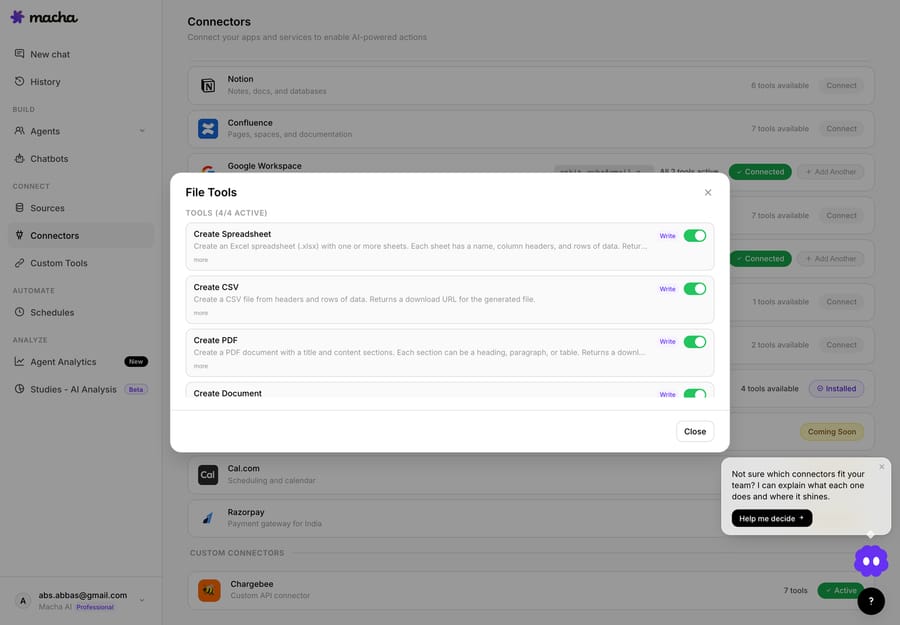
Built-in file generation: Agents can generate XLSX spreadsheets, CSV files, PDF documents, and DOCX Word documents on the fly. Always available with no setup required.
The phrase that matters is "no setup required." File Tools is the one connector you never connect. There's no OAuth handshake, no API key, no account to link; its auth is listed as "Built-in (no auth)." It's part of every workspace from day one, so any agent you build can produce files the moment you tell it to.
Under the hood, files are generated in memory and returned as download links. Nothing is written to a third-party drive you have to manage. The agent assembles the bytes, hands back a link, and you (or a customer, or a Slack channel) download it. That keeps file generation as light as any other tool call, with no storage to configure or clean up.
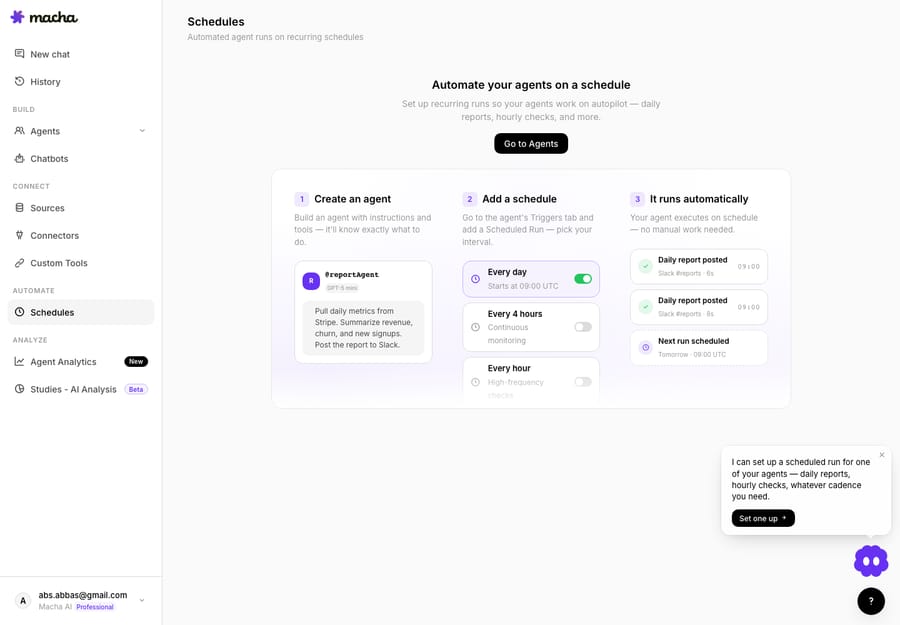
Which file types can a Macha agent generate?
File Tools is one connector with four actions. Each maps to a real deliverable, and the agent picks the right one based on what you asked for:
| Action | Output | Use it for |
|---|---|---|
| Create Spreadsheet | Excel .xlsx with formatted columns and rows (multi-sheet) | Reports, exports, anything someone will sort, filter, or pivot |
| Create CSV | Plain .csv from tabular data | Imports into another system, BI pipelines, lightweight data handoffs |
| Create PDF | Formatted PDF from text, tables, or structured data | Customer-facing summaries, invoices, anything that should look final |
| Create Document | Word .docx with headings, tables, and formatted text | Drafts, write-ups, handover notes someone will edit |
The split is intentional. A spreadsheet is for data someone will keep working with. A CSV is for a machine. A PDF is for a human who shouldn't change it. A DOCX is for a human who will. Because all four are built in, an agent can match the format to the audience without you wiring up four separate integrations.
How does a scheduled weekly support report work?
The best use of file generation isn't ad hoc. It's the report nobody enjoys building. Here's the pattern we walk most teams through first, from Macha's weekly support report use case. It chains two connectors: your help desk for the data (Zendesk here; Macha runs on Zendesk, Freshdesk, Gorgias, Front, HubSpot or Intercom) and File Tools for the deliverable.
The agent runs on a scheduled trigger, every Monday at 9:00 AM, and executes four steps with no human in the loop:
- Search tickets. Query every ticket from the last 7 days in Zendesk.
- Compile metrics. Calculate volume, resolution time, CSAT, top topics, and per-agent performance.
- Create the spreadsheet. Generate an Excel report with separate Summary, Tickets, Agent Performance, and Topics sheets.
- Share the file. Hand over
weekly-support-report-mar-24.xlsx, posted to Slack, emailed, or dropped in the thread.
The chat-side summary the agent posts alongside the file looks like this (illustrative figures from the use case):
Weekly Support Report, Mar 17 to Mar 23 - Total tickets: 312 - Resolved: 298 (95.5%) - Avg first response: 8 min - Avg resolution time: 1.8 hours - CSAT: 96% - Top topics: Account access (42), Billing (38), Setup help (31) Full report attached as weekly-support-report-mar-24.xlsx with detailed breakdowns by agent, topic, and day.
The human-readable headline lands in the channel where people already are, and the full multi-sheet workbook is one click away for anyone who wants to dig in. No one opened a spreadsheet to make it.
Why does a schedule change the economics?
A copilot inside a spreadsheet still needs you to show up, paste data, and prompt it. A Macha agent on a scheduled trigger shows up on its own, and scheduled triggers are included on every Macha plan. The report that used to cost a manager 45 minutes every Monday (pulling the export, building the pivot, formatting it, pasting the highlights into Slack) simply arrives. The chore stops existing.
It works on request, too. Ask the agent "give me last month's billing tickets as a spreadsheet," and you get the file back in the conversation. Same tool, different trigger.
What else can agents generate files for?
File generation is a primitive, so it shows up anywhere data needs to leave the help desk as a file:
- Customer-facing PDFs. An agent resolving a billing dispute can generate a formatted PDF summary of the account activity and attach it to the reply. No template engine, no design tool.
- CSV exports for another system. Need ticket data in your BI warehouse or a finance tool? Ask the agent to compile it as a CSV and the output is import-ready.
- DOCX handovers. A triage agent can write up a complex escalation as an editable Word doc for the engineer who picks it up next.
- One-off data pulls. Any question that ends in "...and can you send that as a spreadsheet?" now has a one-step answer.
Macha is the agent layer on top of your help desk, so it already has the data and the tools. File generation lets it package the result in whatever format the next person needs.
When is a generated file the wrong answer?
File generation is useful, but it isn't a BI platform. The edges:
- A generated file is a snapshot, not a live dashboard. Monday's
.xlsxreflects Monday. If you need numbers that update as you click, use an analytics tool with a live connection. (For interactive analysis across thousands of tickets, that's what Studies is for: a structured results grid and report charts, not a flat export.) - Garbage in, garbage out. The agent reports what it can pull and compute. If your help desk tags are inconsistent or CSAT coverage is thin, the spreadsheet reproduces those gaps.
- Generating a file isn't billed separately. It's a tool call like any other, and billing is per ticket: one conversation, charged once, however many files the agent builds along the way. Plans start at $299 a month for up to 750 tickets. What a big report does cost is time, so scope the query and match the cadence to the value. See the pricing page for every tier.
- Files aren't archived for you. Output is generated in memory and returned as a download link. If a report needs a permanent home, route it: post to Slack, email it, or save it to a drive.
- Very large datasets need scoping. A spreadsheet of every ticket you've ever had is neither fast nor useful. Scope the query (a date range, a view, a tag) so the agent compiles a report a human will open.
How does this compare to AI inside a spreadsheet?
Tools like Excel Copilot, Gemini in Google Sheets, and the spreadsheet add-ins above are good at one thing: helping a person who is already in a spreadsheet work faster. You still open the file, you still bring the data, you still drive.
Macha sits one layer up. The agent lives in your support workflow, already holds the connection to your help desk and commerce tools, and treats the file as an output it produces for you: triggered, scheduled, or asked. If your goal is "help me analyse this sheet," a spreadsheet copilot is the right tool. If your goal is "I never want to build this report again," you want an agent that hands it to you. The two are complementary.
FAQ
Do I need to connect or configure anything to generate files? No. File Tools is built into every workspace with no auth and no setup. Any agent can generate files the moment you instruct it to.
What file formats can a Macha agent generate? Four: Excel spreadsheets (.xlsx), CSV files (.csv), PDF documents (.pdf), and Word documents (.docx). The agent picks the format that fits the request.
Where do the generated files go? They're generated in memory and returned as a download link in the conversation. From there you can route them (attach to a reply, post to Slack, or email them) so they land where your team works.
Can a generated spreadsheet have multiple sheets? Yes. The weekly support report example produces a single workbook with separate Summary, Tickets, Agent Performance, and Topics sheets.
Does generating a file cost extra? No. Billing is per ticket: one conversation, charged once, whether or not the agent builds a file in it. There's no separate fee for File Tools. See the pricing page.
Can the agent run reports automatically? Yes. Pair file generation with a scheduled trigger and the report compiles and delivers itself on the cadence you set: weekly, daily, or custom.
How do I try it?
If your team still builds a recurring report by hand, this is the fastest win in Macha. Start a free trial ($50 of usage, no credit card required), connect your help desk, and tell an agent what report you want and how often. Explore the File Tools integration or the weekly report use case to see the full pattern.
Written by Abbas (Customer Support & AI, Macha) · Reviewed by Ankeet Guha (Co-founder & CTO) · Published 2026-06-24 · Last updated 2026-09-24.
Sources
- Macha changelog, April 9, 2026: File Tools connector release notes.
- Shortcut pricing and Ajelix pricing, checked 24 September 2026. GPT for Work, Kimi and Microsoft Excel Copilot are named as the spreadsheet-assistant category Macha is contrasted against.






