





 Shopify
 Stripe
 Slack
Slack Notion
 Google Workspace
 Confluence

How Does a Macha Changelog Entry Become a Live Support Agent?


Every Macha changelog entry adds to one of four parts of a live agent: a connector, a tool, a trigger, or the instructions and model. The dated releases from February to September 2026 below show how each one turns into an agent answering tickets in your help desk.
Key takeaways
- A live Macha agent is built from four parts, a connector, tools, a trigger, and instructions plus a model, and most changelog entries improve one of the four.
- Macha shipped Gorgias and Front connectors on June 23, 2026 with 15 tools each and built-in agent templates, then a full Intercom connector with 11 tools on September 17, 2026.
- Macha's scheduled triggers enforce a minimum 1-hour interval, a cap of 24 runs a day and at most 3 concurrent runs per org, and switch off after 5 failures in a row.
- Macha's June 5 debounce update batches rapid-fire events into one agent run and force-fires a bucket after 25 events or 10× the debounce window, capped at 2 minutes.
- Macha bills per ticket whichever model or tools an agent uses, with plans starting at $299 a month for 750 tickets, about $0.40 each.

Every entry in Macha's public changelog improves one of the four parts of a live agent: a connector, a tool, a trigger, or the instructions and model. The June 23, 2026 Gorgias release shows the path: a connector with 15 tools and a built-in agent template, which you can wire into an agent that answers Gorgias tickets on its own. Every date and feature below is a real, shipped entry from February to September 2026, not a roadmap promise. The point is to show how a single changelog line becomes an agent that resolves a ticket in your help desk while you're asleep.
Quick framing, because it matters for everything that follows. Macha is not a helpdesk. It's an AI agent layer that sits on top of the helpdesk you already run (Zendesk, Freshdesk, Gorgias, Front, HubSpot or Intercom) and connects to the commerce, knowledge, and comms tools around it (Shopify, Stripe, Notion, Confluence, Jira, Slack, Google Workspace, and more). If the category is new to you, our primer on what an AI layer for support actually is explains why that distinction matters. So when we "ship a feature," we're usually shipping new surface area for an agent to act on: a new connector, a new tool, a new trigger, or a fix that makes an existing action reliable. Read the changelog with that lens and it stops looking like a list of release notes and starts looking like a map of what your agents can now do.
What does a changelog show that a "best AI support automation" listicle can't?
If you searched for AI support automation features and landed on a roundup, here's what that page is built to give you — and where it stops short. The two formats answer different questions:
| What the listicles show | What an AI support automation changelog shows |
|---|---|
| A ranked table of ~10–20 vendors with logos, star ratings, and one-line blurbs | One vendor, but every dated thing it actually shipped — connectors, tools, triggers, fixes |
| Marketing-page claims ("automates up to 80% of tickets") | Evidence: the exact feature, the date it went live, and what it unlocked |
| A snapshot frozen the day the article was written | A living record updated most weeks, so you can see velocity and what gets fixed |
| Breadth to compare categories | Depth to judge whether one tool is worth committing your queue to |
Use a listicle to build a shortlist. Use a changelog to vet the finalist. A category roundup can't tell you whether a vendor fixes silent failures or ships press releases — only the shipping record can. The rest of this post is that record, organized by the four things a live agent is made of, so you can read it the way an operator would: not "who has the most logos," but "what can my agents now do, and how fast does that surface keep growing."
What does "changelog → live agent" actually mean?
A live Macha agent is four things wired together:
- A connector — the helpdesk and tools it can touch (e.g. Zendesk + Shopify).
- Tools — the specific actions it's allowed to take (reply, assign, refund, tag).
- A trigger — what wakes it up (a new ticket, a Slack mention, a schedule, a webhook).
- Instructions + a model — how it decides, and which brain it uses.
Almost every changelog entry we publish makes one of those four better. A new connector adds surface area. A new tool adds an action. A new trigger adds a way to fire. A reliability fix makes an action you already rely on actually work. So the journey from "we shipped X" to "an agent now does Y in production" is short by design — most features are live in your dashboard the day they land, and you assemble them into an agent the same afternoon.
Here's the same story told four ways, using real shipping history.
1. Which connectors has Macha shipped?
An agent can only act where it's connected. So a big share of our changelog is connectors — and you can watch the addressable surface grow month by month:
| Date | Shipped | What it unlocked |
|---|---|---|
| Mar 15, 2026 | Freshdesk connector (15 tools) | Full ticket management + attachment text extraction for Freshdesk teams |
| Mar 22, 2026 | Shopify connector (7 tools) | Order lookup, customer search, refunds — commerce context on every ticket |
| Apr 9, 2026 | Confluence connector (7 tools) | Agents read and write internal wiki knowledge |
| Apr 9, 2026 | Custom API Tools | Connect any REST API as agent tools, no waiting on us |
| Jun 23, 2026 | Gorgias + Front connectors (15 tools each) | Shopify-native and shared-inbox teams get first-class support |
| Aug 24, 2026 | Gmail, Outlook, Google Calendar, Jira, Asana, HubSpot | Inbox, calendar, project tracking and CRM, connected with one-click OAuth |
| Sep 17, 2026 | Intercom connector (11 tools, 4 triggers) | Agents read and reply to Intercom conversations, add notes, assign, tag and close |
The June 23 release is the cleanest example of the pipeline in action. We added Gorgias (built for Shopify-native support) and Front (shared-inbox-first), each with 15 tools: Gorgias covers tickets, messages, customers, macros, tags and team assignment; Front covers conversations, contacts, custom fields, inboxes and teammate routing. Both connect with an API key and land under Connectors → Support with built-in agent templates. That last detail is the whole point: the connector doesn't just appear, it appears next to a template that wires the tools into a working agent so you're not starting from a blank page.
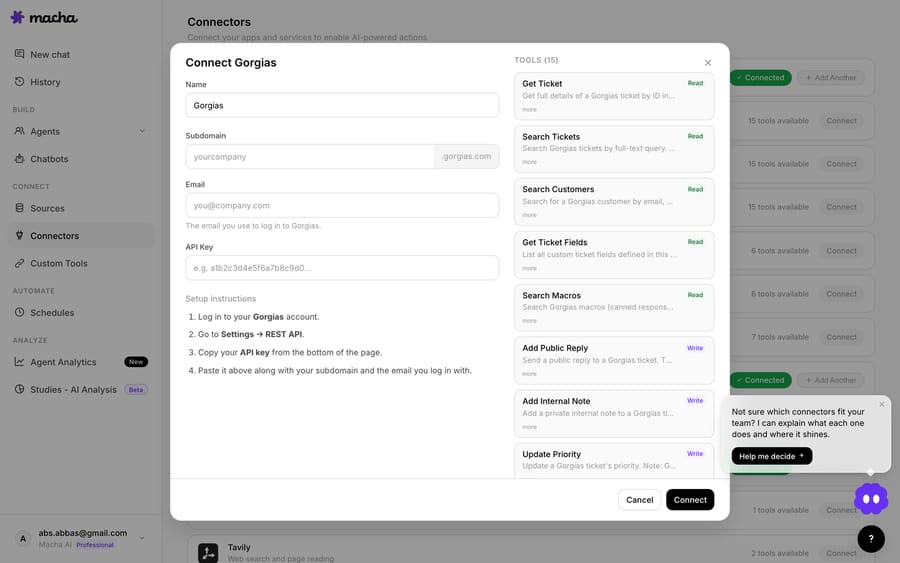
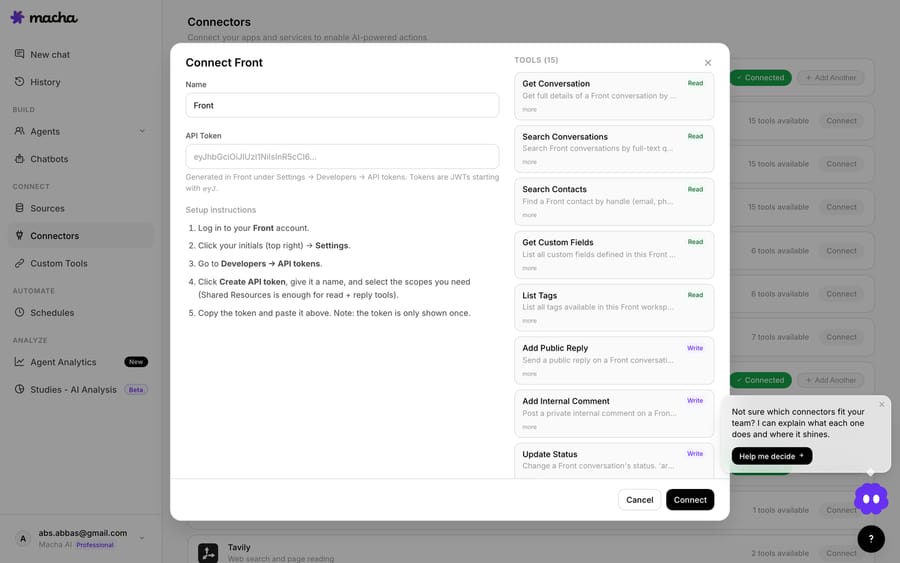
You can browse the full current set on the integrations page. The honest read on connectors: the count goes up most months, but Macha's help-desk connectors cover Zendesk, Freshdesk, Gorgias, Front, HubSpot or Intercom. If your team runs something else, the Custom API Tools route is the path, not a native connector.
2. How have Macha agents gotten smarter?
Surface area is useless without judgment. The other heavy theme in the changelog is making agents smarter and easier to build:
- Sub-agents (Mar 8 → Apr 3) — agents delegate to specialist sub-agents, up to three levels deep, with circular-reference prevention. By Apr 3 sub-agents could perform write operations in autonomous mode while staying read-only in interactive chat for safety.
- AI Agent Builder & Editor (Apr 3 → Apr 9) — describe what you need in plain language and Macha assembles a fully configured agent: instructions, tools, triggers, sub-agents, model. Available on every plan.
- Image vision for Zendesk attachments (Apr 17) — agents download image attachments and read them: screenshots, receipts, product photos, error dialogs.
- The model lineup (Apr 23 → Aug 26): GPT-5.4 joined on Apr 23 and GPT-5 became the default for new agents (today new agents start on GPT-5.4); GPT-5.6 Terra (the new flagship) and GPT-5.6 Luna arrived on Jul 27; Claude Sonnet 5 joined the picker on Aug 26. GPT-5.4 Mini stays as the fast option for high-volume agents.

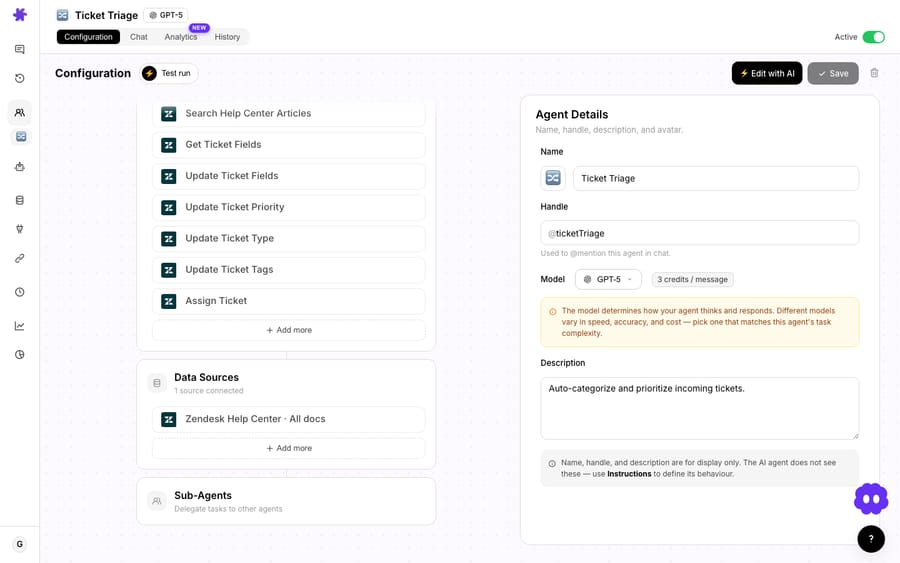
The AI Agent Builder is the most direct "changelog → live agent" tool we've shipped, because it collapses the four-step assembly into one conversation. Tell it "reply to Gorgias tickets about shipping using my help center, and escalate anything mentioning a chargeback," and it picks the connector tools, writes the instructions, and proposes a trigger. You review and save. We break down exactly how that describe-and-build flow works in the AI Agent Builder deep dive.
3. What can wake a Macha agent up?
A smart, well-connected agent that never fires is a screensaver. Triggers are how automation becomes autonomous:
- Trigger system (Mar 1) — agents run autonomously on Zendesk ticket events, Freshdesk updates, Slack mentions, and custom webhooks.
- Scheduled (cron) triggers (Mar 22 → Apr 9) — run an agent hourly or daily, with guardrails: a minimum 1-hour interval, a cap of 24 runs a day, and at most 3 concurrent runs per org, so a misconfigured schedule can't run away. A schedule that fails 5 times in a row turns itself off and emails you.
- Custom webhooks (Apr 9) — a universal webhook URL with a signing secret, so any external system can fire an agent without a dedicated connector.
- Debounce on every event trigger (Jun 5) — batch rapid-fire events (a customer sending five messages in a row) into one agent run instead of five, with safeguards that force-fire a bucket after 25 events or after 10× the debounce window, capped at 2 minutes.

Scheduled triggers are what power the "generate weekly support reports as spreadsheets" and "daily support metrics summary in Slack" use cases — an agent that wakes itself on a clock, queries your helpdesk, and posts a digest. No human pressing run.
4. Why do reliability fixes matter as much as features?
Here's the part most "features" posts skip, and the part that actually decides whether you trust an agent with a live queue. A large chunk of our changelog isn't new capability at all — it's making existing actions trustworthy. A few that matter:
- Zendesk tag updates now reliable (Jun 10) — we fixed a long-standing bug where the tag tool reported success but silently failed to apply the tag. We also stopped it from wiping the existing tag set on every write. The tool now returns the verified final tag list, so the agent sees the truth, not its own intent.
- Connector health + Test Connection + Reconnect (Apr 23) — connectors now carry a health status; when auth breaks, affected agents auto-deactivate and admins get an email, and a one-click test verifies credentials before anything goes live.
- OAuth refresh locking (Apr 9 → Apr 23): tokens refresh before they expire, with per-subdomain locking for Zendesk and then a shared refresh lock for Zendesk, Google and Shopify, so concurrent refreshes no longer clobber each other.
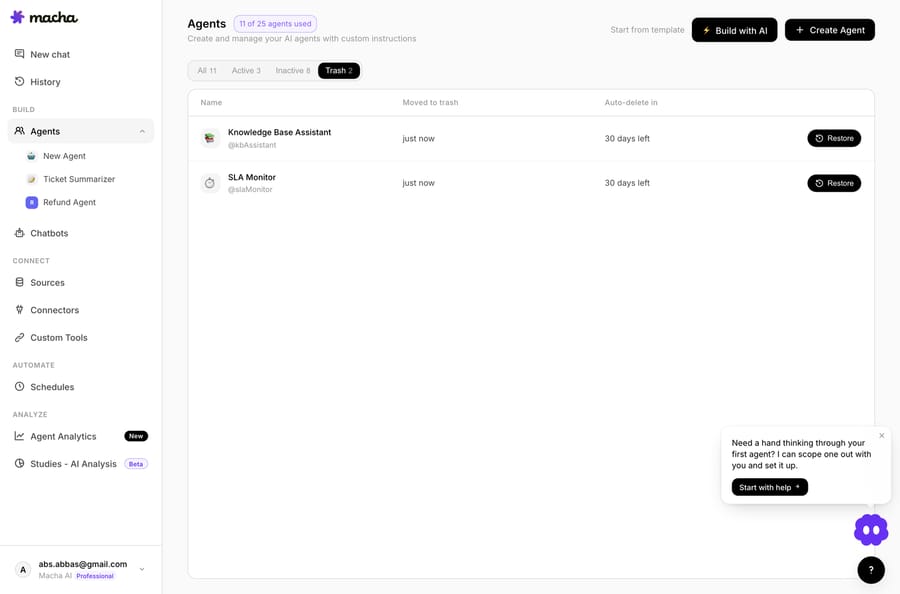
- Soft-delete agents (Jun 17) — deleting an agent now moves it to a 30-day Trash with one-click restore; its triggers are paused (not destroyed) so restoring brings the whole config back intact.
If you only read the headline features, you miss that the boring fixes are what make the headline features safe to deploy. An agent that adds a tag is a toy until the tag actually lands every time.
How do you turn a changelog entry into a live agent?
Let's run the pipeline end to end on the June 23 Gorgias release, so it's concrete rather than abstract.
- Read the changelog. June 23: Gorgias connector ships, 15 tools, API-key auth, agent templates included.
- Connect. In the dashboard, Connectors → Support → Gorgias, paste the API key, run Test Connection — the same verified-credentials check from the April reliability work, so I know it's live before I build on it.
- Assemble the agent. Start from the bundled Gorgias template (or describe it to the AI Agent Builder). Tools: search tickets, get customer, add a reply, assign to a team. Instructions: answer shipping/returns FAQs from the help center, escalate billing disputes.
- Add a trigger. Gorgias custom-webhook trigger on ticket created — and because debounce shipped in June, batch a customer's rapid messages into one run.
- Pick a model. A fast model such as GPT-5.6 Luna or GPT-5.4 Mini for volume FAQs; reserve GPT-5.6 Terra for the escalation sub-agent. The model doesn't change what you pay.
- Go live. Save. The next matching Gorgias ticket fires the agent autonomously.
Most of those steps take minutes, not days, so the gap between "a connector appeared in the changelog" and "an agent is closing tickets in your inbox" is usually one working session. Fast iteration matters because first versions rarely resolve much: Automation Anywhere cites a Gartner survey in which AI deflected 45% of queries but fully resolved only 14% through self-service. The speed of this pipeline is what lets you close that gap by testing and adjusting instead of guessing once and hoping.
What are the downsides of weekly shipping?
Fast shipping is not an unalloyed good, and pretending otherwise would be the kind of marketing this post is trying to avoid.
- Not every line is for you. A changelog that moves weekly will mostly ship things your team doesn't need. Reading it as a to-do list is a mistake; read it as an option list and adopt deliberately.
- New capability deserves a test run, not blind trust. This is exactly why we ship behind confirmation modals, Test Run with real data, and read-only-in-chat defaults for write tools. Use them. Turn an agent loose on a sample before the live queue.
- Connectors are finite. Weekly velocity doesn't mean every tool you own is supported. Help-desk-side it's Zendesk, Freshdesk, Gorgias, Front, HubSpot or Intercom; beyond that you're in Custom API Tools territory, which is powerful but is real configuration work.
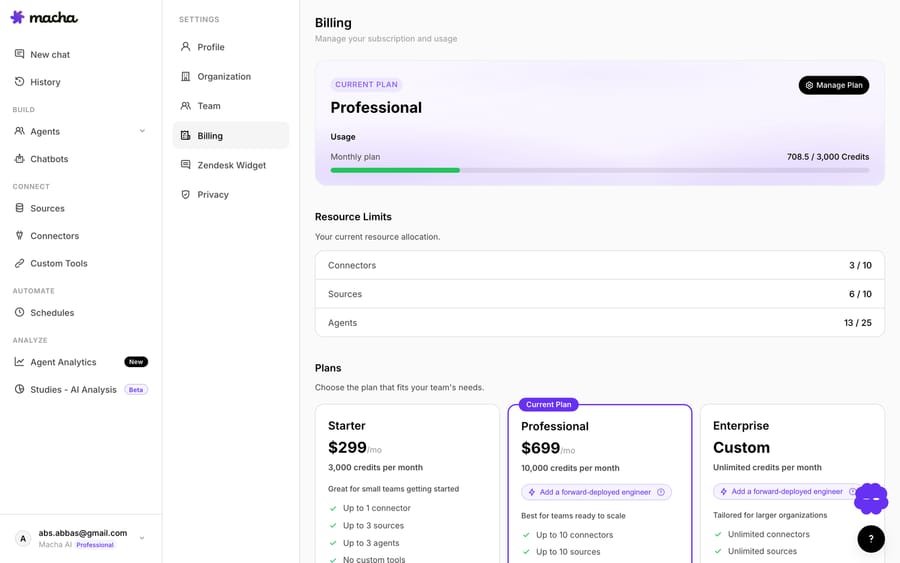
- Pricing is per ticket, not per feature. New models and new tools keep arriving, but none of them change the unit: Macha bills per ticket — one conversation, charged once however many messages, lookups or drafts it takes, whichever model the agent runs on. Treat the pricing page as the source of truth rather than memorizing a number from a blog; plans start at $299 a month for 750 tickets, about $0.40 each.
The discipline that keeps weekly shipping from becoming chaos is that the interfaces stay stable even as the surface grows. A connector you wired in March still works the same way in June — we proved that explicitly on Jun 5, when we made the agent on/off toggle preserve your existing Zendesk Triggers instead of tearing them down. Velocity underneath, stability on top.
What has shipped for Zendesk teams?
If Zendesk is your helpdesk, the changelog reads as a steady stream of new things your agents can do inside Zendesk: routing tickets to groups (May 2), reading image attachments (Apr 17), resolving custom field IDs to human labels (Apr 17), reliable tagging (Jun 10), global OAuth so connecting is a click (Apr 9), and a Macha sidebar inside every Zendesk ticket (Jul 14). The dedicated Macha on Zendesk page maps those to the Zendesk-specific workflows, and the broader blog covers individual features in depth as they ship.
FAQ
Where can I see Macha's actual release history? The public changelog lists every dated release — connectors, tools, triggers, model changes, and reliability fixes — going back to February 2026, most recently the Intercom connector on September 17. Every feature referenced in this post is a real entry there.
How quickly does a new feature become usable? Most ship live to your dashboard the day they're announced. A new connector or tool is available to wire into an agent immediately; you assemble and deploy the agent yourself, typically the same session.
Does shipping weekly break my existing agents? That's an explicit design goal, not a hope. New capability lands as added surface area; existing connectors, tools, and triggers keep their interfaces. We've shipped specific work to guarantee it — soft-delete with restore, agent toggles that preserve Zendesk Triggers, and connector health checks that warn before anything fails silently.
Is Macha replacing my helpdesk? No. Macha is an AI agent layer that runs on top of Zendesk, Freshdesk, Gorgias, Front, HubSpot or Intercom. It builds agents that act inside the helpdesk you already use — it doesn't replace it. See the integrations page for the current connectors.
How is all of this priced? Per ticket — one conversation, charged once, however many messages, tool calls or drafts the agent takes, and whichever model it runs on. Plans start at $299 a month for 750 tickets, about $0.40 each, and every plan includes setup and monitoring by the Macha team; details live on the pricing page. You can start with a free trial ($50 of usage, no credit card required).
Which help desks did Macha add most recently? HubSpot arrived with the Composio-backed connectors on August 24, 2026, and a full Intercom connector with 11 tools and 4 autonomous triggers shipped on September 17, 2026, available on every plan.
Where should you start?
The best way to understand a support automation platform isn't a feature matrix — it's the changelog. It shows you what the team actually values, how fast they fix the unglamorous things, and whether new capability lands as a usable tool or a press release. Macha's is public for exactly that reason.
If you want to run the pipeline yourself, start a free trial ($50 of usage, no credit card required), connect your helpdesk, and turn the most recent changelog line into a live agent. Or browse the docs for the full walkthrough, and the use cases for agents other teams have already assembled from the same building blocks.
Written by Abbas (Customer Support & AI, Macha) · Reviewed by Ankeet Guha (Co-founder & CTO) · Published 2026-06-24 · Last updated 2026-09-24.






