





 Shopify
 Stripe
 Slack
Slack Notion
 Google Workspace
 Confluence

Which AI Model Should Your Macha Agent Use? GPT-5.6 Terra, GPT-5.4, Mini, Claude and Groq (2026)


Every Macha agent runs on a model you pick, and because billing is per ticket, that choice changes answer quality and speed but never the bill. Match the smallest model that clears each job, and keep the flagship for the agents where one mistake is expensive.
Key takeaways
- Macha agents should run on the smallest model that clears the job: GPT-5.4 Mini for triage, GPT-5.4 or GPT-5.6 Luna for replies, and GPT-5.6 Terra for strict refund logic.
- GPT-5.4 is the default model for new Macha agents, with a 1,050,000-token context window, while GPT-5.6 Terra became Macha's recommended flagship on 27 July 2026.
- Groq's Llama and Mixtral models left Macha's picker on 28 August and were replaced by GPT OSS 120B and 20B, which cannot read image attachments.
- Macha documents image vision on GPT-5.4 Mini and Claude Sonnet 4.5, so an agent that reads Zendesk screenshots should stay on one of those two models.
- Macha bills per ticket regardless of model, from $299 a month for 750 tickets, so switching an agent's model changes quality and latency, not cost.
Pick the smallest model that clears each agent's job: GPT-5.4 Mini for high-volume triage and order-status work, GPT-5.4 (the default for new agents) or GPT-5.6 Luna for most customer-facing replies, and GPT-5.6 Terra for strict, high-stakes logic like refunds. On Macha the choice does not change what you pay, because billing is per ticket (from $299 a month for 750 tickets), so it is purely a quality, speed and capability decision. Every agent has its own model setting, and every sub-agent has its own on top of that.
| Agent job | Start with | Why |
|---|---|---|
| WISMO, triage, tagging, FAQ deflection | GPT-5.4 Mini | Fast, bounded tasks, cheap mistakes |
| General customer-facing replies | GPT-5.4 (default) or GPT-5.6 Luna | Better prose and longer threads |
| Refunds, billing, strict multi-step rules | GPT-5.6 Terra | Macha's flagship for reasoning and tool selection |
| Sensitive, emotional threads | Claude Sonnet 5 or 4.5 | Tone; Sonnet 4.5 reads images |
| Latency-critical, text-only queues | GPT OSS 120B or 20B (Groq) | Fastest; no image vision |
What should you weigh when picking a model?
Strip away the brand names and model selection is the same trade-off on any platform that lets you choose a model per task: Macha, a raw OpenAI or Anthropic API, or anything in between. Four levers pull against each other, and picking a model is deciding where you want to sit on each:
- Quality / reasoning: how well the model handles nuance, ambiguity, and strict multi-step logic. The thing you're tempted to max out everywhere, and the thing you rarely need to.
- Cost: on a raw API it's tokens, on a per-seat tool it's licences, and on Macha it's nothing: a ticket costs the same whichever model answers it. Worth naming, because on most platforms this is the lever that quietly decides the other three for you.
- Latency: how fast the answer comes back. Smaller models are faster, which matters most for live chat and anything high-volume where a queue can back up.
- Context window: how much the model can hold at once: a long ticket thread, several knowledge sources, a big system prompt. Bigger windows stop a model losing the plot on messy threads.
The whole game is spending quality and context where a mistake is expensive, and buying speed everywhere else. Macha makes that choice explicit and per-agent instead of a single global default, and takes the price lever off the table so it's decided on merit.
Which models can a Macha agent run on?
Macha bills per ticket: one thread between Macha and one person, charged once no matter how many replies it takes, and whichever model produced them. So model choice moves quality and latency, not your bill.
Here's the current picker. Alongside the OpenAI tiers, Macha exposes Anthropic and Groq models in the same list. The lineup changed three times this summer: GPT-5.6 Terra and Luna arrived on 27 July 2026, Claude Sonnet 5 replaced Claude Sonnet 4 on 26 August, and on 28 August Groq's Llama 3.3 70B, Llama 3.1 8B and Mixtral 8x7B were retired and replaced by GPT OSS 120B and GPT OSS 20B.
| Model | Provider | Context | Best for |
|---|---|---|---|
| GPT-5.6 Terra | OpenAI | About 1M | Macha's flagship: strict, high-stakes logic, multi-step reasoning and tool selection |
| GPT-5.6 Luna | OpenAI | About 1M | High-volume replies where speed matters, a small step down from Terra |
| GPT-5.4 (default) | OpenAI | 1,050,000 | The default for new agents; nuanced replies and long threads |
| GPT-5 | OpenAI | 400,000 | Previous-generation all-rounder |
| GPT-5.4 Mini | OpenAI | 400,000 | High-volume agents: WISMO, status, triage, classification, FAQ deflection |
| Claude Sonnet 5 | Anthropic | Not listed | Anthropic's latest Sonnet; calm tone on sensitive tickets |
| Claude Sonnet 4.5 | Anthropic | Not listed | Warm, emotionally aware replies; image vision |
| GPT OSS 120B / 20B | Groq | Not listed | Very low latency, but no image vision |
None of these choices changes what you pay: every model bills the same, one charge per ticket. Plans and what counts as a ticket are on the pricing page.
A few things worth knowing before you choose:
- GPT-5.4 is where new agents start. It has a 1,050,000-token context window (per OpenAI's model docs) and handles most support workflows well. Since July, Macha's own recommendation for the best answer on every ticket is GPT-5.6 Terra, and GPT-5.4, GPT-5 and GPT-5.4 Mini stay in the picker as previous-generation options. Existing agents were not migrated to the new models.
- Mini is the speed tier. GPT-5.4 Mini has a 400,000-token context window, supports image vision, and follows instructions well enough for bounded, high-volume jobs.
- Terra is the instruction-follower. Its edge isn't raw eloquence, it's discipline: honoring strict rules ("only ever issue one refund," "never promise a delivery date"), complex branching, and multi-step tool sequences where order matters.
- Claude is the tone pick. Claude Sonnet 4.5 is vision-capable and, per industry consensus, holds a calmer, more human tone on emotionally charged tickets (gettalkative). Reach for Claude on refund-gone-wrong or complaint threads where how the reply reads matters as much as what it says. Claude Sonnet 5 is newer; test it on image tickets before relying on it there.
- Groq is the speed pick. The GPT OSS models on Groq are the fastest in the picker, which suits very high-volume, latency-sensitive queues, with one hard limit: Groq models can't read image attachments and return a "not supported" message, so don't put a vision agent on them.
A note on retired models: if you've been on Macha a while, you may remember GPT-5 Mini, GPT-4o Mini, and o4-mini. Those were retired on 23 April 2026 and every agent on them was auto-migrated to GPT-5.4 Mini. Agents on the old Llama and Mixtral models move to a current model on their next update, and Claude Sonnet 4 no longer appears in the list. There's nothing to fix, but re-check those agents to confirm the model still fits.
Where do you set an agent's model?
There are two places a model gets chosen, and confusing them is the most common mistake we see.
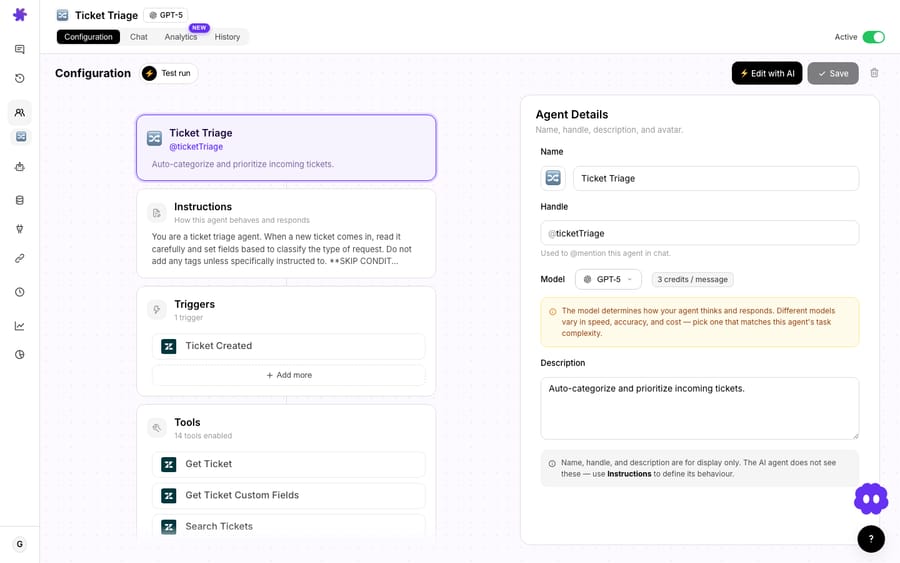
The agent's default lives in the agent's configuration card, with a helper notice spelling out the differences. This is the model the agent uses every time it runs autonomously from a trigger (a new Zendesk ticket, a scheduled job). This is the one that matters for quality at scale.
The per-conversation override is the dropdown in the top-right of a chat. Change it there and you've changed the model for that one conversation only. Macha pops a toast making this explicit and pointing you to Settings if you actually meant to change the org default. Handy for spot-testing whether a tougher model handles a tricky thread better before you commit the agent to it.
The agents table carries a Model column with each provider's icon, so you can audit your whole fleet at a glance. That's the fastest way to spot the mismatch: a high-volume, latency-sensitive agent quietly sitting on the slowest model.

Which model fits which kind of agent?
Forget "which model is best." Ask "how expensive is a mistake here, and how much volume runs through this agent?" That two-axis read gets you to the right tier almost every time.
Start on Mini when…
The task is bounded and a wrong answer is cheap to recover from:
- WISMO / order status: look up an order, report the tracking. (See the order-status use case →)
- Triage and routing: read a ticket, pick a category, set a tag, assign a group.
- Classification and tagging: turn free-text into structured fields.
- FAQ deflection: answer from a knowledge source you've grounded it on.
These are high-volume and forgiving. Mini is fast, which is what high-volume queues need, and it handles this class of work without fuss.
Stay on GPT-5.4 or try Luna when…
The agent writes customer-facing prose that has to read well, reasons over a longer or messier thread, or stitches a few tools together:
- A front-line resolution agent that drafts the actual reply a customer reads.
- Anything juggling a long conversation history or several knowledge sources where Mini starts to lose the thread.
- General-purpose agents where you've noticed Mini's answers are fine but not good.
You get better reasoning and a much larger context window at the same price per ticket, so the only thing to weigh is the extra second or two of latency. Luna is the faster of the new pair if that second matters.
Reserve Terra for…
The agents where a single mistake is genuinely expensive and the logic is strict:
- Refunds, billing, and policy agents bound by hard rules ("refund once, never twice," "escalate anything over $X").
- Complex branching workflows with many conditional steps and tool calls that must fire in the right order.
- Multi-step orchestration where an off-by-one error compounds.
This mirrors the wider industry pattern: route the bulk of traffic to a small fast model and escalate only the hard 10–20% to a flagship, going premium only when quality demonstrably suffers on the cheaper tier (aicomparison.ai, Cobbai). Macha lets you implement exactly that, per agent and per sub-agent.
The sub-agent trick
Multi-agent setups make this concrete. A fast Mini router reads every incoming ticket and delegates: most go to Mini specialists, but a billing dispute or a multi-part complaint gets handed to a Terra sub-agent. The queue stays quick at the front door and the careful thinking happens only where it's needed. Each sub-agent carries its own model, so this routing is configuration, not code, and the whole chain is still one ticket.
Does the model change what you pay?
No. A ticket answered by Mini and a ticket answered by Terra cost the same: one charge, about $0.40, from $299 a month for 750 tickets, up to $3,999 for 10,000. That's the whole cost section.
That inverts the usual advice. There's no saving to chase by putting a high-volume agent on the small model, and no premium to justify by putting a refund agent on the flagship. What you're actually trading is latency (a fast model keeps a live-chat queue moving) and quality on the cases that bite. You can watch your ticket volume against your allowance live on the Billing page's usage card.

How do you test whether a smaller model is good enough?
The honest answer to "is Mini good enough here?" is test it on your real tickets. Two ways to do that inside Macha:
- Per-conversation override. Open a representative thread, switch the model in the top-right dropdown, and re-run the agent. Compare the two replies side by side. Instant, no commitment.
- A Studies or simulation run. For a rigorous read, replay a batch of historical tickets on Mini, then on GPT-5.4, and compare the outputs at scale before you change a production agent. Studies run on the free trial too. (See our walkthrough of running an AI analysis across thousands of tickets.)
Both beat guessing. A model that looks great on three test cases can drift under volume. Production consistency and latency matter as much as peak quality, which is why the support-LLM literature pushes evaluation over intuition (eesel AI).
When should you not upgrade the model?
A guide that only ever says "use the bigger model" isn't a guide. Some honest caveats:
- Bigger isn't always better-behaved. Terra's strength is instruction discipline, not prose. If your agent's job is a warm, human-sounding apology, a Claude model or GPT-5.4 may feel better to customers than the flagship. Match the model to the failure mode you actually have.
- The flagship won't fix a bad prompt. If an agent hallucinates because it has no grounding, upgrading the model just makes it slower. Fix the knowledge source and instructions first. Model choice is the last tuning knob, not the first.
- Vision narrows your options. If an agent must read image attachments on Zendesk tickets, stick to the models Macha documents as vision-capable (GPT-5.4 Mini and Claude Sonnet 4.5), and test any other model on a real image ticket first. Groq models return a "not supported" message. Check capability before anything else.
- Defaults drift. Auto-migrated agents and copied-from-template agents can quietly sit on a model that no longer fits. Audit the agents table's Model column quarterly.
- Per-conversation ≠ org default. Changing the model in a chat does not change what your trigger-fired agent uses in production. Set the default in the agent's config; the chat dropdown is for testing.
FAQ
What's the default model for a new Macha agent? GPT-5.4, with a 1,050,000-token context window. Admins can change the organization default in Settings, and any agent can override it. Macha recommends GPT-5.6 Terra when you want the best answer on every ticket.
Does the model I pick change what I pay? No. Macha bills per ticket: one thread between Macha and one person, charged once however many messages it takes, whichever model answered them. Model choice is a quality and latency decision, not a budget one.
What's the real difference between GPT-5.6 Terra and GPT-5.6 Luna? Terra is Macha's flagship, sharper on multi-step reasoning and tool selection. Luna is the mid-tier: faster, with a small step down in quality. Both launched on 27 July 2026 with a context window of about 1M tokens.
Can different agents use different models? Yes. Every agent has its own model setting, and every sub-agent has its own on top of that. The common pattern is a fast Mini router that escalates only hard tickets to a flagship sub-agent.
Does changing the model in chat change it everywhere? No. The top-right dropdown changes the model for that one conversation only. To change what an agent uses in production, set its default model in the agent's configuration (Macha shows a toast reminding you of this).
Which models can read images? Macha documents image vision on GPT-5.4 Mini and Claude Sonnet 4.5 for Zendesk ticket attachments. Groq models, now GPT OSS 120B and 20B, decline with a "not supported" message. Test any other model on a real image ticket before relying on it.
How often should you revisit an agent's model?
Model choice isn't set-and-forget. It's a dial you tune per agent against two questions: how costly is a mistake, and how much volume flows through. Put bounded, high-volume jobs on Mini, keep general replies on GPT-5.4 or Luna, and reserve Terra for the strict, high-stakes agents. Then check the agents table after every model change in the picker, like the three this summer, so nothing sits on the wrong one.
Want to try it on your own queue? Start a free trial ($50 of usage, roughly 125 tickets, no credit card required), connect your helpdesk (Zendesk, Freshdesk, Gorgias, Front, HubSpot or Intercom), and switch a couple of agents between models to feel the difference, or read the docs and pricing for the full breakdown.
Written by Abbas (Customer Support & AI, Macha) · Reviewed by Ankeet Guha (Co-founder & CTO) · Published 2026-06-24 · Last updated 2026-09-24.






