





 Shopify
 Stripe
 Slack
Slack Notion
 Google Workspace
 Confluence

Which Zendesk Trigger Should Your Macha AI Agent Use?


Macha agents can start from a dozen different events, and picking the wrong one means an agent that fires too often or not at all. The choice comes down to whether a person starts the task and when the agent's job actually begins.
Key takeaways
- Choosing a Macha trigger starts with one question: if a person starts the task it is a chat with no trigger, and if it should run automatically it needs one.
- The Zendesk New Ticket trigger fires on the first customer message before any agent replies, making it the default for triage, first replies and summaries.
- A summarizer agent on the Customer Reply trigger would re-summarize on every reply, so New Ticket, which runs once per ticket, is the calmer choice.
- A Custom Webhook trigger lets Zendesk's own trigger conditions decide which tickets reach a Macha agent, while Scheduled triggers run at most once every 1 hour.

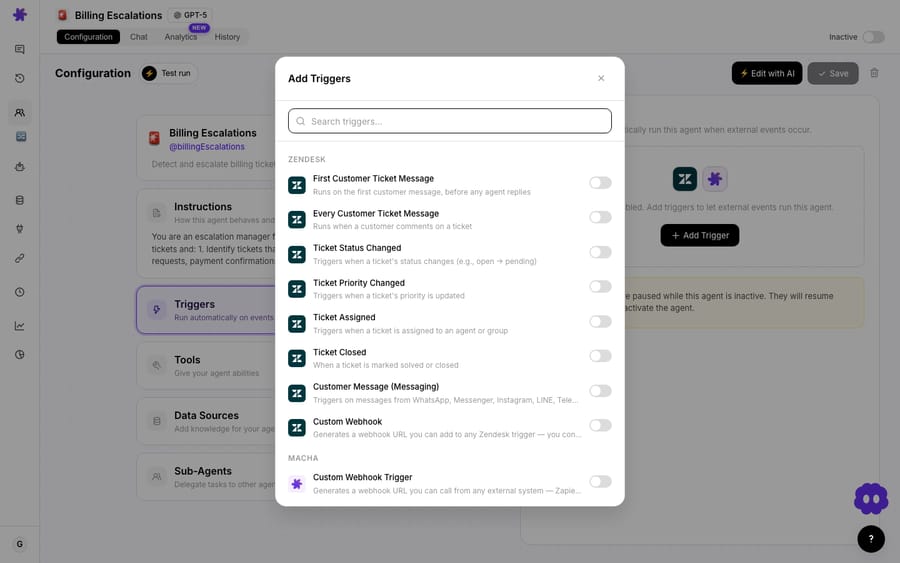
Pick a trigger in two moves: if a person will start the task, you need no trigger at all (that's chat); if it should happen automatically, choose the event that fires at the exact moment the agent's job begins, which for most Zendesk support work is New Ticket.
Watch the guide
Do you need a trigger at all?
- If someone on your team will open Macha and talk to the agent, that's a chat. No trigger needed.
- Triggers are for when you want the agent to start on its own when something happens in a connected app. (New to the idea? Read what a trigger is on Macha and how to set one up.)
Which Zendesk trigger matches the moment the agent should act?
New Ticket fires on the first customer message, before any agent replies, which makes it the default for triage, first replies and summaries.
| You want the agent to run… | Use this trigger |
|---|---|
| On every new ticket (triage, first reply, summary) | New Ticket |
| Every time the customer replies | Customer Reply |
| On WhatsApp, Instagram or web chat messages | Messaging |
| When a ticket's status moves (e.g. open to pending) | Status Changed |
| When a ticket is marked solved or closed | Ticket Closed |
| When priority is updated | Priority Changed |
| When a ticket is assigned to an agent or group | Ticket Assigned |
| Only on tickets matching your own Zendesk conditions | Custom Webhook |
| On a clock, not an event | Scheduled (every 1 hour at most often, paid plans) |
The principle: the trigger should fire at exactly the moment the agent's job becomes relevant, no earlier and no more often. The same logic applies on the other help desks Macha runs on (Zendesk, Freshdesk, Gorgias, Front, HubSpot or Intercom), though each one names its events differently.
What if two triggers both seem to fit?
Ask what would go wrong if it fired too often. A summarizer on Customer Reply would re-summarize on every reply, overwriting a good summary with a half-finished one; the same agent on New Ticket runs once. When in doubt, pick the more specific, less frequent event. If the agent has to follow a fast back-and-forth, add a debounce window so a burst of messages on one ticket reaches the agent as one run. (More in trigger best practices.)
When is a custom webhook or a schedule the better choice?
Use a Custom Webhook when the built-in event is too broad. Macha gives you a webhook URL, and you attach it to a Zendesk trigger whose conditions you set in Zendesk's admin, so only matching tickets ever reach the agent. Use Scheduled for time-based work such as a daily summary: at most once an hour, up to 24 runs a day, and off during the free trial.
Frequently asked questions
How do I know if I even need a trigger? If a human starts the task, you don't; that's chat. Triggers are only for automatic, background starts.
What's the most common Zendesk trigger? New Ticket. It fires on the first customer message and is the default for triage, first replies and summaries.
New Ticket or Customer Reply? New Ticket runs once per ticket; Customer Reply runs on every customer comment. Use Customer Reply only when the agent genuinely needs to react to each message.
Can I schedule an agent on the free trial? No. Event triggers work during the $50 trial, but scheduled triggers switch on once you're on a paid plan.
Pick a trigger and go: add the right event and let your agent run itself. $50 of free usage, no credit card required. Start free.






