





 Shopify
 Stripe
 Slack
Slack Notion
 Google Workspace
 Confluence

How Do Macha Top-Ups Work? Buying Tickets Beyond Your Monthly Allowance


A Macha top-up adds tickets on top of your monthly allowance when a spike uses up the month's tickets before renewal day. You buy it from the billing page, and it's spent only after your plan's tickets run out.
Key takeaways
- A Macha top-up is a one-time purchase that adds tickets on top of the monthly allowance, bought through an in-page Chargebee checkout on the billing page.
- Macha has no overages: once the month's ticket allowance is used, agents pause until the next billing date unless the customer buys a top-up or moves up a tier.
- A Macha top-up balance survives a downgrade to a smaller tier untouched, but it is drawn down only after an active paid subscription's monthly allowance is spent.
- Macha tiers run from $299 a month for 750 tickets to $3,999 for 10,000, about $0.40 a ticket, so a team buying top-ups most months should move up a tier.
- Each Macha top-up purchase is recorded against the Chargebee invoice ID as a unique key, so a duplicate payment webhook cannot double-credit or double-charge the account.
A Macha top-up is a one-time purchase that adds tickets on top of your monthly allowance, bought from the billing page through an in-page Chargebee checkout and spent only after the month's plan tickets run out. It turns "we've used the month's tickets and it isn't renewal day yet" from a wall into a thirty-second checkout, and it's open to active paid subscriptions, not trials.
| Monthly plan allowance | Top-up balance | |
|---|---|---|
| How you get it | Your tier, from $299 a month for 750 tickets | One-time purchase on the billing page |
| Resets each cycle? | Yes | No, it carries across cycles |
| Spent when? | First | Only after the monthly allowance is used |
| Survives a downgrade? | Shrinks to the new tier | Yes, untouched |
| Who can buy | Comes with every paid plan | Active paid subscriptions only |
| Price | Published on the pricing page | Not published; shown on the billing page when you buy |
What counts as a Macha ticket?
Before top-ups make sense, it's worth being precise about the unit. Macha bills per ticket — one thread between Macha and one person, charged once no matter how many messages, tool calls or follow-ups it takes. Three things count: an email ticket and every follow-up on it, a whole live chat, and a whole Copilot session. The model an agent runs on doesn't change the price. Plans start at $299 a month for 750 tickets and run to $3,999 for 10,000, about $0.40 a ticket on every tier, with custom pricing above that. Every feature is included on every tier, and so is setup and monitoring by the Macha team.
Your plan comes with a monthly ticket allowance that resets each billing cycle (see the pricing page for the tiers). A top-up is a second bucket that behaves differently.
What happens when the month's tickets run out?
Nothing is charged without you choosing it. There are no overages on Macha — when the month's tickets are used, your agents pause until the next billing date rather than quietly running up a bill. From there you have two moves: move up a tier, or add a top-up for the rest of the month.
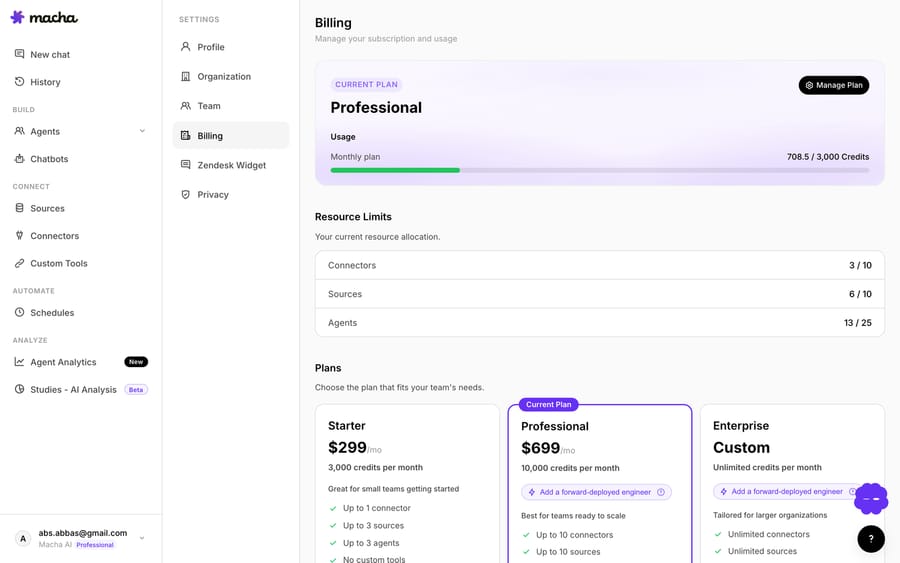
Checkout runs through Chargebee one-time checkout in an in-page popup — you don't leave the dashboard, and the balance lands on your account as soon as the payment clears. (An earlier cold-load bug where the very first "Buy" click could silently do nothing was fixed in early June; the popup now waits for Chargebee's script to finish loading before it opens.)
How does the billing page show a top-up balance?
Because the two buckets behave differently, the billing page shows them separately. The Usage card splits your monthly plan usage — with a bar that resets each cycle — from your top-up balance, plus a note reminding you that top-ups are spent after your monthly allowance.
As of June 17, that split got even clearer: when you're carrying a top-up balance, a green +N top-up chip now sits right above your monthly count, with a question-mark hover that explains the model (persistent across cycles, used automatically after the monthly allowance is spent). At a glance you can see both "how much of this month's plan is left" and "how much insurance I'm carrying."

What happens to your balance if you cancel or downgrade?
Because a top-up is a balance rather than a date-bound grant, it doesn't behave like your monthly allowance when your plan changes — and the rules are worth stating plainly, since this is the question people ask second.
- Downgrading to a smaller tier: your top-up balance is untouched. It lives in a separate bucket from your plan allowance, so changing tiers doesn't reset, refund, or forfeit it. You just keep a smaller monthly allowance with the same cushion behind it.
- Cancelling your subscription: a top-up only does its job while you hold an active paid plan — that's the plan that runs your agents and draws the balance down in the first place. A top-up isn't a standalone cash balance you can cash out, and it isn't refunded for being unused. Cancelling keeps your access through the end of the billing period.
The short version: a top-up lasts as long as you're a paying customer. A downgrade keeps it; a full cancellation parks it. For the exact contractual and refund terms — including anything specific to your account — check the billing docs and our refund policy before you cancel.
Can you buy a top-up from inside Studies?
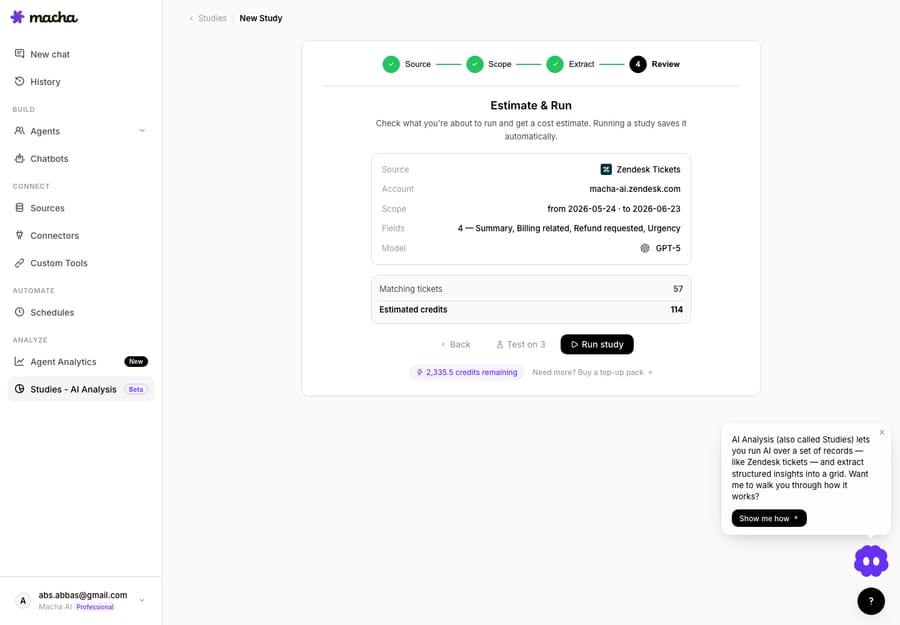
The most common moment you'll actually want a top-up is right before kicking off something big — and the classic example is a Studies run that analyzes thousands of tickets at once. Studies shows you an estimate before you confirm, and if that estimate is bigger than what's left in your allowance, you'd rather top up than abandon the run.
So there's a "Need more? Buy a top-up" deep link sitting right next to the remaining-balance pill on the Studies Review screen. Click it and you land directly on the top-up section of the billing page — no hunting through settings. (The deep-link scroll was also hardened in early June so it reliably reaches that section after the billing data finishes loading.)
Who can buy top-ups?
The top-up section is scoped deliberately:
- Active paid subscriptions see the section and can buy.
- Trial users don't — you move onto a paid plan first. (A free trial gives you $50 of free usage, about 125 tickets, with no credit card and no time limit; top-ups are a feature of paid accounts.)
Can a top-up be double-charged?
No. Top-up purchases are idempotent. Each purchase is recorded against the Chargebee invoice ID as a unique key, so if a payment webhook gets delivered more than once — which payment systems do, by design — your account can't be double-credited (or double-charged in effect). It's the kind of thing you never notice when it works, which is exactly the point. There's also a broader billing-resilience fix in the same family: if a renewal payment fails and a retry later succeeds, your subscription status now flips back to active automatically instead of getting stuck.
When is a top-up the right call instead of a bigger tier?
Top-ups are a precision tool, not a default. Here's the honest read.
Reach for a top-up when:
- You hit a temporary spike — a product launch, a seasonal surge, a one-off backlog — and you only need extra headroom this month, not every month.
- You want to run a large Studies job that's bigger than what's left in the month, and you'd rather not wait for renewal.
- You want a standing buffer so a busy week never silently stalls your agents.
Don't reach for a top-up when you're consistently over. Every tier costs about the same per ticket, so the saving from moving up isn't a volume discount: it's that a plan sized to your real volume never leaves your agents paused while you notice and buy more.
The takeaway: if you're buying a top-up most months, that's a signal to move up a tier. Top-ups are designed for the exceptional month, not the every month. Used that way, they keep a temporary spike from turning into a service gap.
FAQ
How do I buy a top-up? From the billing page in your Macha dashboard. A Chargebee checkout opens in an in-page popup, and the balance is added to your account once payment clears. Active paid subscribers can buy; trial users move onto a plan first.
What happens when I use up the month's tickets? Your agents pause until the next billing date — there are no overages, so nothing is charged without you choosing it. Move up a tier or add a top-up and they pick straight back up.
What happens to my top-up balance if I downgrade or cancel? A downgrade to a smaller tier leaves it fully intact — it's a separate bucket from your plan allowance. It's attached to an active paid subscription, though: it's the plan that runs your agents and draws it down, and an unused balance isn't refunded as cash. So it survives a downgrade and is parked (not deleted) if you cancel. See the billing docs for the exact terms.
Which is spent first — my plan allowance or my top-up? Your monthly plan allowance, always. A top-up is only drawn down after the monthly bucket is empty, so you never have to choose a bucket.
Is a top-up cheaper than moving up a tier? Not if you need the headroom every month. Tiers run at about $0.40 a ticket from 750 to 10,000 tickets, and a right-sized plan never pauses mid-month. Top-ups are for one-off spikes. Compare on the pricing page.
If you're not on Macha yet, start a free trial ($50 of usage, no credit card required), connect your helpdesk, and see how far your first 125 tickets go — then read the billing docs for how plans and top-ups fit together.
Written by Abbas (Customer Support & AI, Macha) · Reviewed by Ankeet Guha (Co-founder & CTO) · Published 2026-06-24 · Last updated 2026-06-24.






