





 Shopify
 Stripe
 Slack
Slack Notion
 Google Workspace
 Confluence

How Do You Draft Ticket Replies From Google Docs With an AI Agent?


The answers your team needs often live in a Google Doc the ops team keeps current or a Notion page three people have bookmarked, not in the help center. A Macha agent can read those docs on each ticket and leave a draft reply as an internal note for a person to approve.
Key takeaways
- A Macha agent drafts ticket replies by reading a Google Doc and searching Notion pages, then posts the draft as a private internal note for a human to approve before sending.
- Macha's Google Workspace connector gives an agent three actions: Read Google Doc, Read Google Sheet, and Sync Docs to Knowledge, with documents chosen through the Google Picker.
- In the worked example, a Macha agent cites an Enterprise rate limit of 10,000 requests/minute and a 5M monthly quota pulled from a Google Doc and a Notion page.
- A full Macha drafting run of reading the ticket, reading a doc, searching Notion and writing the note counts as one ticket, about $0.40 on the $299, 750-ticket tier.
- The live Read Google Doc action fetches the current version of a document at run time, while Sync Docs to Knowledge indexes many docs for semantic search.

To draft ticket replies from Google Docs, connect Macha's Google Workspace connector, give an agent the Read Google Doc action (plus Notion's Search Pages if you use Notion), and trigger it on new tickets so it posts its draft as a private internal note that a human approves before sending. When a ticket needs a real answer, the agent reads the conversation, pulls the relevant doc, and writes the reply where your team already works. Macha is an AI layer that sits on top of the help desk you already run (Zendesk, Freshdesk, Gorgias, Front, HubSpot or Intercom), so the draft lands on the ticket itself.
The important word is draft. This isn't auto-resolution. The agent does the research and writes the first version; a person on your team reviews, edits and sends. You get the speed of automation with a human still owning what goes out.
What does the drafting agent actually do?
The workflow is four steps, and each maps to a real connector action:
- A ticket arrives that needs a detailed response (the Zendesk New Ticket trigger, or a Custom Webhook trigger scoped to a tag, a group or a brand so it only fires where you want it).
- The agent reads the relevant Google Doc using the Google Workspace Read Google Doc action, which pulls the full content of a doc by ID or URL.
- It searches Notion for any supporting context with the Search Pages action, so the draft isn't limited to one source.
- It posts the draft as an internal note on the ticket (Add Internal Note: private, visible only to agents), with a question like "Shall I post this as a public reply?"
Here's the worked example from the use case itself. A customer named Mark asks about API rate limits and pricing tiers. The agent reads the "API Documentation" Google Doc, cross-references the "Pricing Tiers" Notion page, and drafts:
"Hi Mark, thanks for reaching out about our API. Here are the details for the Enterprise tier: • Rate limit: 10,000 requests/minute • Monthly quota: 5M requests • Priority support and dedicated endpoint available • Pricing: Custom — I'd love to set up a call to discuss your specific needs. Would Thursday at 2pm work for a quick chat?"
That draft sits in the internal note. The human agent reads it, tweaks the call to action if needed, and sends. The research that used to mean alt-tabbing between docs becomes a quick review.
Why draft instead of auto-reply?
There's a spectrum here, and picking the right point on it matters more than picking the flashiest one:
- Auto-reply: the agent answers the customer directly with no human in the loop. Right for high-volume, low-risk, well-documented questions ("how do I reset my password?").
- Draft for review: the agent writes the reply, a human approves it. Right for detailed, account-specific, or higher-stakes answers where a wrong number or an over-promise costs you.
Anything that pulls from internal engineering docs, pricing, or policy belongs in the second bucket. Docs drift, edge cases exist, and "10,000 requests/minute" being wrong by a zero is a support incident. Drafting keeps a human as the final gate while still removing the slow part: the hunting.
If you've read our companion piece on drafting ticket responses for agent review, this is the same pattern with Google Docs as the primary source. Use this one when your source of truth is a Doc; use that one when it's a Notion wiki. In practice, you'll often wire up both.
How do you set it up?
1. Connect Google Workspace
In Macha, add the Google Workspace connector, sign in with Google (OAuth), and pick the specific documents the agent may read through the Google Picker. The connector gives the agent three actions: Read Google Doc, Read Google Sheet, and Sync Docs to Knowledge.
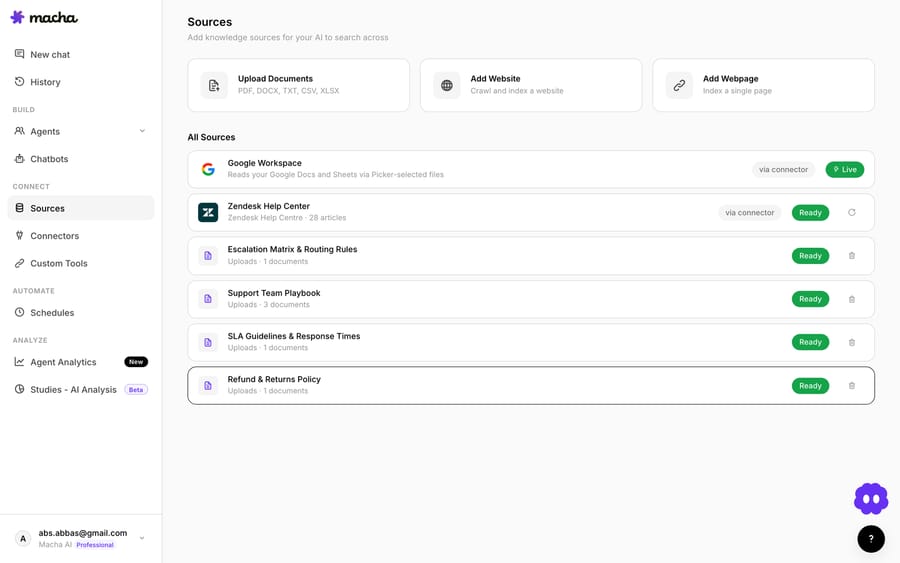
You can change the picked documents and reconnect from the connector settings at any time, which is useful when the account owner changes or you want to confirm the integration is healthy before you go live.
2. Should the agent read docs live or search a synced index?
This is the one design choice worth pausing on, because the two approaches behave differently:
| Approach | How it works | Best when |
|---|---|---|
| Read Google Doc (live tool) | The agent fetches a specific doc on demand during the run, by ID or URL. | You have a handful of canonical docs and want the agent to read the freshest version every time. |
| Sync Docs to Knowledge | Docs are indexed into a Macha knowledge source (embeddings) and the agent searches across them semantically. | You have many docs and want the agent to find the relevant one by meaning, not by knowing its URL. |
For a small, stable set of source-of-truth docs, the live Read Google Doc action is simplest and always current. For a sprawling Drive, syncing to a knowledge source lets the agent retrieve the right passage without you naming the doc up front. Most teams end up using both: a couple of pinned docs read live, plus a synced knowledge base for the long tail.
3. Add Notion (optional, but common)
If part of your truth lives in Notion, connect it too. The agent can then Search Pages and Get Page alongside the Google Doc, which is what produces the "pulled from two sources" draft in the example above. The Notion connector also supports Sync to Knowledge if you'd rather index it.
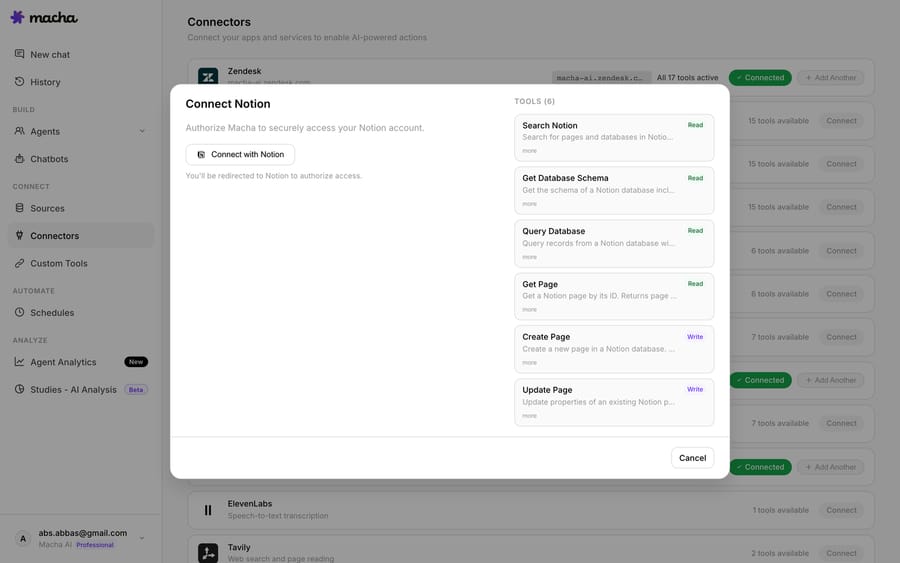
4. Build the drafting agent
Create an agent and give it the connectors it needs: Zendesk (to read the ticket and post the note), Google Workspace and Notion. In the agent instructions, be explicit about the rules that keep a drafting agent trustworthy:
- Always post as an internal note, never a public reply. This is the single most important instruction; it's the difference between "draft for review" and "auto-send."
- Cite the source. Ask the agent to name the doc it pulled from so the reviewer can spot-check in one click.
- Say so when the docs don't cover it. A drafting agent that admits "I couldn't find this in our docs" is far more useful than one that confidently invents a rate limit.
- Match your voice. Drop in a few example replies or a tone note so the draft reads like your team wrote it.
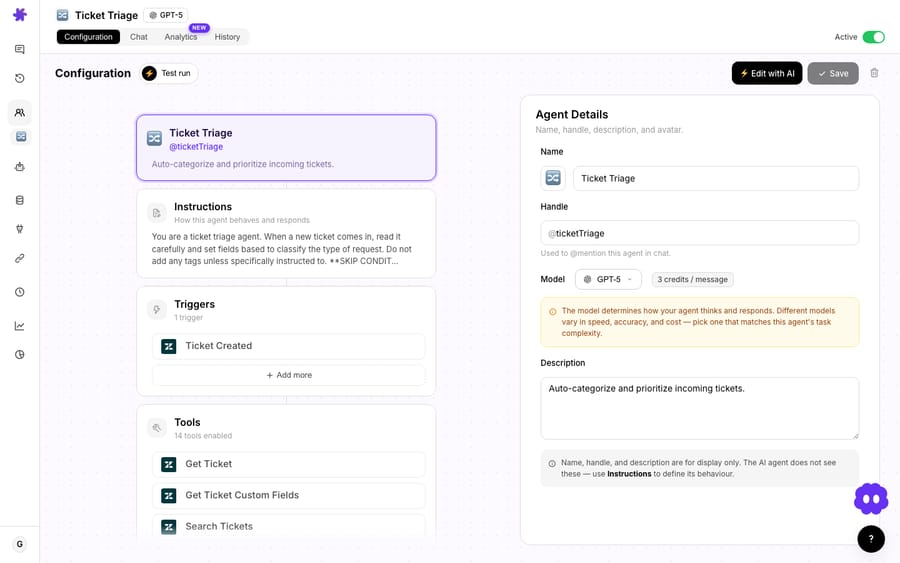
5. Wire the trigger
Point the agent at the New Ticket trigger, or at a Custom Webhook trigger you call from your own Zendesk trigger, and scope it. You rarely want it firing on every ticket: gate it to a tag (needs-draft), a specific group, or a brand, so it only drafts where a doc-grounded reply actually helps. The internal note then shows up on the matching tickets in your normal Zendesk queue.
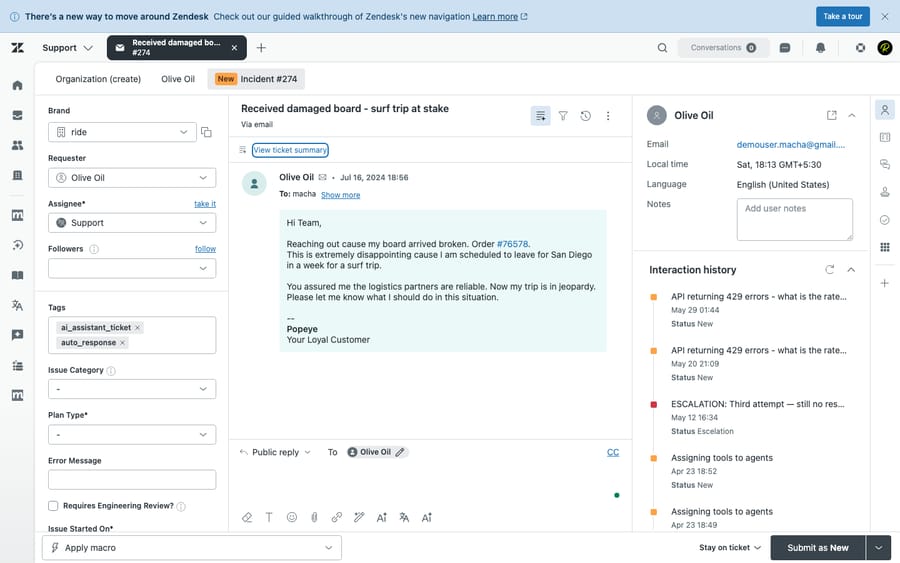
What does a drafted reply cost?
Macha bills per ticket, not per "deflection." A typical draft on this workflow takes several steps (read the ticket, read a doc, search Notion, write the note), and the whole thing is one ticket, about $0.40, whichever model you point it at. Pricing starts at $299 a month for 750 tickets and runs to $3,999 for 10,000, with setup and monitoring by the Macha team included. For drafting work, a fast default model is usually plenty, since a human reviews everything before it sends. You can start on a free trial ($50 of usage, no credit card required) and watch it run on your own tickets before committing. Full plan details are on the pricing page.
When should you not lean on this?
This pattern is useful, but it has limits:
- Garbage doc in, garbage draft out. The agent is only as accurate as the Google Doc behind it. If your docs are stale, the drafts will be confidently stale. Pin the docs you trust and keep them current, or this becomes a way to spread wrong answers faster.
- Permissions are real. The agent reads the documents picked for it through the connected Google account. Don't pick docs that shouldn't inform customer replies (HR notes, unreleased pricing, security runbooks).
- Don't skip the human gate for risky topics. Refunds, legal, security, account changes: keep these as drafts (internal notes) reviewed by a person, not auto-sends. The whole value here is that a human still owns the send.
- It's assist, not full resolution. If your goal is to deflect high volumes of repetitive questions with no human touch, that's a different setup: auto-reply from your knowledge base. This use case is deliberately the slower, safer one.
- Over-broad triggers create noise. Firing on every ticket buries good drafts under irrelevant ones. Scope tightly first, then widen.
What else can the same agent do?
Drafting from Google Docs is one agent in a larger toolkit. Because Macha sits on top of your helpdesk rather than replacing it, the same agent can read attachments, look up an order in Shopify, check a payment in Stripe, or route the ticket. The Google Doc draft is one tool in its hands. If you run Zendesk, the Macha on Zendesk page shows how the agent lives inside the workspace your team already uses. And if you'd rather start from a working template than a blank agent, the agent templates give you a head start.
FAQ
Does the customer ever see the AI draft directly? No, not in this setup. The draft is posted as a private internal note in Zendesk, visible only to your agents. A human reviews and sends the public reply. (Macha can post public replies for true auto-resolution use cases, but that's a separate, deliberately-chosen mode.)
Live Read Google Doc vs. syncing Docs to knowledge: which should I use? Use the live Read Google Doc action for a small set of canonical docs you want read fresh every time. Use Sync Docs to Knowledge when you have many docs and want the agent to find the right one by meaning. Most teams combine both.
Can it pull from Google Docs and Notion in the same reply? Yes. The standard pattern reads a Google Doc and searches Notion pages in the same run, then drafts a single reply grounded in both, which is how the worked example produces its answer.
What if the answer isn't in any doc? Instruct the agent to say so rather than guess. A good drafting agent flags "I couldn't find this in our documentation" and leaves the ticket for a human, which is the behavior you want for anything not yet written down.
Does this work outside Zendesk? Yes. Macha layers on Zendesk, Freshdesk, Gorgias, Front, HubSpot or Intercom. The trigger and the "internal note" surface map to whichever helpdesk you run; the Google Docs and Notion side is identical.
How fresh is the doc the agent reads? With the live Read Google Doc action, it reads the current version at run time. With a synced knowledge source, freshness depends on the sync. Macha keeps Docs as a live knowledge source, but a live tool call is the most up-to-the-second option.
How do you get started?
If your best answers already live in Google Docs and Notion, you don't need to migrate them into a help center to make them useful on tickets. Connect the docs, build a drafting agent, scope the trigger, and let it write the first version. Start a free trial ($50 of usage, no credit card required), connect Google Workspace and Notion, and draft your first reply, or read the docs for the full agent walkthrough.
Written by Abbas (Customer Support & AI, Macha) · Reviewed by Ankeet Guha (Co-founder & CTO) · Published 2026-06-24 · Last updated 2026-09-24.






