Intercom
 Shopify
 Stripe
 Slack
Slack Notion
 Google Workspace
 Confluence

Freshdesk vs Freshservice: What Is the Difference and Which Do You Need? (2026)


Freshdesk is a help desk for supporting external customers, while Freshservice is an ITIL-based service desk for internal IT and employee requests, and both start at $19 per agent a month. Freshservice puts problem and change management on its $99 Pro plan and its AI agent on Enterprise, while Freshdesk includes 500 AI agent sessions on every plan.
Key takeaways
- Freshdesk is a customer support help desk for external customers, while Freshservice is an ITIL-based IT service management platform for internal employees, and both come from Freshworks.
- Freshdesk costs $19, $55 or $89 per agent a month on annual billing, and Freshservice costs $19, $49 or $99, with its Enterprise price unpublished.
- Freshservice adds problem, change and release management only on its $99 Pro plan, and even SLA management starts on the $49 Growth plan.
- Freshdesk includes 500 Freddy AI Agent sessions on every plan and charges $49 per 100 more, while Freshservice includes 1,200 sessions per license per year on Enterprise only.
- Freshdesk still offers a free program for up to 2 agents for 6 months, started from inside an account, while Freshservice has only a 14-day trial.
Freshdesk is a customer support help desk for the team that answers your external customers over email, chat, phone and social, from $19 per agent a month. Freshservice is an IT service management (ITSM) platform for the team that runs IT and employee services inside your company, built on ITIL practices like incidents, problems, changes and asset management, also from $19. Same parent (Freshworks), different jobs.
| Freshdesk | Freshservice | |
|---|---|---|
| Serves | External customers | Internal employees |
| Plans (annual, per agent/mo) | Growth $19, Pro $55, Enterprise $89 | Starter $19, Growth $49, Pro $99, Enterprise custom |
| Free option | Free program: up to 2 agents for 6 months | None |
| Trial | 14 days on the Enterprise plan | 14 days with every feature |
| AI agent | 500 Freddy AI Agent sessions on every plan, then $49 per 100 | Freddy AI Agent (Classic) on Enterprise only |
Prices checked on the Freshworks pricing pages on 24 September 2026. A disclosure: Macha (the company publishing this) makes an AI agent layer that runs on top of customer-support help desks like Freshdesk and Zendesk, so we work alongside one side of this comparison, not the other. The one aside about where we fit comes near the end.
How did we compare them?
We pulled plan names, prices and feature tiers from the official Freshworks pricing pages for Freshdesk and Freshservice, plus Freshworks' own Freshdesk vs Freshservice page. For real-user signal we used G2 and Capterra aggregate ratings, review counts and recurring pros and cons, with an attributed reviewer quote where one was available. Freshservice's Enterprise price isn't published, so we don't state one. Pricing in this space moves, so confirm current rates before you budget. Our next review is scheduled for December 2026.
What is the core difference between Freshdesk and Freshservice?
This is the whole decision, so it's worth slowing down on.
Freshdesk answers your customers. It's a help desk: software for an external-facing support team. A customer emails, opens a chat, calls or DMs you on social; the message becomes a ticket; an agent (human or AI) resolves it; you measure CSAT. The mental model is company → customer.
Freshservice serves your employees. It's a service desk built for IT and, increasingly, other internal departments (HR, facilities, finance, legal). An employee can't log in, needs a laptop or requests software access; that becomes a ticket or a service request; IT resolves it while also managing the assets, changes and problems behind the scenes. The mental model is company → employee, and it's structured around ITIL, the standard framework for IT service management.
That split (external customers against internal employees) drives almost every feature difference below. Freshdesk optimizes for omnichannel customer conversations and satisfaction scores. Freshservice optimizes for the IT service lifecycle: what broke, why, what's changing and which assets are involved.
What is Freshdesk?
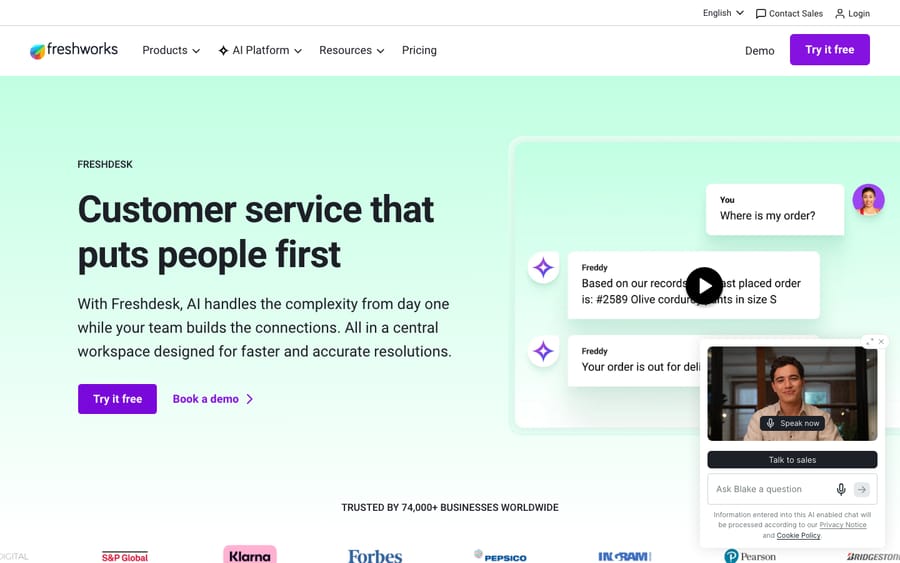
Freshdesk is Freshworks' customer support help desk. Its job is to pull every channel a customer might reach you on (email, live chat, phone, WhatsApp, social) into one shared inbox of tickets, then help agents and Freddy AI resolve them quickly.
Core capabilities:
- Omnichannel ticketing: email, chat, phone, social and messaging in one queue, with a shared inbox, threads and tasks.
- Customer context and collaboration: customer history, collision detection, and 5,000 external collaborators included on Pro and Enterprise so non-support teammates and third parties can chip in.
- Automation and SLAs: routing rules, canned responses, SLA policies and scenario automations to move tickets without manual triage.
- CSAT and reporting: satisfaction surveys, out-of-the-box and custom reports, and analytics aimed at measuring service quality.
- Self-service: a knowledge base and customer portal so customers can help themselves.
If your buyers, users or members open tickets, Freshdesk is the side of the house you're shopping for. For a deeper walkthrough, see our guide to what Freshdesk is.
What is Freshservice?
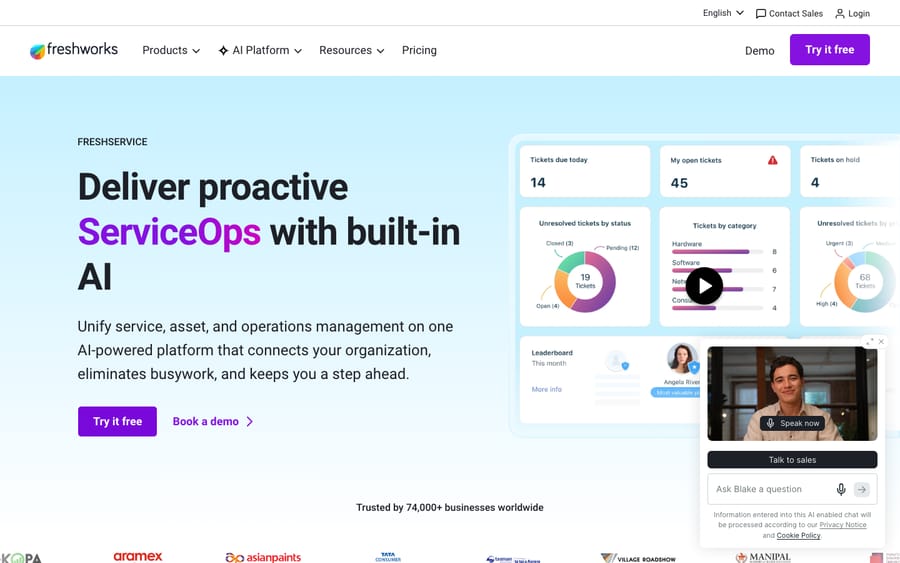
Freshservice is Freshworks' ITSM platform, a service desk built around the ITIL lifecycle for internal IT and employee service teams. Where Freshdesk thinks in tickets and CSAT, Freshservice thinks in incidents, problems, changes and the assets underneath them.
Core capabilities:
- Incident management: the ITSM equivalent of ticketing. Log, categorize, route and resolve issues that disrupt employees' work.
- Problem and change management: find the root cause behind recurring incidents (problems), and govern infrastructure changes with approvals and risk assessment (change and release management).
- Asset management and CMDB: track hardware and software assets and their relationships in a Configuration Management Database. IT asset management is metered in asset units; the Growth package includes 100, and more are sold in packs.
- Service catalog and requests: a catalog of standard requests (new laptop, software access, onboarding) with approval workflows, separate from break/fix incidents.
- Workload, release and major-incident management: lifecycle and operations tooling on the Pro tier and above.
If your "customers" are the people who badge into your office every morning, Freshservice is the tool. Freshservice has no free plan. It starts on paid tiers, with a 14-day free trial of every feature, which is the first structural difference from Freshdesk.
How do Freshdesk and Freshservice compare side by side?
| Freshdesk | Freshservice | |
|---|---|---|
| Category | Customer support / help desk | IT service management (ITSM) |
| Primary users | External customers (via support agents) | Internal employees (via IT/service teams) |
| Built around | Omnichannel tickets + CSAT | ITIL: incidents, problems, changes |
| Signature features | Email/chat/phone/social, shared inbox, customer portal, CSAT surveys | Asset management/CMDB, service catalog, change/release, problem management |
| Self-service | Customer knowledge base + portal | Employee support portal + knowledge base |
| AI | Freddy AI Agent on every plan, Copilot add-on, Insights on Enterprise | Copilot add-on from Pro; Freddy AI Agent and Insights on Enterprise |
| Free plan | Free program for up to 2 agents, first 6 months | No, paid plans only (14-day trial) |
| Entry price (annual) | $19/agent/mo (Growth) | $19/agent/mo (Starter) |
| Top published tier (annual) | $89/agent/mo (Enterprise) | $99/agent/mo (Pro); Enterprise custom |
| G2 rating (mid-2026) | ~4.4 / 5 (~3,700 reviews) | ~4.6 / 5 (~1,300 reviews) |
| Best for | Teams supporting external customers | IT/employee service teams needing ITIL + assets |
Prices from Freshworks' pricing pages on 24 September 2026; G2 figures as read in mid-2026. Confirm before budgeting.
How much do Freshdesk and Freshservice cost?
Both bill per agent per month and both discount for annual billing (Freshdesk says 20%), but the plan ladders differ because they're priced for different value.
Freshdesk (annual, per agent/month):
- Growth: $19. Ticketing and shared inbox, customer portal and knowledge base, out-of-the-box reporting, and Freddy AI Agent with the first 500 sessions included.
- Pro: $55. Adds a multilingual help desk, custom dashboards and reporting, intelligent routing, multiple SLA policies and external collaborators.
- Enterprise: $89. Adds Freddy AI Insights, skill-based routing, a sandbox, audit logs and IP whitelisting.
- Free program for very small teams: up to 2 agents for the first 6 months. It no longer appears on the pricing page. You start it from Admin > Account > Plans and Billing inside an account, per Freshdesk's help center.
Freshservice (annual, per agent/month):
- Starter: $19. Incident management, knowledge management, task management and a support portal.
- Growth: $49. Adds the service catalog, SLA management, on-call management and cloud management, plus the IT asset management Growth package with 100 asset units.
- Pro: $99. Adds problem, change, release and major-incident management (the core ITIL disciplines), workload management and employee journeys.
- Enterprise: custom. Adds Freddy AI Agent (Classic) with 1,200 sessions per license per year, Freddy AI Insights, a sandbox and audit logs. Freshworks doesn't publish the price.
Two things stand out. First, Freshservice climbs faster: ITSM capability is concentrated in the higher tiers, and even SLA management starts on Growth, so a team that needs real ITIL workflows typically lands on Pro at $99, not Starter. A 10-agent IT team on Pro pays $990 a month before AI. Second, Freshdesk has a free on-ramp and Freshservice doesn't, though Freshdesk's is now time-limited and hidden. For a full breakdown of the customer-support side, see Freshdesk pricing explained.
How does Freddy AI differ between them?
Both platforms ship Freddy AI, Freshworks' AI layer, and it splits into the same three pieces in each. What changes is where each piece sits on the plan ladder.
- Freddy AI Agent: the autonomous, conversational bot. In Freshdesk it deflects and resolves customer queries (returns, order status, account questions) and comes with every plan: 500 sessions included, then $49 per 100 sessions. An email session is a 72-hour window from the customer's first email. In Freshservice it handles employee requests (password resets, access requests), and the Classic version sits on Enterprise only, at 1,200 sessions per license per year, where a session is any interaction a unique user has with it in 24 hours.
- Freddy AI Copilot: agent-assist for your humans (reply suggestions, summaries, tone adjustment). $29/agent/month as an add-on on Freshdesk Pro and Enterprise and on Freshservice Pro and Enterprise.
- Freddy AI Insights: analytics over your tickets and conversations, included on the Enterprise tier of both.
Note the incentive in the session meter. Freshworks earns more as your bot handles more conversations, and a customer who writes back after the 72-hour window starts a new session. The recurring real-user gripe is the same on both sides: the strongest Freddy AI features sit on the higher tiers or behind the meter. Budget for AI as a line item on top of the seat price.
When does a company need both?
They aren't mutually exclusive. Plenty of organizations run both, and Freshworks designs for that. A common setup:
- Freshdesk for the customer-facing support team (your e-commerce or SaaS customers email in).
- Freshservice for internal IT (employees request laptops, report outages, need access).
They can share data through Freshworks integrations and APIs, so an issue that starts as a customer ticket but turns out to be an infrastructure problem can be linked across the two. The rule of thumb: if you support external customers and run an internal IT or service function of any size, you'll likely outgrow forcing one tool to do both. Freshdesk bent into an IT desk loses the asset, change and CMDB backbone; Freshservice pointed at customers loses the omnichannel and CSAT polish.
If you run everything in Freshdesk and your IT team is straining against it, that's the signal to add Freshservice rather than migrate, and vice versa. A true migration between the two is rare because they aren't substitutes.
What do users say about each?
Aggregate review sentiment lines up with the "different tools, different jobs" framing.
- Freshdesk: ~4.4/5 on G2 across roughly 3,700 reviews. The standout theme is ease of adoption, with a G2 ease-of-use score around 8.8. One verified reviewer put it plainly: "My favorite feature about Freshdesk is that our entire team was up and running without any actual training in a very brief period… all our support channels are in one shared dashboard." The common watch-outs are reporting depth and the cost of stacking AI add-ons.
- Freshservice: ~4.6/5 on G2 across roughly 1,300 reviews (and ~4.5/5 on Capterra over ~600 reviews). Reviewers praise the intuitive ITIL setup, workflow automation and asset management, and the breadth of the Freshworks marketplace. The most frequent criticism: Freddy AI Agent is gated to the Enterprise tier, which several mid-market reviewers call too expensive, alongside notes about workflow rigidity and limited advanced customization.
Net: both are well liked, Freshservice edges Freshdesk on rating (a smaller, IT-savvy user base tends to rate higher), and the shared complaint is AI pricing. These G2 and Capterra figures were read in mid-2026 and weren't re-read for this update.
Which one should you choose?
- Choose Freshdesk if you're supporting external customers: e-commerce, SaaS, services, any business with a support inbox. You want omnichannel ticketing, CSAT and a fast-to-adopt help desk, and a two-person team can start on the 6-month free program.
- Choose Freshservice if you're running internal IT or employee services and need ITIL: incident, problem and change management, a service catalog with approvals, and asset and CMDB tracking. There's no free plan, but the structured ITSM backbone is the point.
- Choose both if you do both jobs at real scale. Forcing one tool to cover the other loses the features that make each good.
- Either way, budget AI separately. Freddy AI Agent sessions, Copilot at $29 a seat and Insights on Enterprise are the most common source of "the bill was higher than the sticker."
Where does an AI agent layer like Macha fit?
One narrow aside, scoped to the customer-support side only: if you land on Freshdesk (or Zendesk) for external customers and want stronger AI resolution than the built-in bot, Macha is an AI agent layer that runs on top of your existing help desk. It connects to your knowledge and bills per ticket (one thread with one person, charged once however many messages, lookups and drafts it takes) rather than per session, so a customer who replies after a time window closes isn't billed twice. Plans start at $299 a month for up to 750 tickets, with setup and monitoring by the Macha team included.
To be clear about scope: this is a customer-support play, not an ITSM one. If your need is Freshservice-style IT service management (assets, change control, CMDB), Macha isn't the tool for that job. On the Freshdesk side, if you'd rather watch the automation work before committing, you can start with $50 of free usage, no credit card required.
Frequently asked questions
What's the difference between Freshdesk and Freshservice? Freshdesk is a customer support help desk for external customers (omnichannel ticketing, CSAT). Freshservice is an IT service management (ITSM) platform for internal employees and IT, built on ITIL: incidents, problems, changes, asset management and a service catalog. Same vendor (Freshworks), different jobs.
Is Freshservice just Freshdesk for IT? Not quite. Freshservice shares Freshworks' ticketing DNA but adds an ITSM backbone Freshdesk doesn't have: change and release management, a CMDB and asset database, problem management, and a service catalog with approval workflows. Freshdesk, in turn, has omnichannel customer features and CSAT that Freshservice isn't built around.
Which is cheaper, Freshdesk or Freshservice? Their entry tiers are the same ($19/agent/month annually), but Freshdesk has a 6-month free program for up to 2 agents and Freshservice doesn't (14-day trial only). Freshservice's ITSM features concentrate in higher tiers, so real ITIL use typically lands on its $49 or $99 plans. Add Freddy AI as a separate line item on either.
Can you use Freshdesk and Freshservice together? Yes. Many organizations run Freshdesk for customer support and Freshservice for internal IT, sharing data via Freshworks integrations and APIs. If you support both external customers and internal employees at scale, running both is the intended setup.
Does Freddy AI work in both? Yes. Freddy AI Agent, Copilot and Insights appear in both products, tuned to the use case (customer queries in Freshdesk, employee requests in Freshservice). Freshdesk includes 500 AI Agent sessions on every plan; Freshservice puts its AI Agent on Enterprise only.
Vendor details are from Freshworks' official Freshdesk and Freshservice pricing pages and Freshdesk's help center, checked 24 September 2026. Ratings are from G2 and Capterra as noted. Next review: December 2026.
Add AI agents to your Freshdesk
Macha reads the ticket, drafts the reply and takes the action, inside the Freshdesk you already run.