





 Shopify
 Stripe
 Slack
Slack Notion
 Google Workspace
 Confluence

How Do Front Webhooks Work? Application vs Rule Webhooks, Signing and Rate Limits (2026)


Front delivers events through application webhooks, attached to an app, and rule webhooks, fired from a rule, and both time out after 5 seconds. Only application webhooks retry, and the two use different signatures, which changes how you build and secure the endpoint.
Key takeaways
- Front webhooks come in two kinds: application webhooks on an app under Company settings, Developers, and rule webhooks fired by a send to webhook rule action.
- Every Front webhook times out after 5 seconds, so the endpoint should return a 2xx response at once and do the real work on a queue.
- Front application webhooks retry up to 3 times and are then disabled, while rule webhooks never retry, so a handler must de-duplicate on the event id.
- Front signs application webhooks with HMAC-SHA256 over the request timestamp, a colon and the raw body, and rule webhooks with a base64 HMAC-SHA1 of the body.
- Front's Core API allows 50 requests per minute on Starter, 100 on Professional and 200 on Enterprise, enforced per company, with a burst allowance of half that limit.

Front sends webhooks in two ways: application webhooks, attached to an app you create under Company settings → Developers, and rule webhooks, fired by a "send to webhook" action inside a rule. Both POST JSON to your endpoint and both time out after 5 seconds. They differ on retries and signing: application webhooks retry up to 3 times and are signed with HMAC-SHA256, while rule webhooks don't retry at all and are signed with HMAC-SHA1. The Core API and the Plugin SDK cover the other direction, letting your code act on Front and draw your own UI inside it.
| Application webhooks | Rule webhooks | |
|---|---|---|
| Where you set it up | An app under Company settings → Developers | A rule's Then step ("send to webhook") |
| Scope | The whole company; authorization.id names the customer | The inbox the rule lives in |
| Server needed at setup | Yes, it must answer a challenge within 10 seconds | No |
| Timeout | 5 seconds | 5 seconds |
| Retries | Up to 3, then the webhook is disabled | None |
| Signature | HMAC-SHA256 over timestamp + ":" + raw body | HMAC-SHA1 of the body with your API secret, base64 |
| Best for | Integrations shipped to many Front customers | One workspace wired to one internal endpoint |
Sources: Front's application webhooks and rule webhooks docs, checked 24 September 2026.
Should you use an application webhook or a rule webhook?
Front gives you two separate ways to receive events, and picking the wrong one causes most of the early confusion.
Application webhooks are configured as a feature on an app you create under Company settings → Developers. Per Front's application webhooks documentation, they run alongside a Front app and are the option Front recommends for partner integrations available to all Front users. Their defining trait: each request carries an authorization object, and the ID of the customer's company sits in authorization.id. That's how a multi-tenant integration knows which Front company emitted the event. Application webhooks need a live server at configuration time: Front sends a validation request, and your endpoint has 10 seconds to return a 200 with the challenge value.
Rule webhooks are set up through a Front rule: you add a send to webhook action in the Then step. They can be created without a server standing by, they're scoped to the specific inbox (private or shared) the rule lives in, and they can send either the full event payload or a lighter event preview. Front's docs suggest giving each customer a unique URL if you need to tell senders apart. They're the quick, no-code option; application webhooks are the durable, multi-customer one.
The rule of thumb: if you're wiring one workspace to one internal endpoint, a rule webhook is fine, as long as you can live without retries. If you're building something you'll ship to other Front customers, use an application webhook so authorization.id tells you who's calling.
What does a Front webhook payload contain?
Every webhook is an HTTP POST with a JSON body. The top level has a type (the event name), a payload (the event object itself), and, for application webhooks, that authorization block.
{
  "type": "inbound_received",
  "authorization": {
    "id": "cmp_abc123"
  },
  "payload": {
    "id": "evt_55c8c149",
    "type": "inbound",
    "conversation": {
      "id": "cnv_55c8c149",
      "subject": "Where is my order?",
      "status": "unassigned"
    }
  }
}
The event type tells you what happened. Front emits a broad set: common ones include inbound_received, outbound_sent, conversation_moved, and message_delivery_failed, alongside conversation, comment, and tag events. The shape of payload changes with the event type, so your handler should switch on type first.
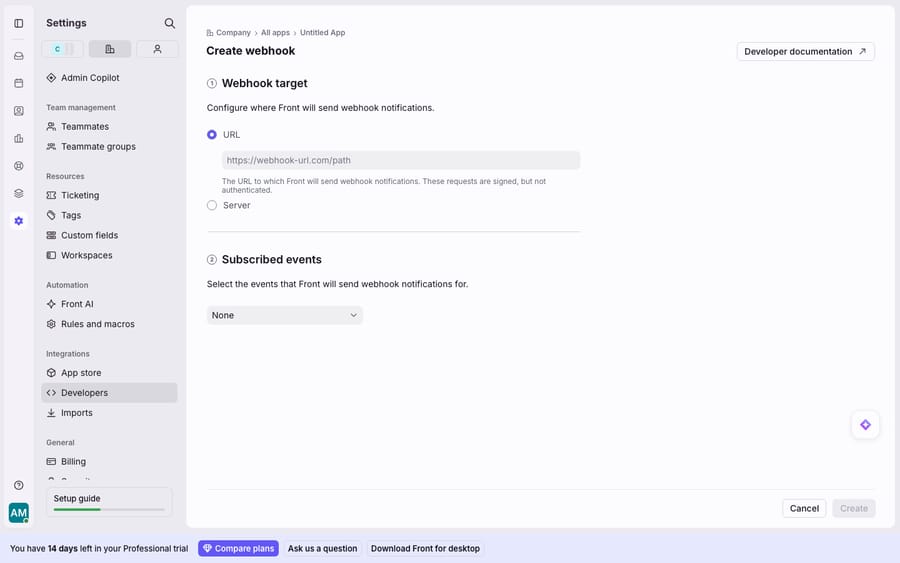
By default a payload is lean, often just IDs. Front's Send Full Event Data toggle changes that: switching it on exposes Subject, Status, Assignee, Recipient, Tags, and the message body directly in the webhook, so you don't have to fire a follow-up API call to hydrate the event. On a busy inbox that's the difference between one inbound request and hundreds of round-trips against your rate limit, and it's the first setting worth turning on.
How do you verify, acknowledge and retry Front webhooks?
The config screen states the caveat plainly: the webhook target is signed but not authenticated. Front doesn't send credentials. It signs each request so you can verify it came from Front.
Verify the signature. For application webhooks, Front signs with HMAC-SHA256. You take the x-front-request-timestamp header, join it to the raw request body with a colon, compute the HMAC with your app's signing key, and compare against the x-front-signature header. Rule webhooks use an older scheme: an HMAC-SHA1 of the request body keyed with your API secret, base64-encoded, in the same X-Front-Signature header. If the signature doesn't match, drop the request. It's your only defense against a spoofed call, since the URL itself is public.
Respect the timeout. Per the docs, webhook requests issued by Front time out after 5 seconds. Your endpoint must acknowledge fast. The correct pattern is to return a 2xx immediately and do the real work on a queue. Never run a slow database write or an LLM call inline before responding.
Plan for retries, or their absence. Application webhooks retry up to 3 times when Front receives a timeout or a 429, 500 or 408, and once retries run out Front disables the webhook. So your handler must be idempotent: the same event can legitimately arrive more than once, so key off the event id and de-duplicate rather than double-processing. Rule webhooks don't retry at all. Front's advice is to poll the List events API to recover anything missed during an outage.
What do the Core API and Plugin SDK add?
Webhooks are the outbound half of Front's platform. The inbound half is the Core API plus the Plugin SDK.
The Core API is Front's backend. It reads and writes almost every object: conversations, messages, contacts, channels, inboxes, teammates, tags, comments, and analytics. It's a REST API you call from your own server, and it's what you use to act on the events your webhook receives.
The Plugin SDK is different: a JavaScript SDK that renders your UI inside Front. Per Front's plugin overview, "a plugin is a small web application that can communicate with Front using a Javascript SDK." There are two kinds:
- Sidebar plugins render in the integrations panel on the right of the Front UI, "roughly 25-30% of the screen width, but can be adjusted by the user." They receive the conversation context (none, one or several selected conversations), so you can show the matching order, ticket, or CRM record beside the message.
- Composer plugins live as an icon in the message composer toolbar and read the
messageComposercontext, which is handy for inserting a snippet or looking something up while replying.
Together these three surfaces (webhooks out, Core API in, Plugin SDK on-screen) make up the developer platform. A typical integration uses all three: a webhook wakes it up, the Core API acts, and a sidebar plugin shows the result to the agent.
What are Front's API rate limits?
Rate limits are per company and set by plan. Front's rate limiting docs cap Core API requests at 50 per minute on Starter, 100 on Professional and 200 on Enterprise, enforced per company rather than per token. On top sits a burst allowance of half your plan's limit; spend it and it takes 10 minutes to replenish. A 429 comes back with a retry-after header, and responses carry x-ratelimit-remaining and x-ratelimit-reset so you can back off before you hit the wall. Front's pricing page sells more headroom as an add-on at $200 a month per extra 100 requests a minute. OAuth partner integrations get a separate 120 requests a minute that doesn't count against the customer's limit. A chatty integration on Starter hits the ceiling faster than you'd think, which is why the Send Full Event Data toggle matters.
Where does a raw Front webhook stop being useful?
A webhook delivers an event, not an answer. This is the structural limit. Front tells you "an inbound message was received" with the subject and body, but the payload can't read the customer's intent, look up their order, or write a reply. Everything past delivery is code you build and maintain: parsing, business logic, drafting, sending. The platform is deliberately a transport and data layer, not a reasoning one.
That seam is where an AI agent layer fits, not to replace the platform but to be the smart consumer on the other end of the webhook. The broader category of AI agents for customer service exists for the reasoning a raw payload can't do. Macha is one such layer: it runs on top of the Front you already use through the live Macha–Front connector, and it does not replace Front, your shared inboxes, your API, or your webhooks. Front delivers the conversation; Macha's agent reads it, works out intent rather than matching keywords, pulls a real order or account status through a custom tool that turns your REST API into something the agent can call, and drafts or sends a grounded reply. You keep Front as the shared inbox and system of record, and you skip writing the handler that turns an event into a resolution. Macha bills per ticket, from $299 a month for up to 750 tickets: one conversation is charged once however many events and replies it takes, never per resolution, so the bill never hangs on an outcome definition you don't control.
The clean division of labor: let Front's webhooks and Core API be the deterministic plumbing, and put an agent on top for the part a payload can't do, which is reading the conversation and answering it well. For the collaborative side, see Front shared inbox explained and Front comments and mentions explained.
FAQ
What's the difference between application webhooks and rule webhooks in Front? Application webhooks are configured on an app under Company settings → Developers, carry an authorization.id identifying the customer's company, retry up to 3 times, and need a live server at setup. They're built for integrations shipped to many Front customers. Rule webhooks are set up inside a rule's Then action, are scoped to a single inbox, can be created without a server ready, send a full or preview payload, and don't retry. Use rule webhooks for one-off internal wiring and application webhooks for products.
How do I verify a Front webhook is genuine? The webhook target is signed but not authenticated, so Front doesn't send credentials; it signs each request. For application webhooks, compute an HMAC-SHA256 over the x-front-request-timestamp value, a colon and the raw request body using your signing key, and compare it with the x-front-signature header. Rule webhooks use a base64 HMAC-SHA1 of the body keyed with your API secret. Reject any request that doesn't match.
What are Front's webhook timeout and retry rules? Front webhook requests time out after 5 seconds, so return a 2xx immediately and process asynchronously. Application webhooks retry up to 3 times on a timeout or a 429, 500 or 408 response and are disabled once retries run out, so your handler must be idempotent and de-duplicate on the event id. Rule webhooks have no automatic retries.
What are the Front Core API rate limits? Limits are per company by plan: 50 requests per minute on Starter, 100 on Professional, and 200 on Enterprise, with a burst allowance of half the standard limit that takes 10 minutes to refill. Exceeding the limit returns a 429 with a retry-after header.
Can I add AI on top of Front's webhooks without replacing Front? Yes. An AI agent layer like Macha connects to Front as a live connector and acts as the smart consumer of your webhook events: it reads the delivered conversation, works out intent, pulls live data through custom tools, and drafts or sends a reply. Front stays your shared inbox, API, and system of record; the agent does the reasoning a raw payload can't.
Ready to turn a webhook event into an actual answer? Start a free trial of Macha and connect it to your Front in minutes.






