





 Shopify
 Stripe
 Slack
Slack Notion
 Google Workspace
 Confluence

How Does Macha Handle GDPR Export, Deletion and Retention?


GDPR compliance for AI customer support comes down to operations your stack can actually perform: hand someone their data, delete it on request, and stop keeping what you no longer need. Macha sits on top of your help desk and holds its own slice of customer data, so it has to perform all three for that slice.
Key takeaways
- Macha's Privacy settings page, shipped March 30, 2026, exports conversations, agents, connectors and custom tools as JSON, with credentials and embeddings stripped out.
- Macha schedules account and organization deletion on a 30-day timer, then cascades cleanup across Spaces files, MongoDB collections and organization memberships.
- Macha deletes conversations after 45 days of inactivity and internal agent logs after 7 days, which covers GDPR's storage limitation principle without manual cleanup.
- Since July 3, 2026, Macha redacts emails, phone numbers, names, addresses and identifiers from stored transcripts and from anything it sends to a model provider.
- A deleted Macha agent sits in a Trash tab for 30 days, a soft-delete feature shipped June 17, 2026, and restores with its triggers, instructions and tools intact.

Macha makes GDPR-compliant AI customer support operable with four controls: a one-click JSON export under Settings → Privacy, 30-day scheduled deletion for accounts and whole organizations with cascade cleanup, automatic retention that deletes conversations after 45 days of inactivity and agent logs after 7 days, and AES-256-GCM encryption of API keys and tokens caught in agent logs. The policy half of GDPR (lawful basis, Article 22, breach notification, the DPA) stays with you as the controller, and the controls have edges worth knowing before a security review.
| Control | GDPR article | What it does | Shipped |
|---|---|---|---|
| Data export | Art. 15 and 20 | JSON copy of conversations, agents, connectors and tools; credentials and embeddings stripped | March 30, 2026 |
| Scheduled deletion | Art. 17 | Account or org deleted after 30 days, cascading across files, database records and memberships | April 9, 2026 |
| Retention TTLs | Art. 5(1)(e) | Conversations deleted after 45 days of inactivity; agent logs after 7 days | April 9, 2026 |
| Log encryption | Art. 5(1)(f) | Keys and tokens in agent logs encrypted with AES-256-GCM | April 9, 2026 |
| PII anonymization | Art. 5(1)(c) and 32 | Personal data redacted from stored transcripts and model calls | July 3, 2026 |
A quick framing note before the controls. Macha is an AI agent layer that runs on top of the help desk you already use (Zendesk, Freshdesk, Gorgias, Front, HubSpot or Intercom), not a help desk itself. So the data Macha stores is a subset: the conversations its agents handle, the agent and connector configuration, knowledge embeddings, and operational logs. Your source helpdesk keeps its own copy of the ticket record and has its own GDPR tooling. Under the regulation Macha acts as a processor for the customer content it touches; you remain the controller. The controls below are how Macha lets you exercise control over the slice it holds.
Which GDPR rights does an AI support tool have to handle?
Three data-subject rights drive almost every technical requirement a support stack has to satisfy. It's worth naming them, because Macha's features map onto them one-to-one.
- Right of access (Article 15) and right to data portability (Article 20): a person can ask for a copy of their data, and where processing is automated and based on consent or contract, in a structured, commonly used, machine-readable format. Macha's JSON export is the mechanism.
- Right to erasure / "right to be forgotten" (Article 17): a person (or an account holder closing their account) can ask for data to be deleted "without undue delay." Macha's scheduled deletion with cascade cleanup is the mechanism.
- Storage limitation (Article 5(1)(e)): you may not keep personal data "longer than is necessary." This is the one teams forget: it's not enough to delete on request, you also need data to age out on its own. Macha's conversation TTLs and log expiry are the mechanism.
One nuance worth keeping straight, because regulators do: portability and erasure are separate requests. Exporting a copy of someone's data does not delete it, and deleting it does not generate an export. Macha keeps them as two distinct actions for exactly that reason.
How do you export your data from Macha?
Under Settings → Privacy you'll find the controls for downloading your data, managing account deletion, and reaching every policy document in one place. The Privacy settings page shipped on March 30, 2026 as a single home for this.

The export produces a complete copy of your data as JSON: conversations, agents, connectors, and custom tools, in a structured, machine-readable format that satisfies the portability requirement out of the box. You don't file a ticket and wait; you click and download.
The detail that matters for a security review is what's deliberately left out. The export strips credentials, embeddings, and sensitive fields before it hands you the file. That's intentional on two fronts:
- You don't want secrets in a download. A portability export that included your connector API keys or OAuth tokens would itself be a liability: a file that leaks the keys to your Zendesk and Stripe is worse than no export at all. Stripping credentials keeps the export safe to store and forward.
- Embeddings aren't portable personal data. The vector embeddings Macha generates for knowledge search are derived artifacts, not the source records; including them would bloat the file without adding anything a data subject can use.
So the export is built to be the thing you can actually hand to a requester or attach to a DSAR response, rather than a raw database dump you'd have to sanitize by hand.
How does account and organization deletion work?
Erasure is where most tools quietly fall short: they soft-delete a top-level record and leave orphaned files, log rows, and memberships scattered across the backend. Macha's scheduled deletion (shipped April 9, 2026) is built to actually finish the job.
When you request deletion of an account or an entire organization, Macha schedules it on a 30-day timer and then performs a cascade cleanup across every place the data lives:
- Spaces files: uploaded attachments and generated documents.
- MongoDB collections: the conversation, agent, connector, and tool records.
- Organization memberships: the user-to-org links, so no dangling access remains.
The 30-day window is a deliberate safety buffer, not a delay tactic. Accidental account deletion is one of the most common "oh no" moments in any SaaS tool, and an irreversible immediate purge turns a misclick into a catastrophe. A scheduled window gives you time to catch and reverse a mistake while still landing comfortably inside the "without undue delay" expectation for erasure.

It's worth distinguishing two different "30-day windows" in Macha, because they look similar and aren't the same thing:
| Mechanism | What it covers | What happens at day 30 |
|---|---|---|
| Scheduled deletion | A whole account or organization | Cascade cleanup permanently removes Spaces files, DB records, and memberships |
| Soft-delete (Trash) | A single agent you deleted | Agent is permanently deleted unless you restore it first |
The second one is worth a beat of its own.
Soft-delete for agents: a 30-day undo
Deleting an agent (not an account) follows a parallel but separate safety pattern that shipped June 17, 2026. We wrote up the design in soft-delete: a 30-day safety net for agents. A deleted agent moves to a Trash tab for 30 days, and you can restore it any time within that window, and its triggers, instructions, sub-agent links, and tool configuration all come back intact. While it sits in Trash, its triggers are deactivated rather than deleted, so it stops firing but its webhook secrets and config are preserved for a clean restore.
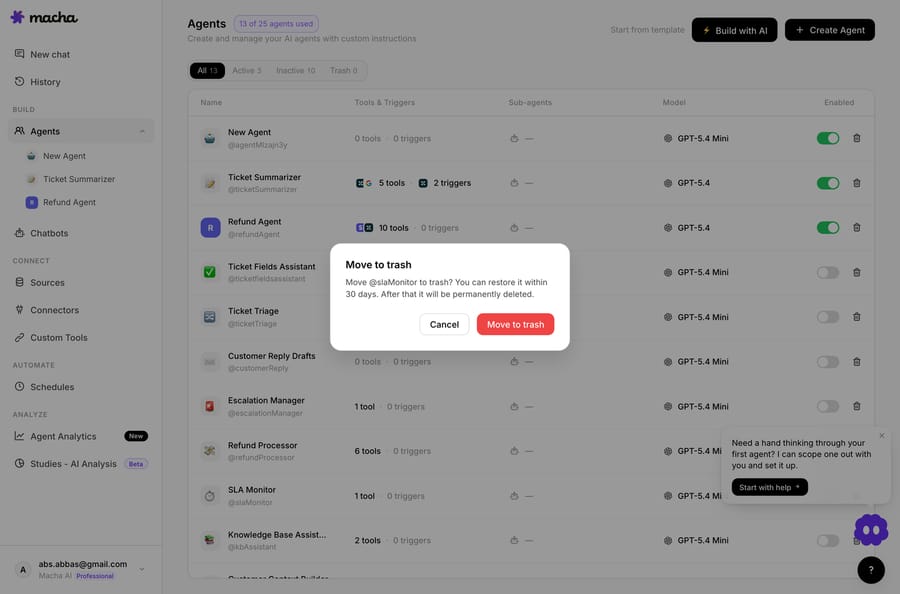
The confirmation copy was rewritten to match: no more "this cannot be undone," because now, for 30 days, it can. It's a small thing that reflects the same philosophy as scheduled deletion: destructive actions should be reversible long enough to catch a mistake, then final.
How long does Macha keep conversations and logs?
Responding to deletion requests is the reactive half of GDPR. The proactive half, the storage limitation principle, is keeping data only as long as you genuinely need it. Macha enforces this automatically so you're not relying on anyone remembering to clean up.
- Conversations auto-delete after 45 days of inactivity. A conversation that hasn't been touched in 45 days expires on its own. This is a TTL (time-to-live), not a manual sweep, so it happens whether or not anyone's watching.
- Internal agent logs expire after 7 days. The verbose operational logs (the step-by-step status of what an agent did) have a much shorter life. They're useful for debugging a recent run and pointless to hoard, so a week is the default lifespan.
- Chat attachments expire automatically alongside the conversations they belong to.
These are sensible defaults rather than knobs you have to find and set, which is the right posture for a storage-limitation control: the safe behavior should be the default behavior.
How does Macha protect credentials and personal data?
Two encryption details round out the picture, and both matter for the integrity and confidentiality principle (Article 5(1)(f)).
Credentials in logs are encrypted with AES-256-GCM. When an agent runs, its internal log messages can incidentally capture API keys or tokens passed to a tool. Rather than store those in the clear, Macha encrypts API keys and tokens in internal agent log messages with AES-256-GCM before they're stored. Combined with the 7-day log expiry, that means secrets are both short-lived and unreadable at rest.
Connector credentials are encrypted at rest as a baseline, and the custom-tool editor shows only a masked hint of a configured key, enough to confirm which key is set without re-exposing the secret to anyone with screen access. It's the same reason the data export strips credentials: secrets should be verifiable, never casually visible.
Personal data is redacted before it reaches a model. Since July 3, 2026, Macha scrubs emails, phone numbers, names, addresses and identifiers from stored conversation transcripts and from anything it sends to a model provider. The redaction runs at the boundary with pattern-based detectors, which is fast and covers the common classes; Macha's changelog says an upgrade to Microsoft Presidio's NER-based detection is queued for the same pipeline. For a DPIA, this is the data minimization control (Article 5(1)(c)) you'd cite for third-party inference.
How does Macha handle cookie consent?
Consent for tracking is the part of GDPR a customer actually sees. Macha ships a cookie consent banner with accept/decline controls on every page and layout: the public marketing site, the docs, and the app shell. Decline is a first-class choice, not a dark-pattern afterthought. It's a small surface compared with deletion and retention, but it's the one a regulator's first glance lands on, and it's wired across all layouts rather than bolted onto the homepage only.
Which parts of GDPR can't a product feature handle?
Export, deletion, and retention are the parts of GDPR-compliant AI customer support that are product features. But "GDPR compliant" is a broader claim than any single screen, and the SERP for this topic rewards posts that say so plainly. Here's the rest of the picture your program has to hold: the parts that are policy and process, not a toggle.
- Lawful basis (Article 6). Before an agent processes a customer's data, you need a lawful basis for it. For support, that's almost always performance of a contract (you're answering a paying customer) or legitimate interests (running an efficient support operation), rarely consent, which is fragile and revocable. You name the basis in your records of processing; the tool doesn't choose it for you.
- Automated decision-making (Article 22). GDPR gives people the right not to be subject to a solely automated decision with legal or similarly significant effects. A Macha agent that drafts a reply, triages a ticket, or routes it to a queue is decision support with a human in the loop, not a solely-automated decision about a person, but if you ever wire an agent to take an account-affecting action with no human review, Art 22 is the line to watch. Keep a person in the loop for anything consequential, which is how Macha is designed to run anyway.
- DPIA (Article 35). Introducing AI agents into a support flow is exactly the kind of "new technology" change that can warrant a Data Protection Impact Assessment, especially at scale. A DPIA documents what data the agents touch, the risks, and your mitigations, and the export/retention/encryption controls in this post are the kind of mitigations you'd cite in one.
- 72-hour breach notification (Article 33). If personal data is breached, a controller has to notify its supervisory authority "without undue delay and, where feasible, not later than 72 hours" after becoming aware. As a processor, Macha's job is to tell you without undue delay so your clock can start; the notification duty to the regulator stays with you as controller.
- What belongs in the DPA. The Data Processing Agreement is where the durable commitments live: the subject-matter and duration of processing, sub-processors, security measures, breach-notification mechanics, and (crucially for this post) any contractually-fixed retention periods that differ from the product defaults. If your compliance program needs guaranteed retention windows or specific sub-processor terms, that's a DPA conversation, not a settings screen. For a plain-language companion to this section, see our data privacy and GDPR overview.
The honest framing: Macha gives you the callable operations (export, erasure, retention, encryption) that make the technical half of GDPR real. The policy half (lawful basis, Art 22 boundaries, your DPIA, your records of processing) is yours, and no vendor feature can do it for you.
What don't these controls do for you?
A vendor page that only lists features isn't honest about GDPR. Here's where your obligations still sit, and where Macha's controls have edges.
- Macha covers Macha's slice, not your whole stack. Deleting an org in Macha removes the data Macha holds. It does not reach into your Zendesk or Freshdesk and erase the underlying tickets. Your source helpdesk has its own data and its own erasure tooling, and you have to action both. Macha is the layer on top, not the system of record.
- Export and erasure are separate, on purpose. If a data subject wants both a copy and deletion, that's two actions. Don't assume one implies the other.
- The 45-day and 7-day TTLs are product defaults, not a per-customer DPA term. They reflect how the product behaves today; if your compliance program needs contractually-fixed retention periods, that's a conversation for your Data Processing Agreement, not something you set with a toggle. Macha's security page lists 30, 180 and 365 days as alternative retention windows that can be requested. (Macha's DPA and security policies are linked right from the Privacy page.)
- You're still the controller. Macha gives you the mechanisms (export, scheduled deletion, retention, encryption), but the legal duty to respond to a DSAR within one month (Article 12(3), extendable by two months for complex requests), to assess whether an erasure request has a competing legal-retention ground, and to keep your records of processing, stays with you. Tooling makes compliance operable; it doesn't make you compliant by itself.
That last point is the honest one. The IAPP's guidance on engineering GDPR compliance for agentic AI makes the same case: deletion and export have to be callable operations with evidence that primary data and derived artifacts were handled, which is exactly the shape of what Macha ships, but the controller still owns the policy decisions around them.
What will a security review ask about Macha?
These controls are the trust foundation under everything else Macha does. If you're evaluating Macha as the agent layer on your help desk (see how Macha runs on Zendesk), the data-handling story is the part your security team will read first. Expect three questions: where the data lives, who else touches it (the sub-processor list answers that), and what certifications exist. On the last one, Macha's security page says SOC 2 certification is in progress, with completion expected in Q1 2027, so plan the review around the DPA and the controls above rather than a report. The short version: export is a click, deletion cascades and is reversible for 30 days, retention ages data out by default, and credentials never sit in the clear. For the operational detail and the policy documents, the Privacy and security docs go deeper than this post can.
FAQ
Is Macha a data controller or a data processor under GDPR? For the customer content its agents process, Macha acts as a processor: you, the customer running the agents, are the controller. Macha provides the technical mechanisms (export, deletion, retention) so you can meet your controller obligations for the data Macha holds.
How do I export my data, and what's in the file? From Settings → Privacy, download a complete JSON copy of your conversations, agents, connectors, and tools. Credentials, embeddings, and other sensitive fields are stripped so the export is safe to store and forward.
How long does deletion take? Account and organization deletion is scheduled on a 30-day timer, then cascades across Spaces files, database collections, and org memberships. The window is a safety buffer against accidental deletion while still meeting the "without undue delay" expectation.
Does Macha send customer personal data to AI model providers? Since July 3, 2026, emails, phone numbers, names, addresses and identifiers are redacted from stored transcripts and from anything Macha ships to a model provider, using pattern-based detectors at the boundary.
Can I undo a deletion? For an account/org, the 30-day schedule is your window to reverse a mistake. For a single agent, deletion moves it to a Trash tab where you can restore it, with triggers, instructions, sub-agents, and tools intact — for 30 days.
How long are conversations and logs kept? Conversations auto-delete after 45 days of inactivity; internal agent logs expire after 7 days; chat attachments expire with their conversations. These are automatic TTLs, not manual cleanups.
Does deleting data in Macha delete it from my helpdesk? No. Macha removes the data it holds. Your source help desk (Zendesk, Freshdesk, Gorgias, Front, HubSpot or Intercom) keeps its own copy and has its own erasure tools — you action both.
Do AI support agents count as "automated decision-making" under Article 22? Not when there's a human in the loop. An agent that drafts a reply, triages, or routes a ticket is decision support, not a solely automated decision with legal or similarly significant effect. Keep a person reviewing anything account-affecting and you stay clear of the Article 22 line, which is how Macha is designed to run.
Is "GDPR-compliant AI customer support" something a tool can give me out of the box? A tool gives you the technical operations (export, erasure, retention, encryption) that make compliance operable. The policy half (your lawful basis under Art 6, DPIA under Art 35, records of processing, and the DPA terms) is the controller's to own. Macha covers the former; your program owns the latter.
How can you check these controls yourself?
The fastest way to judge a vendor's data handling is to look at it yourself. Start a free trial ($50 of usage, about 125 tickets, no credit card and no time limit), connect your helpdesk, and open Settings → Privacy: the export, deletion, and policy controls are all there on day one. For plan details, see the pricing page; for the full data-handling reference, read the docs.
Written by Abbas (Customer Support & AI, Macha) · Reviewed by Ankeet Guha (Co-founder & CTO) · Published 2026-06-24 · Last updated 2026-09-24.
This article describes product behavior and is not legal advice. Consult your own counsel for your GDPR obligations.






