





 Shopify
 Stripe
 Slack
Slack Notion
 Google Workspace
 Confluence

Can You Restore a Deleted Macha Agent? The 30-Day Trash Explained


Since the June 17, 2026 release, deleting a Macha agent moves it to a Trash tab for 30 days instead of destroying it. Restoring it brings back its instructions, tools, sub-agent links and trigger config, with triggers paused until you switch them on.
Key takeaways
- Since the June 17, 2026 release, deleting a Macha agent moves it to a Trash tab on the Agents page for 30 days before an automatic, permanent purge.
- Restoring a Macha agent from Trash brings back its instructions, tool configuration, sub-agent links, and trigger config, including webhook secrets.
- A restored Macha agent's triggers stay paused until someone re-enables them, so a team can check the instructions and connectors before the agent touches live tickets.
- Jotform, V7 Labs, and Microsoft Entra Agent ID all keep deleted agents restorable for 30 days, the same window Macha uses.
- Deleting, trashing, and restoring a Macha agent costs nothing, because Macha bills per ticket rather than for managing agents.

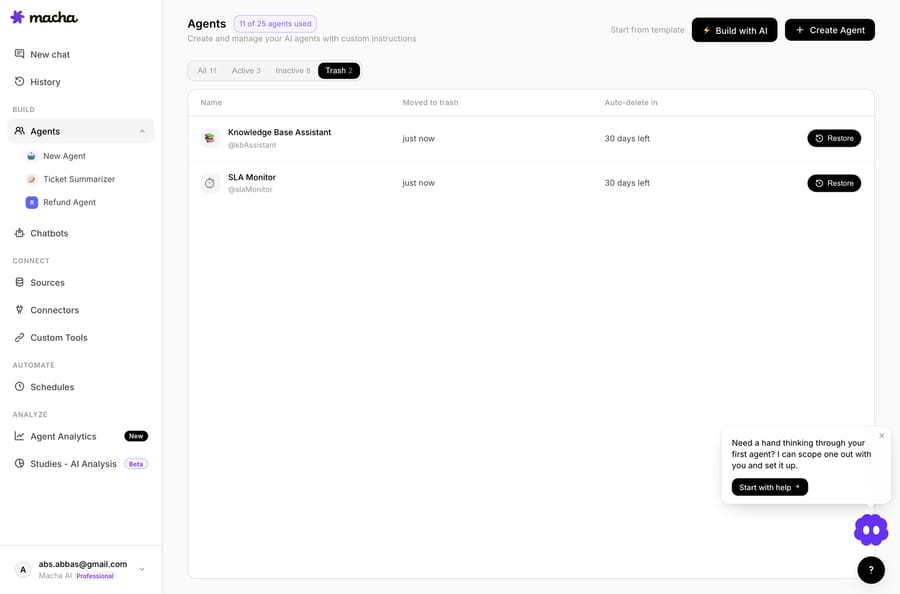
Deleting a Macha agent is reversible: since the June 17, 2026 release, a deleted agent moves to a Trash tab on the Agents page for 30 days, and one click on Restore brings back its instructions, tool configuration, sub-agent links, and trigger config. After 30 days it is purged automatically and permanently. The one gotcha is triggers: they come back paused, and you switch them on again yourself.
| What happens | On delete | On restore |
|---|---|---|
| Agent record | Moves to the Trash tab for 30 days | Returns to the Agents list |
| Instructions, tools, sub-agent links | Kept | Come back intact |
| Triggers | Paused; webhook secrets and config kept | Come back paused until you re-enable them |
| Sidekick deletes | Same soft-delete path | Same restore window |
| Cost | Free | Free |
What changed when Macha added soft-delete?
Before June 17, deleting an agent was a hard delete: gone, permanently, immediately. Now every agent delete is a soft delete. The agent is hidden from the main list, not destroyed, and a 30-day clock starts. It's the same pattern you already trust in Gmail's Trash, Notion's trash, or your OS recycle bin, and it has become the norm for AI-agent platforms. Jotform's AI Agents keep deleted agents restorable for 30 days; V7 Labs moves deleted agents to a Trash page for 30 days and shows who deleted them and when; Microsoft's Entra Agent ID treats every standard deletion as a soft delete, restorable from the recycle bin within 30 days before automatic purge. Macha follows the same convention, which is what you want for something this load-bearing: boring and predictable.
How does deleting and restoring an agent work?
1. Deleting an agent now tells you the truth
The delete confirmation copy got rewritten. The old "this cannot be undone" line is gone, because now it can be undone. The new dialog states the 30-day restore window, so you know before you click that you have a way back.
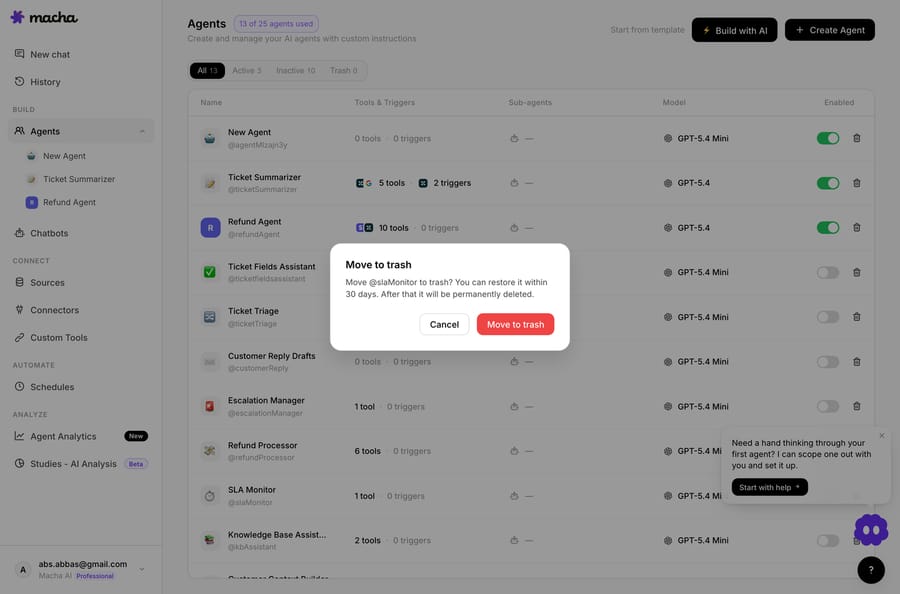
That's a small copy change with an outsized effect. Hard-delete dialogs make you sweat because the warning is accurate: there's no recovery. Once recovery exists, the old warning would be false, so it's gone. Confirmation friction drops, because the stakes dropped.
2. The agent moves to a Trash tab, not the void
Deleted agents leave your main Agents list and reappear under a Trash tab on the same page. Each row in Trash shows two things you need under pressure: how long ago the agent was trashed, and how many days remain before it's automatically purged. Next to each is a one-click Restore button.

So when someone asks in Slack "did the billing triage agent disappear?" on a Tuesday, you don't file a support ticket and wait. You open Trash, find it, see "trashed 2 days ago, 28 days remaining," and click Restore.
3. Restore brings the whole agent back, not a skeleton
This is the part that matters most, and it's where naive "undelete" features fall down. Restoring a Macha agent doesn't resurrect a name and a blank config. It brings back, intact:
- Instructions: the full system prompt and behavior rules you tuned.
- Tool configuration: every connector and tool the agent was wired to (Zendesk, Shopify, Stripe, Notion, and the rest).
- Sub-agent links: if the agent delegated to specialist sub-agents, those relationships come back.
- Triggers: the webhook and scheduled trigger config, including webhook secrets (with the one caveat below).
In other words, restore is not "create a fresh agent with the old name." It's the agent you deleted, exactly as it was.
4. The AI sidekick follows the same flow
Macha's dashboard sidekick, the assistant you can ask to build, edit, or manage agents in plain language, routes deletes through the same soft-delete path. Tell it "delete the abandoned-cart agent" and the agent goes to Trash with the same 30-day window; it doesn't hard-delete behind your back. There's no back door around the safety net, which is the property you want from an AI that can take destructive actions for you.

Do a restored agent's triggers start firing again automatically?
No, and that's deliberate. When an agent goes to Trash, its triggers are paused, not deleted. They stop firing immediately, so a trashed agent won't keep responding to webhooks or scheduled runs (you don't want a "deleted" agent still answering tickets). The webhook secrets and trigger config are preserved, so nothing is lost.
Restore does not flip those triggers back on. The trigger config comes back, and you re-enable the triggers when you're ready. After a restore you almost always want to check the config first: confirm the instructions are what you expect and that the connectors are still authorized, before the agent acts on live tickets again. Auto-resuming triggers would mean a recovered agent could start firing the instant it comes back, possibly mid-review.
So the mental model is: restore = the agent is back and editable; re-enable triggers = the agent is live again. Two steps, on purpose.
When is soft-delete not the safety net you need?
Reversible delete is a good default, but it solves one problem: accidental or premature deletion. It doesn't replace a few other things:
- It's not version control. Soft-delete protects you from deleting an agent, not from editing one badly. If you mangle an agent's instructions and save, that's a normal edit, and Trash won't roll it back. For risky changes, duplicate the agent first or keep your prompt in source control.
- It's not a guarantee you can ignore. The window is 30 days. After that the purge is automatic and permanent. If you trashed something important "to clean up," don't assume it'll be there next quarter.
- It's not compliance-grade retention. If you need an audit trail of who changed what and when across your agents, soft-delete is a recovery convenience, not a governance system. (V7 Labs shows who deleted an agent in its Trash page; treat Macha's Trash as a recovery tool, not a forensic record.)
- It's not an archive with a manual purge. Macha's docs describe one exit from Trash besides Restore: the automatic purge at 30 days. If you want an agent kept longer as a reference, restore it and deactivate it instead of leaving it in Trash.
Used for what it's for, "I clicked the wrong button" and "turns out we needed that agent after all," it's exactly right. Just don't ask it to be a backup system. For a step-by-step recovery walkthrough, see how to recover a deleted agent from Macha's 30-day Trash.
Why did soft-delete ship now?
Macha agents have become more expensive to rebuild over the last few releases. An agent today isn't a single prompt; it can carry layered sub-agents, multiple connectors, custom tools, and webhook triggers wired into your helpdesk. The more configuration an agent accumulates, the worse an accidental delete gets. As agents become real infrastructure, deleting them should behave like deleting infrastructure: recoverable, with a grace period.
It landed in the same June 17 release as a cut to the cost of running agents: that release lowered GPT-5 from 3 credits to 2 per response and GPT-5.4 from 5 to 3. Macha has since replaced credits with one plan priced per ticket, from $299 a month for 750 tickets. Soft-delete fits the same theme: experiment more freely, because a wrong move is no longer fatal. And restoring an agent is free. It's a safety feature, not something you're billed for.
FAQ
How long do I have to restore a deleted agent? 30 days from when you deleted it. The Trash tab shows the days remaining for each agent. After 30 days it's permanently purged and can't be recovered.
Does restoring bring back the agent's triggers and tools? Yes. Instructions, tool configuration, sub-agent links, and trigger config (including webhook secrets) all come back intact. The one difference: restored triggers stay paused until you re-enable them.
Does soft-delete cost anything? No. Deleting, trashing, and restoring agents are free. Macha bills per ticket, one conversation charged once however many steps the agent takes, not for managing your agents. See the pricing page for details.
What happens if I delete an agent through the AI sidekick? The same thing as deleting it manually. The dashboard sidekick uses the soft-delete path too, so any agent it deletes goes to Trash with the same 30-day restore window. There's no hard-delete shortcut.
Can I permanently delete an agent before 30 days? Macha's docs and changelog describe only the automatic purge after 30 days; they don't document a manual "delete forever" button in Trash. Plan on a trashed agent staying recoverable for the full window.
Is this the same as backing up my agents? No. Soft-delete protects against deletion, not bad edits or long-term retention. Treat it as an undo for the Delete button, not as version control or a backup system.
How do I start using it?
Soft-delete is live for every Macha account, with nothing to enable. If you've avoided cleaning up your Agents list because delete felt too final, trash freely and restore from the Trash tab if you change your mind. New to Macha? Start a free trial ($50 of usage, no credit card required), build a few agents on top of your existing helpdesk, and the Delete button has a 30-day undo behind it. Full release notes are in the changelog.
Written by Abbas (Customer Support & AI, Macha) · Reviewed by Ankeet Guha (Co-founder & CTO) · Published 2026-06-24 · Last updated 2026-09-24.






