Shopify
 Stripe
 Slack
Slack Notion
 Google Workspace
 Confluence

Gorgias Automate vs an AI Agent Layer: What Does Each Really Cost in 2026?


Gorgias bills its AI Agent per automated interaction, only when the AI resolves a conversation with no human, and charges a helpdesk ticket fee on the same ticket. An AI agent layer like Macha charges once per ticket instead, which changes the math for returns, exchanges and subscription work.
Key takeaways
- Gorgias charges $0.85 to $1.00 per automated interaction when AI Agent resolves a conversation alone, while Macha charges once per ticket from $299 a month for 750 tickets.
- A ticket that Gorgias AI Agent fully resolves on its own is billed both a helpdesk ticket fee and an automation fee, according to Gorgias' billing documentation.
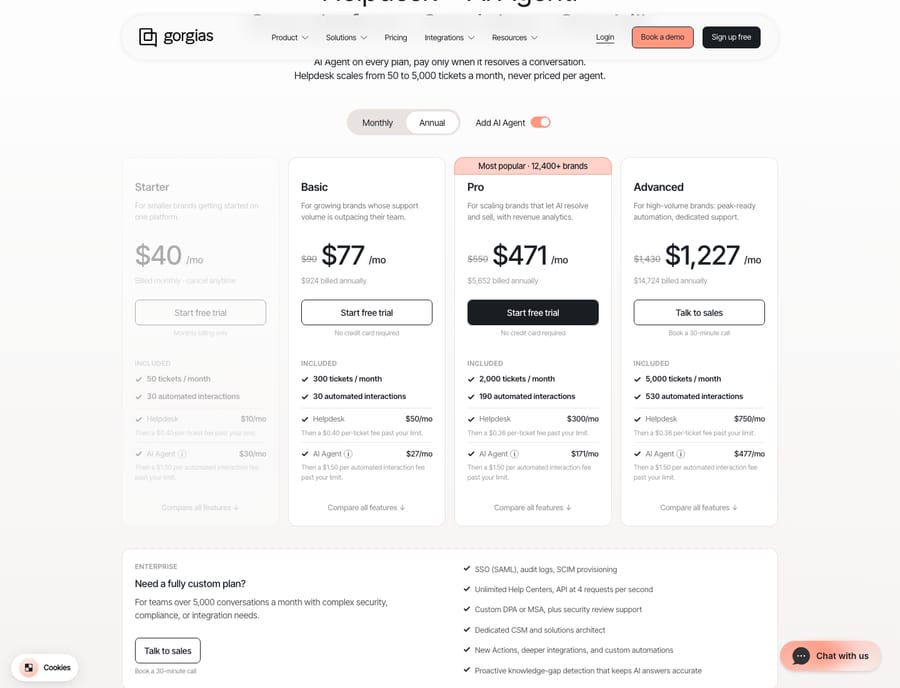
- Gorgias bundles 30 automated interactions on Starter and Basic, 190 on Pro and 530 on Advanced, then bills $1.50 per interaction; with AI Agent, plans run from $40 to $1,430 a month on monthly billing.
- For a return that needs a policy check, order verification and a label, Gorgias bills an automation fee only on a full autonomous resolution, while Macha charges one ticket.
- Macha runs on top of Gorgias and the Macha team builds, tests and runs the agent for you, with setup and a dedicated success manager included in about $0.40 a ticket.

Gorgias charges an automation fee of $0.85 to $1.00 per automated interaction, only when AI Agent resolves a conversation with no human, and $1.50 per interaction past your plan's bundle, on top of the helpdesk ticket fee for the same ticket. An AI agent layer such as Macha charges once per ticket instead, from $299 a month for 750 tickets, whether or not the conversation ends in a clean autonomous resolution.
| Gorgias AI Agent (Automate) | AI agent layer (Macha) | |
|---|---|---|
| Billing unit | Automated interaction (a full AI resolution) | Ticket (one thread, charged once) |
| Rate | $1.00 (Starter), $0.90 (Basic, Pro), $0.85 (Advanced) | About $0.40 a ticket on every tier |
| Past the bundle | $1.50 per interaction | Next volume tier; no per-interaction overage |
| Helpdesk ticket fee on the same ticket | Yes, also charged | Paid separately to your help desk |
| AI works but hands off | No automation fee | One ticket charged |
| Setup | Configured in your Gorgias account | Done for you by the Macha team, with a dedicated success manager, included |
How is Gorgias Automate priced?
Gorgias splits your bill into two meters. The first is the helpdesk ticket meter you already know: per Gorgias' billing documentation, a ticket becomes billable when at least one message in it is sent from your Gorgias helpdesk, whether that message came from a human agent, from AI Agent, or from an automated Rule. On gorgias.com/pricing (checked 24 September 2026) the helpdesk alone runs $10, $60, $360 and $900 a month on monthly billing for 50, 300, 2,000 and 5,000 tickets.
The second meter is the AI one, and it is outcome-based. Gorgias charges an additional automation fee only when AI Agent resolves a ticket without handing the conversation over to a human. Fully autonomous resolutions through AI Agent, Flows, Order Management, or Article Recommendations trigger it; a ticket the AI hands off to a person does not. Gorgias' own AI Agent pricing explainer (updated 28 May 2026) defines the billable event plainly: "A billable interaction is counted when the AI resolves a customer conversation entirely on its own."
That is a real advantage. You don't pay for the AI's failed attempts, and emails with no replies, spam, and human-resolved tickets don't count. For a store where 40% of contacts are order-status questions the AI can close end to end, you pay for outcomes and nothing else.
What does the "only pay for resolutions" pitch leave out?
Two mechanics change the arithmetic once you look closely.
Dual billing on the same ticket. When AI Agent responds to and completely resolves a ticket on its own, Gorgias' docs confirm you pay both a ticket fee and an automation fee on that one ticket. A fully automated WISMO reply isn't "free automation": it's a helpdesk ticket plus a resolution charge. If the AI hands off to a human, you pay only the ticket fee, which is the more forgiving case.
Overages above your included interactions. Each plan bundles a set number of automated interactions: 30 on Starter and Basic, 190 on Pro and 530 on Advanced. Past that, Gorgias bills $1.50 per interaction, up from the $0.85 to $1.00 base rate. A seasonal spike (BFCM, a viral product) is exactly when your resolution count runs hottest and your per-unit price steps up.
Here is the current shape of the two meters. With AI Agent added, plans run from $40 a month (Starter, monthly billing) to $1,430 a month (Advanced, monthly), or $1,227 a month for Advanced billed annually.
None of this makes Gorgias' model bad; it makes it outcome-shaped. It rewards clean, one-and-done automations and quietly penalises the messier, multi-step work that defines returns and subscriptions, where the AI often does a lot of useful work without a tidy autonomous "resolution." For the full plan-by-plan breakdown, our Gorgias pricing explained guide walks the tiers, and Gorgias Automate & AI complete guide covers what each automation surface actually does.
What does per-resolution billing reward, compared with per-ticket billing?
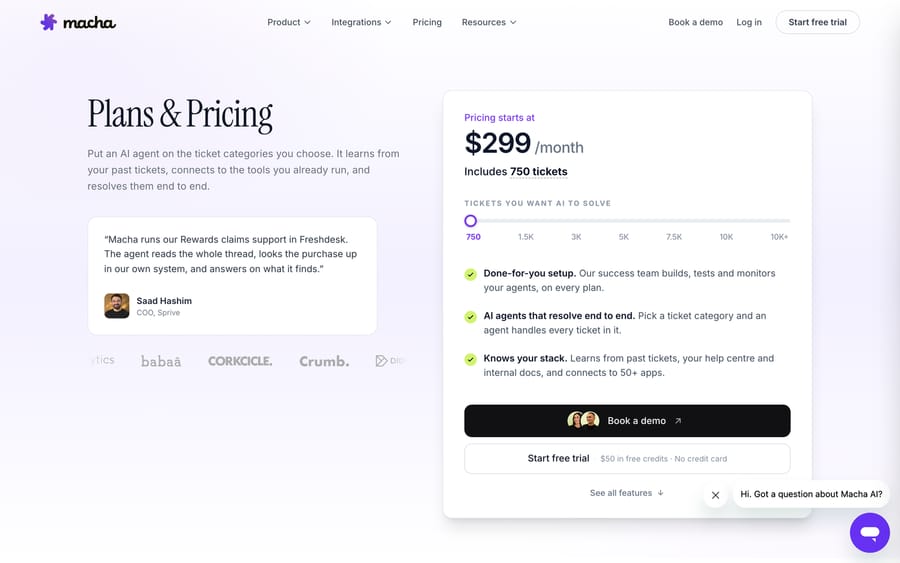
The cleanest way to see the difference is to stop thinking about "AI cost" as one number and look at what each model charges for. Gorgias charges per resolution (an outcome). An AI agent layer like Macha charges per ticket (one charge per thread, however many replies, tool calls, or lookups it takes). The Macha pricing page details the current plan, shown in the screenshot below.
Neither model is universally cheaper. They behave differently by ticket type:
| Ecommerce scenario | Gorgias Automate (per resolution) | AI agent layer (per ticket) |
|---|---|---|
| WISMO: one lookup, one reply, closed | One automated interaction billed (plus a ticket fee) | One ticket charged, however many steps (order lookup plus reply) it takes |
| Return/exchange: check policy, verify order, issue label, update tags | If fully autonomous, one resolution; if it hands off, no automation fee despite real AI work | The whole ticket is charged once whether or not it "resolved" |
| Subscription change: pause, swap SKU, adjust date via API | Same all-or-nothing outcome billing | One ticket charged, however many API calls and steps it takes |
| Peak season overflow | $1.50 per interaction above your bundle | Charged as a normal ticket against your monthly volume tier, with no interaction overage |
| AI does work but hands off | Not billed for the AI portion (good) | Billed as one ticket (you pay for the thread, not each step) |
The honest read: if most of your volume is simple, self-contained deflections, per-resolution billing is elegant and predictable. As soon as you automate deeper, multi-tool workflows, where the agent reasons across your store's order, returns, and subscription systems, per-ticket billing tells you what the automation actually cost, and it doesn't charge a resolution as both a ticket and an interaction. Tickets are charged once, never "per resolution."
What is the difference between deflection, resolution and automation?
The pricing debate usually collapses three different things into one word. Separating them is the point.
Deflection is preventing a ticket from ever reaching an agent: a help-center article or a self-serve flow that answers before a human is needed. Resolution is the AI closing a conversation autonomously, which is the event Gorgias meters. Automation is broader than both: any AI action that moves a ticket forward, such as triaging by intent, pulling an order via a custom tool, drafting a grounded reply for an agent to approve, updating a tag, or handing off cleanly with full context.
Gorgias' billing optimises for the middle one, resolution, because that's the outcome it can charge for. But a lot of the value in an ecommerce queue lives in automation that isn't a clean resolution: the return the AI investigated and teed up for a human, the subscription edit it half-completed before a policy check, the triage that routed a VIP to the right person. That work is real, and a per-ticket model prices it openly rather than leaving it unbilled and unrewarded. This is the reason the broader category of AI agents for customer service exists: to do reasoning-heavy work, not just close easy tickets.
Does Macha replace Gorgias or run on top of it?
Macha is an AI agent layer that runs on top of the Gorgias you already use. The connector is live: you connect Macha to Gorgias, and it reads and writes the same tickets your team already works. It does not replace Gorgias, your Rules, your Flows, or your billing relationship with them. Setup is covered in connect Gorgias to Macha for automated ticket replies, and what native Automate does on its own is in Gorgias AI Agent explained.
What the layer adds is the multi-step, tool-using automation that per-resolution billing tends to under-serve: an agent that looks up an order and issues a return label through a custom tool, pauses or swaps a subscription via API, triages by intent before a timer or a rule fires, and drafts grounded replies your agents approve. You keep Gorgias as the system of record and the helpdesk; Macha handles the reasoning-and-action work on top. You don't build that agent yourself. Macha is the done-for-you option: you connect Gorgias, Shopify and the other tools your answers come from, about 15 minutes, and the Macha team analyzes about a month of your past tickets, builds the knowledge base and the agent, tests it on a sample of those tickets, and runs it in safe mode, with drafts as internal notes in Gorgias, until the drafts are right. Macha is priced per ticket on one plan by volume: $299 a month for up to 750 tickets, $599 for 1,500 and $1,199 for 3,000, about $0.40 a ticket, which includes the setup and a dedicated success manager who handles your changes afterwards: new ticket categories, instruction edits, new tools. A return that took six steps is still one charge, not billed as a resolution one month and invisible the next. The pricing page carries the full table.
FAQ
How does Gorgias bill for AI Agent? On an outcome basis. Per Gorgias' billing docs, an automation fee applies only when AI Agent resolves a ticket without handing it to a human. The pricing page lists $1.00 per interaction on Starter, $0.90 on Basic and Pro and $0.85 on Advanced, with $1.50 per interaction above your bundled amount. Confirm current figures on gorgias.com/pricing.
Does one resolved ticket get charged twice? It can. Gorgias' documentation states that when AI Agent responds to and completely resolves a ticket on its own, you pay both a helpdesk ticket fee and an automation fee on that single ticket. If the AI hands the ticket to a human instead, only the ticket fee applies. Accounts on Gorgias' legacy pricing (before 28 May 2025, not moved to the current plans) pay one fee per ticket.
What's the difference between per-resolution and per-ticket billing? Per-resolution (Gorgias Automate) charges for a clean autonomous outcome. Per-ticket (an AI agent layer like Macha) charges once per thread, covering a lookup, a tool call and a drafted reply however many steps it takes, as part of your monthly plan. Simple deflections favour per-resolution; deep multi-step ecommerce workflows are priced more predictably per ticket.
Is Macha a replacement for Gorgias? No. Macha is an AI agent layer that runs on top of Gorgias through a live connector. It reads and writes your existing Gorgias tickets and complements Gorgias' native Automate; it does not replace your helpdesk. The Macha team sets it up for you: it analyzes your past tickets, builds the knowledge base and the agent, and runs it in safe mode until the drafts are right, included on the trial and every plan.
Which model is cheaper for my store? It depends on your ticket mix. If most contacts are one-and-done deflections, per-resolution billing is elegant and predictable. If you automate returns, exchanges, and subscription edits with multi-tool workflows, per-ticket billing shows what the automation actually cost and avoids paying twice for one resolved ticket. Model your top ticket types before committing.
Want to see per-ticket automation on top of your own Gorgias queue? Start a free trial of Macha, connect it to Gorgias in minutes, and the Macha team builds your first agent from there.