





 Shopify
 Stripe
 Slack
Slack Notion
 Google Workspace
 Confluence

How Do You Set Up the Gorgias Chat Widget? Appearance, Campaigns and Offline Mode


The Gorgias chat widget is one Chat integration per store, included on every Helpdesk plan, with four areas to configure: appearance, install scope, campaigns and offline behavior. Campaigns on a Shopify-connected widget need the paid Convert subscription, and a Chat availability setting decides when the widget switches to the Offline Capture form.
Key takeaways
- The Gorgias chat widget is one Chat integration per store, included on every Helpdesk plan, and only the account owner and admins can configure it.
- Gorgias chat appearance settings allow a logo up to 500 KB, business-hours and outside-hours greetings of 50 characters each, and a launcher label of 20 characters.
- Gorgias Light campaigns work only on chat integrations not connected to a Shopify store; a Shopify-connected widget needs the Convert subscription to run any campaign.
- The Gorgias Chat availability setting has three modes: offline whenever no agent is available, offline outside business hours, or offline capture only.
- A Gorgias chat campaign becomes a billable ticket only when the shopper replies, so an ignored pop-up adds nothing to ticket usage.
The Gorgias chat widget is one Chat integration per store, included on every Gorgias Helpdesk plan, and you configure it in four places: Appearance (brand color, a logo up to 500 KB, greetings capped at 50 characters), where it's installed, proactive Campaigns, and Chat availability, which decides when the widget drops to the Offline Capture form. Only the account owner and admins can change these settings.
| Area | Where you set it | Limit that matters | Plan |
|---|---|---|---|
| Appearance | Settings → Channels → Chat → [integration] → Appearance | Logo 500 KB; greetings 50 characters; launcher label 20 characters | All Helpdesk plans |
| Install scope | Chat integration → Installation method | Quick install covers every page of a connected Shopify store | All Helpdesk plans |
| Campaigns | Convert → [integration] → Campaigns | Light campaigns only on chats not connected to Shopify | Convert needed for Shopify-connected chat |
| Offline behavior | Preferences → Chat availability | Three modes: agent availability, business hours, offline only | Offline Capture on all Helpdesk plans |
What is the Gorgias chat widget, technically?
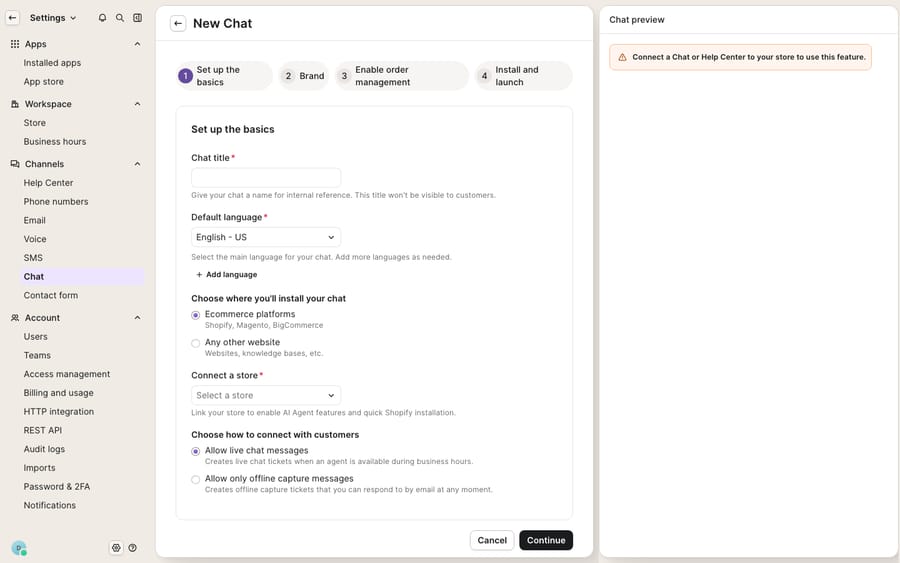
The widget is a single Chat integration you create inside Gorgias and then install on your storefront. One integration maps to one widget, and appearance, targeting, campaigns and offline capture are all configured on that integration. Per the Gorgias Chat documentation, you create it by giving it a name, a default language and a location, then connecting the store where the widget should appear. On Shopify you can pick Quick install to drop the widget onto every page automatically, or install manually to place it on specific pages, on headless Shopify, BigCommerce, Magento 2, other websites, or via Google Tag Manager.
Chat itself has no separate price: Gorgias lists it as available on all plans. What costs extra is the layer around it. Chat automation needs an AI Agent subscription, and campaigns on a Shopify-connected widget need the separate Convert subscription. We break the tiers down in Gorgias pricing explained, and our Gorgias Chat explained post covers how Chat fits into the wider helpdesk. The widget preview will also remind you that a live store connection is required before anything renders to real shoppers.
How do you make the widget match your brand?
Appearance lives under Settings → Channels → Chat → [your integration] → Appearance, with a live preview panel on the right that updates as you change settings. It shows both the business-hours and outside-hours states, plus the home and conversation views. According to Gorgias' Customize Chat Appearance guide, the settings you control are:
- Brand color: applied to both the widget header and the launcher button; pick from the swatch or paste a custom hex code.
- Home page logo: a PNG, JPG or GIF up to 500 KB, ideally horizontal with a transparent background.
- Greeting messages: separate lines for business hours and outside hours, each capped at 50 characters.
- Launcher appearance: icon only, or icon with a custom label of up to 20 characters.
- Launcher position: bottom right (the default), bottom left, top right or top left, with horizontal and vertical pixel offsets for fine-tuning against other on-page elements.
- Chat window size: Expanded or Compact.
- Privacy policy: a rich-text field with formatting, links and emoji.
- Agent display: whether to show agent names and profile pictures.
The 50-character greeting and 20-character launcher label are the two limits that trip people up most, so write those short. If a floating cart or cookie banner already sits bottom-right, the pixel offset is what saves you from an overlapping mess.
How do you control where and when the widget appears?
There are two layers of "where." The first is install scope: Quick install puts the widget on every page; manual install lets you scope it to specific pages or specific storefronts. The second layer is campaign targeting, which decides when a proactive message fires. Campaign targeting uses the Current URL filter, and the logic is worth learning once: an operator of "is" against / means the homepage only, while "contains" against / means every page. Everything after your domain counts toward the match, including UTM parameters, which is why a campaign aimed at one landing page can silently miss visitors arriving from an ad.
If you're already using Gorgias Rules to automate ticket handling, think of campaign targeting as the front-of-funnel cousin: rules act on tickets after they arrive, campaigns act on visitors before a ticket exists.
How do Gorgias chat campaigns work, and which plan do you need?
Campaigns are automated messages that appear inside the widget based on who a visitor is, where they are and what they're doing: a "Need help sizing?" nudge on a product page, or a "Free shipping over $50" prompt in the cart. You configure them at Convert → your chat integration → Campaigns, per the Chat Campaigns documentation.
The plan gating changed, and it now turns on whether your widget is connected to Shopify, not on how many campaigns you run:
| Light campaigns | Convert campaigns | |
|---|---|---|
| Who gets it | Any Helpdesk plan whose chat integration isn't connected to a Shopify store | Convert subscribers with a connected Shopify store |
| Triggers | Current URL and Time spent on page (plus language, if the chat runs in several) | Adds cart activity, Shopify customer history and more |
| Message | Basic rich text | Richer, Shopify-driven merchandising |
| Best for | Non-Shopify sites that want a couple of always-on nudges | Shopify stores doing behavior- and cart-driven targeting |
The practical consequence: if your chat is connected to Shopify, you need Convert to run any campaign at all. A few other notes from the docs. The campaign bundle is a script that has to be on your storefront; without it, "campaigns are saved in your account but aren't displayed to visitors." It comes with the Shopify Theme App Extension install and needs a manual install on headless Shopify, WooCommerce, BigCommerce, Magento and custom sites. Messages support rich text, links, images and emoji, and you can show a named agent as the sender. Duplicating a campaign strips any links from the copy, so re-add them by hand. Campaigns also won't fire if the shopper already closed or interacted with one in that browser session, or opened the chat before the trigger. On billing, a campaign only becomes a billable ticket when the shopper replies, so an ignored pop-up costs nothing.
What happens to the Gorgias chat widget after hours?
Gorgias handles offline time with Offline Capture, available on all Helpdesk plans: the widget asks the shopper for an email address and the reason for the request, and the submission creates an email ticket in your helpdesk, so nothing gets lost overnight. Gorgias Bot then emails the shopper a summary, and the agent's reply continues in that thread.
When the widget goes offline depends on the Chat availability setting under the integration's Preferences tab, per Gorgias' chat preferences docs. There are three modes:
- Live when agents are available: chat appears offline whenever no agent is available, even during business hours.
- Always live during business hours: chat stays open through your business hours and switches to offline mode outside them.
- Offline (capture messages only): shoppers can only use the offline form until you change the setting.
The outside-hours greeting you set in Appearance is what shoppers see in the offline state, which is why Gorgias gives you two greeting fields. One exception: if AI Agent is turned on for chat, conversations started outside business hours go to AI Agent instead of Offline Capture. If you pick the agent-availability mode, keep at least one agent marked Available during staffed hours, or the widget will show offline while your team is at their desks.
Where does the chat widget stop, and where does an AI layer pick up?
Give Gorgias its due: appearance, targeting, campaigns and offline capture all live in one integration, the preview is useful, and Offline Capture means you never silently drop an after-hours shopper. For a lot of stores, that's a complete live-chat setup.
But the widget config controls presentation and routing: how the bubble looks, which pages it shows on, when a campaign fires, and how offline messages get captured. It does not produce the answer. A campaign can pop "Need help with your order?" but the shopper's actual "where's #4471?" still lands as a ticket a human has to read, look up and reply to. The proactive features cost extra on Shopify (Convert), and chat automation needs Gorgias' AI Agent subscription. So the widget is good at starting conversations while leaving the answering to your team or to a paid add-on.
That seam is where an AI agent layer fits, and it's worth understanding what a Gorgias AI agent can and can't do before you pick one. Macha is one such layer, and it runs on top of the Gorgias you already use via a live native connector. It isn't a helpdesk you switch to, and it doesn't replace your widget, your campaigns or your macros. When a chat conversation opens, whether a shopper clicked the launcher or a campaign nudged them, Macha reads the message, looks up order status through a custom tool that wraps your fulfilment API, and drafts or sends a grounded reply inside the same Gorgias ticket the widget created. Returns and subscription questions work the same way: reason over the real order, then answer.
The billing incentive differs too. Gorgias bills AI Agent per automated interaction, and each interaction also counts as a helpdesk ticket. Macha bills per ticket: a whole chat, charged once however many messages, lookups and drafts it takes, starting at $299 a month for up to 750 tickets on the pricing page, with setup and monitoring by the Macha team included. A chat that runs six turns and two order lookups costs the same as one that runs two. Keep Gorgias' widget as the front door and the system of record, and add an agent for the reasoning the widget config can't do.
FAQ
Where do I configure the Gorgias chat widget's appearance? Go to Settings → Channels → Chat → [your integration] → Appearance. There you set the brand color (applied to the header and launcher), a home logo up to 500 KB, business-hours and outside-hours greetings (50 characters each), launcher position with pixel offsets, and whether to show agent names and avatars, with a live preview on the right.
How many chat campaigns can I run? Gorgias' current docs don't publish a cap. What matters is the connection: Light campaigns are available on any Helpdesk plan whose chat isn't connected to a Shopify store, while a Shopify-connected chat needs the Convert subscription to run campaigns. Either way, install the campaign bundle, or active campaigns won't show to visitors.
What happens to the chat widget when my team is offline? That depends on the Chat availability setting: offline whenever no agent is available, offline outside business hours, or offline only. In the offline state shoppers see your outside-hours greeting and can submit the Offline Capture form, which creates an email ticket so the request isn't lost. If AI Agent is on for chat, after-hours chats go to AI Agent instead.
Is Gorgias Chat included in every plan? Yes. Gorgias lists Chat as available on all plans. The paid extras are AI Agent for chat automation and Convert for campaigns on Shopify-connected widgets. Our Gorgias pricing breakdown covers what each costs.
Can I add AI to the Gorgias chat widget without replacing Gorgias? Yes. Macha connects to Gorgias as a live native connector and runs on top of your existing widget and campaigns without replacing them. It reads chat conversations, looks up order or account status through custom tools, and drafts or sends grounded replies, while Gorgias stays the system of record. Billing is per ticket, a whole chat charged once, not per resolution.
Does a chat campaign count as a billable ticket? Only if the shopper replies. The first reply creates a chat ticket and counts toward your Helpdesk ticket usage; a campaign nobody answers costs nothing.
Want the conversations your widget starts to get answered? Start a free trial of Macha and connect it to your Gorgias.






