





 Shopify
 Stripe
 Slack
Slack Notion
 Google Workspace
 Confluence

What Is a Helpdesk-Agnostic AI Layer? One Agent Across Six Help Desks (2026)


Most AI support tools only work inside the help desk that sells them, so migrating means throwing away every agent, prompt and automation you built. A helpdesk-agnostic layer keeps that work portable by treating the help desk as a connector you can swap.
Key takeaways
- A helpdesk-agnostic AI layer keeps agents, knowledge and tools outside the help desk, so Macha runs the same agent on Zendesk, Freshdesk, Gorgias, Front, Intercom and HubSpot.
- Zendesk is Macha's deepest help desk connector, with 17 actions, 8 trigger events, image reading on attachments and Help Center articles that auto-sync as knowledge.
- Front and Intercom have no Update Priority action in Macha, and HubSpot has no public-reply action, so those steps need adapting when an agent moves there.
- Macha bills per ticket rather than per resolution, starting at $299 a month for 750 tickets, about $0.40 each, and that price includes setup by the Macha team and a dedicated success manager.
- Other agnostic engines price differently: eesel AI sells monthly credit batches from $299 for 500 tickets or chats, Quickchat Enterprise starts at $0.50 per resolution, and Fin costs $0.99 per outcome.

A helpdesk-agnostic AI layer keeps the agents, knowledge, tools and logic in their own layer and treats the help desk underneath as a connector you can swap. Macha is built this way: one agent runs on Zendesk, Freshdesk, Gorgias, Front, HubSpot or Intercom through live read-and-write connectors, from 11 actions on Intercom and HubSpot to 17 on Zendesk, and it sits on top of the help desk you already run rather than replacing it. The current list is always on our integrations page.
| Connector | Auth | Actions | Writes back | Knowledge | Stands out |
|---|---|---|---|---|---|
| Zendesk | OAuth / API Key | 17 | Public reply, internal note, status, priority, type, subject, tags, fields, assign | Help Center auto-syncs as a live source | Deepest connector: 8 trigger events, image reading on attachments |
| Freshdesk | API Key | 15 | Public reply, internal note, priority, status, tags, fields, assign | Search solution articles | Agent and group lookups for clean routing |
| Gorgias | API Key | 15 | Public reply, internal note, priority, status, tags, fields, assign | Search macros (canned replies) | Built for Shopify-native e-commerce support |
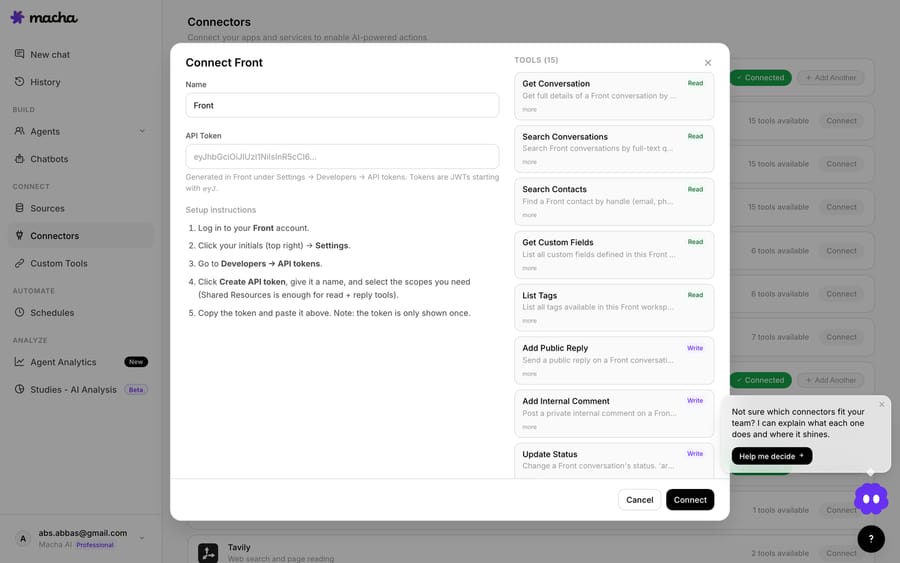
| Front | API Token | 15 | Public reply, internal comment with @mentions, status, tags, fields, assign | List tags and inboxes for routing | Shared inbox across email, chat and SMS |
| Intercom | OAuth | 11 | Reply, internal note, close, assign, tags | Search Help Center articles | Triggers on first or every customer message |
| HubSpot | OAuth | 11 | Update ticket, add note, update contact, move deal stage | None built in | Tickets, contacts and deals in one CRM |
What does "helpdesk-agnostic" actually have to mean?
The phrase gets used loosely, so set a hard bar. A genuinely helpdesk-agnostic layer has to clear three tests, and most "integrations" pages fail at least one:
- Real read/write, not a read-only widget. Lots of "integrations" are a sidebar that can read the ticket and suggest a draft a human pastes. That's a copilot bolted to a window. Agnostic means the agent can fetch the ticket, look up the customer, post the reply, change the status, set tags and assign, by itself, through the help desk's own API.
- The same build runs everywhere. If switching help desks means rebuilding your agents from scratch, the layer isn't portable. It's multi-vendor lock-in. The agent, knowledge sources and tool logic should be defined once and re-pointed at a different connector.
- Depth, not just a logo. "Supports Zendesk" can mean one endpoint or twenty. Agnostic means each connector is deep enough to run support: comments, custom fields, attachments, routing, the things a real queue needs.
Macha is designed against all three. The table above is the scorecard, and the next section reads it.
What can an agent do on each help desk?
The help desk connectors are live in Macha, and each one lets the agent read the thread, look up the customer and take actions back on the record. The auth and the surface differ because the underlying products differ, but the shape of what an agent can do stays close.
Read the table the way it's meant: on the four ticket-first desks the middle columns are nearly identical. Get the ticket, search the queue, look up the customer, read attachments, reply publicly, leave an internal note, change status, set tags, update fields, assign to the right team. That common core is why an agent built on one of them runs on the others: you're composing the same verbs against a different inbox.
The differences are worth naming. Zendesk is the deepest connector: 17 actions, 8 trigger events (new ticket, customer reply, status change, messaging and more), image reading on attachments (screenshots, receipts, product photos), and Help Center articles that auto-sync as a knowledge source. Gorgias adds Search Macros, so an agent can reach for your existing canned replies instead of inventing tone. Front works at the conversation level for shared inboxes and posts internal comments with @mentions. Intercom works on conversations too, with reply, note, close, assign and tag actions plus Help Center search. HubSpot is the different one: its 11 actions cover tickets, contacts, notes and deal stages, and the connector has no public-reply action, so a HubSpot agent updates the record and leaves notes rather than answering the customer directly.
One asymmetry to flag: Update Priority exists on Zendesk, Freshdesk and Gorgias but not on Front or Intercom, which route by status, tags and assignment instead. A priority-setting step is the one thing you'd adapt when moving an agent onto either of them.
Is connecting a help desk a project?
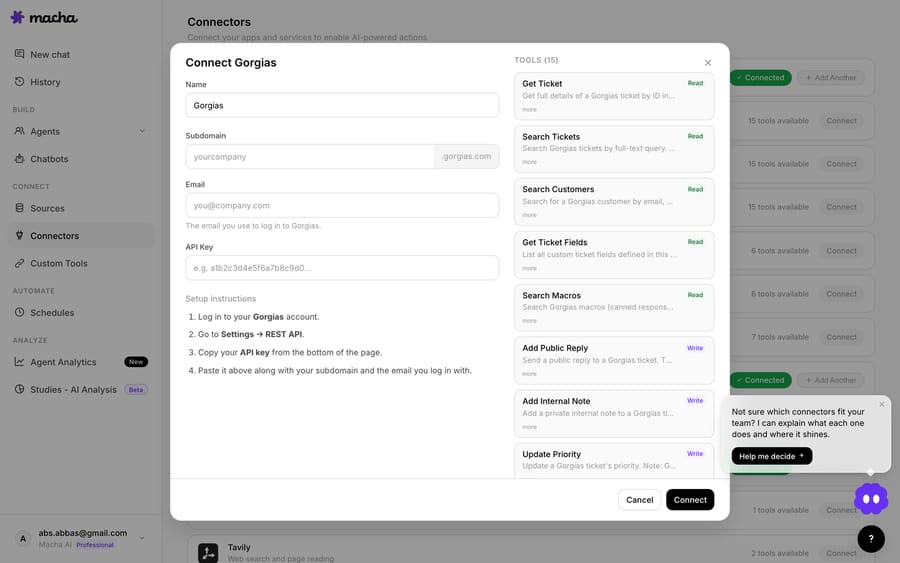
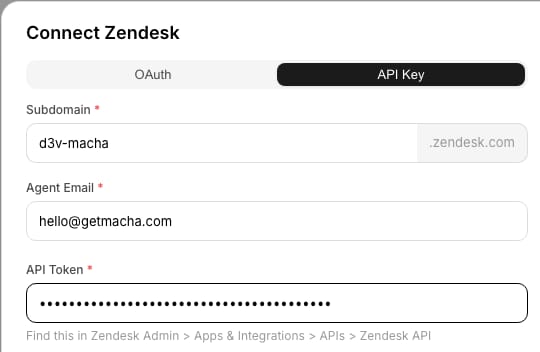
No. Because the layer is agnostic, adding a help desk is authorizing a connector: OAuth for Zendesk, Intercom and HubSpot, an API key or token for Freshdesk, Gorgias and Front. The agent's tools light up once it's connected.
How does the same agent move to a different help desk?
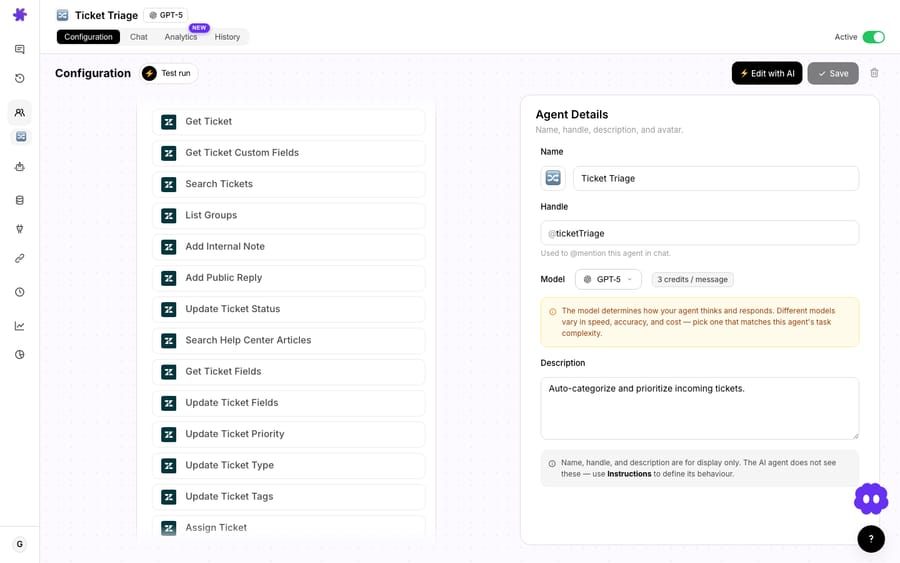
This is the part single-platform AI can't do. In Macha an agent is defined separately from the help desk: you give it instructions, attach knowledge sources, and grant it tools. The tools include help desk actions, but also commerce and knowledge connectors like Shopify, Stripe, Notion, Confluence, Slack and Google Workspace. The help desk is one tool group among many, which is why it's swappable.
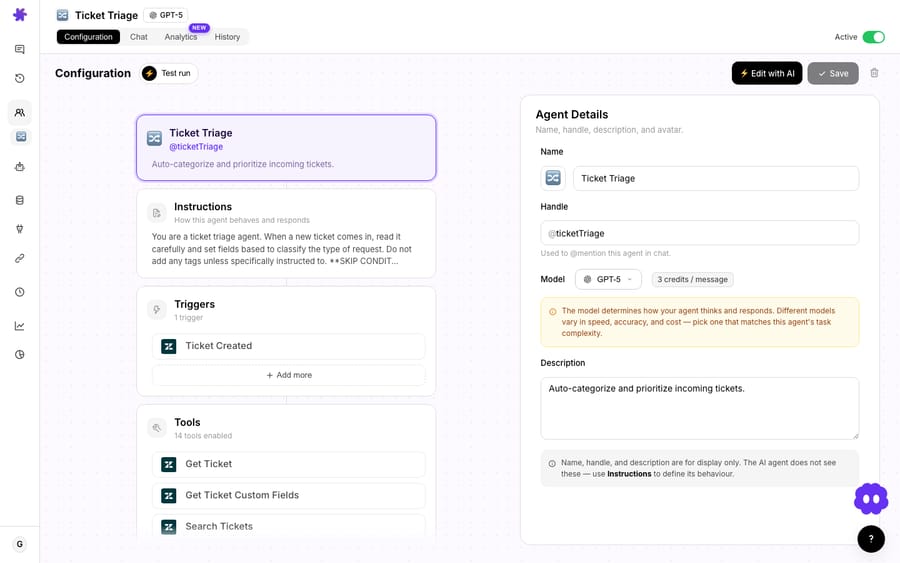
So a "look up the order, check refund eligibility, reply, and tag for the right team" agent isn't a Zendesk agent or a Freshdesk agent. It's an agent that happens to be pointed at one help desk's reply-and-tag tools today. Re-point it at Front's tools and the Shopify and Stripe logic, the knowledge base and the reasoning come along unchanged. You adapt the few help-desk-specific verbs (like the missing priority action on Front) and ship.
Can you run two of the same help desk at once?
Yes. Agnostic also means you're not limited to one instance. If you run two Zendesk brands, or a production and a sandbox, or two regional Freshdesk accounts, you can connect both, and the agent's tool picker scopes each action to a specific instance. The agent knows which inbox it's acting on.

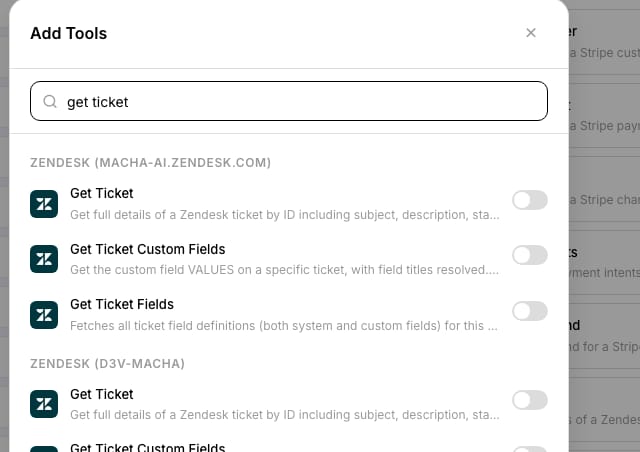
This is mundane in a layered architecture and close to impossible in a native one. Zendesk's own AI has no concept of "also do this in our other Zendesk, and a Freshdesk, at the same time."
How does Macha compare with other helpdesk-agnostic AI?
"Helpdesk-agnostic" isn't unique to Macha, but the kind of agnostic varies a lot.
- Native, single-platform AI: Zendesk AI, Freshdesk Freddy, Intercom Fin inside Intercom. Deep on their host, no portability. Fine until you migrate; then you start over.
- Agnostic resolution engines: eesel AI, Quickchat AI, and Fin in standalone mode. These plug into several help desks. eesel's pricing page sells monthly credit batches from $299 for 500 credits, where one ticket or chat is one credit. Quickchat lists Enterprise from $0.50 per resolution with a 2,000-resolution monthly minimum. Fin costs $0.99 per outcome, with a 50-outcome monthly minimum when it runs outside Intercom, and lists Salesforce, HubSpot, Freshworks, Front, Zoho, Gorgias, Dixa and Sprinklr among the platforms it runs on. Salesforce completed its acquisition of Fin on 10 September 2026. (All checked 24 September 2026.)
Where Macha sits: it's agnostic and action-deep and it brings the rest of your stack. The agent can pull an order from Shopify, check a charge in Stripe, read a runbook in Notion, ping a team in Slack, and then write back to whichever help desk raised the ticket. The pricing model is different on purpose: Macha bills per ticket, one conversation charged once however many messages, lookups and replies it takes, not per deflection or per resolution. A single ticket might take one step or twelve and cost the same, so the bill tracks the volume you handle rather than an outcome every vendor defines differently. There is one plan priced by volume, starting at $299 a month for 750 tickets, about $0.40 each. $299 gets you 750 tickets on Macha and 500 on eesel: $0.40 a ticket against $0.60, with setup done for you included. That setup is the Macha team's work: it analyzes your past tickets, builds the knowledge base and the agent, and runs it in safe mode until the drafts are right, and a dedicated success manager handles your changes after go-live. See the pricing page for the tiers.
When is a helpdesk-agnostic layer the wrong tool?
Helpdesk-agnostic is a real advantage, but a layer model has edges worth knowing before you commit:
- You still need a help desk. Macha is the AI layer, not the ticketing system. If you don't run Zendesk, Freshdesk, Gorgias, Front, HubSpot or Intercom, there's nothing for the layer to sit on yet. This is by design: we don't want to be your help desk.
- Parity is close, not pixel-perfect. As the table shows, connectors differ: Front and Intercom have no priority action, macro search is Gorgias-only, Help Center auto-sync is Zendesk-only, and HubSpot has no public-reply action. Re-pointing an agent is a small adaptation, not zero work.
- Switchability is insurance, not a daily feature. Most teams won't change help desks this quarter. The value is that your AI investment survives the day you do, and that you can run several help desks at once if your org does. A single-Zendesk shop with no plans to move may find native depth enough; the case for a layer is strongest with more than one inbox, more than one brand, or a real chance of migration.
- Depth varies by connector. Zendesk is the most built-out today (17 actions, 8 trigger events, Help Center sync). The others are lighter on a few extras. Check the integrations directory for the exact action list per connector before you assume a specific capability.
If you're locked to one help desk for good and want the deepest native hooks, a platform-native AI is a legitimate choice. Macha's bet is that very few teams are locked for good, and that an agent you can carry between inboxes is worth more over three years than one welded to this quarter's tool.
What does this look like with two help desks?
Say you run Gorgias for your Shopify store and a separate Zendesk for B2B wholesale. With a native approach you'd build (and pay for) two unrelated AI setups. With Macha you build one order-status-and-refund agent, grant it Gorgias tools for the storefront brand and Zendesk tools for wholesale, wire in the same Shopify and Stripe connectors for both, and let triggers run it autonomously on each inbox. One brain, two queues, shared knowledge, and if you ever consolidate onto a single help desk, the agent doesn't notice. You can dig into the mechanics in the docs, and the Zendesk-specific deep dive lives on the Macha on Zendesk page.
FAQ
Is Macha a helpdesk I'd use instead of Zendesk or Freshdesk? No. Macha is an AI agent layer that runs on top of the help desk you already use. It connects to Zendesk, Freshdesk, Gorgias, Front, HubSpot or Intercom and adds agents, knowledge and tool-driven actions. It doesn't replace your ticketing system.
Do the same agents really work across every helpdesk? Yes. An agent is defined independently of the help desk: instructions, knowledge sources and tools. Help desk actions are one tool group, so the same agent re-points to a different connector. You adapt only the few help-desk-specific steps, for example Front and Intercom have no priority action to set.
Can I connect more than one helpdesk, or two of the same one? Both. You can run different help desks side by side and connect multiple instances of the same help desk (two Zendesk brands, a prod and a sandbox), with the agent's tool picker scoping each action to a specific instance.
What can an agent actually do on a ticket, versus just suggest? Take real actions through the help desk API: fetch the ticket and customer, read attachments, post a public reply, leave an internal note or comment, update status, tags and fields, and assign. On HubSpot the writes are ticket updates, notes, contact updates and deal-stage moves rather than public replies.
How is this priced, per resolution? No. Macha bills per ticket: one conversation, charged once however many messages it takes. A ticket that takes a dozen steps costs the same as one answered in a single reply, about $0.40, from $299 a month for 750 tickets. See the pricing page for the tiers, and start with a free trial ($50 of usage, no credit card required).
Which helpdesk has the deepest integration today? Zendesk: 17 actions, 8 trigger events, image reading on attachments, and Help Center auto-sync as a knowledge source. Freshdesk, Gorgias and Front have 15 actions each, and Intercom and HubSpot have 11, each with its own strengths (macros on Gorgias, shared-inbox comments on Front, Help Center search on Intercom).
How do you try it?
The cleanest way to test "helpdesk-agnostic" is to build one agent, point it at your help desk, and, if you run more than one, point a copy at the second. Start a free trial ($50 of usage, no credit card required) and connect Zendesk, Freshdesk, Gorgias, Front, HubSpot or Intercom; the Macha team builds the first agent for you, and you can see the same layer work across them. Browse the integrations directory for the full action list per connector, or read more on the blog.
Written by Abbas (Customer Support & AI, Macha) · Reviewed by Ankeet Guha (Co-founder & CTO) · Published 2026-06-24 · Last updated 2026-09-24.
Resolve tickets automatically with AI agents
Macha's AI agents work on top of the help desk you already use — no code.





