





 Shopify
 Stripe
 Slack
Slack Notion
 Google Workspace
 Confluence

How Does Macha's Agent Evaluation Grade AI Agents? An AI Judge, Tested on 18 Conversations


Macha's Agent Evaluation uses a separate AI judge to grade every conversation an agent ran against the agent's own instructions, with a verdict and a one-line reason for each. We ran it over 18 real conversations and the agent scored 75% followed.
Key takeaways
- Macha's Agent Evaluation uses a separate GPT-5 judge to grade each agent conversation Yes, Partially or No against the agent's own instructions, with a one-line reason.
- Auto-Eval grades every Agent-mode conversation in the background with no cap and no charge on every plan, including the trial.
- In a run over 18 conversations from June 16 to June 23, the judge marked 10 Yes, 7 Partially and 1 No, an adherence score of 75%.
- The 75% adherence score counts a Partially as half, so 10 fully followed conversations plus 3.5 is divided by 18.
- The MT-Bench study found strong LLM judges reach over 80% agreement with human preferences, so running Test on 3 before a full evaluation is a sensible check.

Macha's Agent Evaluation grades an agent's past conversations with a separate AI judge (GPT-5 by default), which marks each one Yes, Partially or No against the agent's own instructions, writes a one-line reason, and rolls the verdicts into a percent-followed score. In the run walked through below, the judge graded 18 real conversations and scored the agent 75% followed. It comes in two layers: Auto-Eval, which grades every Agent-mode conversation in the background at no cost on every plan, and evaluations you create with your own checklist over a date range you pick.
| Auto-Eval | Evaluations you create | |
|---|---|---|
| What it grades | Every Agent-mode (trigger-fired) conversation, as it finishes | A date range of past conversations you choose |
| Checklist | Fixed: instructions followed, why, resolution, sentiment, category | Yours, or built by AI from the agent's instructions |
| Judge model | GPT-5, fixed | Your pick (GPT-5 by default) |
| Cost | Free on every plan, including the trial | Cost estimate shown before you run |
| Setup | A per-agent switch | A three-step wizard: Scope, Extract, Review |
Most teams check agent quality the slow way: they spot-check a handful of transcripts, trust their gut, and move on. That doesn't scale, and it doesn't catch an agent quietly skipping a step on one conversation in eight. Agent Evaluation is the LLM-as-a-judge pattern, now a standard way to evaluate AI systems, pointed at your support agents and wired into the same dashboard where you build them. I ran an evaluation over 18 live conversations from one of our agents, and below is exactly what came back, warts and all.
Why isn't deflection enough to judge an AI agent?
For years the headline metric for support automation was deflection: did the bot keep the ticket away from a human? But as 2026 CX writing points out, a bot can give a wrong answer in two seconds. That's fast, and it's a failure. Deflection tells you the agent responded. It tells you nothing about whether the agent did the right things to get there.
Agent Evaluation measures the other thing: execution quality. Not "did the customer go away happy" (that's CSAT, and it's noisy), but "did the agent search the ticket before answering, follow its escalation rules, stay on-channel, and produce the output it was told to produce." It's the difference between grading the outcome and grading the work. Both matter; only one tells you what to fix.
That's also why this is an AI judge and not a dashboard of averages. An LLM judge reviews each conversation against explicit criteria and produces a verdict with a written justification, the same approach Databricks and others use to score agent accuracy at scale. It applies the exact same rubric to every conversation: no reviewer drift, no Monday-morning leniency.
Where do you find Agent Evaluation in Macha?
Agent Evaluation is a tab on every agent, next to Configuration, Try it and History. You don't leave the agent to grade it; you open the agent and ask "how have you been doing?"
Under the hood it runs on the same analysis engine as Studies, Macha's tool for running an AI analysis across thousands of records, so if you've used Studies the flow will feel familiar. The difference is the source: instead of raw help-desk tickets, Agent Evaluation reads Agent Conversations, the actual chats, trigger runs and sub-agent handoffs this agent has executed.
What does Auto-Eval grade without any setup?
Since 21 July 2026, Auto-Eval grades every conversation an agent handles in Agent mode, with no cap and no charge on any plan. Each finished run gets one pass from a fixed GPT-5 judge, which fills in five fields: Instructions followed (Yes / Partially / No), Why, Resolution (Resolved, Partially resolved, Unresolved, Escalated to human, or No resolution needed), Customer sentiment and a topic Category such as Refunds or Shipping delay. Chat sessions in the dashboard, widget conversations and test runs are left out, so the score reflects what customers actually get.
The tab shows a rolling adherence score, a daily trend line, and an AI-written note every 50 graded conversations with 2 to 4 instruction tweaks that would lift the score. Since 9 September 2026 the grading runs on per-agent rules in three tiers (critical, important, quality) that Macha suggests each time you save new instructions, and continuous evaluation is a switch on each agent, so you can turn it on for the agents you're still tuning. The continuous agent evaluation page has the details. Auto-Eval's rubric is locked, which is the price of it being free: every agent gets the same headline number computed the same way. For your own rubric over a chosen window, you create an evaluation.
How do you create an evaluation of your own?
The builder walks three steps: Scope → Extract → Review. Here's each one with what I did.
1. Scope: pick the conversations to grade
First you choose the window. The source is fixed to Agent Conversations, and you set a date range (the default is the last 7 days). You can also restrict to conversations run on one AI model and choose which version of the instructions to grade against: the ones live at the time, today's, or a saved version. For this run I scoped one week, June 16 to June 23, which matched 18 conversations.
2. Extract: tell the judge what "good" looks like
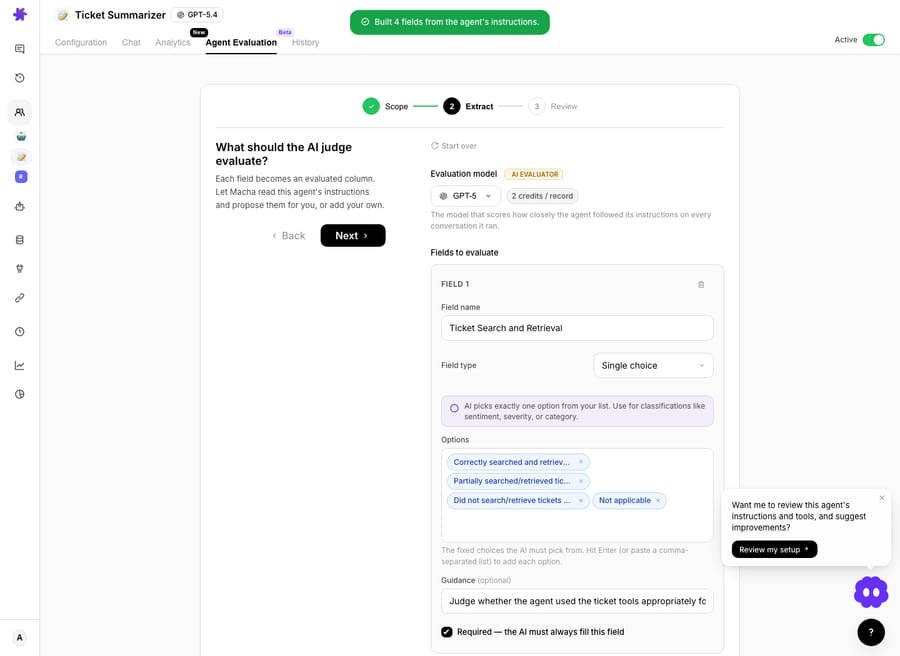
This is the heart of it. The prompt reads "What should the AI judge evaluate?", and rather than make you write a rubric from scratch, Macha will read the agent's own instructions and propose the criteria for you. I clicked build, and it returned "Built 4 fields from the agent's instructions", turning the things I'd told the agent to do into the things it would now be graded on. Two fields are always added and can't be removed: Instructions followed and a short Why.
Each field becomes an evaluated column. You pick a field type the same way you do in Studies:
- Single choice: the judge picks exactly one verdict from your list (good for Correctly searched / Partially / Did not / Not applicable).
- Multiple choice: the judge ticks every item that applies (for example, which pieces of content a summary covered).
- Plus Yes/No, number, short text and long text types for flags, scores and free-text reasons.
My first field was Ticket Search and Retrieval, a single-choice column with four options and a one-line guidance note ("Judge whether the agent used the ticket tools appropriately…") so the judge knew how to decide. A Required toggle forces the judge to fill that field on every conversation.
Notice the model selector at the top of this step. It carries an "AI Evaluator" badge, and its subtitle says it plainly: "The model that scores how closely the agent followed its instructions on every conversation it ran." I ran the judge on GPT-5. The judge is a different model doing a different job from the agent it grades: here the agent ran on GPT-5.4 while the evaluator ran on GPT-5. You're not asking the agent to mark its own homework.
3. Review: see the cost, then run
Before anything executes, you get an Estimate & Run screen: the source, the date range, the fields, the model, the exact count of matching conversations, and the cost estimate.
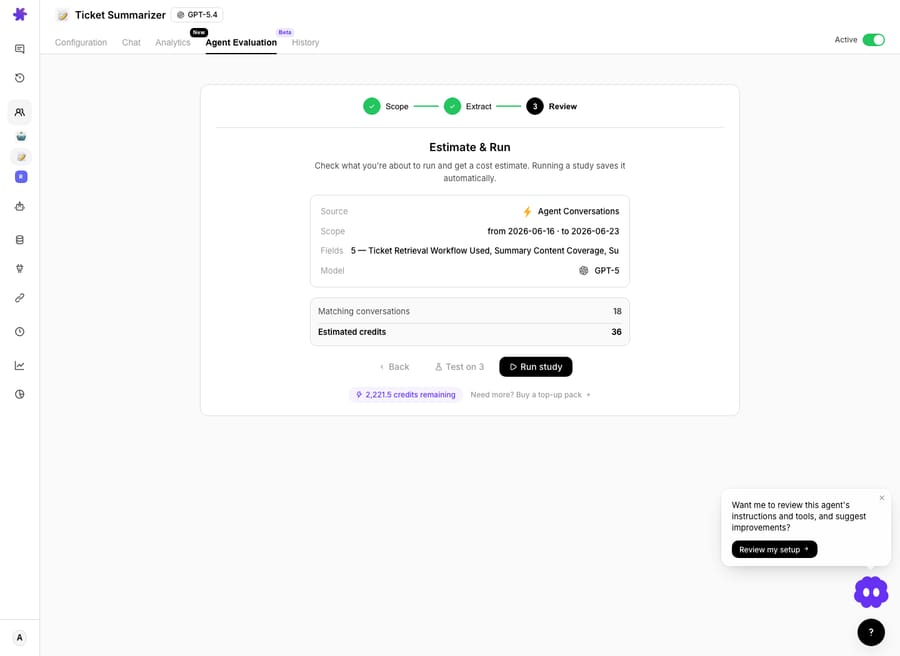
Mine read 18 matching conversations, with the estimated cost of the run shown right below. A "Test on 3" button samples a few conversations first so you can sanity-check the rubric before committing the whole batch. I hit Run study.
What did the judge find on 18 real conversations?
Thirty seconds later, the report. Eighteen conversations processed, zero errors, six reportable columns.
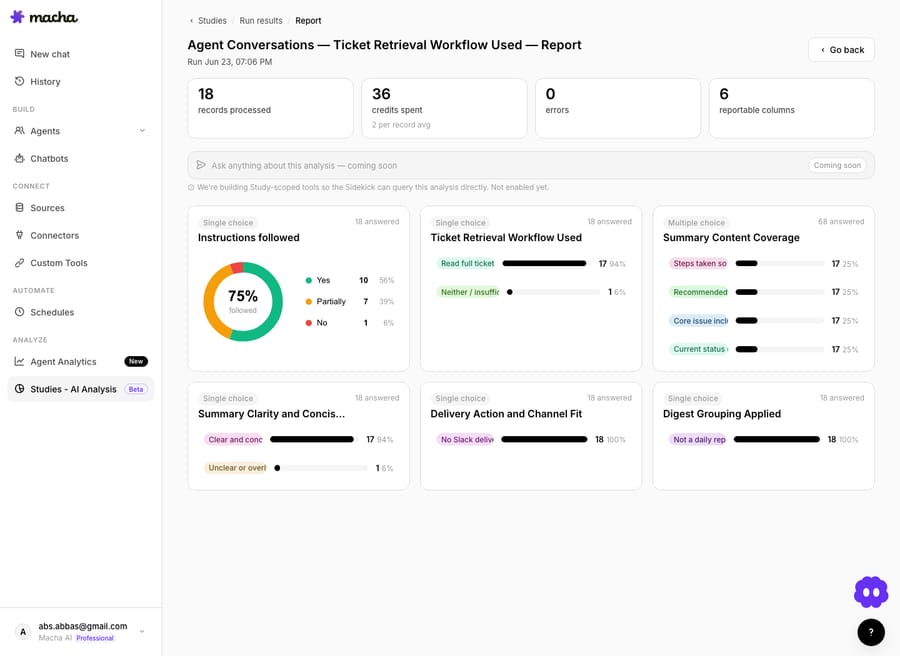
The headline is the Instructions Followed donut: 75% followed. Broken down, that's Yes 10 (56%), Partially 7 (39%) and No 1 (6%). The 75% gives half credit for a Partially: 10 plus 3.5, divided by 18. In plain terms, this Ticket Summarizer agent did everything it was told on a little over half its conversations, most of it on another 39%, and missed the brief once. That single number is worth more than a month of gut feel, and it's a baseline I can now move.
The per-criterion charts are where it gets actionable:
| Evaluated criterion | What the judge found |
|---|---|
| Ticket Retrieval Workflow Used | Read full ticket 17 (94%) · Neither / insufficient 1 (6%) |
| Summary Content Coverage (multi) | ~17 each across steps taken, recommended action, core issue, current status |
| Summary Clarity & Concision | Clear and concise 17 (94%) · Unclear / overlong 1 (6%) |
| Delivery Action & Channel Fit | Correct channel (no errant Slack delivery) 18 (100%) |
| Digest Grouping Applied | Correct (not a daily report) 18 (100%) |
Read that as an operator and the fix-list writes itself. The agent nails channel fit and clarity (94 to 100%), but in one conversation it didn't retrieve the full ticket before summarizing, and that's almost certainly the same conversation dragging the "instructions followed" number down. One row. The judge found it in a batch I'd otherwise never have re-read.
The grid: a verdict and a reason on every row
The donut is the summary; the results grid is the receipts. Every conversation gets its own row with the judge's verdict, a one-line reason for the call, and the agent's own output side by side, so you can click into the "No" and see why the judge marked it down, not just that it did.
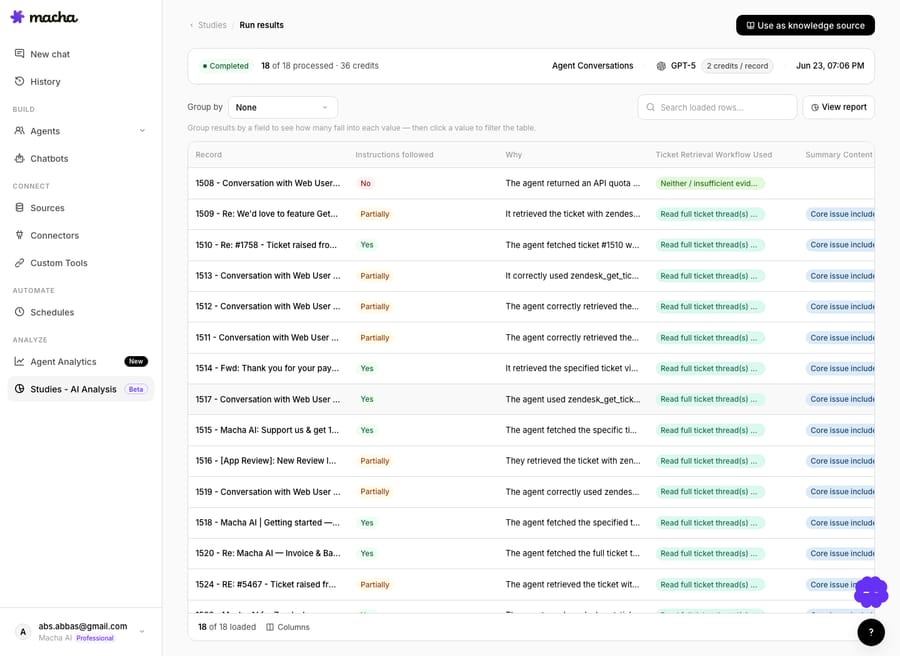
This is what makes an LLM judge trustworthy: it doesn't just assert a score, it shows its work. A "Partially" with the reason "summarized correctly but did not pull the latest ticket comment" is something you can act on in five minutes. A bare 3.8/5 isn't.
How do you turn a low score into a fix?
A score you can't act on is just anxiety. After my run, Sidekick offered in the corner: "Want me to review this agent's instructions and tools, and suggest improvements? Review my setup." So the path is short: evaluate, find the one criterion that's lagging, ask Sidekick to tighten the instruction behind it, then hit Run again on the same evaluation next week and watch the number move. For a before-and-after on a prompt change, run once against the instructions in effect at the time and once against the latest, over the same date range.
You can also push a completed evaluation into a Knowledge Source (the "Use as knowledge source" action, top right of the grid), turning graded conversations into searchable context, the same way Studies results can become agent knowledge.
Where does an AI judge need a human check?
Agent Evaluation is useful, but it's a judge, not an oracle. A few honest caveats:
- The judge is only as good as your rubric. Build with AI gives you a strong first draft from the agent's instructions, but vague criteria produce vague verdicts. Spend two minutes adding guidance and tight option lists; that's what makes the score mean something.
- LLM judges aren't infallible. The MT-Bench study found strong judges like GPT-4 reach over 80% agreement with human preferences, and newer agent-as-a-judge approaches push higher. That's agreement, not truth. For high-stakes calls, spot-check the judge the way you'd spot-check the agent. Run Test on 3 first and read the reasons; if they don't match your judgment, fix the rubric before the full run.
- It grades execution, not outcomes. "Followed instructions" isn't "customer was happy." If your instructions are wrong, a 100% score means the agent is reliably doing the wrong thing. Auto-Eval's resolution and sentiment fields help here; pair them with CSAT data.
- An evaluation you create isn't free. It reads real conversations and bills for that work, and the review step shows the estimate before you confirm, so a big back-fill is never a surprise. Test on 3 keeps experimentation cheap. Auto-Eval costs nothing.
For most teams none of that is a dealbreaker. It's the difference between knowing your agent skips a step 6% of the time and suspecting it might.
FAQ
What is Agent Evaluation? It's an AI judge built into Macha that grades how closely an agent followed its own instructions across past conversations. Auto-Eval grades every Agent-mode conversation automatically; for a custom rubric, you define (or auto-generate) a checklist and an evaluator model scores every conversation in your date range. Either way you get a percent-followed score, per-conversation verdicts, and a one-line reason for each call.
What is "LLM as a judge"? A pattern where one AI model evaluates another's outputs against explicit criteria, producing a score and a written justification, and applying the same rubric to every item with no reviewer drift. Agent Evaluation is that pattern, specialized for support agents and wired into the Macha dashboard.
Does the agent grade itself? No. A separate evaluator model does the grading (the one with the "AI Evaluator" badge). In my run the agent ran on GPT-5.4 and the judge ran on GPT-5: different model, different job.
How much does an evaluation cost? Auto-Eval is free on every plan, including the trial. For an evaluation you create, the review step shows the exact estimate before you confirm, and Test on 3 lets you validate the rubric cheaply first. My run was 18 conversations. See the pricing page for plan prices.
Which plans include it? Macha sells one plan priced by monthly ticket volume, from $299 for up to 750 tickets, and every feature is on it, so Agent Evaluation is included whichever tier you're on. Check the pricing page for the tiers.
Does evaluation slow the agent down? No. Auto-Eval grades a conversation after it finishes, in the background, so the agent replies without waiting for the judge.
How do you try Agent Evaluation?
If you've ever shipped an agent and then wondered whether it's doing what you told it to, Agent Evaluation gives you a straight answer in minutes, on conversations that already happened. Start a free trial ($50 of usage, no credit card required), open any agent, and run an evaluation over last week. Or read the Agent Evaluation docs for the full walkthrough, and see how the same engine powers Studies across your whole ticket archive.
Written by Abbas (Customer Support & AI, Macha) · Reviewed by Ankeet Guha (Co-founder & CTO) · Published 2026-06-24 · Last updated 2026-09-24.






