





 Shopify
 Stripe
 Slack
Slack Notion
 Google Workspace
 Confluence

What Is Macha's AI Tool Builder? Connect Any REST API to Your Agents by Chatting


Macha agents already reach the big help desks and apps through native connectors, but most support teams also depend on one internal API that nobody packages. The AI Tool Builder, shipped on March 30, 2026, turns that API into tested agent tools from a short chat.
Key takeaways
- Macha's AI Tool Builder, shipped on March 30, 2026, turns any REST API that uses an API key, bearer token or basic auth into agent tools from a chat.
- The Tool Builder calls discovered endpoints against the live service and groups the working tools under one named connector on the connectors page.
- Tools using POST, PUT, PATCH or DELETE are flagged as writes that need confirmation in chat, but autonomous trigger runs execute writes immediately.
- Custom API tools add nothing to the bill because Macha charges per ticket, with one plan starting at $299 a month for up to 750 tickets.
- Macha's docs currently list the conversational AI Tool Builder under Macha Experiment Labs, while the manual Custom API Tool editor sits beside it.

Macha's AI Tool Builder turns any REST API that authenticates with an API key, bearer token or basic auth into agent tools from a chat: you describe the API in plain language, paste a credential, and Macha discovers the endpoints, tests them against the live service, and groups the working ones into a connector your agents can use. It shipped on March 30, 2026, and the Custom Tools docs currently list it under Macha Experiment Labs. No OpenAPI spec to upload, no glue code, no Postman collection.
That closes a gap native connectors leave open. Macha agents already reach the big systems (Zendesk, Freshdesk, Gorgias, Front, HubSpot or Intercom, plus Shopify, Stripe, Slack, Notion and more), but most support teams also run one internal service, such as a custom OMS, a regional carrier or a homegrown loyalty API, that nobody else integrates with.
How does the Tool Builder compare with an MCP server, a unified API or a direct API call?
There are four common ways to give an agent an external capability, and they fit different jobs rather than competing. In short, the Tool Builder owns the long tail — the internal and niche REST APIs nobody ships a packaged connector for — while MCP servers and unified APIs earn their keep when the same integration has to be reused at scale.
| Approach | Best when | Setup effort | Who runs it | Main watch-out |
|---|---|---|---|---|
| Conversational Tool Builder (this release) | A long-tail or internal REST API your agents need now | Minutes — describe it, paste a key | Macha (hosted, encrypted) | Needs a reachable endpoint + API-key / bearer / basic auth; not full OAuth; listed under Experiment Labs |
| Manual Custom API Tool | One endpoint that needs an exact body, header or param shape | Minutes — fill the editor | Macha (hosted, encrypted) | More control, more typing; you map the request by hand |
| MCP server | One capability reused across many agents, products or LLM providers — or a vendor already ships an MCP server | Build / stand up a server | You (or the vendor) | Overkill for a single internal endpoint; you operate a server |
| Unified API (Merge, Composio, Nango) | You need one normalized interface across many same-category SaaS apps (CRMs, ticketing, HRIS) | Connect through the aggregator | The aggregator vendor | Adds a dependency and cost; only covers the categories it supports |
| Direct API call in code | Deterministic, high-volume, latency-sensitive or compliance-bound paths | Engineering build | You | No agent reasoning; you write and maintain the code |
A useful rule of thumb the broader ecosystem has settled on: direct API calls win when you need exact, repeatable, low-latency behaviour; MCP shines when one capability is reused across many agents and you're abstracting complexity for better reasoning; and unified-API platforms reduce integration surface area when you're connecting many apps in the same category. The Tool Builder isn't trying to replace any of those. It's the fastest path for the one internal service that none of them will ever package for you. (And because an auto-built tool can later be promoted to a maintained connector or MCP server, starting in the Tool Builder doesn't lock you out of those paths.)
Why is connecting an API the hard part of building agents?
Most "build an AI agent" tutorials stop at the model and the prompt. The unglamorous truth is that the integration layer is where agent projects stall. To make a single REST endpoint usable by an agent you normally have to: read the vendor's API docs, model the request (path, query params, body), wire up authentication, handle the response shape, and then describe the whole thing to the model so it knows when to call it and what arguments to pass.
The industry has converged on a few ways to ease this. The Model Context Protocol (MCP) standardises how tools are exposed to models; automation platforms like n8n let you expose existing nodes as agent tools; and several AI and help-desk vendors ship integration builders of one kind or another. They work, but most still assume you'll hand-map endpoints or stand up a server. Macha's bet is simpler: the fastest spec for an internal API is a sentence describing it plus a working credential, and an AI that's allowed to try the call and learn from the response.
How does the AI Tool Builder work?
You start the builder from the Custom Tools area, which gives you two ways in: Build with AI (the conversational path) and Create Custom Tool (the manual editor).

Pick Build with AI and describe what you want to connect — for example, "Connect our ShipStation account so agents can look up shipment tracking by order number." From there the AI drives four things, in order.

1. It discovers and tests endpoints. You describe the API and paste your credentials. Macha proposes the endpoints that match your intent and then actually calls them against the live service. Tools are created from the requests that succeed — so a tool exists in your library only after it has demonstrably returned a real response, not because a doc said it should.
2. Smart auth handling. Credentials are captured from the first successful test request and applied to every tool created in that session. You authenticate once in the conversation; the builder doesn't make you re-paste the same bearer token for each endpoint it discovers. Macha supports the auth schemes real REST APIs use — API key, bearer token, and basic auth.
3. Auto-grouping into a connector. The tools the builder creates are automatically grouped under a single named connector, complete with an emoji icon and a brand colour, and that group shows up on your connectors page alongside the native integrations. So a one-off internal API ends up looking and behaving like a first-class connector, not a loose pile of HTTP calls.
4. Auto-detected write protection. The builder inspects the HTTP method: anything that mutates state (POST, PUT, PATCH, DELETE) is automatically flagged as a write operation that requires confirmation. Read-only GET tools run freely. In interactive chat, a tool that cancels an order or issues a refund won't fire until you click Confirm. Know the limit: once an agent runs autonomously from a trigger, Macha's docs say write actions execute immediately with no confirmation step, so scope which write tools an autonomous agent gets.
The result of a five-minute conversation is a working connector your agents can use immediately.
When should you use the manual Custom API Tool editor instead?
The AI Tool Builder is the fast lane, but it sits on top of a full manual tool editor — and sometimes you want the manual editor. If your endpoint needs a hand-tuned request body, a specific header, or query parameters the AI couldn't infer from your description, you build the tool by hand.

A custom tool is just a defined HTTP request: choose the method, set the URL with parameters, supply a body template for writes, and pick the authentication (none, API key, bearer token or basic auth). Credentials are encrypted at rest and never exposed to the AI model, and (from the same March 30 release) the edit modal shows a masked hint of the configured key so you can confirm which key is wired up without ever exposing the secret.
The most important habit here is the built-in test. You can fire the endpoint directly from the tool editor — before it ever touches an agent — and confirm it returns what you expect.
A few quality-of-life fixes landed alongside the builder that you feel most when editing by hand: you can delete a tool inline from the list without opening the modal, and empty optional parameters are automatically stripped from the request URL — which quietly fixes a whole class of failures from APIs that reject empty query values.
How do you give a new tool to an agent?
Building the tool is half the job; the agent has to actually use it. Created tools live in your library and on the connectors page, and you assign them to an agent the same way you assign native ones — from the agent's tool picker.
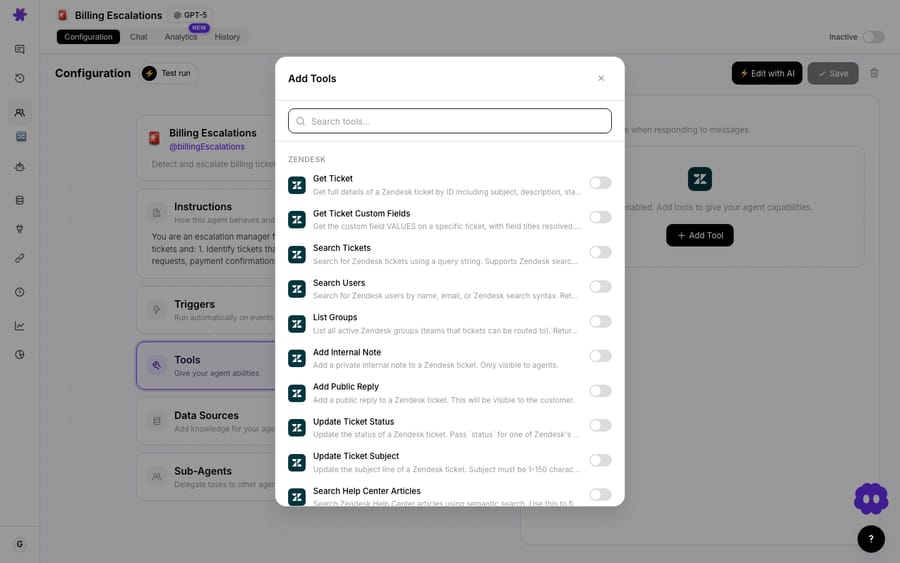
Because the auto-grouped connector behaves like any other, your custom API shows up right next to Zendesk and Shopify when you're composing an agent.

A practical pattern: a triage agent reads a new Zendesk ticket (native connector), calls your custom carrier tool to fetch live tracking (built in five minutes with the Tool Builder), and drafts a reply with the real ETA. Leave the address-change tool (a PUT the builder flagged as a write) off that autonomous agent and keep it for a chat-mode agent, where a human confirms each write. None of those steps is billed separately: Macha charges per ticket — one thread with one person, charged once however many tools the agent calls along the way — so the economics are identical to your native-connector workflows.
When should you not use the Tool Builder?
The Tool Builder is genuinely fast, but it isn't magic, and a few honest caveats keep you out of trouble:
- It needs working credentials and a reachable endpoint. The builder learns by making real calls. If the API is behind a VPN, IP allowlist, or an OAuth dance Macha can't complete with a pasted secret, the conversational path won't discover much. API key / bearer / basic auth are the supported schemes — a fully OAuth-only API is a poor fit.
- Test in a sandbox first. Because the builder hits the live service to learn, point it at a test or staging key while you're exploring. You don't want endpoint discovery firing real
POSTs against production, and write confirmation only protects you in chat, not in autonomous runs. - AI-discovered endpoints still deserve a human read. The builder is excellent at the common cases; for an unusual body shape or a non-standard pagination scheme, drop into the manual editor and tune it. Treat the AI output as a strong first draft, not gospel.
- The real limit is your own tool list, not a plan. Custom API tools aren't gated behind a higher tier. Macha has one plan, priced on monthly ticket volume (see the pricing page), with custom API tools included at every volume. What does bite when you connect dozens of internal services is the agent's own clarity: the more near-identical tools it can see, the more precisely its instructions have to say which one to reach for.
- It's not a replacement for a real integration. For a high-volume, mission-critical system you'll lean on Macha's native connectors (or a maintained MCP server) over a hand-built tool group. The Tool Builder shines for the long tail of internal and niche APIs that no vendor will ever build a first-class connector for.
Where does the Tool Builder fit in Macha?
The Tool Builder is one of three "describe it and Macha builds it" capabilities that shipped in this window — alongside the AI Agent Builder (build a whole agent from a description) and Studies (run one AI analysis across thousands of tickets and get a grid of answers). Together they push the same idea: the configuration surface of an agent platform should be a conversation, and the system should be allowed to test its own work before you trust it. For teams running Macha as the agent layer on top of Zendesk or another supported help desk, the Tool Builder is what lets a generic support agent reach into the one system that makes your business yours.
FAQ
What kind of APIs can I connect? Any REST API that authenticates with an API key, bearer token, or basic auth. You describe it in the builder, paste the credential, and Macha discovers and tests the endpoints. APIs that require a full OAuth flow Macha can't complete from a pasted secret aren't a fit for the conversational path.
Do I need to write any code or upload an OpenAPI spec? No. The AI Tool Builder works from a plain-language description plus a working credential — it doesn't require a spec file or glue code. If you want precise control, the manual Custom API Tool editor is there for hand-built requests.
How does Macha keep destructive actions safe? The builder auto-detects the HTTP method: POST, PUT, PATCH, and DELETE are automatically marked as write operations that require confirmation, so in chat an agent can't change data without an explicit go-ahead. GET (read-only) tools run freely. Autonomous agents running from a trigger execute writes immediately, so only give them the write tools you're comfortable running unattended.
Are my API credentials secure? Credentials are encrypted at rest, never exposed to the AI model, and the edit modal shows only a masked hint of the configured key, never the full secret.
Does using a custom tool cost extra? No. Macha bills per ticket — one thread with one person, charged once however many tools the agent calls or steps it takes — so a tool call doesn't add anything to the bill. See the pricing page for details.
Which plans include the Tool Builder? Macha has one plan priced on monthly ticket volume, from $299 a month for up to 750 tickets, and custom API tools are included at every volume. The conversational Tool Builder is currently listed in the docs under Macha Experiment Labs. Check pricing for the current tiers.
How do you try the Tool Builder?
If your agents keep hitting a wall at the edge of your native connectors, the AI Tool Builder is the bridge. Start with $50 of free usage, no credit card required, open the Custom Tools area, and describe the API you've always wanted your agents to reach — or read the Custom Tools docs for the full walkthrough.
Written by Abbas (Customer Support & AI, Macha) · Reviewed by Ankeet Guha (Co-founder & CTO) · Published 2026-06-24 · Last updated 2026-09-24.






