Intercom
 Shopify
 Stripe
 Slack
Slack Notion
 Google Workspace
 Confluence

What Can an AI Support Agent Do in Judge.me? Find, Reply to and Hide Reviews Through the API (2026)


Judge.me's REST API lets an AI support agent find a shopper's reviews from their email address in two calls and make three documented writes: publish or hide a review, post a public reply, and send a private email reply. Every call carries the store's private API token in an X-Api-Token header plus a shop_domain parameter. What the API won't do is change a review's words or star rating, because Judge.me says it doesn't support editing reviews through the API "for authenticity reason." This page maps each review ticket to the endpoint that answers it, credits what Judge.me's Gorgias, Commslayer and Sentimo integrations already do, and shows what happened when we ran a Judge.me agent on a test ticket.
Key takeaways
- Judge.me's API lets an AI agent find a shopper's reviews by email, then publish or hide a review, post a public reply or send a private email reply, using a private token sent as X-Api-Token.
- Judge.me's review list has no email filter, so an agent calls GET /reviewers/-1?email= to get the reviewer's Judge.me ID, then GET /reviews?reviewer_id= to list that person's reviews.
- Judge.me's public reply and private reply endpoints both email the reviewer unless the call sets send_reply_email or send_private_email to false, because both default to true.
- Judge.me's Gorgias integration, on the Awesome plan at $15 a month, turns low-star reviews into Gorgias tickets and adds three macros that publish or hide the review and reply to the reviewer.
- In our 28 September 2026 test on ticket #1145, a dummy key made Judge.me return HTTP 401 twice, and the agent never called the second lookup tool without a reviewer ID.

Which Judge.me support jobs can an AI agent do through the API?
We read every support-relevant endpoint in Judge.me's API reference on 28 September 2026. The server is https://api.judge.me/api/v1. A store's private token goes in the X-Api-Token header and the store's .myshopify.com domain goes in the shop_domain query parameter on every call.
| Support job | Endpoint | Read or write | Emails the shopper? | Who can do it today |
|---|---|---|---|---|
| Find the shopper's reviewer record by email | GET /reviewers/-1?email= | Read | No | A person in Judge.me admin; an AI agent with a custom API tool |
| List that reviewer's reviews and their status | GET /reviews?reviewer_id= | Read | No | Judge.me admin; Gorgias sidebar (the 3 latest reviews, review count and average rating); Commslayer sidebar (the customer's review history); an AI agent |
| Count a reviewer's reviews, optionally by star rating | GET /reviews/count?reviewer_id= | Read | No | Judge.me admin; an AI agent |
| Publish or hide a review | PUT /reviews/{id} with curated set to ok or spam | Write | No | Gorgias sidebar and macros; Judge.me admin; an AI agent with a Write tool |
| Reply publicly on the review widget | POST /replies | Write | Yes, unless send_reply_email is false | Gorgias macro; Judge.me admin; an AI agent with a Write tool |
| Send the reviewer a private email reply | POST /private_replies | Write | Yes, unless send_private_email is false | Gorgias macros; Judge.me admin; an AI agent with a Write tool |
| Change a review's text or star rating | None: "we don't support editing reviews via API" | Not available | n/a | Judge.me admin or the reviewer's own profile |
| Answer from Judge.me Q&A content | No Q&A endpoint in the reference (Q&A is an Awesome-plan widget) | Not available | n/a | Judge.me admin |
Count the write rows and you get three documented support writes, all reachable with the same static private token: publish or hide, public reply, private reply. The reads that make them safe take two calls, because the shopper writes in with an email address and Judge.me's review list only filters by reviewer_id, product_id and rating.
Two of those writes send email. An agent that posts a public reply to acknowledge a complaint also sends the reviewer an email from the store, unless the tool sets send_reply_email to false. Judge.me's incentive is plain, since a reply the reviewer never sees does less for the store's reputation, but a support team usually wants one conversation with the customer, in the ticket, and not a second one arriving from the review app.
What do customers ask about Judge.me reviews?
Review tickets fall into five shapes, and the review record answers most of the status questions on its own. The job for the agent is to read three fields correctly.
- "Why isn't my review showing?" The
curatedfield decides it.okmeans the review is published on the storefront,not-yetmeans it's waiting for moderation, andspammeans it isn't published. Judge.me's reference notes thatspam"doesn't mean the review is spam," so the agent should never use that word with the customer. - "My review is live but it's not showing the Verified badge." The
verifiedfield has eight values. Judge.me countsconfirmed-buyer,buyer,verified-purchase,semi-verified-purchaseandadminas verified. Judge.me's verified status article explains the usual misses:unconfirmed-buyermeans a web review whose author didn't click the verification link (or the store turned that email off), andnothingmeans the review email doesn't match an order email. - "Please remove my review" or "I want to change my 1-star to 5 stars." The API can hide a review but can't edit one. A change of rating has to happen in Judge.me admin or through the reviewer's own profile; Judge.me's
review/updatedwebhook lists "edited from admin or user profile" as the two places an edit comes from. - "You never answered the complaint in my review." The agent can find the review and, with a Write tool, reply publicly or privately. Whether it should is the brand's decision, and the next sections argue for a person first.
- "Someone left a fake review of your product." The agent can find the review only if it has the review's ID or the reviewer's email. It has neither when a third party reports a review, so this is a handoff.
The hidden field trips people up. It looks like the obvious "is it live?" flag, but Judge.me defines it as archived in the Reviews dashboard and says it "doesn't determine whether the review is published on storefront." An agent that reads hidden: false as "published" will tell a shopper their unpublished review is live.
How does the lookup work, from email to reviewer ID to reviews?
Judge.me's reference has a general rule for finding a record by something other than its ID: set the ID in the path to a negative number and pass the other field instead.
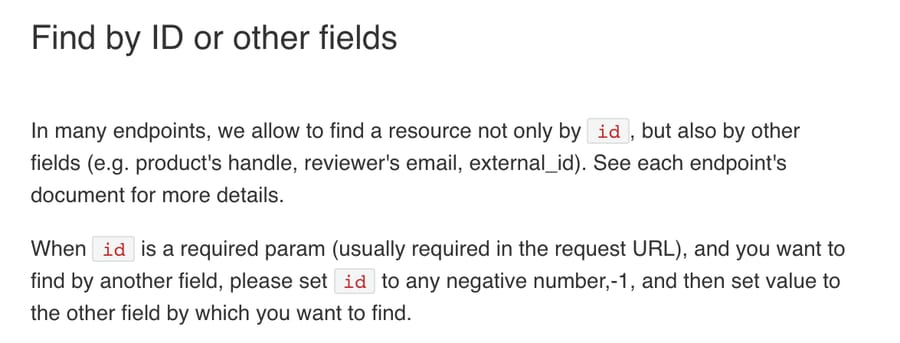
For reviews, that gives a two-step chain:
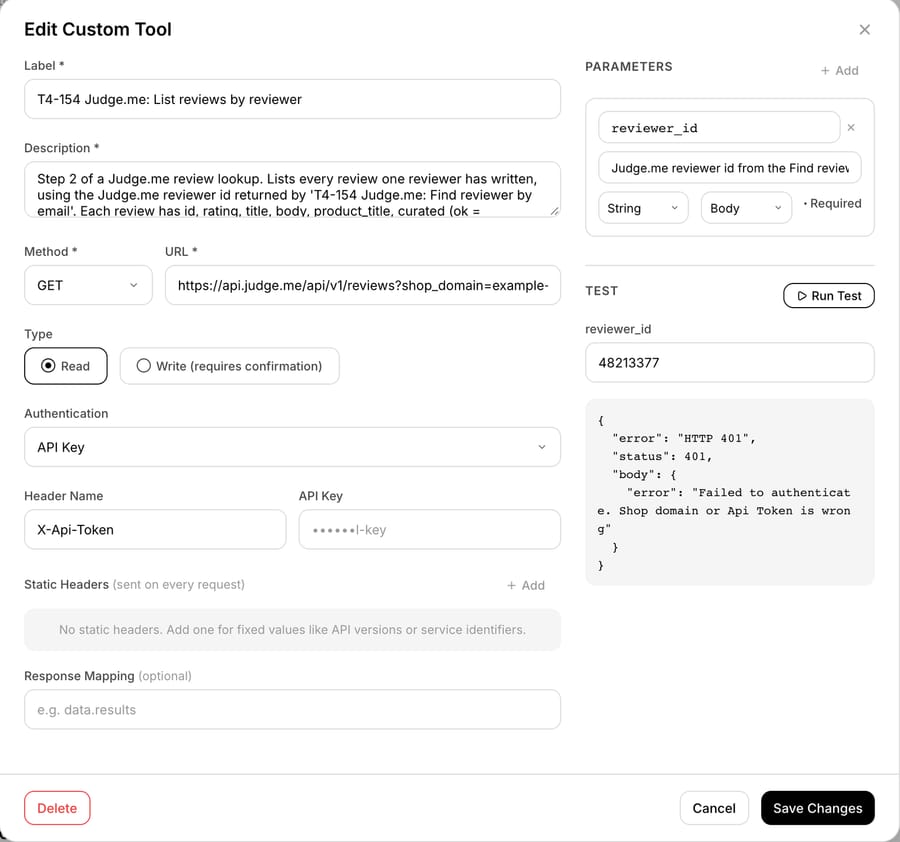
GET /reviewers/-1?shop_domain=...&[email protected]returns the reviewer's Judge.meid, name and email.GET /reviews?shop_domain=...&reviewer_id=<that id>&per_page=10returns that reviewer's reviews, each withid,rating,title,body,product_title,curated,hidden,verifiedandcreated_at.
GET /reviews/count?reviewer_id= is a cheap third call when the agent needs to know whether a shopper has one review or twenty before paging through them. The review list pages with page and per_page; the reference's example page size is 10.
We learned the lookup the hard way. An earlier Judge.me tool on our test account called /reviews with a reviewer_email parameter. The reference doesn't list that parameter. With a dummy key, Judge.me returns the same authentication error whatever filter you send, so a placeholder test can't tell you a filter is undocumented; only reading the reference can. The tools on this page use the documented route.
The review body in the API response is raw. Judge.me's reference warns that these endpoints can return unpublished reviews and content that is "not sanitized yet," and says to use the widget endpoints to display reviews on a storefront. For a support agent that only reads the text into a ticket, that's fine. It does mean the agent will see reviews the store has chosen not to publish, so the instructions should say what it may repeat back to the customer.
What do Judge.me's help desk and AI integrations already do, and where does an AI agent add something?
Judge.me's own Gorgias integration comes first, because for many stores it already does the moderation job. It's on Judge.me's Awesome plan, listed at $15 a month on the Shopify App Store with a 15-day free trial. It creates a Gorgias ticket for every new review under a star threshold you choose, for example 3 stars and below, tags it, and gives agents a sidebar widget with Publish and Hide buttons plus three macros. The same widget shows the customer's 3 latest reviews, their total review count and their average rating, so a Gorgias agent can already see a shopper's recent reviews next to any ticket. The three macros are:
- Hide review and send private email reply to customer.
- Publish review and post public reply on the review widget.
- Publish review and send private email reply to customer.
Judge.me's Awesome plan also lists AI-written replies to reviews among its features. So a Gorgias team on Awesome already has review-to-ticket routing, one-click moderation, the shopper's recent reviews in the sidebar and help drafting a reply. The Free plan already covers unlimited reviews. The Gorgias and Klaviyo integrations sit on the $15 Awesome plan, while Sentimo and Aidify are available on Free.
Gorgias isn't the only one. Judge.me's Helpdesk collection lists five integrations. Sentimo, on the Free plan, moderates new reviews automatically (approve, reject or hold for a person, based on sentiment) and writes AI replies, which it can publish without review if you turn on auto-accept. Commslayer, on Awesome, turns reviews into support tickets, shows the customer's review history with product names and ratings in the ticket sidebar, and replies publicly or privately. Tidio (Awesome) handles reviews in its chat inbox, and Aidify (Free) uses review ratings to recommend products in chat. If your problem is moderating and replying to new reviews, Sentimo may cover it before you need any agent.
An AI support agent adds something in three places:
- Tickets the integrations don't create. Gorgias and Commslayer turn new reviews into tickets, and Sentimo works on the reviews themselves. None of them answers the shopper who emails your support address asking where their review went, or why it has no Verified badge. That shopper's ticket starts from an email address, which is where the two-call lookup earns its keep.
- Help desks outside the list. Judge.me's Helpdesk collection has no integration for Zendesk, Freshdesk, Front, Intercom or HubSpot. On those desks, the review record reaches the ticket only if someone, or something, calls the API.
- Answering from the record. The macros and sidebars act on a review or show it to a person: Gorgias's sidebar shows the latest 3, and Commslayer's shows all of a shopper's reviews and their status on email tickets. None of them writes the answer to the shopper's question. An agent can read
curatedandverifiedfor any of the shopper's reviews and give the shopper the actual reason, then hand the decision to a person with the facts already in a note.
Which Judge.me actions should stay with a person?
We'd keep every Judge.me write with a person at first, even though the API documents them:
- Hiding a review. The FTC's final rule on consumer reviews and testimonials, announced in August 2024, bars a business from presenting its displayed reviews as representing most or all reviews when some were suppressed for their rating or negative sentiment. A removal request from the reviewer is fine to honor once someone confirms the request came from the reviewer's own email. A request to hide someone else's bad review is exactly the case the rule is about.
- Public replies. They appear on the storefront widget and, by default, email the reviewer. An agent can draft one into an internal note; a person posts it.
- Anything that changes the words. There's no endpoint, so this is a person in Judge.me admin or the reviewer themselves.
- Privacy requests. The reference lists a
POST /reviewers/data_requestendpoint with an example body shaped like Shopify's customer data request, but no description of what it does. We wouldn't give an agent an undocumented endpoint for a privacy obligation.
How is it set up with Macha?
Judge.me has no built-in Macha connector. It connects through a custom API tool that Macha's team sets up during onboarding, with the store's private token in the X-Api-Token header and the store domain in the URL. Custom tools are included on every plan. Judge.me's API help article says the token is in Judge.me admin under Settings, then Integrations, then View API tokens. Use the private token: the public one is meant for widget GET requests in storefront JavaScript. The reference doesn't say which Judge.me plan the private token needs, and neither does that article.
Macha's team builds the two read tools first, "Find reviewer by email" and "List reviews by reviewer", and adds Write tools only for the actions your team wants automated. Each Write tool is marked Write in its configuration. In our 28 September dashboard tests, a custom Write tool ran without a confirmation card, so the safety has to live in the agent's instructions: which reviews, which action, and when to hand off.
One configuration detail applies to the hide call. PUT /reviews/{id} needs the review ID in the URL and {"curated": "spam"} in the body. When a Macha custom tool has a body template, it doesn't fill URL placeholders from parameters sent in the body. So we set review_id as a header parameter. We checked the result against an echo service before pointing the tool at Judge.me: the URL came back as /reviews/91022544, the body as {"curated":"spam"}, and the only side effect was an extra X-Review-Id header on the request.
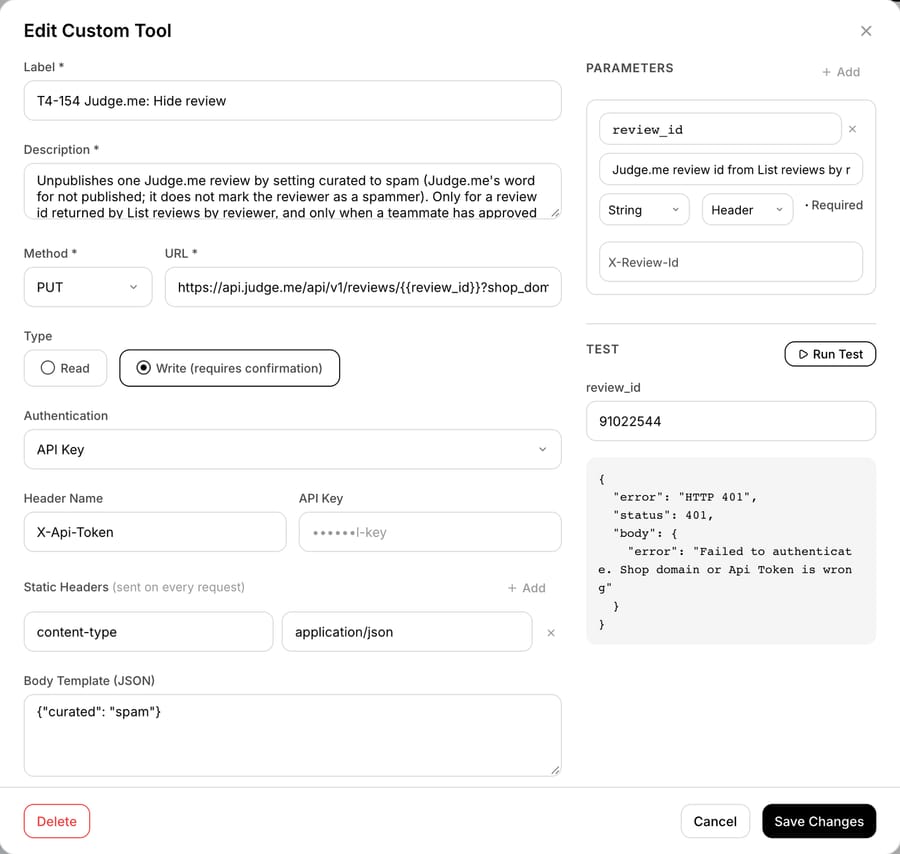
A reply tool follows the same pattern with no path parameter: POST /replies with a body template carrying review_id, "send_reply_email": false if you don't want Judge.me emailing the reviewer, and reply.content. We didn't build one for this test.
Agent instruction example
This is the instruction we gave the test agent, word for word. It reads and hands off; it never writes to Judge.me.
You handle tickets about product reviews for our store. Our review app is Judge.me. 1. Read the ticket and work out what the customer wants: remove or change a review, find out why a review isn't showing or has no Verified badge, get an answer to a complaint they wrote in a review, or report someone else's review. 2. Find the customer's reviews in two steps. Call "T4-154 Judge.me: Find reviewer by email" with the requester's email, then call "T4-154 Judge.me: List reviews by reviewer" with the reviewer id it returns. Never call the second tool with an id the first tool didn't return. If there's no reviewer, or more than one review could match, ask the customer which product and roughly when they reviewed it. 3. Answer status questions from the review's fields. curated "ok" means published. curated "not-yet" means it's waiting for moderation. curated "spam" means the store hasn't published it: never use the word spam with the customer; say it isn't published and a teammate will look. hidden only means archived in our dashboard, so don't use it to decide whether a review is live. verified values confirmed-buyer, buyer, verified-purchase, semi-verified-purchase and admin show the Verified badge; any other value doesn't. 4. You never publish, hide, edit or reply to a review. Judge.me's API can't edit a review's words. For a removal or change request, or a complaint written in a review, reply that a teammate will take care of it today, add an internal note with the review id, product, rating, curated and verified values and what the customer asked for, and tag the ticket reviews_handoff. 5. If the ticket mentions a product fault that could hurt someone, an injury or allergic reaction, or a legal threat, send only a short holding reply, add an internal note and tag the ticket reviews_urgent. 6. If a Judge.me tool returns an error, don't tell the customer what went wrong inside our systems. Reply that a teammate is checking and will follow up today, add an internal note with the tool name, the HTTP status and the error message, and tag the ticket app_tool_error. Never paste the customer's address or phone number into a note.
What happened when we ran a Judge.me agent on a test ticket
On 28 September 2026 we created an inactive agent, "T4-154-Judge.me review requests", on our Macha Demo account with the instruction above, four Zendesk tools (get ticket, public reply, internal note, tags) and the two Judge.me read tools. The Hide review tool was built but not attached. Every Judge.me tool used a placeholder key, so any call would reach Judge.me's live API and be refused. We don't have a Judge.me store to test against.
We used Macha's Test run, which simulates a new Zendesk ticket on our d3v-macha sandbox and uses only the agent's attached tools. The made-up customer, Priya, wrote: she'd left a 1-star review of an Oat Linen Shirt after the seam split, the replacement was great, and she wanted the review changed to 5 stars; separately, her review of Linen Drawstring Shorts had no Verified badge. That's two jobs in one ticket, and the API can do neither of them in full: it can't change a rating, and the badge depends on a verification step only the reviewer or the store's order data can satisfy.
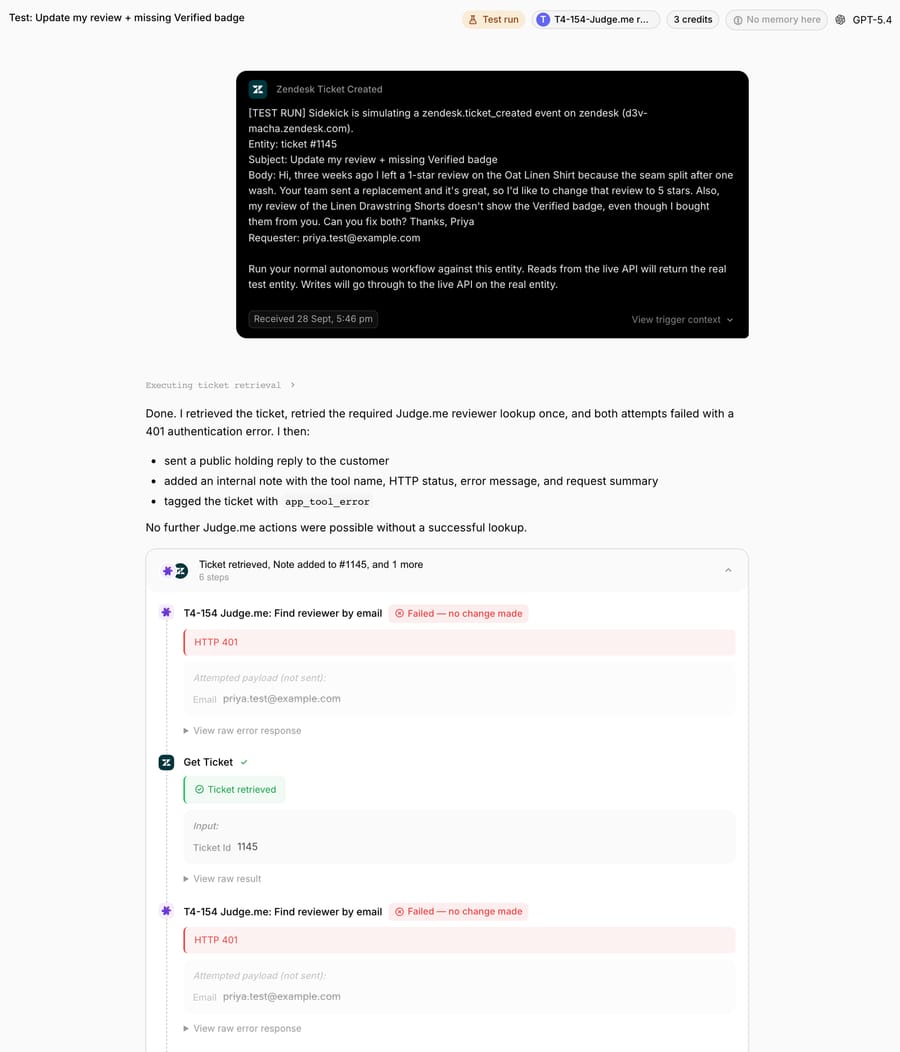
What the agent did, in order:
- Called "Find reviewer by email" with [email protected] straight from the trigger payload. Judge.me returned HTTP 401:
Failed to authenticate. Shop domain or Api Token is wrong. - Read the ticket, then retried the reviewer lookup once. Same 401.
- Never called "List reviews by reviewer." Rule 2 says not to call it with an ID the first tool didn't return, and it had none.
- Tagged the ticket
app_tool_error, added an internal note and posted a public holding reply, 24 seconds after the ticket was created.
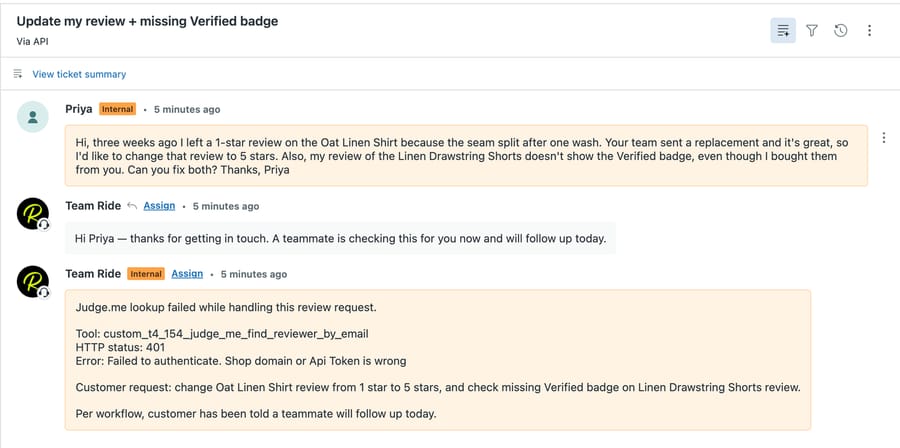
The internal note carried what a person needs: the tool, the status, Judge.me's error text and both of Priya's requests. The reply didn't blame "our systems." It also didn't tell her that the API can't change a rating. That was the right call here, since the agent never reached a review record and rule 4's handoff would have applied anyway.
What we didn't see: a successful Judge.me response, a real review's curated and verified values, or the reviews_handoff branch. Those need a live token. The 401 proves the request shape reached Judge.me with the right header and domain parameter; it doesn't prove the agent reads a real review correctly.
What goes wrong with the Judge.me API?
- One error for two mistakes. A wrong token and a wrong
shop_domainreturn the same message,Failed to authenticate. Shop domain or Api Token is wrong. Check both. - The wrong header for the token type. OAuth access tokens go in
Authorization: Bearer. Judge.me's reference says an OAuth token sent asX-Api-Tokenfails with that same authentication message. A merchant's private token is the one that belongs inX-Api-Token. - A private token you can't rotate. Judge.me's API help article says there's no self-serve way to regenerate the private token; if it's exposed, you contact Judge.me support. Keep it in the tool's credential field, never in a URL or an instruction.
- No published rate limit. The reference doesn't state one, so a two-call lookup per ticket is the pattern to keep, not a loop through a store's whole review list.
- Replies that email by default.
send_reply_emailandsend_private_emailboth default totrue. Set them explicitly in the body template. - The word "spam".
curated: spamis Judge.me's label for unpublished. Repeating it to a customer who asked why their review isn't live reads as an accusation. - Reading
hiddenas published. It means archived in the dashboard.curateddecides whether a review is on the storefront.
Where Macha fits
Macha fits teams on Shopify and Judge.me that run Zendesk, Freshdesk, Gorgias, Front, HubSpot or Intercom and get review questions by email: "where's my review," "why no Verified badge," "please take it down." The agent finds the reviewer by email, reads the review's real status, answers what the record can answer and hands the rest to a person with the review ID, rating and status in a note. Judge.me connects through a custom API tool that Macha's team sets up during onboarding, authenticated with the store's private token in X-Api-Token. On Gorgias with Judge.me Awesome, the integration's ticket routing and macros already cover moderation; Macha adds the inbound shopper tickets the integration doesn't create. On the other desks, it brings the Judge.me record to the ticket. It's the wrong fit if your review work is mostly new low-star reviews: on Gorgias or Commslayer the integration's ticket routing already handles those, and Sentimo moderates and replies to them on the Free plan. Macha is priced per ticket from $299/month for 750 tickets (see pricing), so a review ticket with two lookups, a note and a reply is one charge. The review apps comparison covers Okendo, Fera, Stamped and the others; the whole Shopify app map is in which Shopify apps an AI agent can work with; and the Smile.io page shows the same custom-tool pattern for loyalty points. How custom tools are configured is in the custom tools docs.
Frequently asked questions
Does Judge.me have a public API?
Yes. Judge.me's REST API lives at https://api.judge.me/api/v1 and is documented as an OpenAPI reference at judge.me/api/docs. Merchants authenticate with a private token in the X-Api-Token header plus shop_domain; app developers use OAuth with a Bearer token.
Can I find a customer's Judge.me reviews by email?
Yes, in two calls. GET /reviewers/-1?email= returns the reviewer's Judge.me ID, and GET /reviews?reviewer_id= lists their reviews. The reviews endpoint documents no email filter.
Can an AI agent reply to a Judge.me review?
Judge.me's API documents both: POST /replies posts a public reply on the review widget and POST /private_replies sends the reviewer a private email with a subject and body. Both email the reviewer by default, so set send_reply_email or send_private_email to false if you don't want that.
Can the Judge.me API change a review's star rating or text?
No. Judge.me's reference says "For authenticity reason, we don't support editing reviews via API." PUT /reviews/{id} only publishes or hides a review through the curated field.
Where do I find my Judge.me API token?
In Judge.me admin, go to Settings, then Integrations, and click View API tokens. Use the private token for server-side calls. Judge.me says it can't be regenerated self-serve, so contact Judge.me support if it's ever exposed.
Does Judge.me integrate with Gorgias?
Yes, on the Awesome plan. The integration creates a Gorgias ticket for new reviews under a star threshold you choose and adds a sidebar widget, showing the customer's 3 latest reviews, review count and average rating, plus three macros that publish or hide the review and send a public or private reply.
How we researched this
- API behavior: Judge.me's API reference, read from its OpenAPI file on 28 September 2026: authentication, "Find by ID or other fields", reviews (index, count, get, update), reviewers (get, data request), replies, private replies, webhooks, and the Review and Reviewer schemas, including the
curated,hiddenandverifieddefinitions. - Tokens: Judge.me's help article Using Judge.me API, 28 September 2026.
- Verified badge: Judge.me's verified status article, 28 September 2026.
- Help desk integration: Judge.me's Gorgias integration article, 28 September 2026. Judge.me's Helpdesk collection listed 5 articles on 28 September 2026: Tidio (Awesome), Gorgias (Awesome), Aidify (Free), Sentimo (Free) and Commslayer (Awesome). We read all 5. None covers Zendesk, Freshdesk, Front, Intercom or HubSpot.
- Plans and popularity: the Shopify App Store listing showed 5.0 stars from 47,606 reviews, a Forever Free plan and Awesome at $15 a month with a 15-day free trial, on 28 September 2026.
- Review rule: the FTC's rule on the use of consumer reviews and testimonials.
- What we ran: on 28 September 2026 we built three custom tools on our Macha Demo account with a placeholder key: "T4-154 Judge.me: Find reviewer by email" and "List reviews by reviewer" (Read) and "Hide review" (Write). Each tool's Run Test got HTTP 401 from Judge.me. Before that, a temporary copy of the Hide tool pointed at httpbin.org confirmed how Macha filled the URL and body; we deleted it afterward. We then ran the inactive agent once with Macha's Test run on made-up ticket #1145 on our d3v-macha sandbox; the reply came 24 seconds after the ticket was created (12:16:32 to 12:16:56 UTC). No real Judge.me store was touched, no review was read or changed, and the customer, products and review IDs are synthetic.
- Not tested live: any successful Judge.me call, the reply endpoints, webhooks, and how the agent handles a real review record.
To see the same setup on your own help desk, start a trial with $50 of free usage (about 125 tickets), no credit card, no time limit, and ask the Macha team to build the Judge.me tools during onboarding.
Resolve tickets automatically with AI agents
Macha's AI agents work on top of the help desk you already use — no code.