





 Shopify
 Stripe
 Slack
Slack Notion
 Google Workspace
 Confluence

What Is Macha Sidekick and What Can It Build for You?


Macha Sidekick is the AI helper inside the Macha dashboard that builds agents, custom API tools and scheduled triggers from a plain-English description. It shows a confirmation card before it writes any configuration, and it's included in every plan and the free trial.
Key takeaways
- Macha Sidekick is the AI helper built into the Macha dashboard that builds agents, custom API tools and scheduled triggers from a plain-English description.
- Sidekick shows a confirmation card before it deletes an agent, changes a trigger or commits any configuration write, so nothing changes without a yes.
- Sidekick's Tool Builder takes pasted API docs or a curl command, fills in the method, URL, auth, parameters and body, and tests the endpoint live before saving.
- Sidekick can't read live customer data, change billing or invite teammates, and it won't create or run a Study on a user's behalf.
- Sidekick is included in Macha's single plan, which starts at $299 a month for up to 750 tickets, and in the $50 free trial.

Macha Sidekick is the AI helper built into the Macha dashboard: you describe an agent, a custom API tool or a scheduled trigger in plain English, and Sidekick builds it, showing you a confirmation card before it writes any configuration. It's the AI that helps you run Macha, which is different from the agents you build for your customers. Your agents resolve tickets and chat with visitors; Sidekick helps you create, test and manage those agents.
| Sidekick can | Sidekick can't |
|---|---|
| Build an agent from a description (instructions, tools, trigger) | Read your live customer data (tickets, orders, payments) |
| Edit an existing agent's instructions, tools or model | Change billing |
| Build and live-test a custom API tool from docs or a curl command | Invite teammates |
| Add a scheduled trigger ("every morning at 9am") | Create or run a Study for you |
| Audit past runs and start test runs before go-live | Skip the confirmation card before a configuration write |
| Answer "how do I" questions from Macha's docs, with web search as a fallback |
Where do you find Sidekick in Macha?
Look for the rotating mascot. The Sidekick docs place it in the sidebar footer, and ⌘K (Ctrl K on Windows and Linux) opens it from any page. Sidekick is context-aware: it knows which screen you're on, so the suggestions in the panel fit what you're doing.

You'll also notice Sidekick occasionally surfaces a small speech bubble on relevant pages, such as a nudge like "want me to build this for you?" on the Agents page or an explainer on the Studies page. Those are dismissible. They point out the thing Sidekick can do on that screen.
What can Sidekick do?
Think of Sidekick as a builder you talk to. The big things:
1. Build an agent by describing it. Tell Sidekick what you want, such as "Create a triage agent that reads new Zendesk tickets, tags them by topic, and assigns billing issues to the Billing group." It confirms the use case, recommends a ranked list of tools from the connectors you already have, drafts the instructions, suggests a trigger and creates the agent. You review and tweak from there. (This is the AI Agent Builder.)
2. Edit an existing agent. "Add a refund tool to my Order agent and tighten its instructions so it always confirms the order number first." Sidekick proposes the change and updates the agent once you confirm.
3. Connect an API as a custom tool. This is the one most people don't expect: "Help me connect Postmark so my agents can send email." Paste the API docs or a curl command, and Sidekick fills in the method, URL, auth, parameters and body template, tests the endpoint against the live API, and saves it as a custom tool any agent can use. (More in how to connect a custom tool.)
4. Schedule an automation. "Add a scheduled trigger to the daily-digest agent that runs every morning at 9am." Sidekick sets up the trigger.
5. Audit and test agents. Sidekick can read past conversations an agent has run and judge them against that agent's own instructions. It can also start a new test run on demand, so you see how an agent behaves before it touches a real customer, and it offers a test right after it creates an agent.
6. Answer "how do I…?" Sidekick is grounded in Macha's own documentation, so you can ask product questions like "What's the difference between a tool and a knowledge source?" and get a real answer without leaving the app. For questions outside the docs, it falls back to a built-in web search with inline citations.
Here's Sidekick on the receiving end of a real instruction. Asked to build a chatbot that drafts replies from your Help Center, it doesn't just say "ok." It plans the whole thing: which tools it'll use and why, the Help Center as the knowledge source, a sensible trigger default, and then it offers to create it.

Why is describing an agent faster than configuring it by hand?
The usual way to set up an automation platform is to learn where every setting lives. Sidekick flips that: you state the outcome, it assembles the configuration, and you refine. Two benefits fall out of that:
- Faster setup. Your first agent, or your tenth, goes from idea to working in a couple of messages.
- A lower learning curve. You don't need to know that tools live in one place and triggers in another; Sidekick knows the layout and does the navigation.
It's most useful for the fiddly stuff. Wiring an external API into an agent by hand means getting the auth, headers and response mapping exactly right. Sidekick's Tool Builder captures those from a successful live test, so you skip the trial and error.
What prompts should you try first?
- "What agents do I have set up?"
- "Create a WISMO agent that looks up orders in Shopify and replies with the status."
- "Connect our internal shipping API as a custom tool."
- "How do I write good agent instructions?"
- "Schedule my SLA-monitor agent to run every hour."
What does building an agent with Sidekick look like?
Here's a typical exchange, building a triage agent without touching a config screen:
You: Create a triage agent for our Zendesk. On every new ticket, classify the topic, set priority from how urgent it sounds, tag it, and assign billing issues to the Billing group. Sidekick: Done. I've created @ticketTriage with a Ticket Created trigger and the Zendesk tools it needs (read ticket, update tags/priority, assign). I've written instructions to classify by topic, set priority from sentiment, and route billing tickets to Billing. Want me to add a fallback so anything it's unsure about goes to your General queue? You: Yes, and only run it on tickets taggedsupport. Sidekick: Updated. It now skips non-supporttickets and routes anything ambiguous to General.
From there you open the agent, read its instructions, run a test and go live. Sidekick did the assembly; you kept the control.
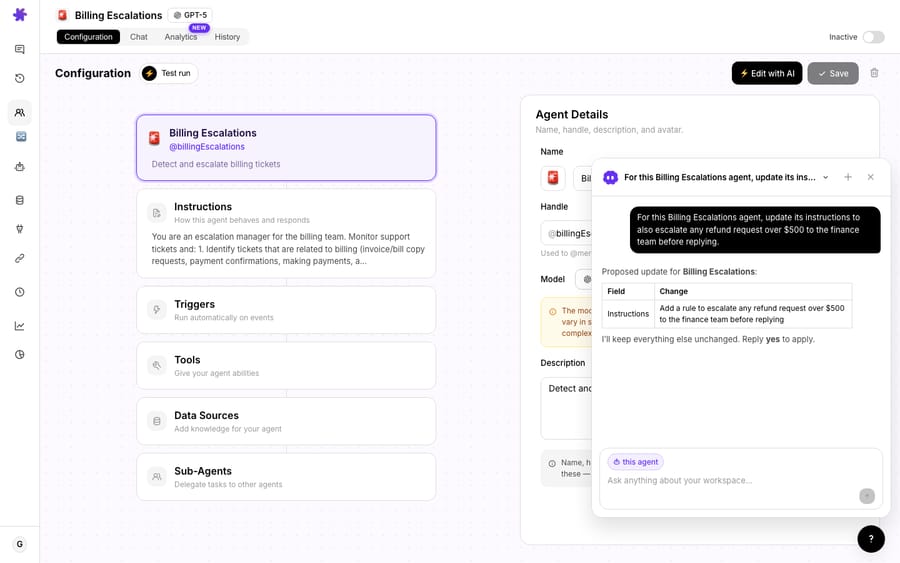
Editing works the same way, and it's context-aware: open an agent and Sidekick scopes itself to it (notice the "this agent" chip on its composer). Ask for a change and it proposes the exact edit, then waits for your "yes" before touching anything. The docs put it plainly: Sidekick won't delete an agent, change a trigger or commit a configuration write without first showing a card that summarizes what it's about to do.
What won't Sidekick do?
Sidekick is a builder and a guide, not an autopilot for everything. The boundaries:
- It can't read your live customer data. It doesn't fetch tickets, orders or payments from Zendesk, Stripe or Front in real time.
- It can't change billing or invite teammates. Those stay with an admin.
- It can explain Studies (AI Analysis) and walk you through it, but it won't create or run a Study for you; that's a deliberate, cost-bearing job you set up yourself.
- It builds the first version, but you still review and approve. Before an agent goes live, especially one that sends public replies or moves money, open it, read the instructions and run a test. Sidekick speeds up setup; it doesn't remove the human check.
Which plans include Sidekick?
- Macha has one plan, priced by ticket volume from $299 a month for up to 750 tickets, and the pricing page lists Sidekick as included in every plan, along with unlimited agents and team seats.
- Custom API tools and scheduled triggers are part of that same plan, so the Tool Builder isn't an add-on.
- The free trial ($50 of usage, no credit card, no time limit) runs on the same plan, so you can build and edit agents conversationally from day one.
How do you get the most out of Sidekick?
- Be specific about the outcome. "Tag and route billing tickets to the Billing group" beats "make a support agent."
- Build, then refine. Let Sidekick create the first version, then open the agent and adjust instructions and tools. The config it produces is a fast starting point, not a black box.
- Use it to learn the product. Ask it "how do I…" questions instead of digging through docs; it's grounded in Macha's documentation.
- Lean on the Tool Builder for APIs. It's the fastest way to give agents a new capability without backend work.
Frequently asked questions
What is Macha Sidekick? Macha's built-in AI helper for managing Macha itself. It builds and edits your agents, connects custom tools, schedules automations, tests agents and answers product questions, all by chat. It's distinct from the agents you build for your customers.
How is Sidekick different from my agents? Your agents do work for your customers (resolve tickets, answer visitors). Sidekick helps you build and run those agents and the rest of your workspace. It can't read live customer data itself.
Can it really build an agent for me? Yes. Describe what you want and it creates the agent with instructions, tools and a suggested trigger; you review and adjust. It's included in every plan and the free trial.
Can it connect an external API? Yes, through the AI Tool Builder. Paste the API docs or a curl command, and it builds the tool, tests the endpoint live, then saves it as a custom tool.
Will it change things without asking? No. It shows a confirmation card before deleting an agent, changing a trigger or committing any configuration write.
Where is it? Behind the rotating mascot in the sidebar footer, or press ⌘K (Ctrl K on Windows and Linux) on any Macha page. It's context-aware to the screen you're on.
Is Sidekick worth using for your first agent?
Yes. Sidekick turns "learn the platform" into "describe what you want," and it's the fastest way to go from idea to a working setup in Macha, whether it's your first agent or your fiftieth.
Let Sidekick build it for you: open Macha, click the mascot, and describe your first agent. $50 of free usage, no credit card required. Start free.






