





 Shopify
 Stripe
 Slack
Slack Notion
 Google Workspace
 Confluence

How Do You Evaluate an AI Support Agent? A 7-Point Checklist (2026)


You can ship an AI support agent in an afternoon, but knowing whether it's any good takes a checklist most teams skip. Grading real conversations against explicit criteria shows where the agent breaks rules before a customer does.
Key takeaways
- An AI support agent evaluation checklist should grade every conversation on resolution, grounding, policy, escalation, tone, safety and efficiency rather than one CSAT score.
- Fin's evaluation guide warns that a test set that is 80% business-hours questions overestimates production performance by 20 to 30 points.
- Macha's Agent Evaluation grades trigger-fired production conversations Yes, Partially or No with a short reason, counting Partially as half in the headline score.
- Macha's Auto-Eval grades trigger-fired conversations at no charge, while a manual evaluation shows the matched conversation count and a cost estimate before it starts.
- Spot-checking an AI judge against 20 to 50 human-graded conversations shows whether evaluation criteria are specific enough to trust at scale.

Measure an AI support agent with a checklist of five to eight explicit criteria (resolution, grounding, policy, escalation, tone, safety and efficiency) graded on every conversation, not with a single CSAT or deflection number. Top-line numbers hide the failures you most need to catch: the agent that promised a refund it wasn't allowed to give, the one that invented a policy, the one that should have escalated and didn't. AI support agent evaluation grades individual conversations against that checklist, so you can see where behaviour drifts and fix the criteria instead of guessing.
| Dimension | The question it answers | Example checklist criterion |
|---|---|---|
| Resolution & correctness | Did the agent actually solve the customer's problem? | "The agent fully resolved the request without leaving an open question." |
| Grounding (anti-hallucination) | Is every factual claim backed by the knowledge base or tool output? | "Every policy/price/date the agent stated is supported by retrieved knowledge. No invented facts." |
| Policy & action correctness | Did it follow the rules and use the right tools on the right data? | "Refunds, cancellations, and account changes followed the documented policy and used the correct tool." |
| Escalation & handoff quality | Did it hand off at the right moment, with context? | "When out of scope, the agent escalated and passed a clear summary instead of looping." |
| Tone & communication | Was the reply clear, on-brand, and appropriate to the customer's mood? | "The response was concise, on-brand, and acknowledged customer frustration where present." |
| Safety & boundaries | Did it stay in scope and protect data? | "The agent made no promises outside policy and exposed no other customer's data." |
| Efficiency | Did it resolve without wasting turns, time, or tool calls? | "The agent reached resolution without redundant tool calls or unnecessary back-and-forth." |
The worked examples below use Macha's Agent Evaluation feature. Macha is the AI agent layer that sits on top of your help desk (Zendesk, Freshdesk, Gorgias, Front, HubSpot or Intercom), so the agents being evaluated are the ones already working your live queue.
Why is a checklist better than a single score?
A single satisfaction or deflection number is a lagging signal. By the time CSAT dips, the bad behaviour already reached hundreds of customers, and the metric won't tell you which of a dozen causes is to blame. Headline numbers are also easy to game: an agent that punts every hard question to a human can post a great "no escalation needed" score on the easy ones while failing the cases that matter.
Two points from the evaluation literature are worth taking on board before you measure anything:
- Deflection is not resolution. Counting a redirect, a deflection or a closed chat as a "resolution" inflates your numbers without solving anyone's problem. The honest check is resolution durability: did the issue stay resolved, or did the customer come back on the same problem within a window you set? Ada makes a related point about first contact resolution: not every resolution should be instant.
- Easy-only test sets lie. Fin's evaluation guide warns that if your test set is 80% "What are your business hours?" questions, you will overestimate production performance by 20 to 30 points. Grade on a representative mix that includes edge cases and emotionally charged conversations.
A checklist fixes both. Each conversation is scored against the same explicit criteria, so a high score has to be earned on hard tickets, not handed out for dodging them. And because every criterion is separate, the result is diagnostic: you don't just learn "the agent is 78% good," you learn which rule it breaks and on which conversations.
Which dimensions should you measure?
Across published evaluation frameworks (Fin's guide lists six dimensions, from resolution accuracy to safety and compliance), the same families of criteria show up. The table at the top is the set that matters for a support agent, with the question each one answers. A few notes on using it well:
- Split deterministic from subjective. Some of these can be checked programmatically (did the agent call the right tool? did it stay under N turns?). The rest, tone, helpfulness, "did it actually resolve," are judgement calls. Reserve an LLM judge for the subjective qualities and keep hard checks for the objective ones.
- Weight by risk, not by frequency. A tone miss is a bad day; a wrong refund or a hallucinated policy is a chargeback or a compliance incident. Treat the safety and policy criteria as gates, not averages.
- Don't measure everything at once. Five to eight sharp criteria you act on beat thirty you never read.
How do you turn a dimension into a scoreable criterion?
A checklist is only as good as its criteria are specific. "Was the response good?" is unscoreable: two reviewers, human or AI, will disagree. Write each criterion as a single, testable statement with explicit pass/fail guidance.
Compare:
❌ "The agent handled the refund well." ✅ "If the customer requested a refund, the agent (a) checked the order against the refund-eligibility policy, (b) only issued a refund within the allowed window, and (c) clearly stated the outcome. Mark FAIL if a refund was issued outside policy or the outcome was left ambiguous."
The second version tells a judge exactly what to look for and when to fail. Three habits make criteria robust:
- One behaviour per criterion. If an "and" is doing heavy lifting, split it, or a partial pass becomes a coin flip.
- Name the failure explicitly. Stating the FAIL condition is what keeps scores consistent across thousands of conversations.
- Make it binary or banded. A yes/no or a small fixed scale aggregates cleanly; a vague 1 to 10 invites drift.
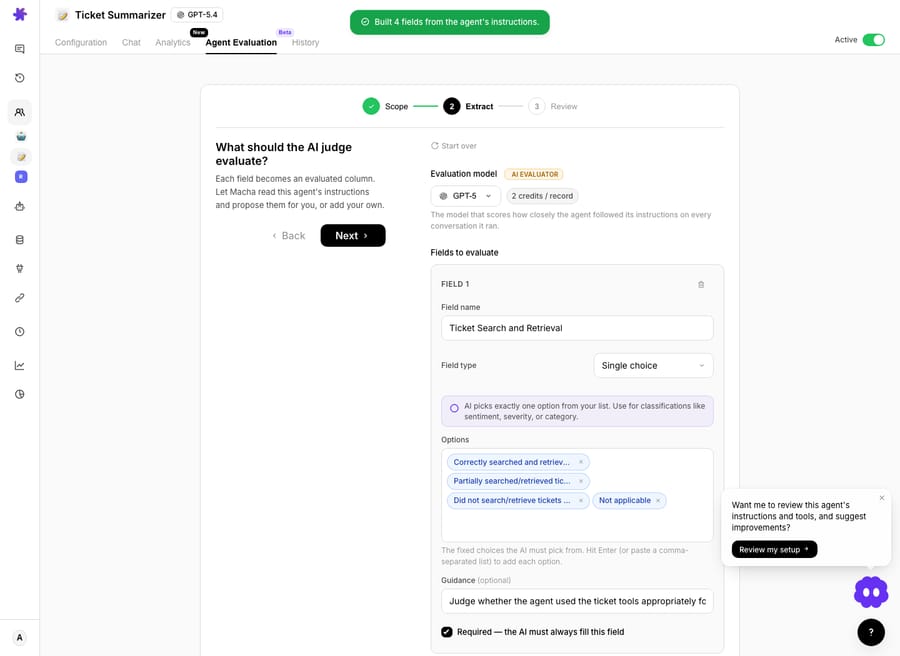
In Macha you can write these criteria by hand or use Build with AI: Macha reads the agent's current instructions, identifies the rules and constraints, and proposes one evaluation field per rule, typically a 3 to 7 field checklist in under thirty seconds. You edit, delete or add fields before running. Fields can be Yes/No, single or multiple choice, short or long text, or a number.
How do you build a representative sample?
Your checklist runs against a set of conversations, and that set is where most evaluations go wrong. If you only grade the tickets the agent obviously got right, you'll measure your own optimism.
A defensible sample includes, in roughly the proportion they occur in your real queue:
- Bread-and-butter tickets: WISMO ("where is my order"), password resets, and FAQ lookups that make up the bulk of volume.
- Multi-step workflows: anything that needs a tool call, a lookup across systems, or conditional logic.
- Edge cases and failure modes: missing order numbers, ambiguous requests, tool timeouts.
- Emotionally charged conversations: angry, confused, or at-risk customers, where tone and escalation matter most.
Because Macha agents run on top of your help desk, the sample is your own history. Agent Evaluation grades the trigger-fired runs where the agent acted on real customer tickets in production, and the judge sees the full delegation tree, every tool call and every sub-agent reply, so a parent agent is graded on its routing too. Dashboard chat sessions, widget conversations and test runs are excluded. For a manual run you set a date range and can restrict it to conversations that ran on a specific AI model.
How does the AI judge score each conversation?
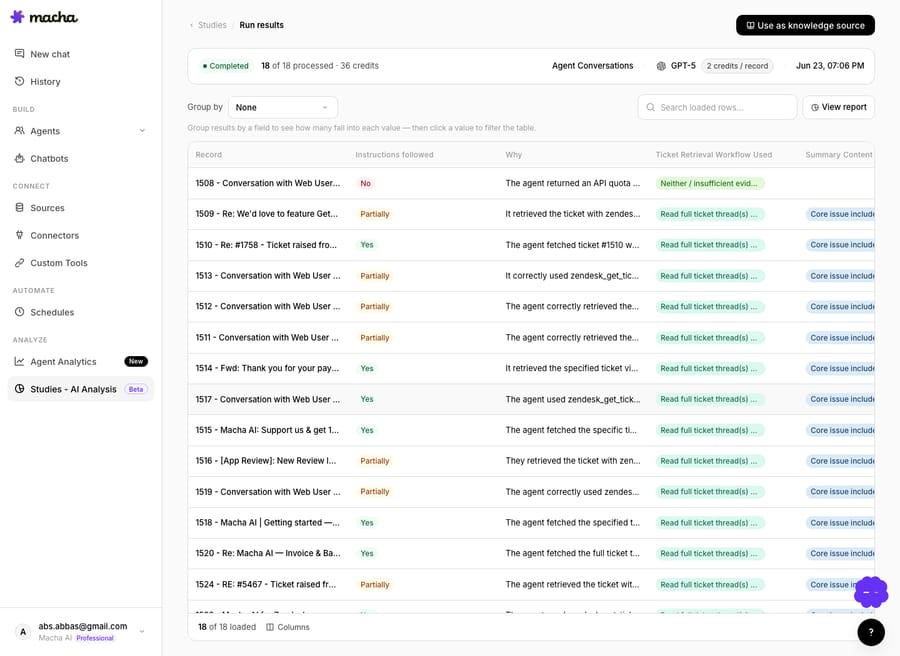
Macha's Agent Evaluation works like a judge. Every conversation gets a core verdict, Instructions followed: Yes (every required step correct), Partially (mostly followed, with notable mistakes) or No (wrong action or non-compliance), plus a short Why that cites the rules the agent followed or missed. Your custom checklist fields are answered alongside it.
There are two ways to run it. Auto-Eval grades trigger-fired conversations automatically, with no setup and no charge. A manual evaluation lets you choose the judge model and the date range, and before anything runs the Review step shows how many conversations matched and a cost estimate. Nothing starts until you confirm, and a live counter shows progress as rows fill in.
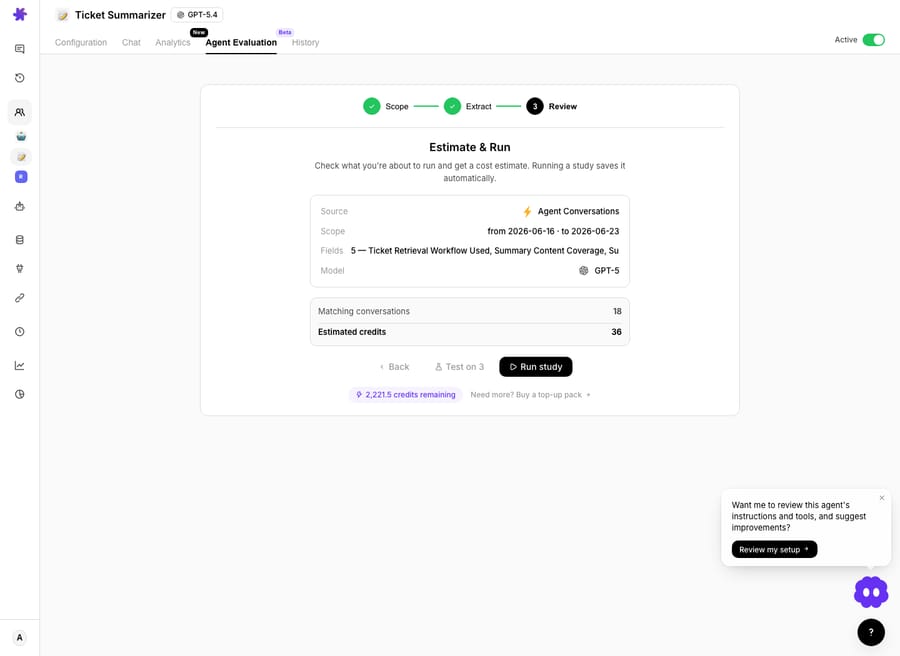
On cost: you pay for the run, not for a "good score." A manual evaluation is one judge pass per conversation, and the estimate is shown before anything starts, so a first pass over a few hundred conversations is a known number rather than a surprise. Save the heavier reasoning models for criteria where nuance changes the verdict. Running agents themselves is billed separately: Macha charges per ticket, one conversation charged once however many messages it takes.
When it runs, you get a results grid, one row per conversation and one column per field, that you can sort and filter to find the failures you care about.
The payoff is the report: a summary card per field, with an overall adherence score for Instructions followed. The headline counts a Partially as half, so a run that is 60% Yes and 40% Partially scores 80%, not 60%. Click into any field to read the conversations behind the number.
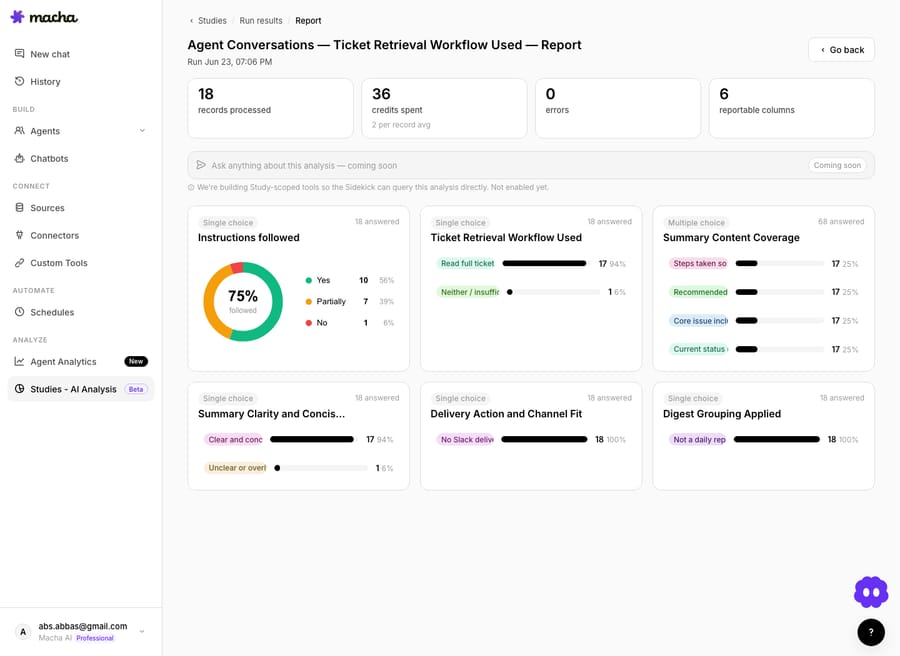
This is the loop that makes the checklist worth building. The score tells you how often the agent follows each rule; the per-conversation reasons tell you why it doesn't; you fix the agent's instructions, knowledge or tools, then re-run the same checklist and watch the number move. It's the analysis counterpart to the live agent, the same way Studies is for ticket content.
How do you know the judge is right?
An LLM judge is fast and consistent, but it is not an oracle, and treating its score as gospel is the most common way these programs go wrong. Two habits keep it honest:
- Spot-check against humans. Have a person grade a small sample, 20 to 50 conversations, and compare with the judge's verdicts. Where they disagree, the criterion is usually too vague; tighten the wording and re-run. Calibrate before you trust the judge at scale.
- Re-read the reasons, not just the score. Macha gives a Why for every verdict so you can audit it. If the reasons are sound but you disagree with the verdict, your rubric is the bug.
When is formal evaluation not worth it?
Evaluation isn't free and it isn't always the right move:
- Manual runs cost money. Running a judge over thousands of conversations is real spend. The estimate-and-confirm step exists so it's never a surprise, but budget for it and start with a sample.
- A judge can be wrong in correlated ways. If your criterion is ambiguous, the judge will be consistently wrong, which looks like signal. Calibration is non-negotiable.
- Don't evaluate what you won't act on. A dashboard nobody reads is worse than no dashboard. If you can't change the agent's instructions, knowledge or tools in response, you don't need the metric yet.
- Tiny volumes don't need this. If you handle a handful of conversations a day, read them. Formal evaluation earns its keep when volume makes manual review impossible, which is when failures hide.
- The checklist drifts. As your product and policies change, criteria go stale. Revisit the checklist on the same cadence as your macros and help-centre articles.
What should a starter checklist include?
If you want a v1 to adapt, this set covers the high-risk behaviour for most support agents without ballooning into noise:
- Resolved: the agent fully addressed the request with no open question left dangling.
- Grounded: every factual claim is supported by retrieved knowledge or tool output; no invented policies, prices, or dates.
- Policy-correct: refunds, cancellations, and account actions followed documented policy and used the correct tool.
- Escalated correctly: out-of-scope or high-risk cases were handed to a human with a clear summary.
- On-tone: concise, on-brand, and appropriately empathetic to the customer's mood.
- In-bounds: no promises outside policy, no exposure of another customer's data.
- Efficient: reached resolution without redundant tool calls or needless back-and-forth.
Run that across a representative batch, calibrate against a human spot-check, fix the two worst-scoring criteria, and re-run. That single loop will tell you more about your agent than any deflection chart.
FAQ
What's the difference between AI support agent evaluation and CSAT? CSAT measures what the customer felt after the fact; evaluation measures whether the agent followed your rules on each conversation, with a reason for every verdict. CSAT tells you something is wrong; a checklist tells you what and where. Use both.
What should an AI support agent evaluation checklist include? At minimum: resolution and correctness, grounding (anti-hallucination), policy and action correctness, escalation quality, tone, safety and boundaries, and efficiency. Write each as a single testable statement with an explicit failure condition.
Can an AI reliably grade another AI? For subjective qualities (tone, helpfulness, "did it resolve") an LLM judge is reliable once calibrated against a human-graded sample. For objective checks (right tool, turn count), prefer deterministic rules. Always re-read the judge's reasons, not just its score.
How much does it cost to run an evaluation in Macha? Auto-Eval grades trigger-fired conversations at no charge. A manual evaluation is one judge pass per conversation, and the Review step shows the matched count and cost estimate before you confirm. Running the agents themselves is billed per ticket, one conversation charged once.
Does Macha evaluate live agents or just test cases? Live ones. Agent Evaluation grades the trigger-fired conversations your agents ran in production, including sub-agent handoffs. Dashboard chats, widget conversations and test runs are left out; for testing before launch, use agent simulations instead.
How do you start measuring?
A good evaluation checklist turns "I think the agent is doing fine" into a number you can defend and a list of fixes you can act on. Write seven sharp criteria, run them over a representative batch, calibrate against a human read, and iterate. Start a free trial ($50 of usage, no credit card required), connect your help desk, and run your first evaluation, or read the Agent Evaluation docs for the full walkthrough. If you're standing this up on Zendesk, the Macha on Zendesk page shows how the agents being graded plug into your existing queue.
Written by Abbas (Customer Support & AI, Macha) · Reviewed by Ankeet Guha (Co-founder & CTO) · Published 2026-06-24 · Last updated 2026-09-24.






